
Data Grid
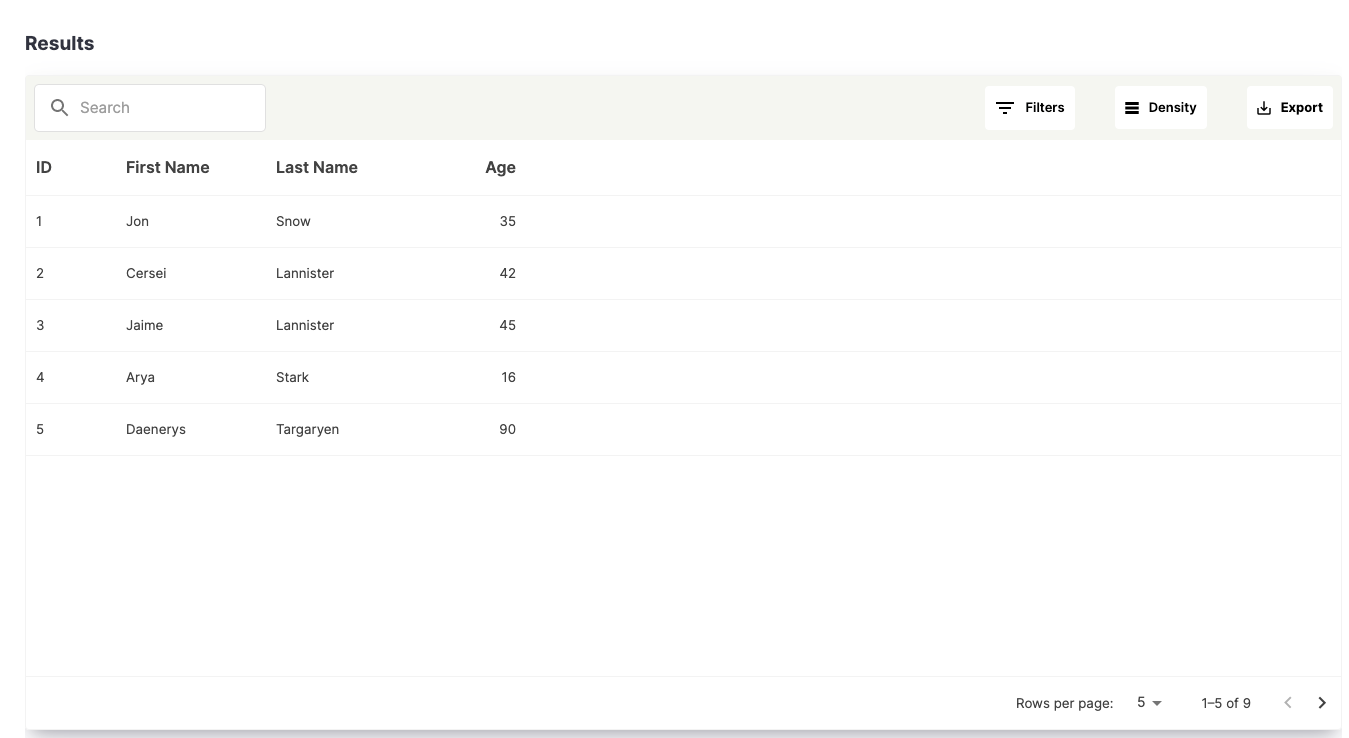
Data Grid is a Python package that allows you to effortlessly present tabular data in a visually appealing format. With built-in features such as client-side filtering, pagination, and export options, it provides a comprehensive solution for displaying and manipulating data.
Features
- Tabular Data Display: Easily present data in a grid-like structure for clear and organized visualization.
- Client-Side Filtering: Enable users to quickly search and filter data within the grid, improving data exploration and analysis.
- Pagination: Divide large datasets into manageable chunks, enabling smooth navigation and enhanced performance.
- Export Options: Provide users with the ability to export grid data to various formats such as CSV or Excel, facilitating data sharing and external analysis.
- Data Masking: Ensure data security by incorporating data masking capabilities during export, safeguarding sensitive information from unauthorized access.
Installation
You can install the Data Grid package from PyPI using pip:
pip install bp-data-grid
Usage
To use the Data Grid component in your Streamlit application, follow these steps:
- Import the necessary modules:
import data_grid as dg
- Add the Data Grid component to your application:
dg.data_grid(
    title="Results",
    rows=rows,
    columns=columns,
)
- Run your Streamlit application:
streamlit run your_app.py
Example
import data_grid as dg

columns = [
  {
    "field": "id",
    "headerName": "ID",
    "width": 90
  },
  {
    "field": "firstName",
    "headerName": "First Name",
    "width": 150,
    "editable": True
  },
  {
    "field": "lastName",
    "headerName": "Last Name",
    "width": 150,
    "editable": True
  },
  {
    "field": "age",
    "headerName": "Age",
    "type": "number",
    "width": 110,
    "editable": True
  }
]

rows = [
    {"id": 1, "lastName": "Snow", "firstName": "Jon", "age": 35},
    {"id": 2, "lastName": "Lannister", "firstName": "Cersei", "age": 42},
    {"id": 3, "lastName": "Lannister", "firstName": "Jaime", "age": 45},
    {"id": 4, "lastName": "Stark", "firstName": "Arya", "age": 16},
    {"id": 5, "lastName": "Targaryen", "firstName": "Daenerys", "age": 90},
    {"id": 6, "lastName": "Melisandre", "firstName": "Tom", "age": 150},
    {"id": 7, "lastName": "Clifford", "firstName": "Ferrara", "age": 44},
    {"id": 8, "lastName": "Frances", "firstName": "Rossini", "age": 36},
    {"id": 9, "lastName": "Roxie", "firstName": "Harvey", "age": 65},
]

dg.data_grid(
     title="Results",
     rows=rows,
     columns=columns,
     key="data_grid",
)
Screenshot
3 maintainers


Download files
Download the file for your platform. If you're not sure which to choose, learn more about installing packages.
Source Distribution
Built Distribution
Filter files by name, interpreter, ABI, and platform.
If you're not sure about the file name format, learn more about wheel file names.
Copy a direct link to the current filters
File details
Details for the file bp_data_grid-1.0.8.tar.gz.
File metadata
- Download URL: bp_data_grid-1.0.8.tar.gz
- Upload date:
- Size: 603.9 kB
- Tags: Source
- Uploaded using Trusted Publishing? No
- Uploaded via:
twine/4.0.2 CPython/3.8.10
File hashes
| Algorithm | Hash digest | |
|---|---|---|
| SHA256 |
fcee2c1a8b7422b612c5f309b1828b75f8289b0065a638e33ec82fbee18aae9a
|
|
| MD5 |
1d4009430375fa2a4f154b8957121317
|
|
| BLAKE2b-256 |
51d69dce89e531939ac0940e2257cde44d7ef78af3f27c29435b1819127704d7
|
File details
Details for the file bp_data_grid-1.0.8-py3-none-any.whl.
File metadata
- Download URL: bp_data_grid-1.0.8-py3-none-any.whl
- Upload date:
- Size: 606.9 kB
- Tags: Python 3
- Uploaded using Trusted Publishing? No
- Uploaded via:
twine/4.0.2 CPython/3.8.10
File hashes
| Algorithm | Hash digest | |
|---|---|---|
| SHA256 |
444bea922d71f2160578974cb556ac995806100e58de587ca2bc4f9a5dcc2f0b
|
|
| MD5 |
851f38e046c7f31c155bd3db8ca3edb0
|
|
| BLAKE2b-256 |
79b71f0433f861f1084e28e34a30cc7fb297f1c80309b89f49564814365ac64b
|














