
Query Tool
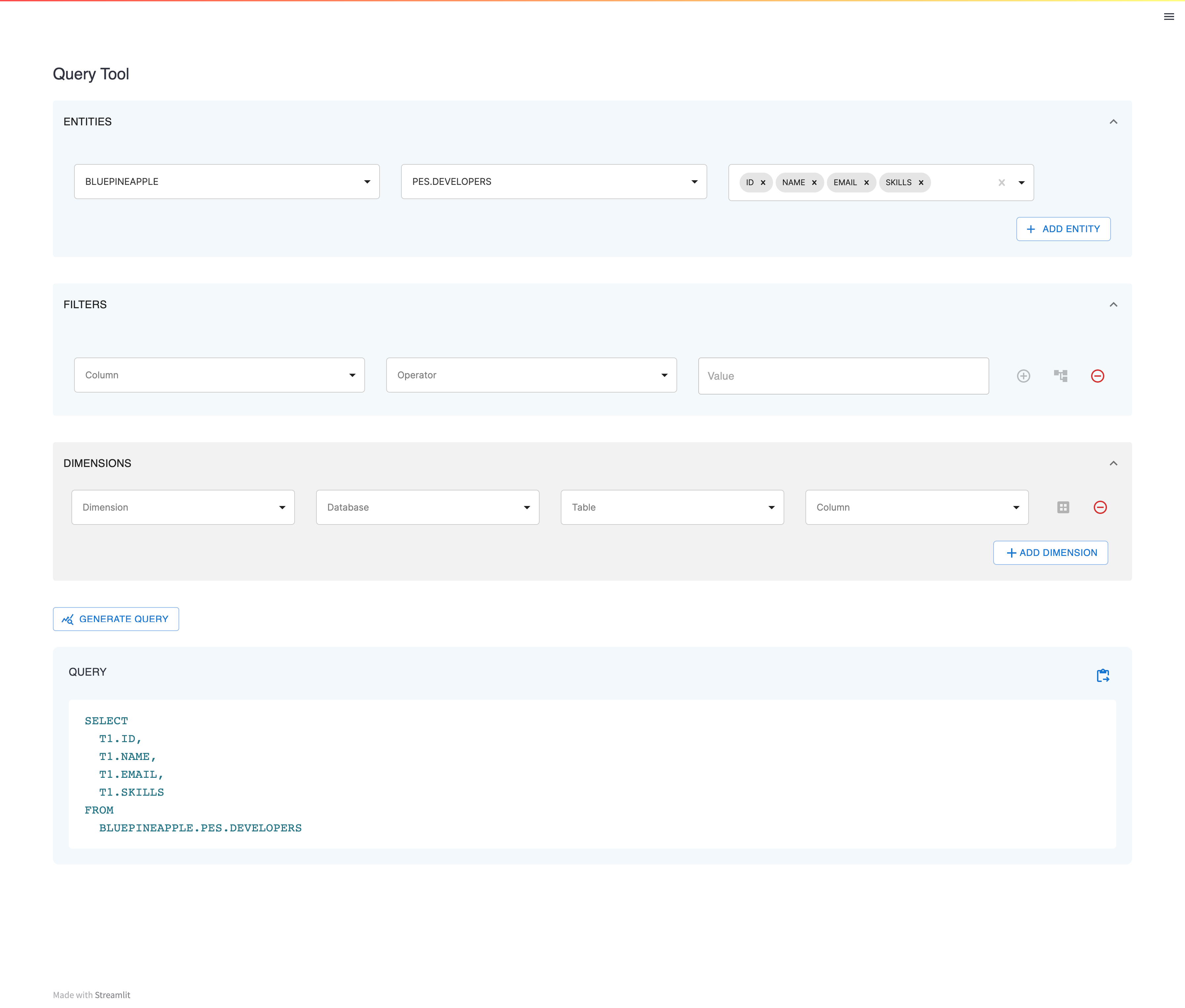
Query Tool - a powerful and user-friendly streamlit component designed to simplify your data analysis. With its intuitive interface, you can easily select the desired databases, columns, and tables, and apply filters, dimensions, and measures to analyze your data. Whether you're a beginner or an experienced analyst, "query_tool" is the perfect tool for your data analysis needs.
Installation
You can install the Data Grid package from PyPI using pip:
pip install bp-query-tool
Usage
To use the Query Tool component in your Streamlit application, follow these steps:
- Import the necessary modules:
import query_tool as qt
- Add the Query Tool component to your application:
qt.query_tool(
    query=query,
    title="Query Tool",
    databases=databases,
    tables=tables,
    columns=columns,
    on_database_change=on_database_change,
    on_table_change=on_table_change,
    on_generate_query=on_generate_query,
    on_copy_query=on_copy_query,
    on_execute_query=on_execute_query,
    key="query_builder",
)
- Run your Streamlit application:
streamlit run your_app.py
Example
import query_tool as qt

databases = ['COMPANY_DB', 'SALES_DB']
tables = [
    {
        'database': 'COMPANY_DB',
        'tables': ['EMPLOYEES', 'DEPARTMENTS']
    },
    {
        'database': 'SALES_DB',
        'tables': ['CUSTOMERS', 'ORDERS']
    }
]
columns = [
    {
        'fqtn': 'COMPANY_DB.EMPLOYEES',
        'columns': ['ID', 'NAME', 'EMAIL', 'POSITION']
    },
    {
        'fqtn': 'COMPANY_DB.DEPARTMENTS',
        'columns': ['ID', 'NAME', 'LOCATION', 'MANAGER']
    },
    {
        'fqtn': 'SALES_DB.CUSTOMERS',
        'columns': ['ID', 'NAME', 'EMAIL', 'PHONE']
    },
    {
        'fqtn': 'SALES_DB.ORDERS',
        'columns': ['ID', 'PRODUCT', 'QUANTITY', 'DATE']
    }
]

def on_database_change(database):
    print(database)

def on_table_change(database, table):
    print(database, table)

def on_generate_query(selection, query):
    print(selection, query)

def on_copy_query(query):
    print(query)

def on_execute_query(query):
    print(query)

qt.query_tool(
    query=query,
    title="Query Tool",
    databases=databases,
    tables=tables,
    columns=columns,
    on_database_change=on_database_change,
    on_table_change=on_table_change,
    on_generate_query=on_generate_query,
    on_copy_query=on_copy_query,
    on_execute_query=on_execute_query,
    key="query_builder",
)
Screenshot
3 maintainers


Download files
Download the file for your platform. If you're not sure which to choose, learn more about installing packages.
Source Distribution
Built Distribution
Filter files by name, interpreter, ABI, and platform.
If you're not sure about the file name format, learn more about wheel file names.
Copy a direct link to the current filters
File details
Details for the file bp_query_tool-1.0.3.tar.gz.
File metadata
- Download URL: bp_query_tool-1.0.3.tar.gz
- Upload date:
- Size: 314.4 kB
- Tags: Source
- Uploaded using Trusted Publishing? No
- Uploaded via:
twine/4.0.2 CPython/3.8.10
File hashes
| Algorithm | Hash digest | |
|---|---|---|
| SHA256 |
4793bba8b741b207f41060ad63f58482078aa290e4aa8276426a4d35ed91f9db
|
|
| MD5 |
cfe7ceef9408b0aee462e55355287ae3
|
|
| BLAKE2b-256 |
d87363066146558e17ec49f786888f1ab7a88b2ecd36f16d393a81b1cb1826fe
|
File details
Details for the file bp_query_tool-1.0.3-py3-none-any.whl.
File metadata
- Download URL: bp_query_tool-1.0.3-py3-none-any.whl
- Upload date:
- Size: 317.5 kB
- Tags: Python 3
- Uploaded using Trusted Publishing? No
- Uploaded via:
twine/4.0.2 CPython/3.8.10
File hashes
| Algorithm | Hash digest | |
|---|---|---|
| SHA256 |
f2e62573631a71aa08ac5056767e061e8d2aafbaa402de2fc1aedcf48d0252f9
|
|
| MD5 |
1ac34f48ab4952715bda1b3b27f59b00
|
|
| BLAKE2b-256 |
1104a8f848861390f41b434563290893b7b02382645c69f7e916a2102385ded4
|














