
bph2_co2: Educational tool for CO2 concentration simulations
Python library for education with tools for CO2 concentration simulations
Installation:
pip install bph2-co2==1.0.0
Example:
see also main.py
from bph_co2.solver import CO2_Simulation, ppm_to_mg_m3, mg_m3_to_ppm
from bph_co2.timeseries import Timeseries
from bph_co2.window import Window

try:
    import importlib.resources as pkg_resources
except ImportError:
    # Try backported to PY<37 `importlib_resources`.
    import importlib_resources as pkg_resources

from bph_co2.resources import Input_Data as case_data


if __name__ == '__main__':

    # load .csv files
    with pkg_resources.path(case_data, 'persons.csv') as path:
        persons_filename = path.__str__()

    with pkg_resources.path(case_data, 'internal_co2_source.csv') as path:
        internal_co2_source_filename = path.__str__()

    with pkg_resources.path(case_data, 'air_change_rate.csv') as path:
        air_change_rate_filename = path.__str__()

    with pkg_resources.path(case_data, 'window_state.csv') as path:
        window_state_filename = path.__str__()

    with pkg_resources.path(case_data, 'indoor_temperature.csv') as path:
        indoor_temperature_filename = path.__str__()

    with pkg_resources.path(case_data, 'outdoor_temperature.csv') as path:
        outdoor_temperature_filename = path.__str__()

    n_persons = Timeseries.from_csv(persons_filename, interpolation_scheme='previous')
    internal_co2_source = Timeseries.from_csv(internal_co2_source_filename, interpolation_scheme='linear')
    air_change_rate = Timeseries.from_csv(air_change_rate_filename, interpolation_scheme='linear')
    window_state = Timeseries.from_csv(window_state_filename, interpolation_scheme='previous')
    indoor_temperature = Timeseries.from_csv(indoor_temperature_filename, interpolation_scheme='linear')
    outdoor_temperature = Timeseries.from_csv(outdoor_temperature_filename, interpolation_scheme='linear')

    # create a window:
    window = Window(hight=1,
                    area=1,
                    state=window_state)

    sim = CO2_Simulation(name='test_simulation',
                         volume=51.48,
                         n_persons=n_persons,
                         emission_rate=27000,
                         internal_co2_source=internal_co2_source,
                         indoor_temperature=indoor_temperature,
                         outdoor_temperature=outdoor_temperature,
                         windows=[window],
                         air_change_rate=air_change_rate,
                         timestep=60,
                         t_end=26640)

    res = sim.calculate()

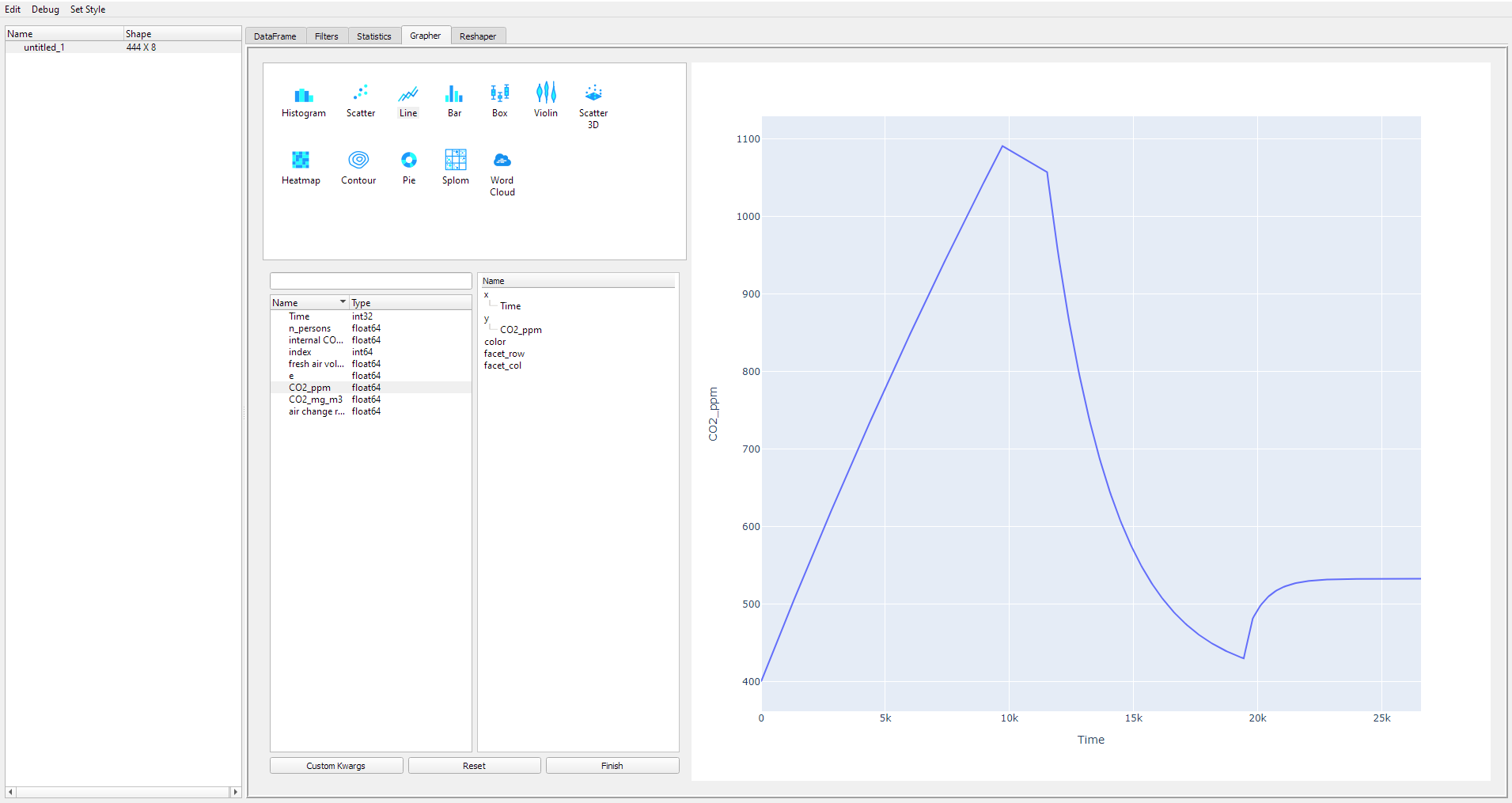
    res.plot()
Usage
Imports:
from src.bph_co2.solver import CO2_Simulation
from src.bph_co2.timeseries import Timeseries
from src.bph_co2.window import Window
CO2_Simulation:
create a CO2_Simulation object. This is the base for running a simulation:
sim = CO2_Simulation(name='my_test_simulation')The CO2_Simulation has the following parameters:
name: the name of the CO2_Simulation; default is ‘Unnamed Simulation’
volume: the volume of the simulated zone [m³]; default is 75
n_persons: number of persons in the zone; default is 1 *
emission_rate: CO2 emission_rate of a person in mg/h; default is 27000 mg/h;
internal_co2_source: co2 emission rate of internal sources in mg/h; default is 0 *
outdoor_temperature: outdoor temperature in °C; default is 10 °C *
indoor_temperature: indoor temperature in °C; default is 20 °C *
windows: windows of the zone; list of window-objects; default is []
air_change_rate: air change rate in 1/h; default is 0.5 *
c0i: initial CO2-concentration in the room/zone in ppm; default is 400
c0e: initial outdoor CO2-concentration in ppm; default is 400
timestep: simulation timestep [s]; default is 360
t_end: end time of the simulation
All parameters can be set on initialization or afterwards. * Parameters can be Timeseries objects
run a simulation:
res = sim.calculate()- display simulation results:
res.plot()
Timeseries Objects:
A Timeseries handles data and returns a value / values for a time [s]. A Timeseries can handle static values (int, float, etc..), numpy arrays (first column has to be the time in [s]) or pd.Dataframes (index must be the time).
- Timeseries objects can interpolate Data in different ways. To specify interpolation scheme pass keyword interpolation_scheme with:
‘linear’: linear interpolation
‘previous’: closest previous value (for example for persons)
Create a timeseries object with static value (integer):
n_persons = Timeseries(data=1)Create a timeseries object with np.array:
array = array = np.empty((2,100))
array[0,:] = np.arange(array.shape[1])
array[1,:] = np.random.rand(array.shape[1])
n_persons = Timeseries(data=array)
Create a timeseries object with pd.Dataframe:
array = array = np.empty((2,100))
array[0,:] = np.arange(array.shape[1])
array[1,:] = np.random.rand(array.shape[1])

df = pd.DataFrame({'Time': array[0,:],
                   'n_persons': array[1,:]})
df.set_index('Time', inplace=True)

n_persons = Timeseries(data=array, interpolation_scheme='linear')
Create a timeseries object from .csv file:
n_persons = Timeseries.from_csv('test.csv', interpolation_scheme='previous')Windows:
In the Simulation windows can be added. Windows create additional air change in the zone dependent of the indoor- and outdoor-temperatures, the opening state and the geometry.
- The window can have three states:
0: closed
1: tilted
2: opened
- The window has the following parameters:
hight: the hight of the window [m]; default is 1
area: the area of the window [m²]; default is 1
state: state of the window; 0: closed, 1: tilted; 2: opened; default is 0 (closed)
c_ref: Austauschkoeffizient [m^0.5 / h * K^0.5], default is 100
a_tilted: effective ventilation area for tilted window [m²]; default is calculated from the window geometry
a_opened: effective ventilation area for opened window [m²]; default is calculated from the window geometry
Create a window:
from src.bph_co2.window import Window

window_state = Timeseries.from_csv('window_state.csv', interpolation_scheme='previous')

window = Window(hight=1,
                area=1,
                state=window_state)
Add window to the simulation:
The windows are specified as a list of window objects:
sim.windows = [window]1 maintainer

Metadata
1 maintainer
Release files for bph2-co2 1.0.4
For a detailed explanation of source distributions (sdists) and built distributions (wheels), please see the package formats documentation.
Source distribution (sdist)
| File | Size | Uploaded | Provenance | |
|---|---|---|---|---|
| bph2_co2-1.0.4.tar.gz | 21.8 kB | Without provenance | Details |
Built distribution (wheel)
| File | Interpreter | ABI | Platform | Reset |
|---|---|---|---|---|
| bph2_co2-1.0.4-py3-none-any.whl | Python 3 | none | any | Details |
Total release size: 45.7 kB
Release files / bph2_co2-1.0.4.tar.gz
| Download URL | bph2_co2-1.0.4.tar.gz |
|---|---|
| Size | 21.8 kB |
| Tags | Source |
|
SHA-256 checksum How to use checksums |
ebc2db575bb405ba5e8994ac469a777cd72b2fd6e4caa0cd125cb390bd764828
|
|
BLAKE2b-256 checksum How to use checksums |
bd1e7985972c209e73eaff5bebd06c6e373ebef0a8bf828993789e8659c0b06f
|
| Upload date | |
|
Uploaded using Trusted Publishing? What is trusted publishing? |
No |
| Uploaded via |
twine/3.2.0 pkginfo/1.6.1 requests/2.24.0 setuptools/50.3.2 requests-toolbelt/0.9.1 tqdm/4.51.0 CPython/3.8.6
|
Release files / bph2_co2-1.0.4-py3-none-any.whl
| Download URL | bph2_co2-1.0.4-py3-none-any.whl |
|---|---|
| Size | 23.9 kB |
| Tags | Python 3 |
|
SHA-256 checksum How to use checksums |
d9662bba3ab994f08b6ae2f5ed75c842462000c07945311bc7757ee4ed1c8efa
|
|
BLAKE2b-256 checksum How to use checksums |
0a5bc9cf18455c6f78391236aa178de0e925e9c2259585cecab38a6abd3ee03d
|
| Upload date | |
|
Uploaded using Trusted Publishing? What is trusted publishing? |
No |
| Uploaded via |
twine/3.2.0 pkginfo/1.6.1 requests/2.24.0 setuptools/50.3.2 requests-toolbelt/0.9.1 tqdm/4.51.0 CPython/3.8.6
|
Security for bph2-co2 1.0.4
Provenance
Provenance describes where a file came from. On PyPI, provenance is shared via attestations, which provide a verifiable record of the build or publishing details. View details, limitations and caveats.
No provenance found
None of the files in this release were uploaded with provenance metadata.
A note on package security
PyPI is a repository for distributing packages, not a service for auditing them. While third-party security researchers and our staff do their best to detect and remove malicious packages, PyPI cannot guarantee the quality, security or suitability of any given package.














