
bragi-io
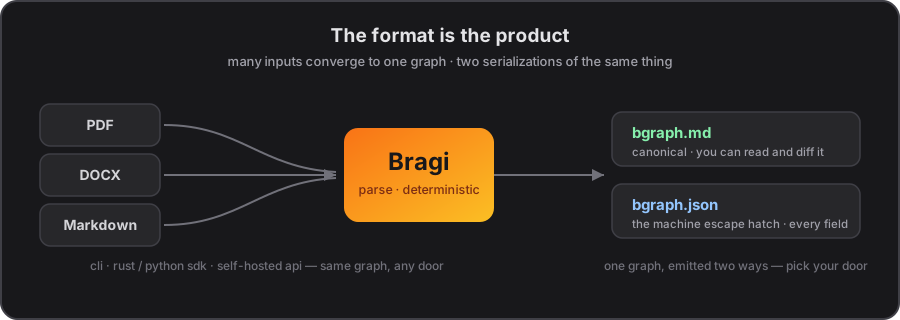
The Python SDK for Bragi. It turns a PDF into a bgraph — one structured, addressable graph of its sections, paragraphs, and content — and hands it back as fully typed Python objects, with the coordinates to point back at the page each piece came from.
The bgraph is the product; this SDK is one door onto it.
Install
pip install bragi-io
Python 3.9+. The only runtime dependency is httpx. On first use, the SDK fetches the bragi binary and a Java runtime automatically; later runs reuse them.
A real bgraph
import bragi

bgraph = bragi.parse_pdf("graphrag.pdf")

print(bgraph)                # <BragiGraph: 368 nodes, schema v1.2.0>
print(len(bgraph.sections))  # 54

for section in bgraph.sections:
    print(section.content.text)
    print(section.location.physical.page)
Parsing From Local to Global: A GraphRAG Approach to Query-Focused Summarization (Edge et al., Microsoft, arXiv:2404.16130, CC BY 4.0) yields 368 nodes. Every node is typed, with IDE autocomplete:
node = bgraph.sections[0]

node.content.text                    # "From Local to Global: A GraphRAG Approach to Query-Focused Summarization"
node.token_count                     # 17
node.location.semantic.path          # "1"
node.location.semantic.breadcrumbs   # ["From Local to Global: A GraphRAG Approach to Query-Focused Summarization", "From Local to Global: A GraphRAG Approach to Query-Focused Summarization"]
node.location.physical.page          # 1
node.location.physical.bounding_box  # BoundingBox(x=121.7, y=100.1, width=368.7, height=36.500008)
A semantic location (where the node sits in the tree) and a physical one (where it sits on the page) travel on every node — so you can ground an answer back on the original page.
Same code, three places the parse runs
The SDK is one interface over one pure function; where the parse runs is a one-line change. Your graph code stays the same:
# 1. Local (default) — runs the bragi binary on your machine
bgraph = bragi.parse_pdf("paper.pdf")

# 2. Self-hosted — point at your own server (see the Docker guide)
bragi.configure(url="http://localhost:8080")
bgraph = await bragi.parse_pdf_async("paper.pdf")

# 3. Hosted — point at the managed API
bragi.configure(api_key="...")
bgraph = await bragi.parse_pdf_async("paper.pdf")
Same input, same graph, whichever door you pick.
Working with the graph
bgraph.nodes                 # list[DocumentNode] — every node
bgraph.sections              # Section nodes
bgraph.paragraphs            # Paragraph nodes
bgraph.root                  # the Document root
bgraph.document_info         # metadata about the document
bgraph.structural_profile    # node counts, token + depth distributions
bgraph.schema_version        # "1.2.0"

bgraph.get_node("7962788f-d2e7-50bc-8359-c47c4b37c03d")   # by id
bgraph.nodes_by_page(1)                                    # all nodes on a page
bgraph.to_dict()                                           # the raw bgraph.json dict
Navigate the tree and render text:
parent = node.get_parent(bgraph)
children = node.get_children(bgraph)

print(section.render(bgraph, breadcrumbs=True))
# [From Local to Global: A GraphRAG Approach to Query-Focused Summarization > From Local to Global: A GraphRAG Approach to Query-Focused Summarization]
# ...the section's text, and its descendants...
Stable names
A node's id is derived from its content and its place in the tree — not from when you parsed it. Reparse after editing one paragraph and only that paragraph's id changes; every other node keeps its id. That's what lets you cache, diff, and build on a bgraph over time.
Error handling
from bragi.errors import (
    BragiError,            # base
    BragiAuthError,        # bad/missing API key (hosted)
    BragiCreditsError,     # out of credits (hosted)
    BragiProcessingError,  # the parse failed
    BragiNotFoundError,    # the bragi binary wasn't found (local)
)

try:
    bgraph = bragi.parse_pdf("document.pdf")
except BragiProcessingError as e:
    print(f"parse failed: {e}")
Documentation
- Python SDK guide — full usage, modes, rendering, error handling
- Schema reference — the
bgraph.jsonfields
License
MIT or Apache-2.0, at your option.
1 maintainer

Metadata
1 maintainer
Release files for bragi-io 0.8.0
For a detailed explanation of source distributions (sdists) and built distributions (wheels), please see the package formats documentation.
Source distribution (sdist)
| File | Size | Uploaded | Provenance | |
|---|---|---|---|---|
| bragi_io-0.8.0.tar.gz | 27.6 kB | Without provenance | Details |
Built distribution (wheel)
| File | Interpreter | ABI | Platform | Reset |
|---|---|---|---|---|
| bragi_io-0.8.0-py3-none-any.whl | Python 3 | none | any | Details |
Total release size: 44.8 kB
Release files / bragi_io-0.8.0.tar.gz
| Download URL | bragi_io-0.8.0.tar.gz |
|---|---|
| Size | 27.6 kB |
| Tags | Source |
|
SHA-256 checksum How to use checksums |
85102c0967ed08e532b9f1e02c8f817480a62fe3b76426fa765da21e2dee82a2
|
|
BLAKE2b-256 checksum How to use checksums |
0f8a94e0a413519085ca65ba2c1d059855d557e6a66bf379a7f530c2e4831780
|
| Upload date | |
|
Uploaded using Trusted Publishing? What is trusted publishing? |
No |
| Uploaded via |
uv/0.8.23
|
Release files / bragi_io-0.8.0-py3-none-any.whl
| Download URL | bragi_io-0.8.0-py3-none-any.whl |
|---|---|
| Size | 17.1 kB |
| Tags | Python 3 |
|
SHA-256 checksum How to use checksums |
f3a99a5836458a31f8edab08c88cf1e6ba6935721d0ea0fd752c87b3f39ee966
|
|
BLAKE2b-256 checksum How to use checksums |
4e7738226230bb83e116ac389e48c2fb62df13ee0f5b1832e3103d23d33cc9df
|
| Upload date | |
|
Uploaded using Trusted Publishing? What is trusted publishing? |
No |
| Uploaded via |
uv/0.8.23
|
Security for bragi-io 0.8.0
Provenance
Provenance describes where a file came from. On PyPI, provenance is shared via attestations, which provide a verifiable record of the build or publishing details. View details, limitations and caveats.
No provenance found
None of the files in this release were uploaded with provenance metadata.
A note on package security
PyPI is a repository for distributing packages, not a service for auditing them. While third-party security researchers and our staff do their best to detect and remove malicious packages, PyPI cannot guarantee the quality, security or suitability of any given package.














