
brain-spi
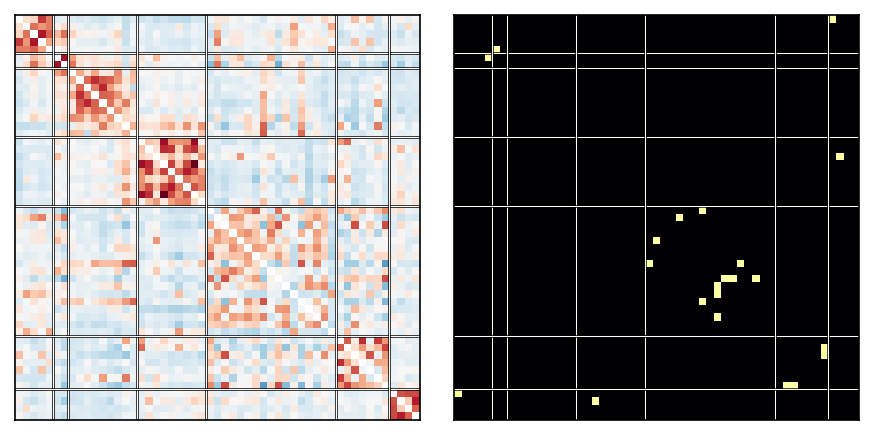
Comparison of pairwise statistics for fMRI connectivity estimation, and a pipeline for finding group differences across them.
brain_spi wraps the SPI connectivity-analysis workflow into a small, importable
library. It lets you run the full pipeline in one call and then inspect either the
aggregated cross-SPI result or any individual SPI's intermediate artifacts.
Try it now in Colab (no install, nothing to clone):
What it does
- Connectivity — derive functional network connectivity (FNC) matrices from multivariate fMRI time series using many pairwise statistics (SPIs), via pyspi plus a small custom set.
- Group differences — per SPI, find edges that differ between two groups using a Welch t-test (Bonferroni-corrected) and a Random-Forest importance mask, then intersect them.
- Aggregate — average the per-SPI masks into a consensus matrix: the fraction of SPIs that flag each edge.
- Robustness — subject-resampling (
bootstrap) and label-shuffle permutation nulls. - Plots & caching — heatmaps with network guides, per-SPI triptychs, the aggregate panel; on-disk caching of the (slow) pyspi computations.
Install
pip install brain-spi
I recommend a separate Python environment: brain-spi relies on pyspi, which
requires numpy < 2 and can conflict with other packages. For development, clone
the repo and pip install -e . instead.
Quickstart
import numpy as np
from brain_spi import BrainSPI

# data: (B subjects, T timepoints, C channels/ROIs);  labels: (B,) with 2 unique values
pipe   = BrainSPI(group_names=('HC', 'patient'))   # sensible defaults (9 curated SPIs)
result = pipe.fit(data, labels)

# headline result — cross-SPI aggregate (computed lazily, cached on first access)
result.aggregate.mean_and        # (C, C) float: fraction of SPIs flagging each edge
result.aggregate.plot()          # one-shot figure

# inspect a single SPI
result['kendalltau'].mean_matrix()       # (C, C) mean connectivity across subjects
result['kendalltau'].and_mask            # significant-p AND RF-important edges
result['kendalltau'].plot_triptych()     # 3-panel: sig-p / RF / AND

# not sure what's available? every result object has a repr + .help()
result.help()
Choosing SPIs
BrainSPI()                                   # default 9-SPI curated set
BrainSPI(spis='spis_all')                    # the broad pyspi set
BrainSPI(spis='/path/to/my_spis.yaml')       # a config file
BrainSPI(spis=['kendalltau', 'spearmanr'])   # an explicit list
SPIs are computed one at a time across all subjects, with a progress bar and a
per-SPI wall-time log (enable with logging.basicConfig(level=logging.INFO)), so
it's easy to spot and drop slow ones.
Robustness
boot = result.bootstrap(n=20, frac=0.66)     # 20 subject-resampled cross-SPI AND maps
boot.mean                                     # average of the 20 (resampling-smoothed aggregate)
boot.survival_rate()                          # how often each edge is flagged (reproducibility)

null = result.label_shuffle(n=100)            # permutation null
null.p_value(result.aggregate.mean_and)       # per-edge permutation p-values (low = significant)
Saving results
The first fit is slow (pyspi dominates); subsequent fits on the same data are
near-instant thanks to the on-disk cache (~/.cache/brain_spi/, override with
BrainSPI(cache_dir=...)). To save a finished result:
result.to_npz('result.npz')              # portable — open with plain numpy.load, no package needed
result.to_pickle('result.pkl')           # exact object

import brain_spi
result = brain_spi.load_npz('result.npz')   # or load_pickle(...)
The .npz is a flat collection of arrays with a self-describing README key inside.
Example notebook
examples/colab_quickstart.ipynb

examples/datasets.py.
1 maintainer

Metadata
1 maintainer
Release files for brain-spi 0.1.1
For a detailed explanation of source distributions (sdists) and built distributions (wheels), please see the package formats documentation.
Source distribution (sdist)
| File | Size | Uploaded | Provenance | |
|---|---|---|---|---|
| brain_spi-0.1.1.tar.gz | 26.6 kB | Without provenance | Details |
Built distribution (wheel)
| File | Interpreter | ABI | Platform | Reset |
|---|---|---|---|---|
| brain_spi-0.1.1-py3-none-any.whl | Python 3 | none | any | Details |
Total release size: 51.2 kB
Release files / brain_spi-0.1.1.tar.gz
| Download URL | brain_spi-0.1.1.tar.gz |
|---|---|
| Size | 26.6 kB |
| Tags | Source |
|
SHA-256 checksum How to use checksums |
a3120d92bc8bc1f5affbf745323792a65443febfdd4a17ed2c609518c1fc1c58
|
|
BLAKE2b-256 checksum How to use checksums |
e49bf5600fdd10d40f4d52604ff8b0ee6e43696858490805e42c90675adb4370
|
| Upload date | |
|
Uploaded using Trusted Publishing? What is trusted publishing? |
No |
| Uploaded via |
twine/6.2.0 CPython/3.12.13
|
Release files / brain_spi-0.1.1-py3-none-any.whl
| Download URL | brain_spi-0.1.1-py3-none-any.whl |
|---|---|
| Size | 24.6 kB |
| Tags | Python 3 |
|
SHA-256 checksum How to use checksums |
cc4d8e4db27e55bfb611b9565dd9005bb27d9a2e79482edde2cce903e9bbc42b
|
|
BLAKE2b-256 checksum How to use checksums |
b16aca5ec96c70c460224f353b57ceaf4db951549d4c0ebf380a4d953d248a14
|
| Upload date | |
|
Uploaded using Trusted Publishing? What is trusted publishing? |
No |
| Uploaded via |
twine/6.2.0 CPython/3.12.13
|
Security for brain-spi 0.1.1
Provenance
Provenance describes where a file came from. On PyPI, provenance is shared via attestations, which provide a verifiable record of the build or publishing details. View details, limitations and caveats.
No provenance found
None of the files in this release were uploaded with provenance metadata.
A note on package security
PyPI is a repository for distributing packages, not a service for auditing them. While third-party security researchers and our staff do their best to detect and remove malicious packages, PyPI cannot guarantee the quality, security or suitability of any given package.
To learn more about protecting yourself from malicious actors, visit our package security documentation.














