
brain-stl 🧠
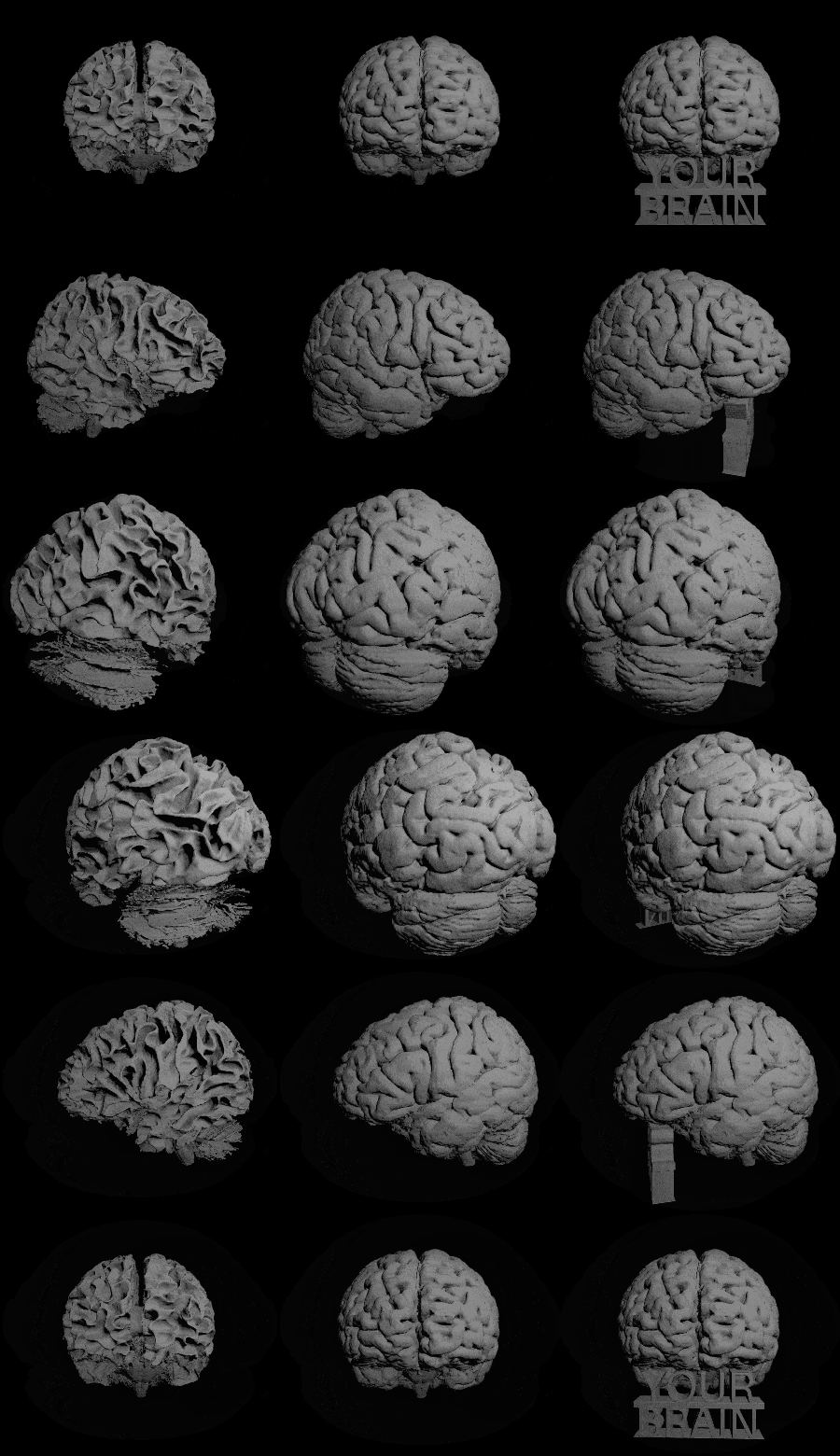
The easiest and fastest way to turn brain MRI scans into 3D printable models 🖨️ powered by deepmriprep ✨
Use the Colab demo or install it locally via pip install brain_stl 💨
By default, the model is saved as brain.stl, but you can customize the filename along with other options like
- Threshold: Pick a value between 0 and 3 for different tissue types (see GIF left,
2.5: white matter only) 🧠 - Hollowness: Adjust how hollow the brain is (enables faster printing) 💨
- Text: Add personalized text that works as a support structure 🔤
- Smoothing: Achieve a polished surface via iterative Laplacian smoothing ✨
- Mesh Reduction: Simplify the mesh to reduce the size of
brain.stl✂️
Usage 💻
To get your first brain.stl just run
from brain_stl import run_brain_stl

run_brain_stl()  # per default output_folder='.' (current folder)
and a publicly available brain MRI scan (from OpenNeuro) will be used 🌐
Scan files can be inputted in NifTi (.nii or .nii.gz) or DICOM (.dcm or folder) format
from brain_stl import run_brain_stl

run_brain_stl('/path/to/scan.nii.gz')  # or '/path/to/dicom_folder'
The main arguments of run_brain_stl are
scan_filepath: Path to the input scan (ifNone, use scan fromurl). Default:Noneoutput_folder: Folder to save the.stlfile and other outputs. Default:'.'stl_name: Name of the example.stlfile (without extension). Default:'brain'
Click here, to see all remaining arguments 📑
nifti_name: If DICOM produces multiple NifTis, this NifTi filename is used to proceed. Default:Noneurl: URL to download a brain scan if noscan_filepathis provided. Default:OPENNEURO_URLuse_cache: IfTrue, reuses intermediate outputs (e.g., tissue data). Default:Falsethreshold: Threshold tissue value (0.5: fluid,1.5: gray matter,2.5: white matter). Default:1.5hollow: How hollow the brain is (0 to 1). Default:0in_template_space: IfTrue, the 3D model is in standardized (template) orientation. Default:Falsemesh_reduction: Fraction of mesh reduction (0 to 1) for smaller.stlfile size. Default:0(no reduction)smooth_iter: Number of iterations for Laplacian smoothing. Default:0(none)smooth_lamb: Strength of each Laplacian smoothing step. Default:0.2text: Custom text used as structural support. Default:Nonetext2: Second line of text. Default:Nonetextsize: Size (height) of the text. Default:120textback: Coronal (depth) position of the back of the text. Default:300textfront: Coronal (depth) position of the front of the text. Default:330textlinelength: Length of line below the text. Default:10
Command-Line Interface 🖥️
Process your first brain scan from the terminal by just running
brain-stl
Without providing any arguments, it downloads a publicly available scan and creates a brain.stl of it 🧠
Run brain-stl --help (+copy&paste into ChatGPT) to understand the usage of custom settings 💡
Share Your Brains 🧠🌐
Use create_gif.py to get a GIF of your model and share it on social media with the hashtag #brain-stl 🤗
1 maintainer

Release files for brain-stl 0.0.1
For a detailed explanation of source distributions (sdists) and built distributions (wheels), please see the package formats documentation.
Source distribution (sdist)
| File | Size | Uploaded | |
|---|---|---|---|
| brain_stl-0.0.1.tar.gz | 117.1 kB | Details |
Built distribution (wheel)
| File | Interpreter | ABI | Platform | Reset |
|---|---|---|---|---|
| brain_stl-0.0.1-py3-none-any.whl | Python 3 | none | any | Details |
Total release size: 232.5 kB
Release files / brain_stl-0.0.1.tar.gz
| Download URL | brain_stl-0.0.1.tar.gz |
|---|---|
| Size | 117.1 kB |
| Tags | Source |
|
SHA-256 checksum How to use checksums |
c5d3c34eb32e79332a79f7ee4424cd4b60078eb8e9b9f5bb73c922e1d21957a9
|
|
BLAKE2b-256 checksum How to use checksums |
a6db6d6b484dc0ec711c0553a58672e4c0cf11ae1a738eb54e76055d179e7293
|
| Upload date | |
|
Uploaded using Trusted Publishing? What is trusted publishing? |
No |
| Uploaded via |
poetry/2.0.0 CPython/3.12.7 Linux/5.15.0-56-generic
|
Release files / brain_stl-0.0.1-py3-none-any.whl
| Download URL | brain_stl-0.0.1-py3-none-any.whl |
|---|---|
| Size | 115.4 kB |
| Tags | Python 3 |
|
SHA-256 checksum How to use checksums |
10da879a8c0e68ede3189ea5498f8ac03322e8187364130d90cf7cbdbab856ed
|
|
BLAKE2b-256 checksum How to use checksums |
9499427658270828e9936141443d031cdf6f1a45593ba3fa43172d9bef16565a
|
| Upload date | |
|
Uploaded using Trusted Publishing? What is trusted publishing? |
No |
| Uploaded via |
poetry/2.0.0 CPython/3.12.7 Linux/5.15.0-56-generic
|













