


Every session with AI, you invent things you never write down — a precaution, a trick, a working fix — and by tomorrow they're gone with the wind. brAInny catches them before they blow away, so you can come back to any of them later, reuse them instead of re-discovering them, and watch what you know actually compound, session after session.
What it does · How it works · Install · Use it · Status · Layout
The problem this solves
You're deep in a task with an AI assistant, solving something else entirely, and along the way you figure out a trick, hit a gotcha you'll absolutely hit again, or land on a working approach you're proud of. It was never the point of the session — so it isn't written anywhere. The session ends, the terminal closes, and it's gone. Weeks later you pay the same cost to re-learn the same lesson.
brAInny is not a note app. It's built specifically to catch that throwaway residue — the stuff nobody would think to write down on purpose — and turn it into something durable:
- A technique you invented gets saved, so next time it's a lookup, not a rediscovery.
- A precaution you learned the hard way gets remembered, so you never pay for the same mistake twice.
- A solution to a fiddly problem stays reachable, so future-you can just reuse it.
- A stray insight that isn't useful yet gets kept as a seed — if it keeps coming back across sessions, brAInny notices and lets it grow.
- A reusable skill — how a project should be structured, how a specific analysis or plot should be built — gets kept as a described procedure plus real evidence: a code excerpt, an equation, or a table structure kept inline, and/or a small attached script, table, or plot — each shown as a badge on the idea so it's visible at a glance which ones have something to literally follow, not just read about.
- Ideas that genuinely combine into something bigger — a tool, a website, a statistical module, a business idea — get proposed as an Opportunity, with an honest AI-assigned confidence weight, in the dashboard's own tab. Not automatic: pure semantic judgment, and most passes propose nothing at all.
It works for anyone who works with AI, not just developers — a precaution, a structure, a working approach is the same shape of thing whether you write code, contracts, prose, or research.
Every idea also remembers who came up with it — human, ai, or
collaborative. Not who typed it: who actually originated it. The human
supplies direction and innovation; the AI supplies collective, pattern-level
knowledge; a lot of real work is genuinely both. /brainny-catch-this is
always human (you're the one pointing at it); the ambient skills judge it
per idea. The dashboard's Graph, Stats, and idea list all filter by this —
see it below.
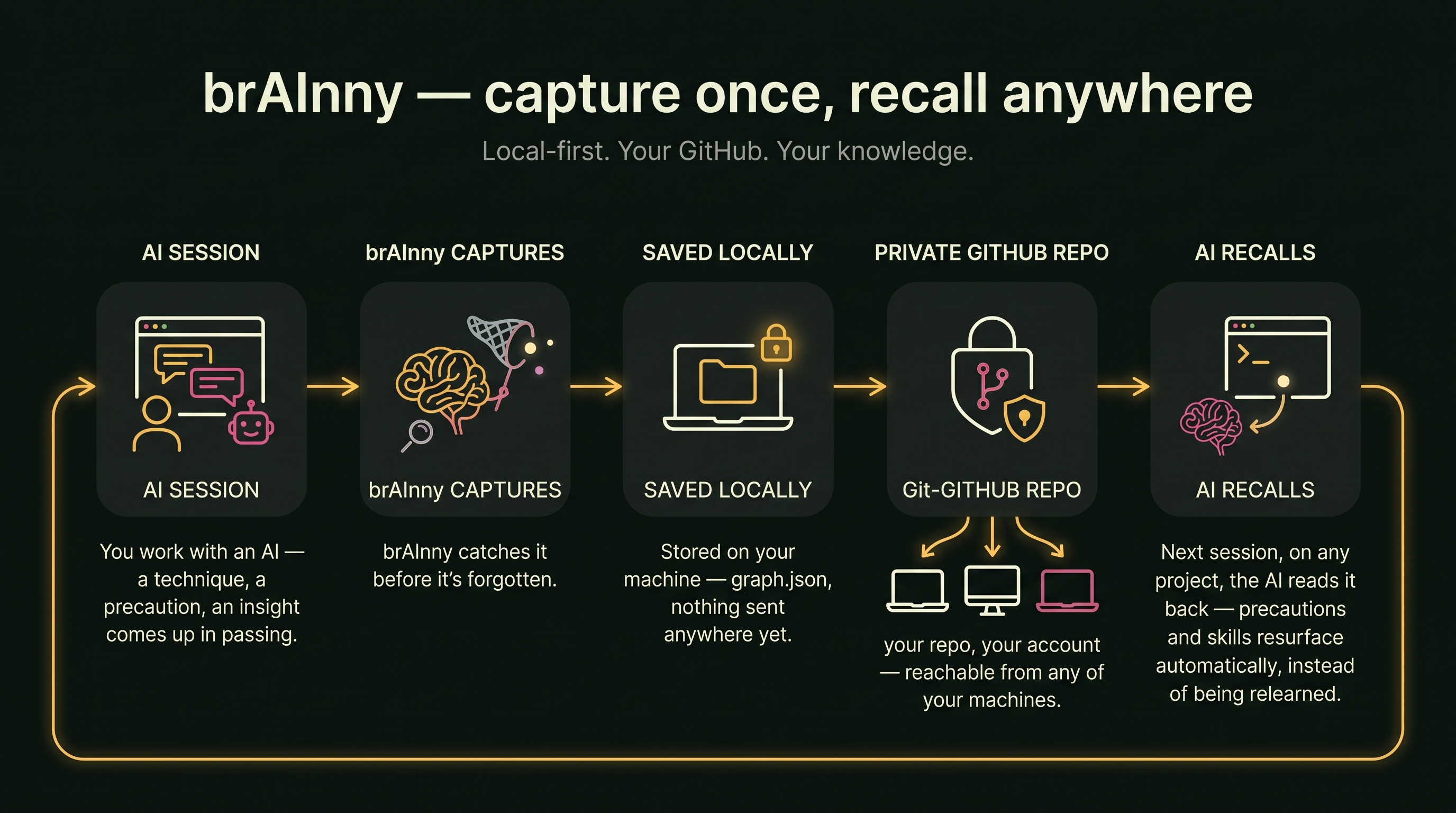
How it works, in one picture
The diagram above is the pitch; this is the literal mechanics:
[ your AI session ]
        │  a lightweight skill watches for reusable moments and emits them
        ▼
   brainny capture           ← the CLI: validates, dedups, files it
        ▼
  brainny-out/graph.json     ← your durable, growing memory for this project
        │
        ├── graph.html       interactive dashboard — browse, search, revisit
        └── (optional) sync to one shared "central" brain across all your projects
Nothing runs on a server, nothing leaves your machine unless you
explicitly point it at a central folder — and even then, syncing to
GitHub is a separate, explicit command, never silent. graph.html itself
has zero network dependency, too — D3 is vendored and baked directly
into the file, not pulled from a CDN, so it renders identically offline,
behind a firewall, or years from now regardless of what's still online.
Not locked to one AI. The brain (the brainny CLI + graph.json) is
plain, assistant-agnostic Python — the skills in skills/brainny/ are
just markdown instructions plus shell commands. The ones built and tested
so far target Claude Code, but nothing about the design is Claude-only:
any assistant that can read an instruction file and run a shell command
can drive brainny the same way.
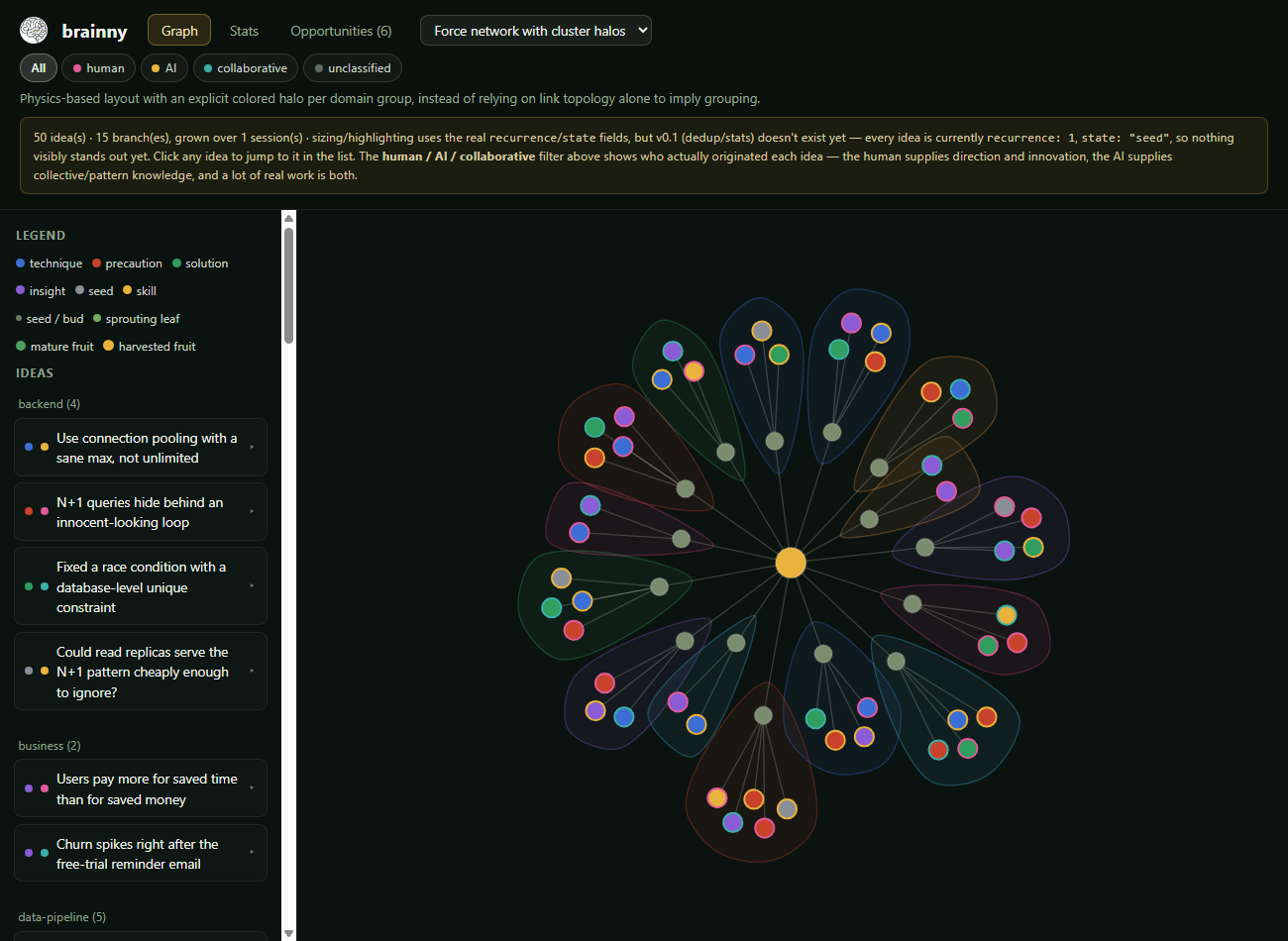
Graph tab — force network with cluster halos. The row of pills under the tabs filters by who originated each idea.
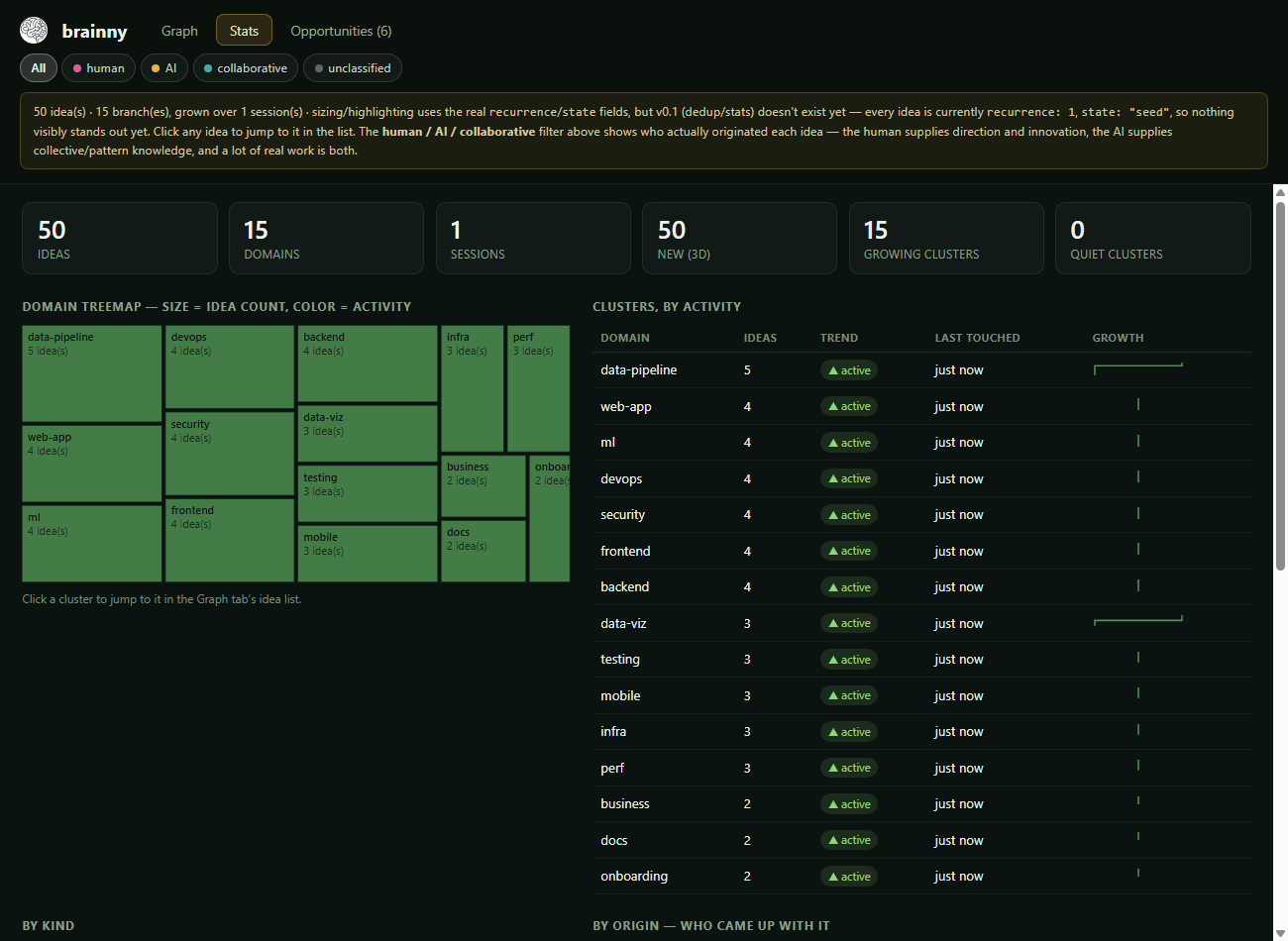
Stats tab — domain treemap, growth trends, kind + origin breakdown.
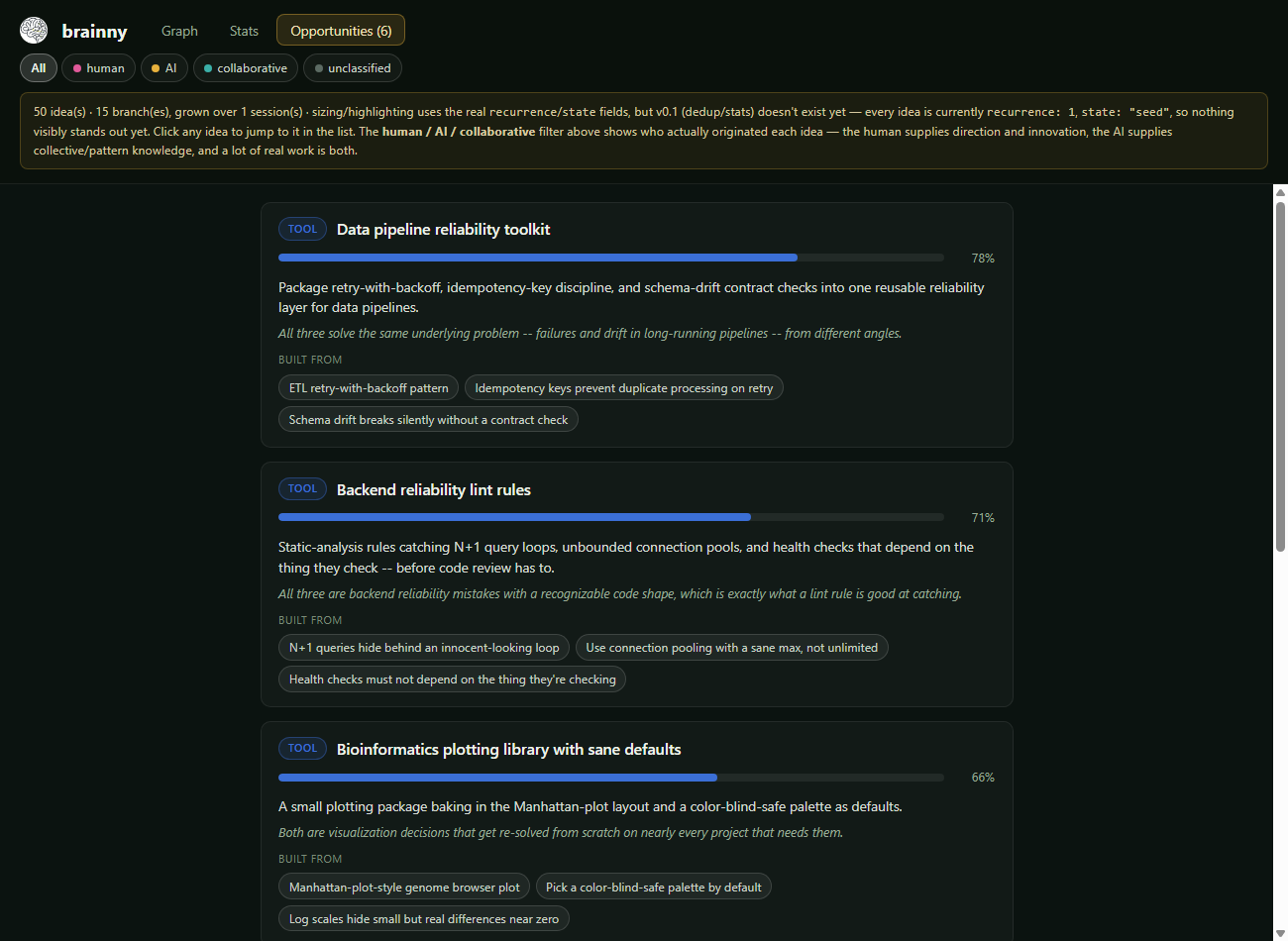
Opportunities tab — AI-proposed combinations, sorted by confidence weight, linked back to the ideas each one draws from.
A fourth tab, Brain, is a different way to look at the same ideas: every connection between them — same kind, same domain, and (brightest) proven to combine in an Opportunity — bundled into one living mesh that resolves into a brain silhouette, no literal neuron dots needed. An old-style robot probe circles it continuously, pausing on ideas with real evidence behind them to show a percent-ready readout, and gathering a live scrolling report as it passes. Click anywhere to open the mesh into real, labeled, clickable idea circles.
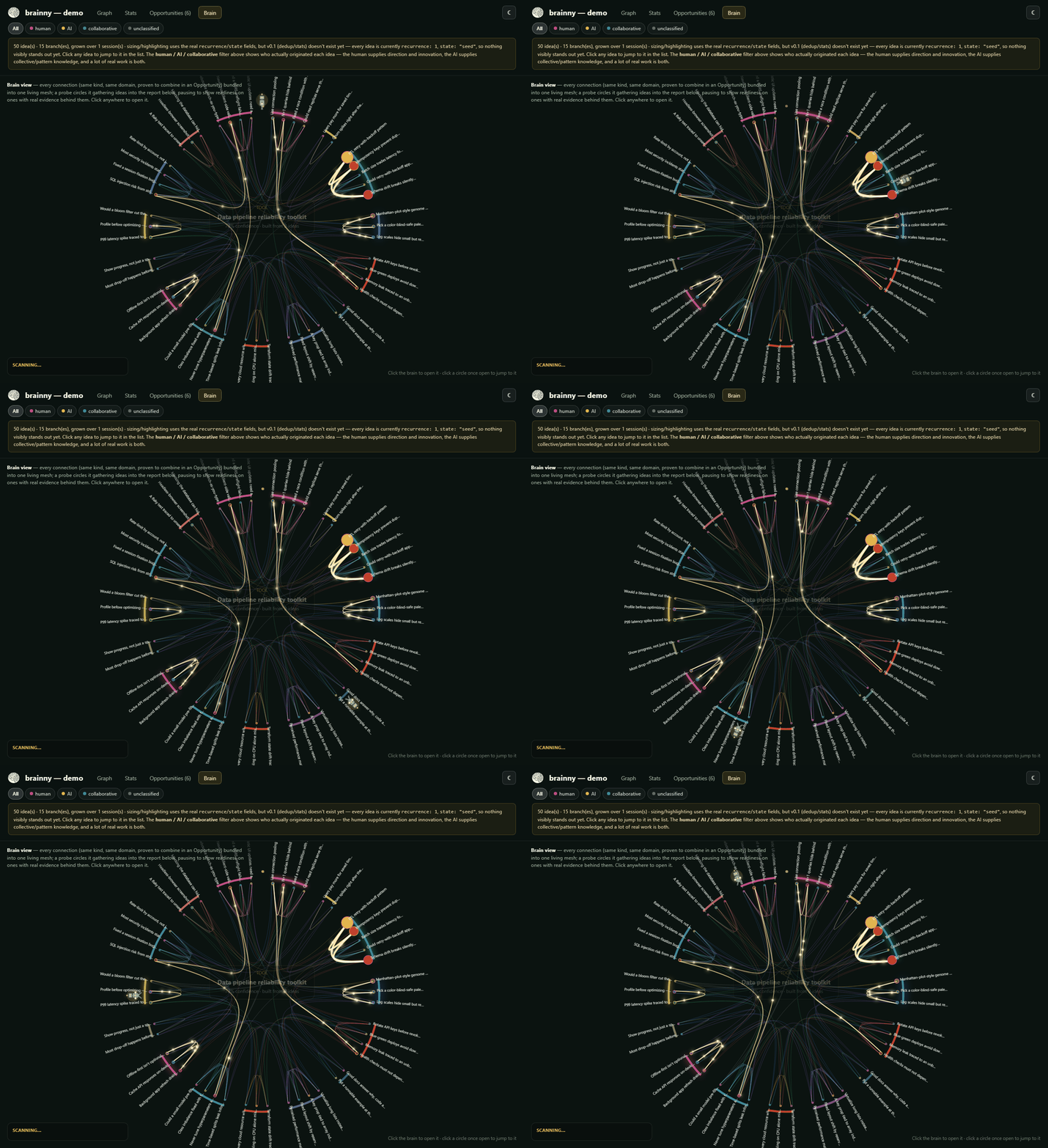
Brain tab — same 50-idea example dataset as the screenshots above, not a mockup. Every view, including this one, has a day/night toggle (top-right) that defaults to your system's preference and remembers your choice.
A fifth tab, Network, is the multi-project picture: your central
brain in the middle, with a small brain for every project connected to
it — sized by how many of its ideas are currently shown, linked back to
the hub. This is the one view that's actually about the central folder
(brainny central --html) rather than one project's ideas; on a
single-project dashboard it still works, just with one small brain.
Click a project to filter the whole dashboard to it (the same filter the
project dropdown uses — they always agree); click the center to
clear it.
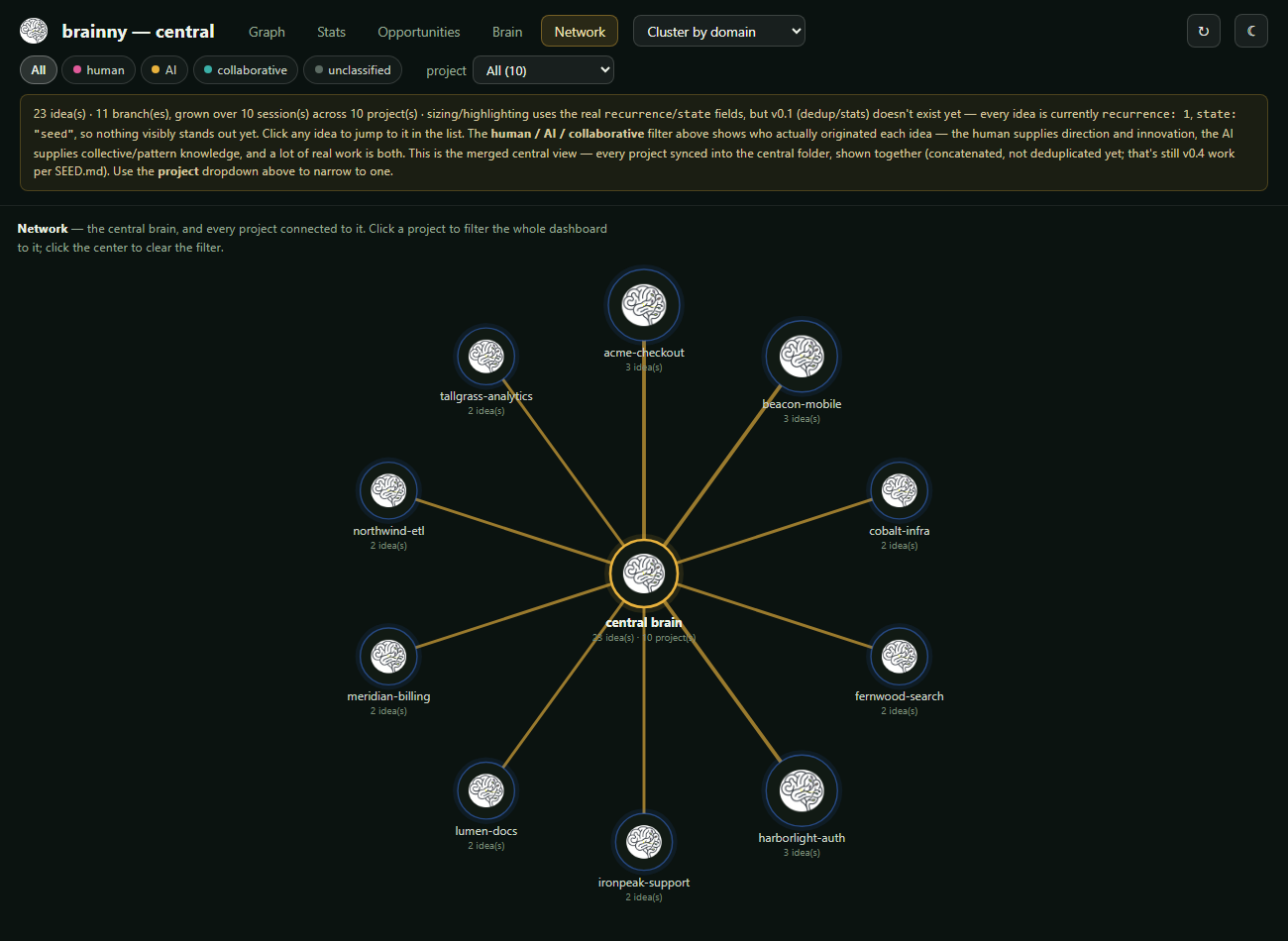
Network tab — a separate, fabricated example central folder with 10 projects (built by calling brainny's own capture/merge functions directly, not hand-edited JSON), so there's actually enough connected to be worth looking at.
All screenshots (and the preview above), except the Network tab's — that
one needs more than one project to be worth showing, so it's a separate
small fabricated central folder instead — are from the same fabricated
example dataset (50 ideas across 14 domains, every kind/origin,
attachments, snippets, and 6 proposed Opportunities) — built to show the
full dashboard, not the maintainer's real ideas. Want to click around
it yourself, not just look at screenshots?
Open the live example dashboard —
see examples/demo/.
Install
pip install brainny
That puts a brainny command on your PATH — usable from any project
directory. python -m brainny and python -m brainny.cli both work too.
Working on brainny itself, or want the dev/test dependencies?
git clone https://github.com/AlsammanAlsamman/brainny
cd brainny
pip install -e ".[dev]"
Windows note. With the Microsoft Store build of Python, the Scripts
directory that receives brainny.exe is often not on PATH — pip prints a
WARNING: The script brainny.exe is installed in '…\PythonXX\Scripts' which is
 not on PATH
. Add that …\Scripts folder to your user PATH (or just run
python -m brainny).
Use it
1. Capture something reusable, by hand or via the assistant skill:
brainny capture path/to/entries.json --project myproj --session s1
(prompts/capture.md shows the shape of an entry. In Claude Code, the
skills/brainny/ skills do this for you — see below.)
Or, mid-session, just point at it: /brainny-catch-this the retry
approach we just built for the API client — searches the whole session
for whatever you describe (not just a recent window), and always tells you what it
captured. Unlike the ambient skills below, this one doesn't second-guess
whether it's worth keeping — you already decided that.
For a reusable procedure rather than a fact, use /brainny-catch-skill
how the GWAS manhattan plot should be made instead — same
user-directed contract, but it captures kind: skill and looks for real
evidence in the conversation (a script, a small table, a small plot) to
attach as proof, via:
brainny attach idea_0031 manhattan.py --type code --description "plotting script"
brainny attach idea_0031 expected_columns.csv --type table --description "required column format"
brainny attach idea_0031 manhattan_example.png --type plot
Attachments are copied into brainny-out/attachments/<idea-id>/, shown
as small badges (code / plot / table) on the idea in the dashboard, and
capped at 2 MB each — small enough to guide future use, not a copy
of the full dataset or output.
Not everything worth keeping needs a whole file, though — a code excerpt,
an equation, a config block, a table's column structure can just live
directly on the idea via the snippet field (capped at 4000 characters),
no brainny attach call needed. Any capture skill can fill it in; the
dashboard renders it as monospace text in the idea's expanded view, with
its own small pencil badge next to the title.
Ask whether ideas combine into something bigger:
/brainny-synthesize looks over everything already captured in the
project — not just this session — for genuine combinations that could
support each other toward a tool, website, statistical module, or
business idea. Each proposal gets an honest 0.0–1.0 confidence weight
(never inflated to look better) and shows up in the dashboard's own
Opportunities tab, linked back to the ideas it's built from. This is
pure AI judgment — nothing deterministic proposes it — so most passes
propose nothing at all, same GATE discipline as every other capture skill:
brainny propose opportunities.json --project myproj --session s1
Mine ideas out of repos you already have, no live session needed:
/brainny-extract <path> points brainny backward instead of forward
— at code someone already wrote, possibly years ago, with no AI session
attached to it at all — and reads through it cold for the same kinds of
techniques, precautions, solutions, and insights every other capture
skill looks for. <path> can be one repo, or a directory containing
several (each one becomes its own project, same as if you'd captured
from inside it directly). This is genuinely expensive (it's really
reading real code) and entirely on-demand — it never runs on its own,
and it budgets its own effort (README/CHANGELOG/commit history and
targeted searches for hard-won-knowledge comments first, a handful of
substantial files, never an exhaustive read of everything) rather than
treating "more repos" as "proportionally more work." Same GATE
discipline as everywhere else: most files, and even most whole repos,
should yield nothing.
2. See what you've kept:
brainny open # the one command: opens the dashboard, generating it first if needed
That's it — brainny open works from the very first run, even before
you've captured anything (you'll get a real, empty dashboard explaining
what to do next, not an error). See it above for what it actually looks
like once there's something in it. The dashboard (brainny-out/graph.html)
is a single self-contained file — no server, works offline:
- Graph — radial tree / force network, click-to-inspect; a cluster by dropdown re-groups both it and the itemized list below by domain (default), kind, or primary tag, remembered across reloads
- Stats — domain treemap, growth trends, kind + origin breakdown
- Opportunities — AI-proposed combinations of ideas
- Brain — edge-bundled mesh + a probe that gathers a live report
- Network — the central brain + a small brain per connected project
- a day/night theme toggle, top-right, in every tab
- an opt-in live toggle next to it — every
capture/attach/propose/syncalready keepsgraph.htmlcurrent the moment it happens (including the merged view at your central folder's root, not just each project's own copy), so a still-open tab only needs the reload itself; turn this on to get that automatically every 20s instead of hitting refresh by hand
brainny status              # counts, domains, last capture, sync state
brainny query                # your ideas as a terminal tree, no browser needed
brainny query --html          # just (re)write brainny-out/graph.html, without opening it
brainny open --central          # this project's central copy -- or, from a directory with no
                                #   local graph to infer a project from, the merged view of everything
brainny open --central --project X  # ...or an explicit project's central copy, from anywhere
brainny search "docker"        # find anything by keyword, tag, domain, kind
brainny recall retry api client  # search THIS project + every project in your central folder
brainny recent --days 7          # what you've captured lately
3. Let it capture itself, ambiently. This is a two-step, one-time setup — skipping step 2 is the most common way this ends up not working:
brainny install-skills                    # step 1: copies skills/brainny/*.md into ~/.claude/skills/
                                           #   -- this alone only makes the slash commands
                                           #   (/brainny-catch, /brainny-extract, ...) work by hand
brainny install-skills --write-claude-md  # step 2: also appends the ambient-capture section
                                           #   to ~/.claude/CLAUDE.md -- this is what actually
                                           #   makes it automatic. Safe to rerun: skips instead
                                           #   of duplicating if that section is already there.
--write-claude-md is the only thing in brainny that ever writes to your
global Claude Code config, and it only does so when you explicitly pass
it — omit it and step 1 alone just prints the block (also readable at
skills/brainny/claude-md-snippet.md) for you to paste in by hand
instead. Either way, do both steps once per machine, then every
Claude Code session will:
- once, ever, per machine — on the first session after install, if no central folder is set up yet, ask whether you want one (and where, and whether to back it with GitHub) before ever touching anything; never asks again after that, whatever you answered;
- quietly scan whatever just happened for anything worth keeping, appended to the end of each task/turn — never a separately-scheduled interruption mid-task — and file it without interrupting you; most cycles catch nothing, and that's correct;
- once, at the start of the session, check whether anything's drifted from your shared central brain and ask before syncing it;
- once per session, give the project's already-captured ideas one free
look for genuine combinations worth proposing as an Opportunity —
the same judgment
/brainny-synthesizedoes by hand, just automatic; silent on the common outcome (nothing clears the bar); - right after your first message, quietly check whether anything you've captured before — in this project or any other one synced to your central brain — is relevant to what you're about to do, and mention it briefly if so. This is the proactive-recall half: everything else here only captures, this is what actually feeds it back to you.
Nothing is ever pushed to GitHub without you asking for it, in that moment, every time.
Every Claude Code command brainny adds:
| Command | Runs | What it does |
|---|---|---|
/brainny |
manually, end of a session | full two-pass review of the whole session (project-aware + project-blind) |
/brainny-catch |
manually, or appended to the end of every task/turn | lightweight scan of what just happened for anything worth keeping; silent when it finds nothing; never runs as a separate interrupting wakeup |
/brainny-catch-this <description> |
manually, whenever you point at something | searches the whole session for what you describe and captures it; always tells you what it did |
/brainny-catch-skill <description> |
manually, whenever you point at a reusable procedure | same as above, but captures kind: skill and attaches evidence (code/plot/table) via brainny attach |
/brainny-sync-check |
automatically, once per session | checks for local drift and for an overdue GitHub push, asking before either |
/brainny-onboarding |
automatically, once ever per machine | offers to set up a new central folder, or download an existing one, plus optional GitHub, on first use |
/brainny-recall |
automatically, once per session, after your first message | surfaces anything relevant you've captured before — in this project or any other one — before the task starts |
/brainny-synthesize [focus] |
manually, whenever you want to check | reviews everything captured in the project for genuine combinations, proposing each with an honest confidence weight via brainny propose |
/brainny-propose-check |
automatically, once per session | the ambient version of /brainny-synthesize above — same judgment, ambient framing (silent unless something clears the bar) |
/brainny-extract <path> [focus] |
manually, whenever you want to mine a repo | reads through one or more existing repos (no live session needed) for the same kinds of ideas every other capture skill looks for; explicitly expensive, so it only ever runs on request |
All of these are installed globally, once, and then work in any project.
4. Optionally, keep one brain across every project (the onboarding skill above offers to do this for you on first run — or by hand):
brainny config set-central ~/brainny-central          # point at a new shared folder
brainny config set-central ~/brainny-central --clone <git-url>  # ...or download an existing one (another machine, GitHub)
Once a central folder is configured, brainny capture and brainny
attach mirror to it automatically, immediately, on every call — no
extra step, and nothing to remember. You only need brainny sync by hand
for two cases: backfilling ideas that were captured before a central
folder existed, or brainny sync --push to also commit & push, if the
central folder has a GitHub remote.
Sync only ever flows project → central. Central never overwrites a
project's own copy unless you explicitly ask for that, and none of this
ever touches git on its own — pushing to GitHub is always a separate,
explicit step. If the central folder is GitHub-backed, brainny status
tracks how long it's been since the last push and flags it as due once
sync-interval-days has passed (default 1 day) —
brainny-sync-check asks before pushing.
See everything together, not one project at a time:
brainny central              # summary: idea count per project, across the whole central folder
brainny central --html       # one merged dashboard: <central-folder>/graph.html
brainny central --open       # ...and open it
This is the actual "one central brain" — every project synced into the
central folder, shown together in a single dashboard with a project
filter alongside the existing origin filter (only appears once there's
more than one project to distinguish). It's a merge, not a reconciliation:
ideas are concatenated as-is, not deduplicated — full cross-project dedup
is still open work (SEED.md's v0.4 milestone). brainny central also
flags any idea whose own provenance names a different project than the
folder it's sitting in — a real, if uncommon, sign that brainny capture
got run from the wrong directory at some point.
Found one of those? Fix it:
brainny reassign idea_0004 idea_0005 --to the-right-project
Moves the given idea(s) out of the current directory's local graph (and
its own central mirror) and into the target project's central copy,
renumbered to avoid colliding with ids already there. Only the target's
central copy gets written — there's no way to know where that
project's actual working directory lives on disk, so its own local
brainny-out/ is left alone (and stays that way; central never writes
back into a project's local copy, per the asymmetric sync rule above).
A small, optional activity badge for somewhere public (a GitHub profile README, say) — counts and shape only, never idea content:
brainny badge                        # merged across every synced project -> ./brainny-badge.svg
brainny badge --local                # just the current directory's own graph
brainny badge --out assets/badge.svg # write it somewhere specific

Nothing gets uploaded anywhere — brainny badge only ever writes a local
.svg file, same "no silent push" rule as everything else here. Shows:
idea count, kind breakdown (skills/techniques/precautions), domains,
project count, and how many ideas were touched in the last 3 days — not
"novelty," since that scoring model isn't built yet (see Status below);
this recency count uses the same honest proxy the dashboard's own Stats
tab already does.
Putting it on a GitHub profile, step by step:
- Generate it, pointed at a file inside a public repo you can push
to (this
brainnyrepo works fine — that's whatassets/badge-example.svgabove actually is):brainny badge --out assets/badge.svg
- Commit and push that file, same as any other change:
git add assets/badge.svg && git commit -m "Update brainny badge" && git push
- Grab its raw URL:
https://raw.githubusercontent.com/<user>/<repo>/<branch>/assets/badge.svg. - If you want it on your profile page specifically (not just this
repo), that lives in a separate, special repo named exactly after your
username —
github.com/<username>/<username>. Clone it, add the image to itsREADME.md:git clone https://github.com/<username>/<username>.git cd <username>

thengit add README.md && git commit -m "Add brainny activity badge" && git push. - Re-run step 1–2 any time you want the badge to reflect newer activity — your profile page re-fetches the raw URL on every view, so nothing on the profile-repo side needs to change again.
No step here runs on its own — capturing, syncing, and badge generation never push to GitHub by themselves, so this is always something you (or an assistant you've explicitly asked) does deliberately.
Status
v0 · seed — the core loop above is real and tested (136 tests).
Capture and proactive recall (brainny recall + the brainny-recall
skill) both work today. Not yet built: automatic dedup/novelty scoring so
recurrence/state truly evolve over time, decay for neglected ideas,
and an MCP server for tighter, tool-level AI access (recall today goes
through the CLI via a skill, not a direct protocol). See OPERATIONS.md
for the full build order and SEED.md for the complete design rationale
— both are as honest about what's not built yet as what is.
Layout
brainny/                 the CLI + engine (Python, assistant-agnostic)
skills/brainny/          the capture skills (assistant-facing prompts)
prompts/                 entry + project-nature templates
tests/                   136 tests, see SEED.md §6 for the testing philosophy
brainny-out/             where captures land when you use brainny *on*
                         this repo (gitignored — same as in any project;
                         not shipped, this is per-user local data)
examples/demo/           fabricated example dashboard, committed on purpose
                         — see "Want to click around it yourself?" above
assets/icon.png          brand mark
SEED.md                  the living design doc — read this first
OPERATIONS.md            how it actually runs day to day
Read SEED.md for the constitution, architecture, and entry schema.
Read OPERATIONS.md for the command surface, ambient capture, and the
central/GitHub sync model in full.
Contributors
| Name | Contact |
|---|---|
| Alsamman M. Alsamman | aalsamman100@gmail.com |
| Muhammad M. Adeel | m.muzammal.adeel@outlook.com |
1 maintainer

Release files for brainny 0.1.1
For a detailed explanation of source distributions (sdists) and built distributions (wheels), please see the package formats documentation.
Source distribution (sdist)
| File | Size | Uploaded | |
|---|---|---|---|
| brainny-0.1.1.tar.gz | 214.7 kB | Details |
Built distribution (wheel)
| File | Interpreter | ABI | Platform | Reset |
|---|---|---|---|---|
| brainny-0.1.1-py3-none-any.whl | Python 3 | none | any | Details |
Total release size: 404.3 kB
Release files / brainny-0.1.1.tar.gz
| Download URL | brainny-0.1.1.tar.gz |
|---|---|
| Size | 214.7 kB |
| Tags | Source |
|
SHA-256 checksum How to use checksums |
7c6dbcbbe7a0d77021acae012d44050d20b5b357c303c00edf7281b7a3cba35f
|
|
BLAKE2b-256 checksum How to use checksums |
44eee39ccce96bb43ed6e9116000a3121c53ae956330958b81a1360ac3004c67
|
| Upload date | |
|
Uploaded using Trusted Publishing? What is trusted publishing? |
No |
| Uploaded via |
twine/7.0.0 CPython/3.12.10
|
Release files / brainny-0.1.1-py3-none-any.whl
| Download URL | brainny-0.1.1-py3-none-any.whl |
|---|---|
| Size | 189.6 kB |
| Tags | Python 3 |
|
SHA-256 checksum How to use checksums |
cec59de83123c6abef48e9c0b210106bcd24503c961e7bfed30206a03485c1e6
|
|
BLAKE2b-256 checksum How to use checksums |
33caf2eaf81cff5cd627c46e2206bb664254c3246febc114769d4fdc239214c6
|
| Upload date | |
|
Uploaded using Trusted Publishing? What is trusted publishing? |
No |
| Uploaded via |
twine/7.0.0 CPython/3.12.10
|














