









brainseg is a PyQt6 desktop application for brain MRI abnormality segmentation. It has a friendly multi-view interface with a PyTorch UNet backend, making it easy to inspect images, run inference with custom .pth models, compare against ground truth, and review statistics in one place.
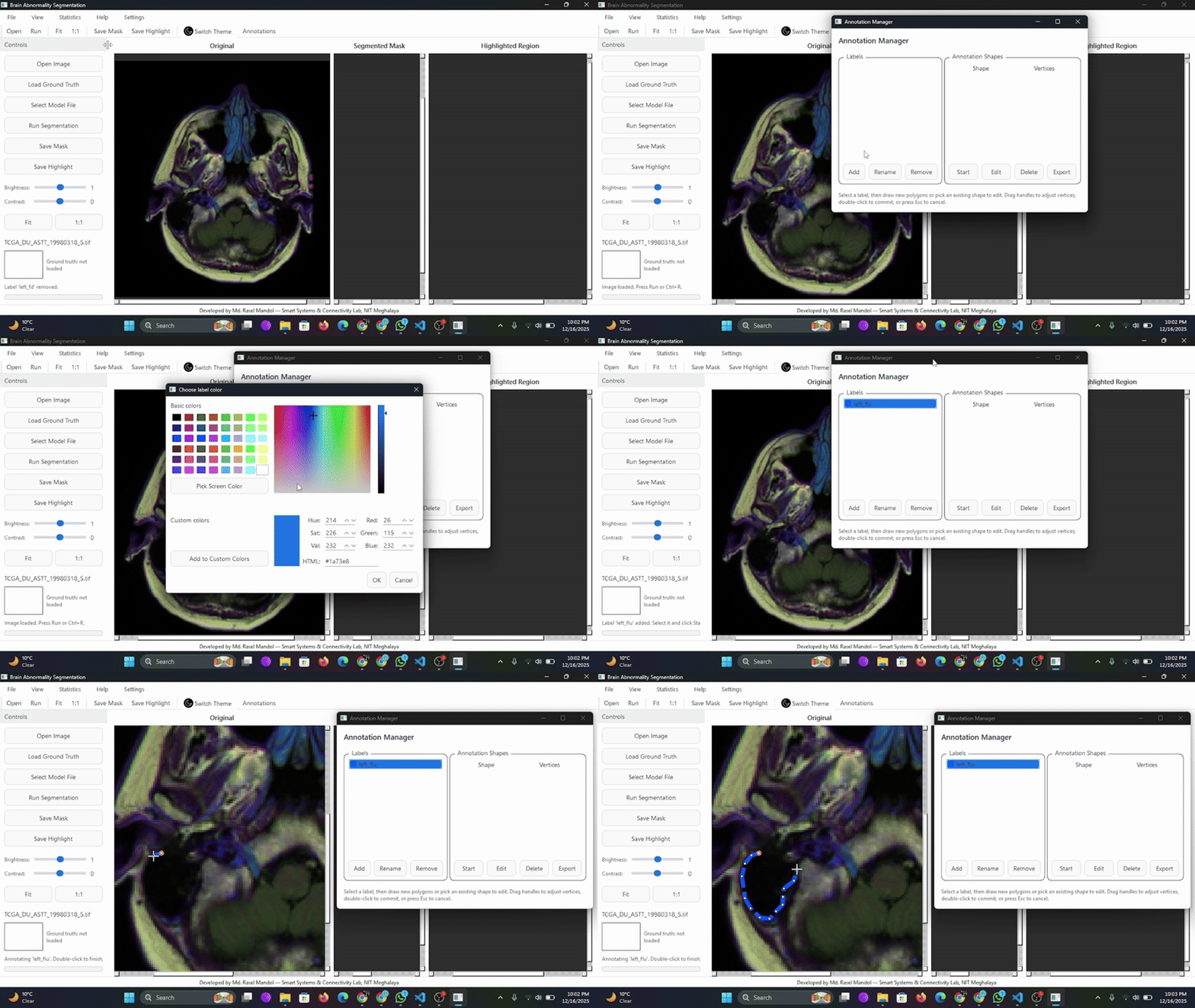
Table of Contents
- Highlights
- Getting Started
- Using the App
- Model Management
- Customization & Settings
- Troubleshooting & Notes
- Development Workflow
- Roadmap
- Contributing
- Citing BrainSeg
- License
Highlights
- Three synchronized canvases for original, mask, and highlighted overlay views with zoom/pan controls.
- Brightness and contrast tuning that preserves zoom state for precise inspection.
- One-click segmentation using your own
.pthcheckpoint; progress bar shows inference status. - Ground-truth loader with thumbnail preview and automatic resizing for metric comparison.
- Research-style statistics window (Dice, Jaccard, Hausdorff, latency, memory, trend plots).
- Theme, accent, and custom color palette so users can adapt the UI to ambient lighting.
- Robust error handling that surfaces detailed model-loading issues via dialogs.
Browse the complete gallery in SCREENSHOTS.md.
Getting Started
Prerequisites
- Windows (tested) with Python 3.10
- PyTorch build that matches your hardware (CPU-only works; CUDA recommended for speed)
- Qt runtime provided by PyQt6 (installed automatically through
requirements.txt)
Installation
PyPI (Recommended)
pip install brainseg-ai
brainseg
This installs the brainseg-ai package and makes the brainseg console entry available system-wide.
[!Note] The previous torch
c10.dllimport error is resolved in the current release, sopip install brainseg-aicompletes without warnings on supported Python >=3.10 environments.
Clone & Install from Source
git clone https://github.com/raselmandol/brainseg.git
cd brainseg
python -m venv .venv
.\.venv\Scripts\Activate.ps1
pip install -r requirements.txt
Build
pip install -e .
Launching the app
python -m brainseg
# or run the legacy script if you prefer
python brainseg/main.py
[!Note] Tip:
pip install -e .adds thebrainsegconsole entry point so you can launch the app from anywhere. After a PyPI install (pip install brainseg-ai), you can simply runbrainsegfrom any shell.
Using the App
- Open Image – load an MRI slice (
.png,.jpg,.tif,.bmp). The original view updates immediately, honoring current brightness/contrast settings. - Adjust Brightness/Contrast – use the sliders on the left dock; zoom/pan state stays intact.
- Load Ground Truth (optional) – import a mask (
.png,.tif). A thumbnail appears under the filename label. - Select Model File – pick a segmentation checkpoint (
.pth). The app validates the file right away and reports issues in a modal dialog if the architecture is incompatible. - Run Segmentation – click Run Segmentation or press
Ctrl+Alt+R. The progress bar indicates inference status, and statistics are recorded automatically. - Save Results – export the mask or highlighted overlay using the corresponding buttons or File menu actions.
Model Management
- Default checkpoint:
brain_segmentation_model.pth. - Validation: selecting a model triggers a quick load test; clear dialogs explain missing keys or shape mismatches.
- Swapping models: re-open Select Model File at any time; the new model is cached for subsequent runs.
Customization & Settings
- Theme toggle (light/dark) plus accent selector (Azure, Emerald, Amber, Rose).
- Custom palette picker applies a brand color across toolbars, docks, and controls in real time.
- Image adjustments -- the Settings dialog mirrors the dock sliders, so you can tweak values from either location.
- Preferences currently apply per session; wiring to
QSettingsis on the roadmap.
Troubleshooting & Notes
- Invalid model: You'll see "Model Load Error" with the traceback if the
.pthdoesn't match the expected UNet shape. - Inference failure: "Segmentation Error" dialogs include the captured stack trace. Re-select a compatible model or verify PyTorch/torchvision versions.
- Large images: Internally resized to the nearest multiple of 32 to satisfy encoder constraints.
- Performance tips: Use the CUDA-enabled PyTorch wheel when a GPU is available; CPU runs are slower but supported.
Development Workflow
# Install in editable mode
pip install -e .

# Run the GUI from source
python -m brainseg

# Quick sanity check (syntax)
python -m py_compile brainseg\model.py brainseg\main_window.py
To-do
- Persist user preferences (theme, accent, last model path) via
QSettings. - Allow background model validation to keep the UI responsive with >1 GB checkpoints.
- Add CLI hooks or REST mode for batch inference.
- Extend statistics window with export-to-CSV and per-run notes.
- ONNX Runtime support
- Segmentation list
- Fetch models from remote sources
- Support semantic and instance segmentation (parallel workflows)
Contributing
Pull requests and feature suggestions are welcome. Please file an issue describing the change, branch from main, and keep PRs focused. For major UI adjustments, sharing mockups or screenshots helps align expectations.
Citing BrainSeg
If this project supports your research or clinical workflow, please cite it using the metadata in CITATION.cff:
Mandol, Md Rasel. BrainSeg: Deep Learning-based Brain MRI Segmentation and Annotation. Version 1.5.5, 3 Jan 2026. MIT License. https://github.com/raselmandol/brainseg
GitHub's "Cite this repository" button also reads the same CFF file, so you can export BibTeX or other formats directly.
License
This project is released under the MIT License.
Maintainer: Md. Rasel Mandol (Smart Systems & Connectivity Lab, NIT Meghalaya)
1 maintainer

Metadata
1 maintainer
Release files for brainseg-ai 1.6.5
For a detailed explanation of source distributions (sdists) and built distributions (wheels), please see the package formats documentation.
Source distribution (sdist)
| File | Size | Uploaded | |
|---|---|---|---|
| brainseg_ai-1.6.5.tar.gz | 207.0 kB | Details |
Built distribution (wheel)
| File | Interpreter | ABI | Platform | Reset |
|---|---|---|---|---|
| brainseg_ai-1.6.5-py3-none-any.whl | Python 3 | none | any | Details |
Total release size: 415.6 kB
Release files / brainseg_ai-1.6.5.tar.gz
| Download URL | brainseg_ai-1.6.5.tar.gz |
|---|---|
| Size | 207.0 kB |
| Tags | Source |
|
SHA-256 checksum How to use checksums |
5eab712f28e7897c64e2eaf293dbae29308477ed8988bd99f6b8ab6324eba3b0
|
|
BLAKE2b-256 checksum How to use checksums |
9c733951d0f227956a9ee0d316836de35cd424a66c5015ce25616b27990742ac
|
| Upload date | |
|
Uploaded using Trusted Publishing? What is trusted publishing? |
No |
| Uploaded via |
twine/6.1.0 CPython/3.12.8
|
Release files / brainseg_ai-1.6.5-py3-none-any.whl
| Download URL | brainseg_ai-1.6.5-py3-none-any.whl |
|---|---|
| Size | 208.7 kB |
| Tags | Python 3 |
|
SHA-256 checksum How to use checksums |
00e7172b717c43bcfa890dedf23ded7ba158e3c49177f345ce74705b2b6b78f3
|
|
BLAKE2b-256 checksum How to use checksums |
397a590c0508e776e0d4a0a0bb5c16c0f3fdd3a062015a08719f84200ab1cceb
|
| Upload date | |
|
Uploaded using Trusted Publishing? What is trusted publishing? |
No |
| Uploaded via |
twine/6.1.0 CPython/3.12.8
|














