
Zero-config observability for Python web frameworks

Project description
 Brakit Python SDK
AI writes your code. Brakit watches what it does.
Every request, query, and API call mapped to the action that triggered it. See your entire backend at a glance.
Open source · Local first · Zero config · AI-native via MCP
GitHub • Website • Contributing





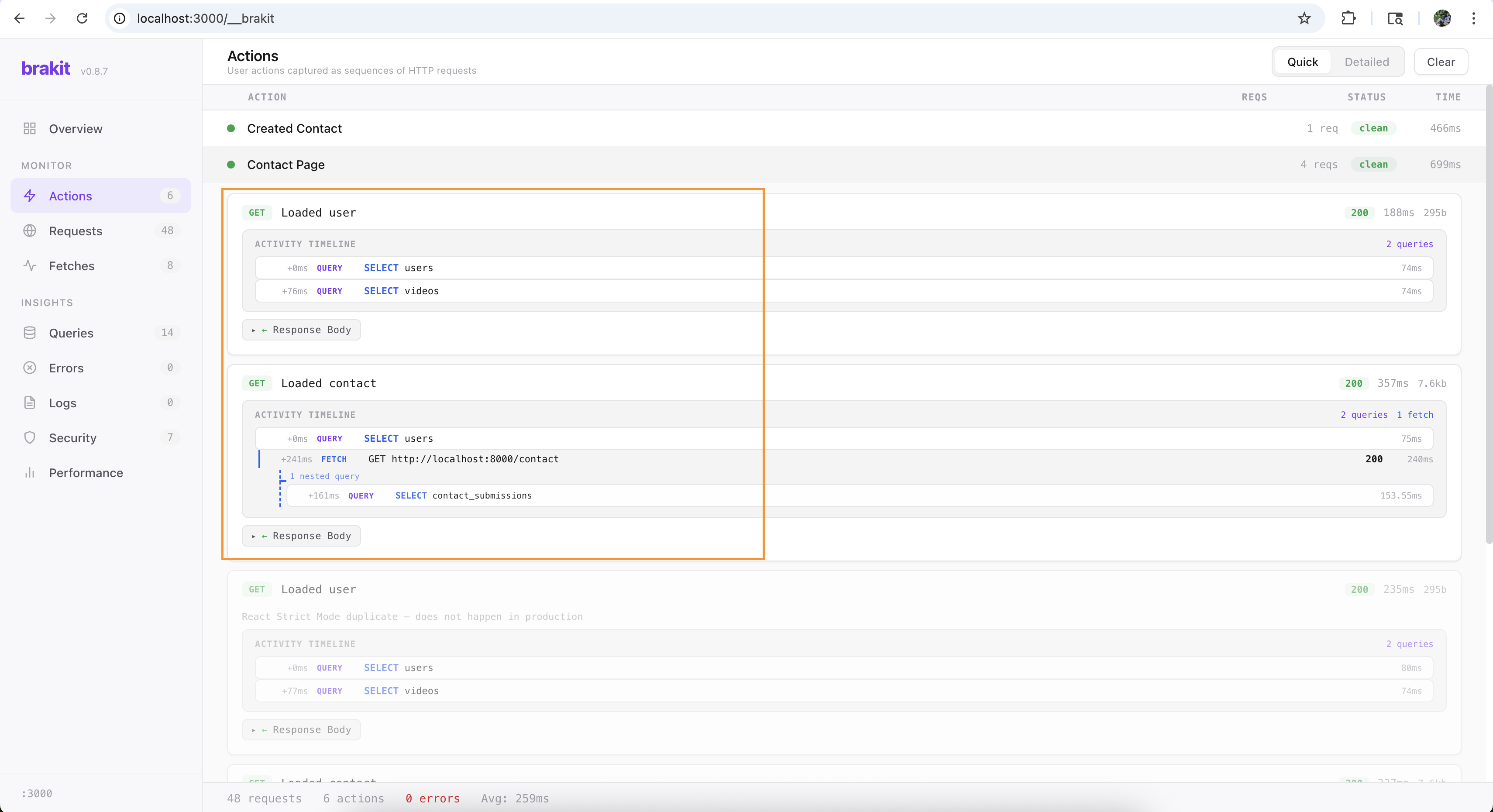
Every endpoint grouped by the action that triggered it — see "Sign Up" and "Load Dashboard", not 47 raw requests
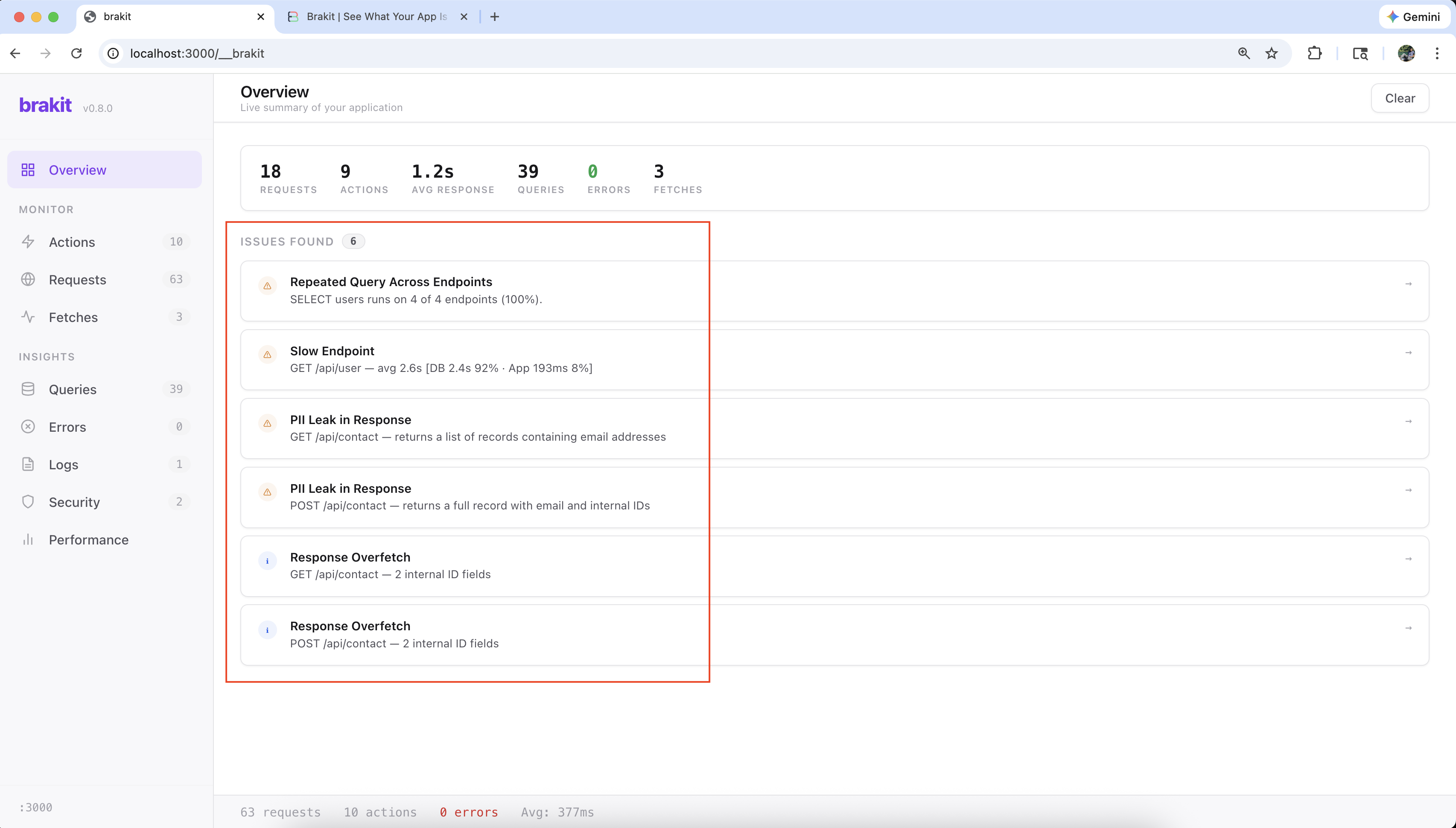
Brakit catches N+1 queries, PII leaks, and slow endpoints as you develop
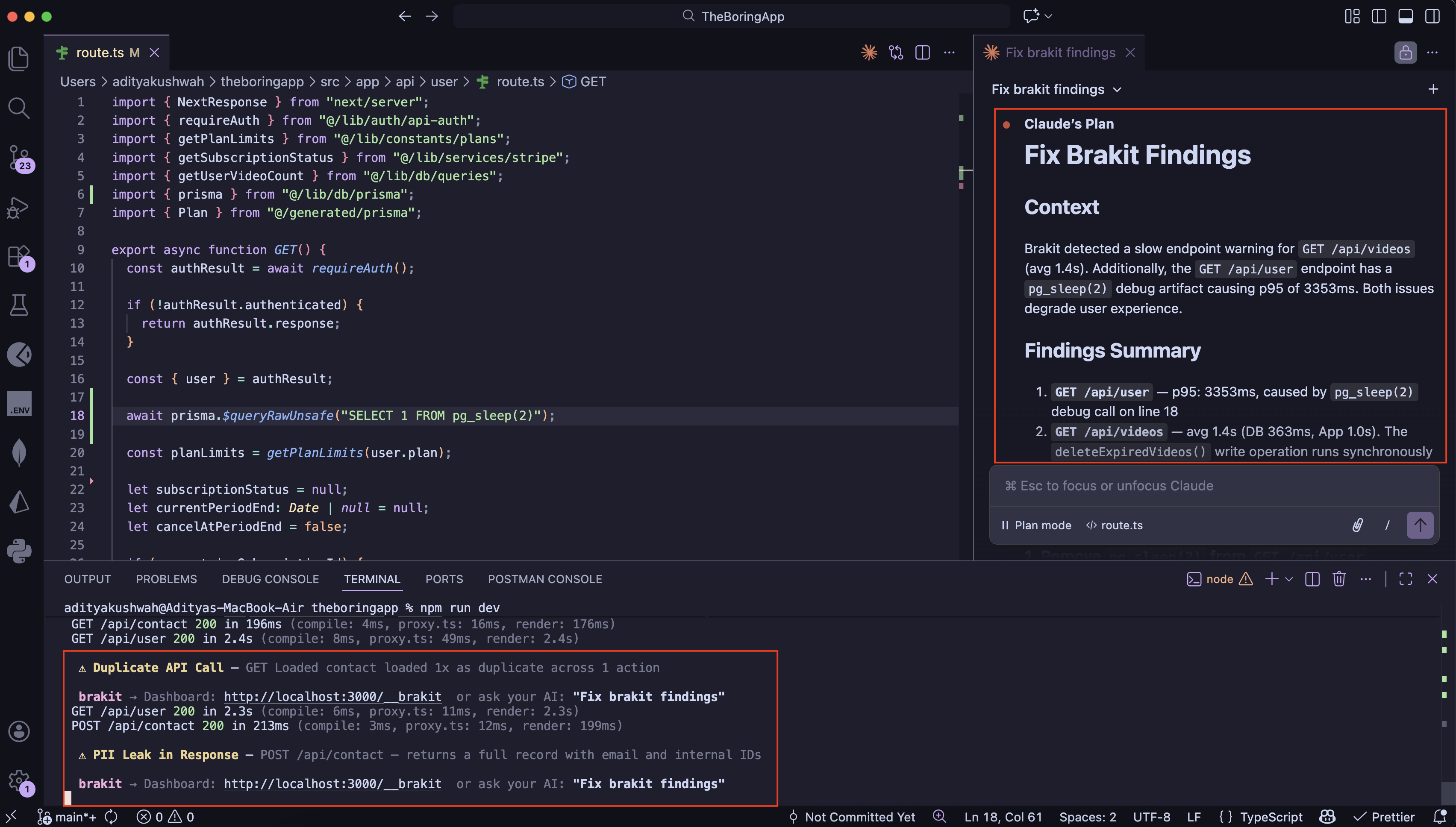
Claude reads issues via MCP and fixes your code
Quick Start
The Python SDK captures queries, fetches, and requests from your FastAPI or Flask backend and forwards them to the Brakit dashboard running in your Node.js frontend.
1. Install the Node.js core (runs the dashboard)
npx brakit install
2. Install the Python SDK
pip install brakit
3. Add one import to your app
FastAPI:
import brakit  # must be before FastAPI import
from fastapi import FastAPI

app = FastAPI()
Flask:
import brakit  # must be before Flask import
from flask import Flask

app = Flask(__name__)
That's it. Start both apps normally. The Python SDK auto-detects your framework, instruments queries and fetches, and forwards everything to the Brakit dashboard at http://localhost:<port>/__brakit.
Full setup guide: brakit.ai/docs/introduction
What You Get
- Cross-service tracing — FETCH from Next.js to FastAPI? The DB query inside FastAPI nests under the fetch automatically
- Full server tracing — DB queries, outgoing HTTP calls, errors — zero code changes
- Live dashboard at
/__brakit— performance overview, request timeline, scatter charts - 8 security rules scanned against live traffic — leaked secrets, PII in responses, missing auth flags
- N+1 query detection — same query pattern repeated 5+ times in a single request
- AI-native via MCP — Claude Code and Cursor can query issues and verify fixes directly
Supported Frameworks
| Framework | Status |
|---|---|
| FastAPI | Supported |
| Flask | Supported |
| Django | Planned |
Supported Databases
| Driver | Status |
|---|---|
| SQLAlchemy | Supported |
| asyncpg | Supported |
| psycopg | Planned |
Supported HTTP Clients
| Library | Status |
|---|---|
| urllib3 | Supported |
| httpx | Supported |
| aiohttp | Supported |
| requests | Supported (via urllib3) |
How It Works
import brakit  →  auto-detect framework  →  instrument everything
                        |
                        +-- DB queries    (SQLAlchemy, asyncpg)
                        +-- HTTP fetches  (httpx, aiohttp, urllib3)
                        +-- Errors        (global exception hooks)
                        +-- Logs          (logging module)
                              |
                              +-- Forward to Node.js dashboard via localhost
import brakit patches your framework's middleware to capture request/response pairs, hooks into database drivers and HTTP clients, and forwards telemetry to the Brakit dashboard running in your Node.js process. No proxy, no extra ports.
Production Safety
Brakit never runs in production. Multiple layers ensure it:
| Layer | How it blocks |
|---|---|
should_activate() |
Checks NODE_ENV + 15 cloud/CI env vars |
| devDependency | Not installed in production |
safe_wrap + circuit breaker |
Errors in brakit code fall back silently |
BRAKIT_DISABLE=true |
Manual kill switch |
Optional Dependencies
# FastAPI support
pip install brakit[fastapi]

# Flask support
pip install brakit[flask]

# Development (tests, linting)
pip install brakit[dev]
Development
git clone https://github.com/brakit-ai/brakit.git
cd brakit/sdks/python

pip install -e ".[dev]"
pytest tests/ -v
Contributing
Brakit is early and moving fast. Areas where help would be great:
- Database adapters — psycopg, Tortoise ORM, Django ORM
- Framework adapters — Django, Starlette
- HTTP client hooks — more client libraries
- Security rules — new patterns, configurable severity
Please open an issue first for larger changes so we can discuss the approach.
License


Download files
Download the file for your platform. If you're not sure which to choose, learn more about installing packages.
Source Distribution
Built Distribution
Filter files by name, interpreter, ABI, and platform.
If you're not sure about the file name format, learn more about wheel file names.
Copy a direct link to the current filters
File details
Details for the file brakit-0.1.5.tar.gz.
File metadata
- Download URL: brakit-0.1.5.tar.gz
- Upload date:
- Size: 31.5 kB
- Tags: Source
- Uploaded using Trusted Publishing? No
- Uploaded via: twine/6.2.0 CPython/3.9.6
File hashes
| Algorithm | Hash digest | |
|---|---|---|
| SHA256 |
b7f728460ea4dac263daf59d79767bfe514b98ddcf952bb30325560738d1a3f9
|
|
| MD5 |
3bfbd71aff99a8c7469d1f77983cd7f9
|
|
| BLAKE2b-256 |
4c52ada6dddc936d8173d1f5974c8a422653ab5fadf48cbe1b8adc68199ef83b
|
File details
Details for the file brakit-0.1.5-py3-none-any.whl.
File metadata
- Download URL: brakit-0.1.5-py3-none-any.whl
- Upload date:
- Size: 47.0 kB
- Tags: Python 3
- Uploaded using Trusted Publishing? No
- Uploaded via: twine/6.2.0 CPython/3.9.6
File hashes
| Algorithm | Hash digest | |
|---|---|---|
| SHA256 |
519675c13bf3d457a9071ac15163ba9f7927d4624fccaf578f82acfa129f442d
|
|
| MD5 |
7aeb23a135947eb22c201690854a54b2
|
|
| BLAKE2b-256 |
5ac9cd07c884f76194fe50f7ec6f17518dd7167d103735591eb9417a62fb51de
|






