
A terminal dashboard for tracking Git branches and GitHub PRs across all your repos

Project description
branchboard
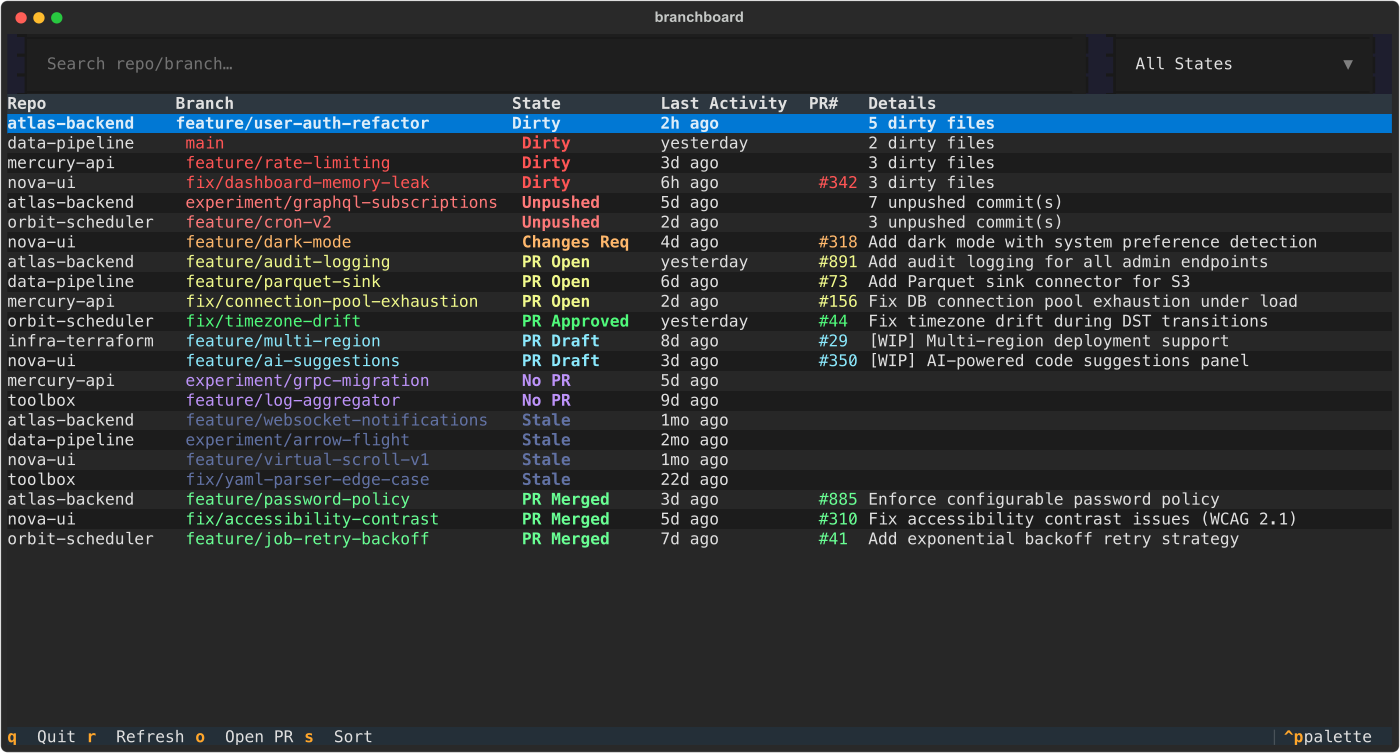
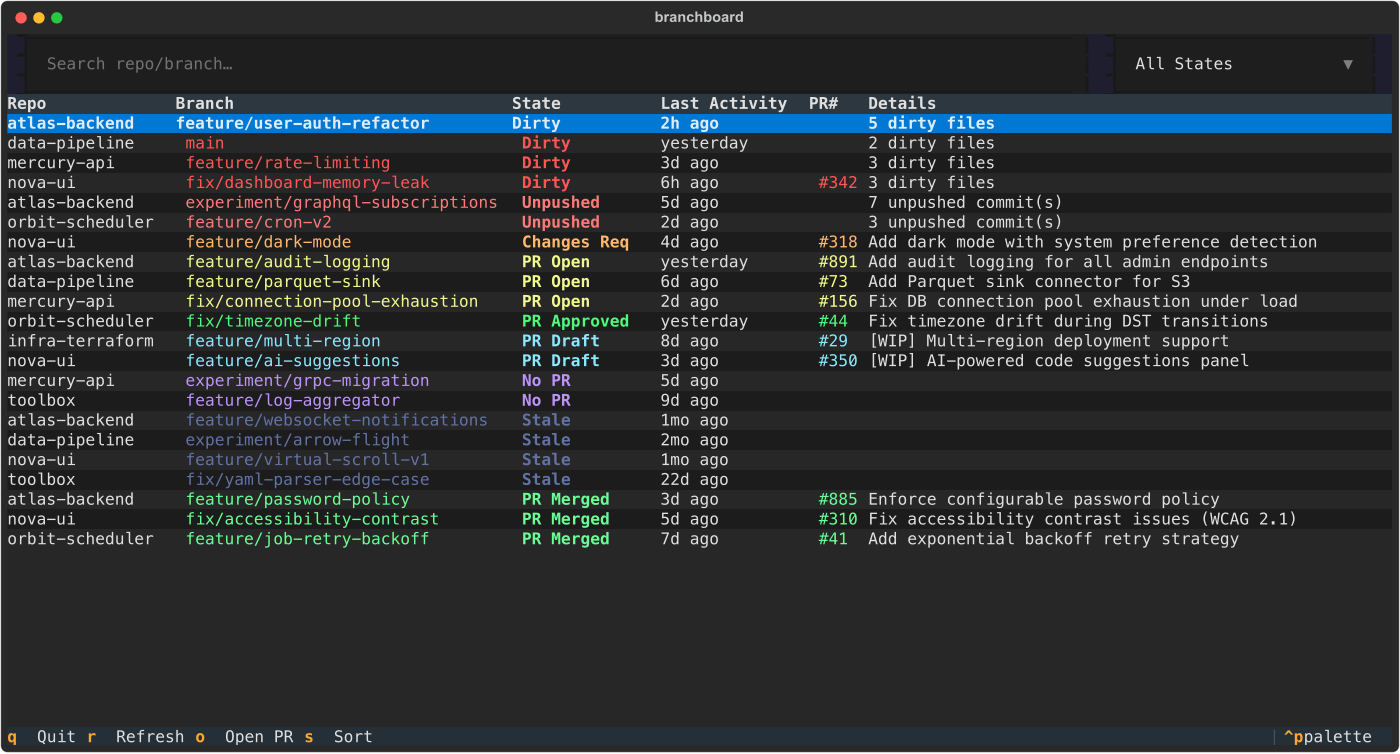
A terminal dashboard that scans your local Git repositories and shows an interactive, color-coded overview of every branch — dirty worktrees, unpushed commits, open PRs, stale branches, and more.
Built for developers who juggle dozens of repos and want a single view of what needs attention.
Features
- Unified view — Scans all repos under a directory tree and displays every non-default branch in one table
- Color-coded states — Each branch is classified and colored by its current state (dirty, open PR, stale, etc.)
- GitHub PR integration — Fetches your open/merged PRs via the
ghCLI and matches them to local branches - Vim-style navigation —
j/k,g/G,Ctrl-d/Ctrl-u,Ctrl-f/Ctrl-bfor fast scrolling - Filtering — Free-text search across repo and branch names, plus a state dropdown
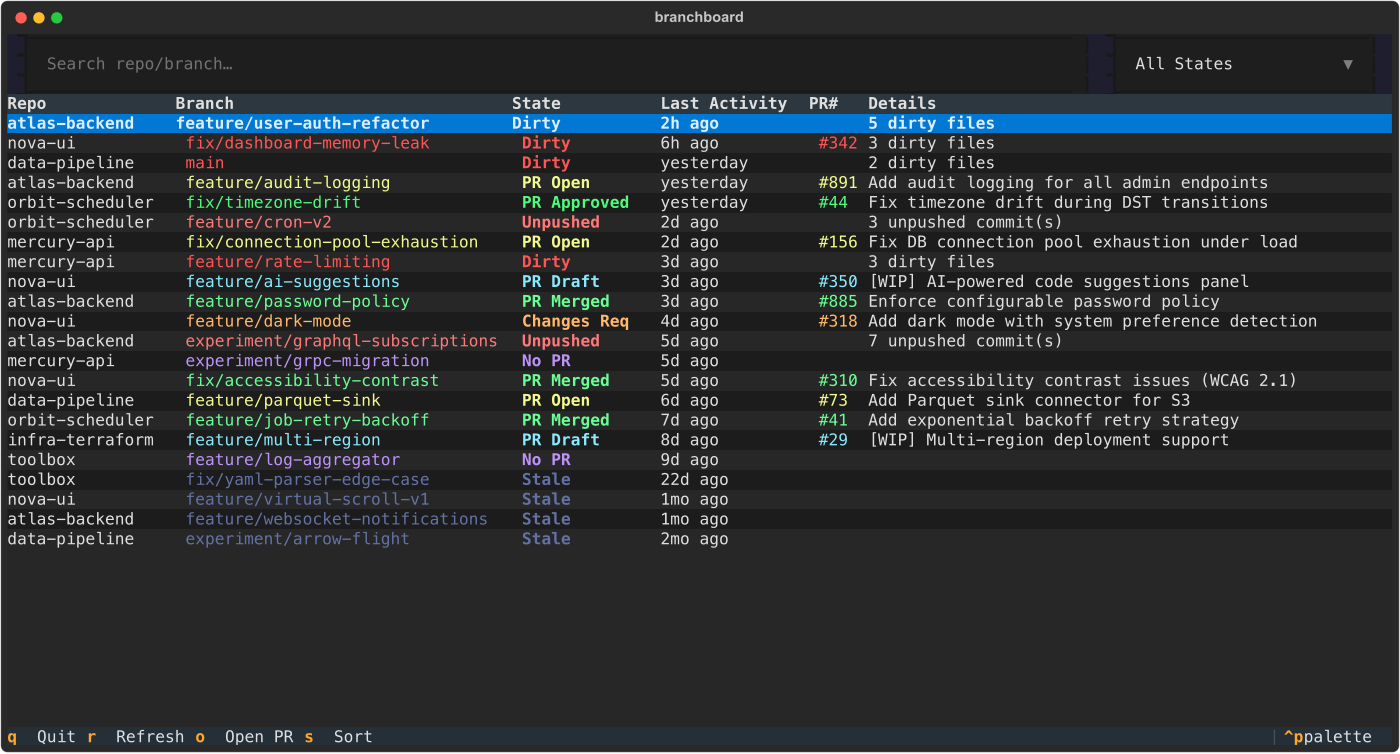
- Sort modes — Toggle between priority sort (actionable items first) and recency sort (most recently active first)
- Detail modal — Press Enter on any row to see full details: dirty file list, PR title, reviewers, URL
- Open PR in browser — Press
oto open the selected branch's PR directly in your browser - Fast — Async concurrent scanning (10 git + 5 GitHub processes), with a 5-minute JSON cache for instant restarts
Prerequisites
| Requirement | Version | Purpose |
|---|---|---|
| Python | 3.9+ | Runtime |
| Git | any | Local branch and status data |
GitHub CLI (gh) |
2.0+ | Fetching PR data from GitHub |
The gh CLI must be installed and authenticated:
# Install (macOS)
brew install gh

# Install (Linux — Debian/Ubuntu)
sudo apt install gh
# or see https://github.com/cli/cli/blob/trunk/docs/install_linux.md

# Authenticate (required once)
gh auth login
Installation
pip (from PyPI)
pip install branchboard
pipx (recommended — isolated install, no venv needed)
pipx install branchboard
From source
git clone https://github.com/somanathk/branchboard.git
cd branchboard
python3 -m venv .venv
source .venv/bin/activate
pip install -e .
Verify
branchboard --help
Usage
# Scan the default directory (~/Work/repos)
branchboard

# Scan a custom directory
branchboard --path /path/to/your/repos

# Bypass the cache and fetch fresh data
branchboard --no-cache
CLI Options
| Flag | Default | Description |
|---|---|---|
--path PATH |
~/Work/repos |
Root directory to scan for Git repositories (searches up to 3 levels deep) |
--no-cache |
false |
Ignore the local JSON cache and re-fetch all Git and GitHub data |
Keyboard Shortcuts
General
| Key | Action |
|---|---|
q |
Quit |
r |
Refresh — clear cache and rescan all repos |
o |
Open the selected branch's PR in your browser |
s |
Toggle sort: priority (default) / most recent |
/ |
Focus the search input |
Escape |
Return focus to the table / close modals |
Enter |
Open detail modal for the selected branch |
Vim Navigation (when table is focused)
| Key | Action |
|---|---|
j / k |
Move cursor down / up one row |
g / G |
Jump to first / last row |
Ctrl-d / Ctrl-u |
Half-page down / up |
Ctrl-f / Ctrl-b |
Full page down / up |
PageUp / PageDown |
Full page up / down |
Home / End |
Jump to first / last row |
Branch States
Branches are classified into states based on local Git status and GitHub PR data. States are listed in priority order (most actionable first):
| State | Color | Meaning |
|---|---|---|
| Dirty | Red | Current branch has uncommitted changes |
| Unpushed | Salmon | Local commits not pushed to any remote |
| Changes Req | Orange | PR has changes requested by a reviewer |
| PR Open | Yellow | PR is open and awaiting review |
| PR Approved | Green | PR is approved but not yet merged |
| PR Draft | Cyan | Draft PR (work in progress) |
| No PR | Purple | Branch is pushed but has no associated PR |
| Stale | Grey | No activity in the last 14 days and no open PR |
| PR Merged | Bright green | PR was merged (branch can be cleaned up) |
Screenshots
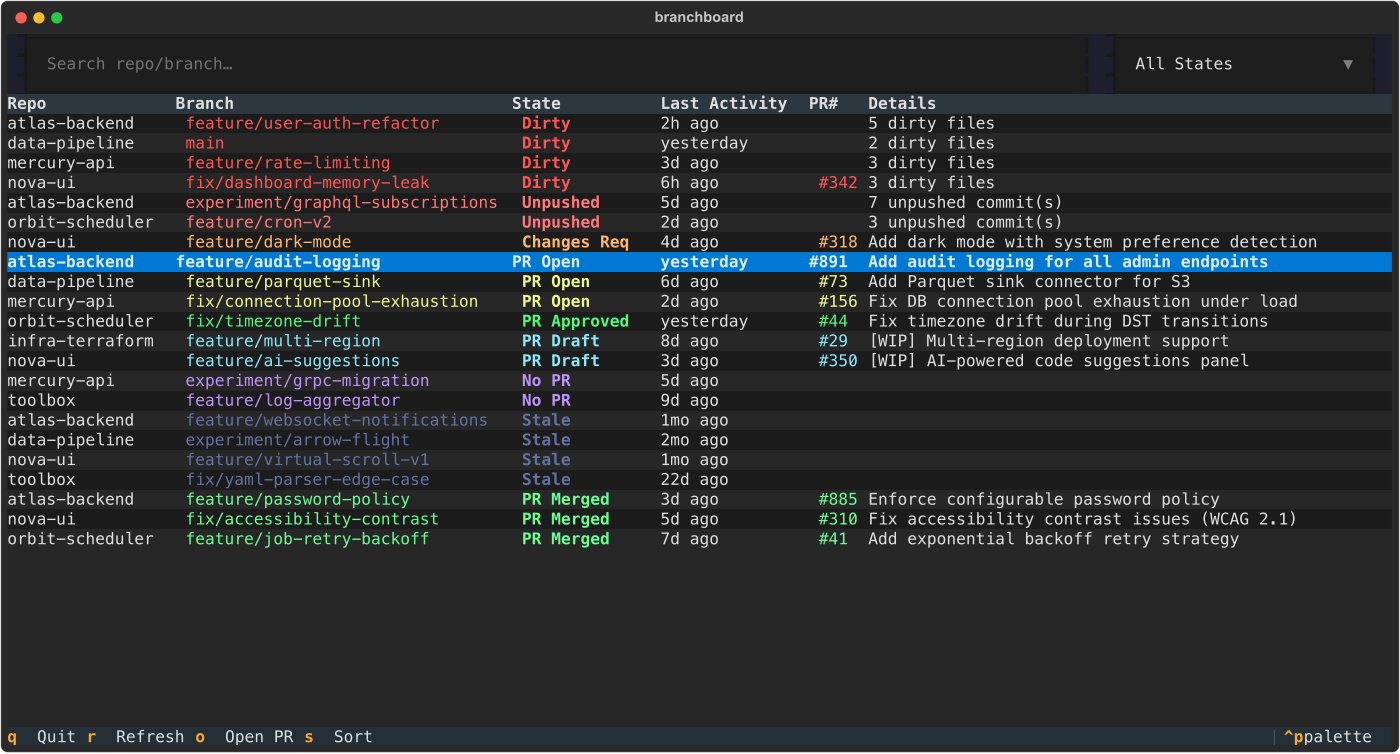
Detail Modal
Press Enter on any row to see full branch and PR details.
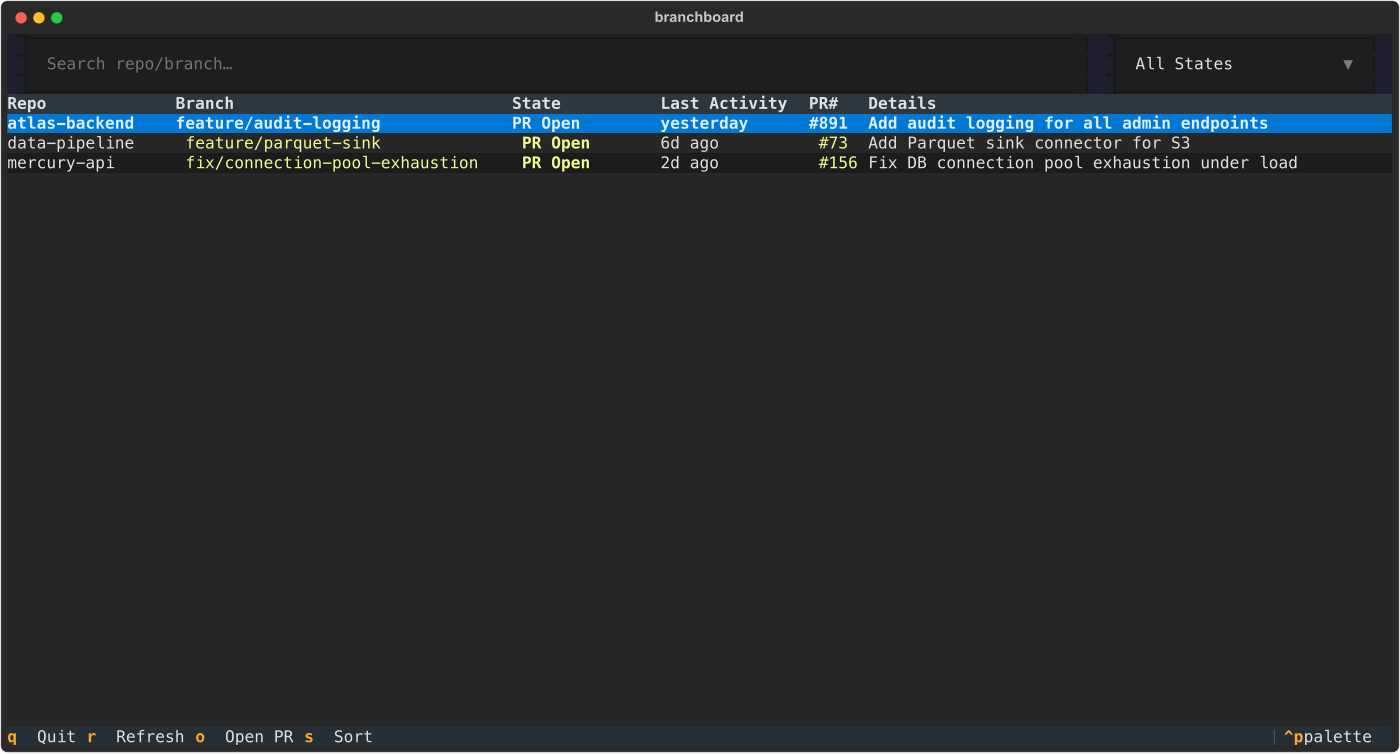
Filtered View
Use the search bar or state dropdown to narrow results.
Recency Sort
Press s to sort by most recently active branches.
Dirty File Details
See exactly which files have uncommitted changes.
How It Works
branchboard starts
  └─ LoadingScreen with progress bar
       ├─ Phase 1: Discover repos (os.walk, 3 levels deep)
       ├─ Phase 2: Scan branches (git for-each-ref + git status, 10 concurrent)
       ├─ Phase 3: Fetch PRs (gh pr list per unique GitHub remote, 5 concurrent)
       └─ Phase 4: Classify each branch into a state
  └─ Render BranchTable sorted by priority
- Repo discovery walks the directory tree looking for
.gitdirectories - Git scanning runs
git for-each-ref,git status --porcelain, andgit remote get-url originconcurrently across repos - PR fetching calls
gh pr list --state all --author @me --json ...for each unique GitHub remote, with results cached to~/.cache/branchboard/(5-minute TTL) - Classification is pure logic — no I/O — mapping Git state + PR state into the branch state enum
Project Structure
branchboard/
├── pyproject.toml                 # Package config and entry point
├── src/branchboard/
│   ├── __main__.py                # python -m branchboard
│   ├── cli.py                     # Argument parsing (--path, --no-cache)
│   ├── app.py                     # Textual App — screen composition, key bindings
│   ├── app.tcss                   # Textual CSS layout
│   ├── models.py                  # BranchState enum, BranchInfo/PRInfo dataclasses
│   ├── scanner.py                 # Async repo discovery + git data collection
│   ├── github.py                  # gh CLI wrapper for PR data
│   ├── classify.py                # Branch state classification logic
│   ├── cache.py                   # JSON file cache (~/.cache/branchboard/)
│   ├── screens/
│   │   ├── loading.py             # Progress bar modal during scan
│   │   └── detail.py              # Branch/PR detail modal
│   └── widgets/
│       ├── summary_bar.py         # State count header bar
│       ├── filter_bar.py          # Search input + state dropdown
│       └── branch_table.py        # Color-coded DataTable with Vim navigation
└── docs/
    ├── generate_screenshots.py    # Screenshot generation with fake data
    └── screenshots/               # SVG screenshots for documentation
Configuration
branchboard uses sensible defaults and requires no configuration file. Behavior is controlled via CLI flags.
| Setting | Value | How to Change |
|---|---|---|
| Scan root | ~/Work/repos |
--path flag |
| Scan depth | 3 levels | Not configurable (covers most monorepo layouts) |
| Cache location | ~/.cache/branchboard/ |
Not configurable |
| Cache TTL | 5 minutes | Not configurable; use --no-cache or press r |
| Stale threshold | 14 days | Not configurable |
| Git concurrency | 10 | Not configurable |
| GitHub concurrency | 5 | Not configurable |
Contributing
See CONTRIBUTING.md for development setup, code style, and how to submit changes.
License


Download files
Download the file for your platform. If you're not sure which to choose, learn more about installing packages.
Source Distribution
Built Distribution
Filter files by name, interpreter, ABI, and platform.
If you're not sure about the file name format, learn more about wheel file names.
Copy a direct link to the current filters
File details
Details for the file branchboard-0.1.5.tar.gz.
File metadata
- Download URL: branchboard-0.1.5.tar.gz
- Upload date:
- Size: 21.2 kB
- Tags: Source
- Uploaded using Trusted Publishing? No
- Uploaded via: twine/6.2.0 CPython/3.13.5
File hashes
| Algorithm | Hash digest | |
|---|---|---|
| SHA256 |
f8b29e556f19a5bcfed843c18924e2c1a9476304522b80dc4a822fb0a43bb339
|
|
| MD5 |
d850171b99d0d28996acb159fa869693
|
|
| BLAKE2b-256 |
1dfb3931f2f7d8576c8316341af2e4652446259602107957c40c8be621730426
|
File details
Details for the file branchboard-0.1.5-py3-none-any.whl.
File metadata
- Download URL: branchboard-0.1.5-py3-none-any.whl
- Upload date:
- Size: 22.2 kB
- Tags: Python 3
- Uploaded using Trusted Publishing? No
- Uploaded via: twine/6.2.0 CPython/3.13.5
File hashes
| Algorithm | Hash digest | |
|---|---|---|
| SHA256 |
e2d36750c84986b07ac98d9dda37359d77b12c253fdd4c3d2d22c3ad95a9a622
|
|
| MD5 |
b6e45f41fef22244e2b4c16d2f49df8c
|
|
| BLAKE2b-256 |
77a3cf208a8e35c32988aa4ce6278af1f01e524cb6f4ec68202e3b346b60b45b
|






