
Branchify Documentation 📂
Branchify generates an ASCII folder structure from any directory. Works for Python>=3.8
Documentation : Check out the documentation here: https://pypi.org/project/branchify/
Features
✅ Command-line Interface (CLI) & Python API
✅ Smart Ignoring of common directories and file types
✅ Explicit Inclusions and Exclusions for directories or file patterns
✅ Configurable File Limit (Depth) of the tree
Installation
pip install branchify
CLI Usage
1️⃣ Generate a Folder Structure (Default)
branchify
2️⃣ Specify a Directory
branchify --path my_project
3️⃣ Ignore Specific Directories and Files
branchify --ignore node_modules venv --ignore-patterns '*.wav'
OR
branchify --i node_modules venv -ip '*.wav'
4️⃣ Explicitly Include Some Directories or Files
branchify --include-dir logs --include-pattern '*.json'
OR
branchify -ind logs -inp '*.json'
5️⃣ Set a Custom File Limit
branchify --depth 5
OR
branchify -d 5
6️⃣ Save Output to a File
branchify --output structure.txt
OR
branchify -o structure.txt
7️⃣ Update Branchify to the latest version
branchify --update
Python API Usage
from branchify.generator import FolderStructureGenerator

# Define customization options for the generator
ignores = {
    'directories': ['node_modules', 'venv', '.git', '__pycache__'],  # Custom directories to ignore
    'ignore_patterns': ['*.log', '*.tmp', '*.bak'],  # Custom file patterns to ignore
}

includes = {
    'directories': ['src', 'assets'],  # Directories to explicitly include
    'patterns': ['*.py', '*.js'],  # File patterns to explicitly include
}

# Custom file limit
file_limit = 25

# Initialize the FolderStructureGenerator with custom parameters
generator = FolderStructureGenerator(
    root_dir="/path/to/root",  # Set the root directory to start from
    ignores=ignores,  # Pass the custom ignores
    includes=includes,  # Pass the custom includes
)

# Override the default file limit
generator.file_limit = file_limit

# Generate and display the folder structure
print(generator.generate())
Default Ignored Files and Directories
The FolderStructureGenerator class comes with predefined settings that ignore certain files and directories when generating the folder structure. These settings can be customized by passing specific arguments during instantiation, but the default ignores are as follows:
Ignored Directories
The following directories are ignored by default:
node_modules: A directory commonly found in JavaScript projects, containing installed packages.venv: A directory for Python virtual environments, which typically contains installed dependencies..git: The Git version control directory, containing internal Git configurations and histories.__pycache__: A directory that stores Python bytecode files.env: Another directory often used for Python virtual environments..vscode: The Visual Studio Code workspace settings folder..idea: The directory used by JetBrains IDEs (such as IntelliJ IDEA, PyCharm) for project-specific settings..svn: The Subversion version control directory, used for managing source code versions..DS_Store: A system file used by macOS to store folder-specific settings, typically hidden..mypy_cache: A directory used by MyPy (a static type checker for Python) to store cached information..pytest_cache: A directory used by pytest to cache results of tests to speed up repeated test runs.__snapshots__: A directory often used for storing test snapshots in JavaScript or other testing frameworks.
Ignored File Patterns
The following file patterns are ignored by default:
*.pyc: Compiled Python files.*.swpand*.swo: Temporary swap files created by text editors (like Vim).*.toml: TOML files, typically used for configuration (e.g.,pyproject.toml).*.lock: Lock files, used by package managers (e.g.,package-lock.json,Pipfile.lock).*.log: Log files, often generated for debugging or runtime information.*.yaml: YAML files, often used for configuration (e.g.,docker-compose.yaml).*.rst: ReStructuredText files, used for documentation.*.ini: Configuration files using the INI format.*.cfg: Another configuration file type.*.out: Output files, often generated during builds or testing.*.gitand*.gitignore: Git-related files and directories used for version control management.
file_limit and Its Functionality
The file_limit is a setting within the FolderStructureGenerator class that restricts the number of files shown in the generated folder structure for a given directory. It can be modified within the cli with the --depth flag.
By default, the file_limit is set to 15. This means that if a directory contains more than 15 files, only the first 15 files will be displayed, and the rest will be represented by an ellipsis (...) at the end of the list.
This limit is applied as follows:
- If a directory contains 15 or fewer files, all files will be shown.
- If a directory contains more than 15 files, only the first 15 will be displayed, and the rest will be omitted to keep the output concise.
Sample Usage
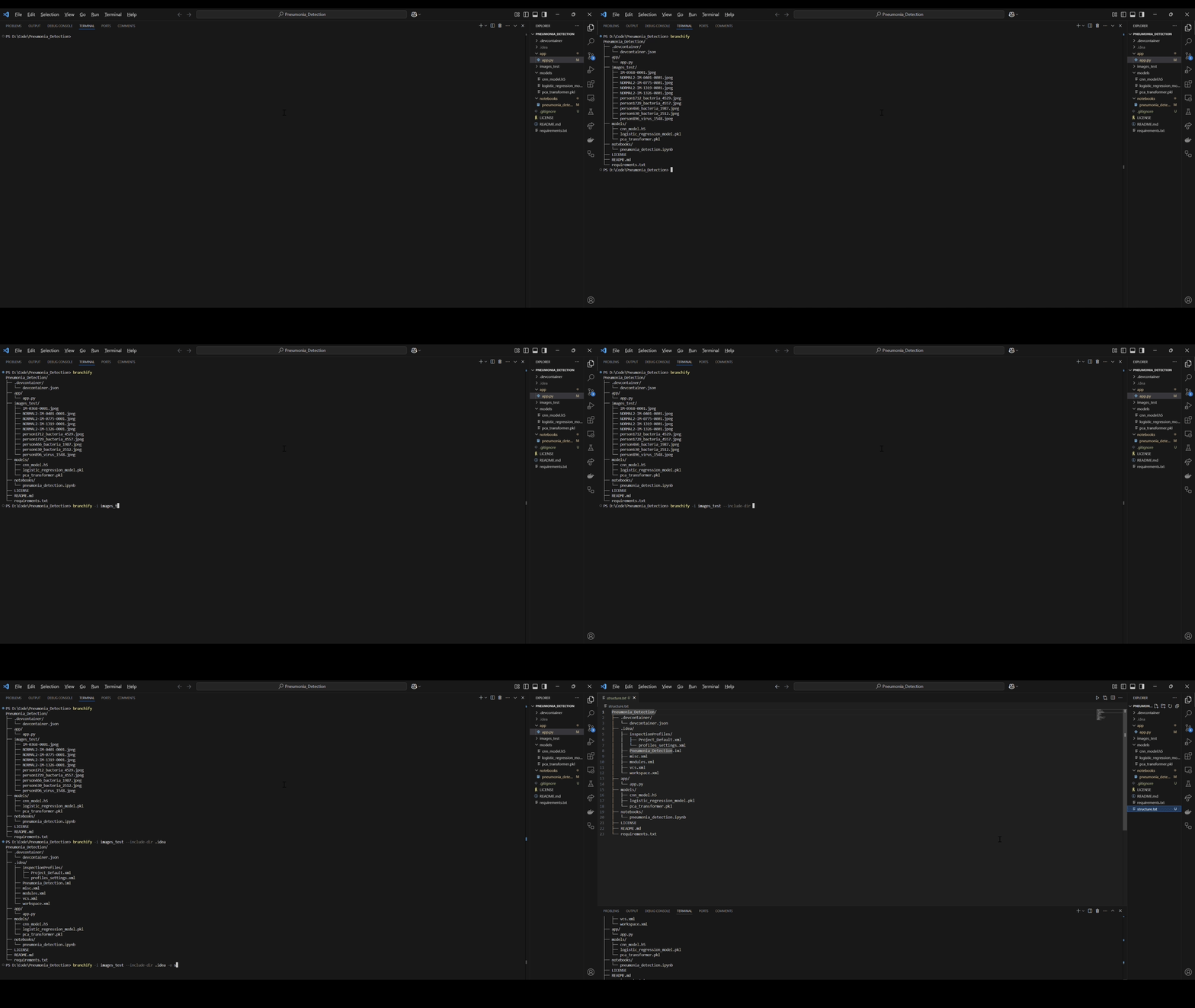
Example Output
Pneumonia_Detection/
├── .devcontainer/
│   └── devcontainer.json
├── app/
│   └── app.py
├── images_test/
│   ├── IM-0368-0001.jpeg
│   ├── NORMAL2-IM-0401-0001.jpeg
│   ├── NORMAL2-IM-0775-0001.jpeg
│   ├── NORMAL2-IM-1319-0001.jpeg
│   ├── NORMAL2-IM-1326-0001.jpeg
│   ├── person1712_bacteria_4529.jpeg
│   ├── person1729_bacteria_4557.jpeg
│   ├── person466_bacteria_1987.jpeg
│   ├── person630_bacteria_2512.jpeg
│   └── person896_virus_1548.jpeg
├── models/
│   ├── cnn_model.h5
│   ├── logistic_regression_model.pkl
│   └── pca_transformer.pkl
├── notebooks/
│   └── pneumonia_detection.ipynb
├── LICENSE
├── README.md
└── requirements.txt
LICENSE
This project is licensed under the BSD License
Contributing
If you'd like to contribute to Branchify, please open an issue or a pull request at the repository, and if you find it helpful, do consider starring the repository!
1 maintainer

Metadata
1 maintainer
Release files for branchify 1.0.3
For a detailed explanation of source distributions (sdists) and built distributions (wheels), please see the package formats documentation.
Source distribution (sdist)
| File | Size | Uploaded | |
|---|---|---|---|
| branchify-1.0.3.tar.gz | 7.3 kB | Details |
Built distribution (wheel)
| File | Interpreter | ABI | Platform | Reset |
|---|---|---|---|---|
| branchify-1.0.3-py3-none-any.whl | Python 3 | none | any | Details |
Total release size: 15.2 kB
Release files / branchify-1.0.3.tar.gz
| Download URL | branchify-1.0.3.tar.gz |
|---|---|
| Size | 7.3 kB |
| Tags | Source |
|
SHA-256 checksum How to use checksums |
b0c48004064eeeb88a81892ff5421c71698c48a012d277bd7007b95974590736
|
|
BLAKE2b-256 checksum How to use checksums |
550c033f29d98d73d986daf2fca5b50bceb6a35f0d8ef7de816b1e9faf856f4e
|
| Upload date | |
|
Uploaded using Trusted Publishing? What is trusted publishing? |
No |
| Uploaded via |
twine/6.1.0 CPython/3.12.8
|
Release files / branchify-1.0.3-py3-none-any.whl
| Download URL | branchify-1.0.3-py3-none-any.whl |
|---|---|
| Size | 7.9 kB |
| Tags | Python 3 |
|
SHA-256 checksum How to use checksums |
3942e9c5def239bad908576c635f4070f389347e9244903d8cab984445dfe1d8
|
|
BLAKE2b-256 checksum How to use checksums |
b90e0fc0ade8c91c75b32bf4d22403cd2468328fd747fb81f1fc77b04f65ce1f
|
| Upload date | |
|
Uploaded using Trusted Publishing? What is trusted publishing? |
No |
| Uploaded via |
twine/6.1.0 CPython/3.12.8
|














