

BrandBox
Ditch the generic sender initials, add some branding to your inbox.






Microsoft Setup · Google Setup · Report Bugs · Request Features
Why It Exists
Every version of Outlook and Gmail shows a colored circle with the sender's initials next to their name. When your inbox is full of "JD", "AS", and "MT", you're left squinting at colored circles trying to remember who's who.
BrandBox fixes that. It fetches each sender's company logo and uploads it as their contact photo via the Microsoft Graph API and Google People API. It works at the account backend level, so logos propagate everywhere automatically — desktop Outlook, Outlook on the web, Gmail mobile, Google Contacts, and all other connected clients.
No more colored circles. Just recognizable brand logos in your inbox.
Features
| Feature | Description |
|---|---|
| Logo Injection | Replaces generic initials with real company logos in Outlook and Gmail |
| Cross-Client Sync | Logos appear on desktop, web, and mobile — set once at the API level |
| Smart Logo Pipeline | SVG-first with 7 sources: SimpleIcons → VectorLogo.Zone → Wikimedia Commons → Hunter → DeBounce → LogoKit → Brandfetch. SVGs provide inherent transparency — no white backgrounds in dark-mode Outlook/Gmail. Rasterized at 400×400px via cairosvg for crisp, high-resolution logos |
| Smart Image Processing | Auto-crops transparency, scales to fill 200×200 preserving aspect ratio, centers on transparent canvas |
| Multi-Provider | Microsoft 365, Outlook.com, Hotmail, Gmail, Google Workspace — all at once |
| Local Privacy | All data stays on your machine; nothing leaves except API calls for photos |
| Incremental Runs | Logo cache and contact state tracking make repeat runs near-instant |
| Inbox Scan | Optionally creates contacts for recent senders (only when a logo is found) |
| Logo Provider Label | Optional --logo-provider flag shows the logo source (e.g. [hunter], [simpleicons]) next to each logo in the progress output |
| Scan-Inbox Progress | Real-time progress bar with per-sender status, MofN counters, and elapsed time during inbox scan — no more silent waiting |
| Interactive Selection | When multiple logos are found for a domain, --interactive renders each candidate as braille art in the terminal so you can arrow-key pick the best one — no more guessing which source has the right logo |
Compatibility
| Provider | Supported account types |
|---|---|
| Microsoft | Microsoft 365 work/school, Personal/Family, Outlook.com, Hotmail, Live |
| Gmail (personal), Google Workspace (business) |
Both providers can run simultaneously. brandbox processes all authenticated accounts in a single --run.
Requirements
- Python 3.11+
- A free Azure App Registration for Microsoft 365 accounts → Microsoft Setup Guide
- A free Google Cloud project for Gmail / Workspace accounts → Google Setup Guide
Installation
With uv (Recommended)
uv tool install brandbox
With pip
pip install brandbox
From Source
git clone https://github.com/divisionseven/brandbox
cd brandbox
uv sync
uv run brandbox --help
Verify
brandbox --version
# Output: brandbox <version>
Setup
Microsoft 365 Setup — Azure App Registration
- Follow the Microsoft setup guide to create an Azure App Registration
- Copy the client ID from the Azure portal
- Set the environment variable:
export BRANDBOX_CLIENT_ID="your-client-id-here"
Add to ~/.zshrc or ~/.zshenv to persist across shell sessions. See the Microsoft setup guide for the recommended macOS Keychain approach.
Google / Gmail Setup — Google Cloud Project
- Follow the Google setup guide to create a Google Cloud project and download OAuth credentials
- Set the path to your credentials JSON file:
export BRANDBOX_GOOGLE_CREDENTIALS="$HOME/.config/brandbox/google_credentials.json"
Add to ~/.zshrc or ~/.zshenv to persist across shell sessions.
Usage
Add an Account
Authenticate your first account. You'll be prompted to choose a provider:
brandbox --add-account
Or specify the provider directly:
brandbox --add-account --provider microsoft
brandbox --add-account --provider google
A browser window (Google) or device code prompt (Microsoft) will guide you through sign-in. Repeat for each account across both providers.
List Accounts
brandbox --list-accounts
Run Logo Injection
Process all authenticated accounts and inject logos:
brandbox --run
Example Output:
  ┌────────────────────────────────────┐
  │ brandbox  v0.3.0                   │
  │ Add some branding to your inbox!   │
  └────────────────────────────────────┘

  ── you@company.com  ·  Microsoft 365  ·  1 of 1 ───────────────────────

  Contacts   147 found

  Processing contacts ━━━━━━━━━━━━━━━━━━━━━━━━━━━━━━ 147/147 15s
  ✓  Alice Johnson         company.com
  ✓  Bob Smith             acmecorp.com
  ·  Charlie Davis         gmail.com          (personal domain)
  ✓  Eve Williams          example.io
  ...

  ✓  118 set  ·  22 already processed  ·  4 no logo  ·  2 personal domain
Automatically Create Contacts for Recent Senders
Logos only show for people already in your contacts. This flag scans recent inbox senders and creates a contact for each one — but only if a logo can be found first. No logo = no contact created.
brandbox --run --scan-inbox
Preview Without Making Changes
brandbox --run --dry-run
Re-Process Contacts That Already Have Logos
brandbox --run --overwrite
Show Logo Provider Labels
Shows the source provider (e.g. [hunter], [simpleicons]) next to each logo
in the progress output:
brandbox --run --logo-provider
Interactive Logo Selection
Sometimes a domain has different logo versions out there, and you may have a favorite that you want to use. The --interactive flag lets you
see all candidates (if more than one logo was found for a domain), and pick the best one right in the terminal:
brandbox --run --interactive
Each candidate is rendered as braille art (using the artty Python API) inside a labelled panel, so you can
visually compare logos before making your choice. Your logo choice for that domain will then be cached and reused like in normal mode.
See Interactive Mode in Action
Interactive Logo Selection Example 1: Obsidian
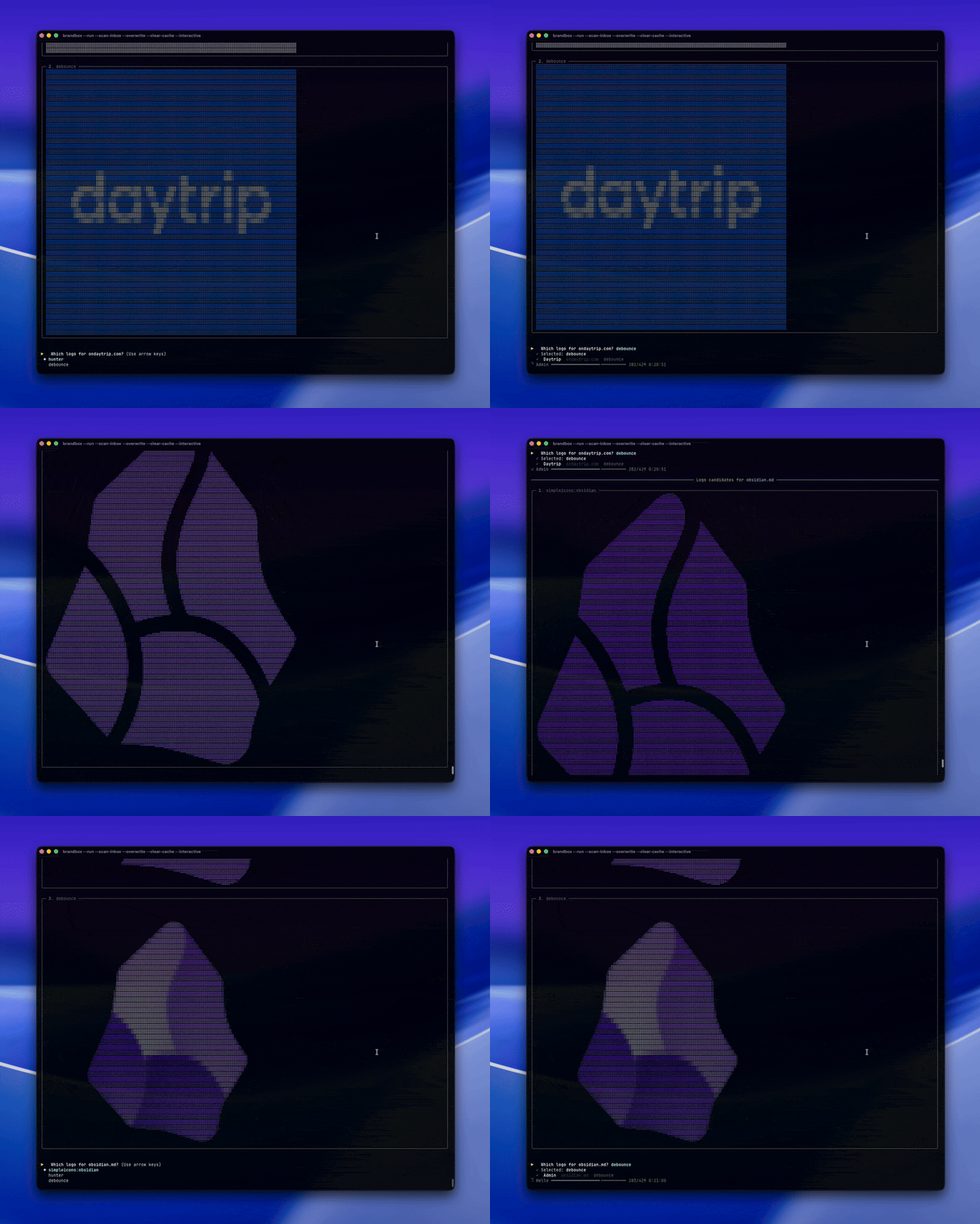
The logos displayed above are trademarks or registered trademarks of their respective owners.
They are shown here for demonstration purposes only.
Interactive Logo Selection Example 2: GoDaddy
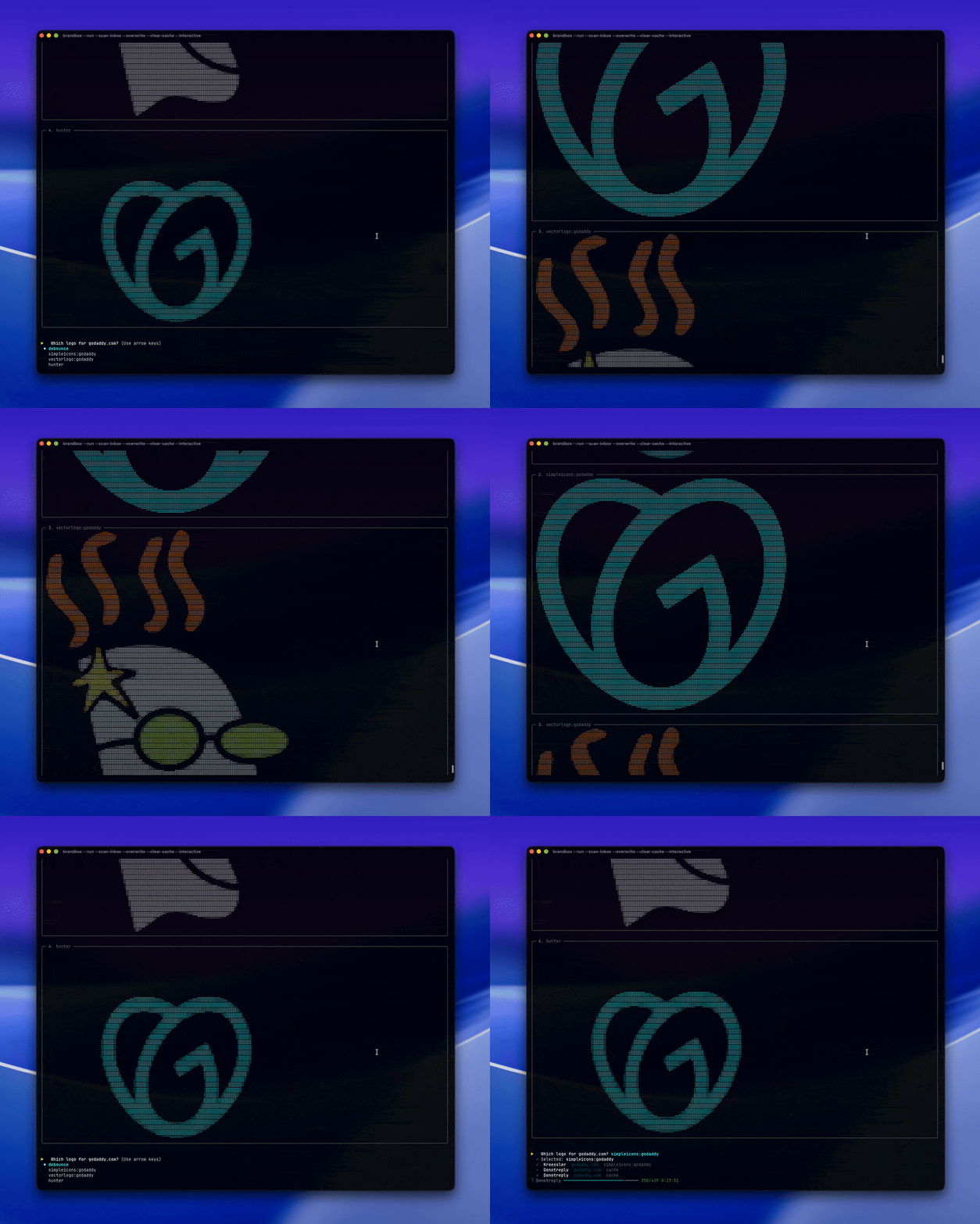
The logos displayed above are trademarks or registered trademarks of their respective owners.
They are shown here for demonstration purposes only.
Interactive Logo Selection Example 3: Novo
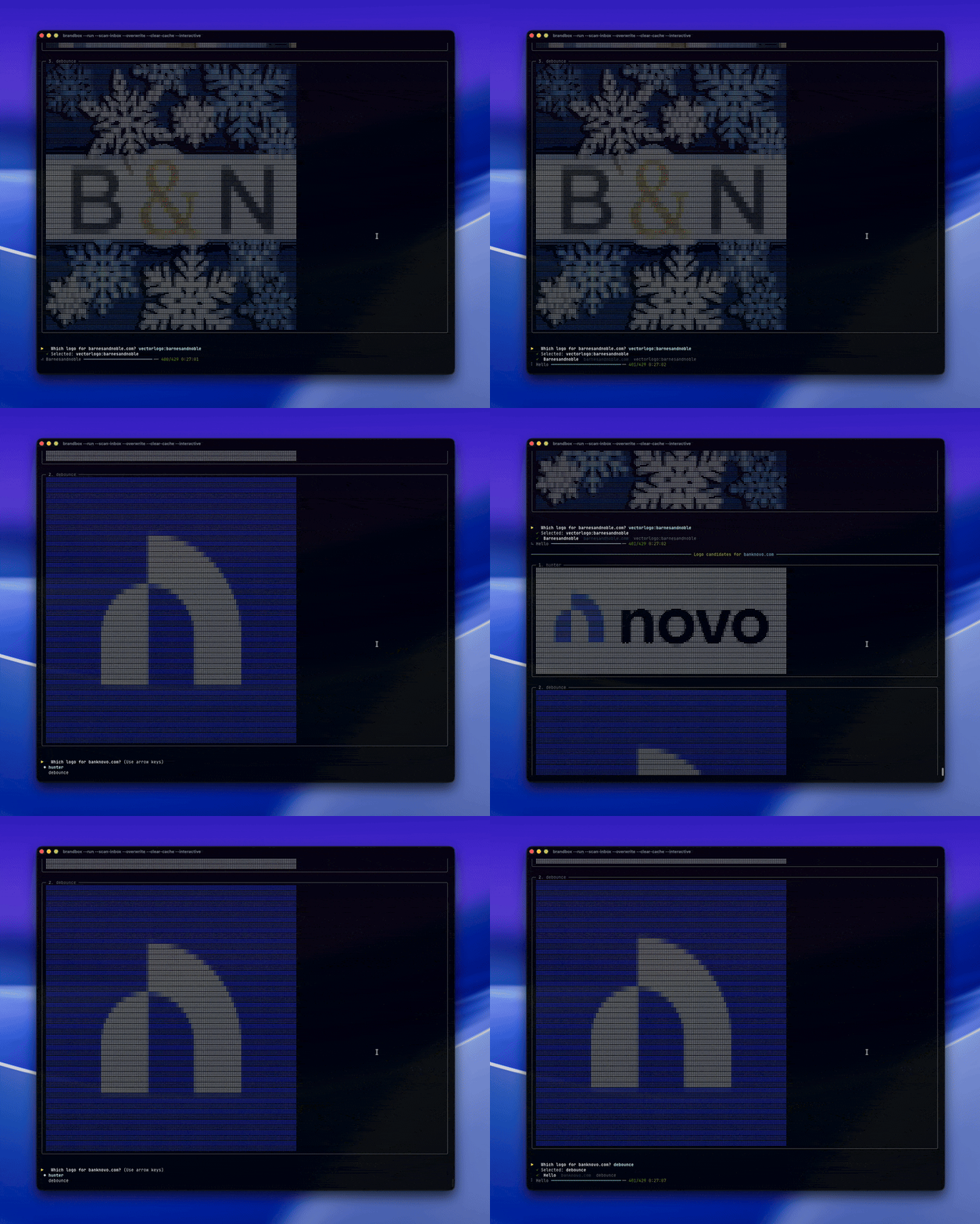
The logos displayed above are trademarks or registered trademarks of their respective owners.
They are shown here for demonstration purposes only.
How It Works:
- All 7 logo sources are fetched in parallel for each domain
- If multiple logos are found, each is rendered as braille art inside a Rich Panel with the source name in the title
- Use the ↑/↓ arrow keys to highlight your choice and press Enter to confirm
- If only one logo is found, it's auto-selected with an
[auto: only 1 source]label — no prompt needed - If no logos are found, the contact is skipped silently and processing continues
- The chosen logo is cached normally, so interactive mode only appears for domains with genuine multi-source choices
Refresh All Logos from Scratch
Clears the cached logo files and re-fetches everything on the next run:
brandbox --clear-cache --run
Reset Processed-Contact State
Forces brandbox to re-evaluate every contact on the next run:
brandbox --reset-state --run
Show Data Directory
brandbox --data-dir
Full Command Reference
Click to expand full command reference
| Flag | Description |
|---|---|
--add-account |
Authenticate a new account |
--add-account --provider microsoft |
Authenticate a Microsoft 365 account |
--add-account --provider google |
Authenticate a Google / Workspace account |
--list-accounts |
List all authenticated accounts |
--run |
Inject logos for all accounts |
--run --dry-run |
Preview without making changes |
--run --overwrite |
Re-process contacts that already have logos |
--run --scan-inbox |
Also create contacts from recent senders (logo required) |
--run --logo-provider |
Show logo source label (e.g. [hunter]) next to each logo |
--run --interactive |
Try all 7 logo sources in parallel and visually pick your preferred logo from braille art panels |
--clear-cache |
Delete all cached logos (re-fetched on next --run) |
--reset-state |
Reset processed-contact state (re-evaluate all contacts) |
--data-dir |
Show the brandbox data directory path |
--version / -V |
Print version number |
Environment Variables
| Variable | Description |
|---|---|
BRANDBOX_CLIENT_ID |
Azure App Registration client ID (Microsoft auth) |
BRANDBOX_GOOGLE_CREDENTIALS |
Path to Google OAuth credentials JSON file |
After Running
Outlook and Gmail cache contact photos and won't show updates until they reload:
| Client | What to do |
|---|---|
| Outlook for Mac | Quit fully (⌘Q) and reopen |
| Outlook for Windows | Close fully and reopen |
| Outlook on the web | Hard-refresh (⌘+Shift+R / Ctrl+Shift+R) |
| Outlook mobile | Close and reopen the app |
| Gmail (web) | Hard-refresh the page |
| Gmail mobile | Close and reopen the app |
| Google Contacts | Logos appear immediately after running |
Data & Privacy
Logo APIs (No Personal Data)
When fetching company logos, BrandBox sends only the company domain name (e.g. stripe.com) to these services:
| Service | Data sent |
|---|---|
| SimpleIcons CDN | Domain slug only (stripe) |
| VectorLogo.Zone | Domain slug only (stripe) |
| Wikimedia Commons | Domain-based filename lookup. Includes User-Agent: Brandbox/1.0 header. |
| Hunter.io | Domain in URL (stripe.com) |
| DeBounce | Domain in URL (stripe.com) |
| LogoKit | Domain in URL (stripe.com) + public free-tier token |
| Brandfetch | Domain in URL (stripe.com) |
No authentication tokens, no user identifiers, and no personal data are sent to any logo API.
Provider APIs (Your Data, Your Account)
All contact operations go through your authenticated provider account (Google or Microsoft 365) under your own OAuth token. No third party has access to this data.
Microsoft Graph API (Mail.Read, Contacts.ReadWrite scopes):
- Contacts: Reads your contact list (
id,displayName,emailAddresses). Uploads company logos as contact photos. - Inbox scan (
--scan-inbox): Reads only thefromfield of recent inbox messages to discover new sender email addresses. Message subjects, bodies, and attachments are never requested or read. - Contact creation: New contacts are created with a display name and email address, derived from the sender's email (e.g.
john.doe@co.com→John Doe).
Google People API (contacts, contacts.other.readonly, gmail.readonly scopes):
- Contacts: Reads your contact list (names, email addresses). Uploads company logos as contact photos.
- Inbox scan (
--scan-inbox): Uses theotherContactsendpoint — Google's pre-computed list of people you've interacted with. This is populated from your Gmail activity but accessed via the People API, not by reading individual messages. - Contact creation: Same as Microsoft — new contacts created with display name and email.
Authentication
- Google: OAuth 2.0 browser flow via
InstalledAppFlow. Tokens stored locally in~/.local/share/brandbox/tokens/and never shared with third parties. - Microsoft: MSAL device code flow. Tokens cached locally in the same directory.
Local Storage
All data is stored locally on your machine — none of this data is ever transmitted:
| File | Contents |
|---|---|
cache/*.png |
Downloaded company logos (processed as 200×200 PNGs) |
cache/*.miss |
Empty sentinel files marking domains with no logo (prevents retries) |
state.json |
Processing state: which contacts have been processed per account (contact IDs + domains only) |
tokens/google_*.json |
Google OAuth credentials |
tokens/microsoft.json |
Microsoft MSAL token cache |
Platform-specific data directory paths:
| Platform | Path |
|---|---|
| macOS | ~/Library/Application Support/brandbox/ |
| Windows | %LOCALAPPDATA%\brandbox\brandbox\ |
| Linux | ~/.local/share/brandbox/ |
Run brandbox --data-dir to see the exact path.
Telemetry
BrandBox does not collect telemetry, analytics, crash reports, or usage data of any kind. No data is ever sent to services other than the logo APIs and authentication providers listed above. There are no "phone-home" calls, no tracking pixels, and no third-party analytics SDKs.
See our security documentation to report any security issues.
Testing
# Using uv (recommended)
uv run pytest tests/ -v

# Using pip
pytest tests/ -v
Documentation
| Document | Description |
|---|---|
| Microsoft 365 Setup | How to configure Azure App Registration for Outlook contacts |
| Google Setup | How to configure Google Cloud project for Gmail contacts |
| How It Works | Technical deep dive into the logo pipeline, contact discovery, and provider architecture |
Contributing
Contributions are welcome! Please open an issue before submitting a large PR to discuss your proposed changes.
git clone https://github.com/divisionseven/brandbox
cd brandbox
uv sync
uv run brandbox --help
See our Contributing Guide.
Run the linter and type checker before submitting:
uv run ruff check src/
uv run mypy src/
License
Distributed under the MIT License.
1 maintainer

Metadata
1 maintainer
Release files for brandbox 0.3.0
For a detailed explanation of source distributions (sdists) and built distributions (wheels), please see the package formats documentation.
Source distribution (sdist)
| File | Size | Uploaded | Provenance | |
|---|---|---|---|---|
| brandbox-0.3.0.tar.gz | 14.3 MB | With provenance | Details |
Built distribution (wheel)
| File | Interpreter | ABI | Platform | Reset |
|---|---|---|---|---|
| brandbox-0.3.0-py3-none-any.whl | Python 3 | none | any | Details |
Total release size: 14.4 MB
Release files / brandbox-0.3.0.tar.gz
| Download URL | brandbox-0.3.0.tar.gz |
|---|---|
| Size | 14.3 MB |
| Tags | Source |
|
SHA-256 checksum How to use checksums |
991d4b9f05fc1c07c49cddac37b03439f91ab78cf0b323b7d6488146e0e400f8
|
|
BLAKE2b-256 checksum How to use checksums |
ac1a1a1e31044525fe8d50e5bf93fc118f26e9b5ebd6f71d14a2d9e3298a1a20
|
| Upload date | |
|
Uploaded using Trusted Publishing? What is trusted publishing? |
Yes |
| Uploaded via |
twine/6.1.0 CPython/3.13.12
|
Provenance
Provenance describes where a file came from. On PyPI, provenance is shared via attestations, which provide a verifiable record of the build or publishing details. View details, limitations and caveats.


PyPI Publish Attestation
PyPI verified that this artifact, at this checksum, originated from the publisher listed below.
Signed by GitHub Actions, verified by PyPI on May 23, 2026.
Transparency logRelease files / brandbox-0.3.0-py3-none-any.whl
| Download URL | brandbox-0.3.0-py3-none-any.whl |
|---|---|
| Size | 32.7 kB |
| Tags | Python 3 |
|
SHA-256 checksum How to use checksums |
09a6c78db9bec922ff789576f2d774cb80caa30c4fbefcfc3f712c124c628379
|
|
BLAKE2b-256 checksum How to use checksums |
f2481cedb597b29a8751183a14c3156d7391f2b78bcb5d668f2307ccd0a6fc2a
|
| Upload date | |
|
Uploaded using Trusted Publishing? What is trusted publishing? |
Yes |
| Uploaded via |
twine/6.1.0 CPython/3.13.12
|
Provenance
Provenance describes where a file came from. On PyPI, provenance is shared via attestations, which provide a verifiable record of the build or publishing details. View details, limitations and caveats.
PyPI Publish Attestation
PyPI verified that this artifact, at this checksum, originated from the publisher listed below.
Signed by GitHub Actions, verified by PyPI on May 23, 2026.
Transparency logSecurity for brandbox 0.3.0
Provenance
Provenance describes where a file came from. On PyPI, provenance is shared via attestations, which provide a verifiable record of the build or publishing details. View details, limitations and caveats.
Full provenance
All 2 files in this release have been uploaded with provenance metadata.
Attestation for brandbox-0.3.0.tar.gz
PyPI Publish Attestation
PyPI verified that this artifact, at this checksum, originated from the publisher listed below.
Signed by GitHub Actions, verified by PyPI on May 23, 2026.
Transparency logA note on package security
PyPI is a repository for distributing packages, not a service for auditing them. While third-party security researchers and our staff do their best to detect and remove malicious packages, PyPI cannot guarantee the quality, security or suitability of any given package.
To learn more about protecting yourself from malicious actors, visit our package security documentation.














