
breakdig
Find the drum breaks, acapellas and other bare sections in your own music, cut to the bar.
breakdig runs every track in a folder through Demucs source separation and a downbeat tracker, then keeps a small index of how loud the drums, bass, vocals and everything else are in each bar. After that you can ask for "drums only, at least 2 bars, 85 to 100 BPM" and get back exact bar ranges you can audition and export from the original files.
Everything runs locally. Nothing is uploaded anywhere.
Install
You need Python 3.11, ffmpeg on PATH, and for reasonable speed an NVIDIA GPU. On Windows:
winget install Python.Python.3.11
winget install Gyan.FFmpeg
On Windows the simplest route is the zip. Download breakdig-0.1.0-windows.zip from the
GitHub release, unzip it somewhere permanent, and run install.bat. It makes a virtual
environment next to itself, installs breakdig into it, and swaps in the CUDA build of
PyTorch if nvidia-smi is present. It prints the full path to breakdig.bat to use
afterwards; add the folder to PATH to type just breakdig.
Or with pip:
py -3.11 -m venv .venv
.venv\Scripts\activate
pip install breakdig
pip install --force-reinstall --no-deps torch torchvision torchaudio --index-url https://download.pytorch.org/whl/cu130
The last line matters. On Windows, pip resolves torch to the CPU-only build, and separation
on the CPU is 10 to 30 times slower. The cu130 wheels need NVIDIA driver 580 or newer; with
an older driver use cu126 in the URL instead. breakdig prints a warning when it is running
without CUDA.
The first breakdig index downloads two models: htdemucs_ft (322 MB) into
%LOCALAPPDATA%\breakdig\models, and the beat_this checkpoint (81 MB) into the PyTorch hub
cache at %USERPROFILE%\.cache\torch\hub\checkpoints. If the Demucs download is cut short,
the run stops and deletes the partial file, and the next run downloads it again.
Quick start
Index a folder. This is the slow part and it only happens once per track:
> breakdig index D:\Music\Breaks
Scanning 14 files...
0 already indexed, 14 to do. Index: C:\Users\you\AppData\Local\breakdig
Done in 189s: 14 ok.
Separated tracks took 13.5s each on average.
Run it again and it only looks at what is new. Ctrl+C is safe at any point; the next run
carries on from the track it was working on. A second index run on the same index while
one is going stops straight away and says so.
> breakdig index D:\Music\Breaks
Scanning 14 files...
14 already indexed, 0 to do. Index: C:\Users\you\AppData\Local\breakdig
Done in 0s: nothing new.
Find sections. With no options, find looks for drums alone:
> breakdig find
ID          ARTIST - TITLE                               BARS     START       END    BPM  CLEAN
-----------------------------------------------------------------------------------------------
13:107-108  Bebop - Fidget Kaos                             2  3:15.724  3:19.403  130.2  -34.0
14:165-166  Innyu - For The Hell Of It                      2  5:07.525  5:11.300  127.7  -30.4

2 section(s). CLEAN is the loudest unwanted stem minus the target, in dB; lower is cleaner.
--silence-db 25 loosens the silence rule (see below) and finds a little more:
> breakdig find --silence-db 25
ID          ARTIST - TITLE                               BARS     START       END    BPM  CLEAN
-----------------------------------------------------------------------------------------------
13:107-109  Bebop - Fidget Kaos                             3  3:15.724  3:21.264  130.0  -29.8
14:164-166  Innyu - For The Hell Of It                      3  5:05.649  5:11.300  127.7  -26.5
14:7-8      Innyu - For The Hell Of It                      2  0:11.273  0:15.062  127.8  -26.4

3 section(s). CLEAN is the loudest unwanted stem minus the target, in dB; lower is cleaner.
> breakdig find --no drums --limit 5
ID          ARTIST - TITLE                               BARS     START       END    BPM  CLEAN
-----------------------------------------------------------------------------------------------
7:25-28     Igor Leontyev - Remote District                 4  0:16.358  0:21.674  183.1  -55.7
10:1-16     Zipp - Coffee Break                            16  0:01.526  0:33.507   60.3  -55.5
2:56-57     Dog On Springs - Footloose (feat. Paul Whit~    2  1:31.346  1:34.819  137.3  -55.3
7:4-6       Igor Leontyev - Remote District                 3  0:03.016  0:06.369  182.8  -54.9
2:43-45     Dog On Springs - Footloose (feat. Paul Whit~    3  1:09.037  1:14.137  142.3  -52.3

5 section(s). CLEAN is the loudest unwanted stem minus the target, in dB; lower is cleaner.
Export everything a find would list by giving the same filters to export, or pick
sections by ID with --pick 13:107-109 14:7-8 (the other filters are ignored then):
> breakdig export --silence-db 25 --out D:\Samples\breaks
wrote   D:\Samples\breaks\Bebop - Fidget Kaos - 3 bars - 130 BPM - 03.16.wav
wrote   D:\Samples\breaks\Innyu - For The Hell Of It - 3 bars - 128 BPM - 05.06.wav
wrote   D:\Samples\breaks\Innyu - For The Hell Of It - 2 bars - 128 BPM - 00.11.wav

3 file(s) in D:\Samples\breaks
Or do all of it in the browser:
> breakdig ui
breakdig UI on http://127.0.0.1:8765  (Ctrl+C to stop)
What you can search for
--only names the stems that play alone, and everything else has to be silent.
--no names the stems that have to be silent, and at least one of the others has to play.
Stems are drums, bass, vocals and other (everything else: keys, guitars, pads, samples).
| You want | Use |
|---|---|
| Drum breaks | --only drums (the default) |
| Acapellas | --only vocals |
| Bass and drums | --only bass,drums |
| Anything without drums | --no drums |
| Instrumentals | --no vocals |
Other filters: --min-bars N (default 2), --bpm 90 or --bpm 85-100, --search "words"
(every word has to appear in the artist, title, album or path), --cleaner-than -25 (only sections at least that
clean), --sort clean|bars|bpm|artist, --limit N, --skip-seams, and --json for
scripting.
How a bar is judged
For every bar, breakdig has the mean level in dB of each separated stem and of the mix.
- A stem is active in a bar if it is no more than 12 dB below the mix.
- A stem is silent if it is more than 30 dB below the loudest active stem in that bar, or below -90 dBFS. Silent wins over active, so a bar of digital silence has nothing active in it.
- A bar where a stem is neither is a grey zone and never matches. That is deliberate: it is what keeps a break with a quiet bassline under it out of "drums only".
- Consecutive matching bars become a section, and a section has to be at least
--min-barslong. - CLEAN is the loudest stem that should be silent minus the target stem, taken from the dirtiest bar in the section. -40 is very clean, -15 means you will probably hear something else in there. Results are sorted by it.
- BPM is 60 divided by the median beat interval inside the section, so tempo drift is handled per section. Bars come from detected downbeats, so 3/4 and changing meters work. The bar after the last downbeat counts too, if the music carries on for a full bar past it.
The 30 dB is --silence-db (and "Silence dB" in the UI). Demucs leaves 20 to 35 dB of bleed
between stems on real records, so at 30 plenty of breaks you can clearly hear on the record
will not match. Dropping it to 25 or 20 finds more at the cost of some bleed. The table's
CLEAN column tells you how much.
Exports
Clips are cut from the original file, not from the separated stems, at the bar lines. Each
edge is moved to the quietest point within 2 ms, which gets rid of most clicks; a loud bass
note held across the bar line can still leave a faint one. Files are WAV at the source
sample rate: 16-bit from 8- and 16-bit sources, 24-bit from everything else,
including MP3 and AAC, which decode to more than 16 bits. A lossy file from a loud master
often decodes past full scale, and those clips are written as 32-bit float so the transients
are not clipped. They are tagged with artist, title with the bar range, album and BPM, and a
comment holds the source path, times and content key. Exporting the same section again
overwrites its file, even after the library has moved or the track was retagged.
Names follow {artist} - {title} - {bars} bars - {bpm} BPM - {mm.ss}.wav, with characters
Windows cannot handle replaced by _ and the name capped at 120 characters. If another
section would get the same name, it becomes ... (2).wav.
Every clip also has a cue point on each beat, labelled beat 1, beat 2 and so on, in the
WAV's standard cue chunk. Editors that read WAV cue points show them as markers to chop
at. Plenty of software ignores them, which does no harm.
--keep drums (or the keep menu in the UI) exports only some stems instead of the mix. Each
section is separated again with three seconds either side, so its edges come out clean,
and the kept stems are put back at the source sample rate. That turns a near miss into a
usable break: search --no vocals, look at the Stems column in the UI to see where the
drums are, and export those rows with --keep drums. --keep drums,bass and the rest work
the same way. The result is only as good as Demucs, so listen before you trust it. The name
gets the stems before the bar count (... - drums - 4 bars - ...), and the isolated clip
and the full-mix clip of the same bars are separate files.
--sp404 (or SP-404 MKII in the UI's format menu) writes 16-bit 48 kHz files named
BRK_0001.WAV, BRK_0002.WAV and so on, plus an index.csv that maps each file back to its
source. --sp404 sx (SP-404 SX / A in the UI) does the same at 44.1 kHz for the SX, the A
and the original 404:
file,artist,title,bars,bpm,start,end,source,stems
BRK_0001.WAV,Bebop,Fidget Kaos,3,130.0,195.724,201.264,D:\Music\Breaks\SOSLP008\SOSLP008_01_BEBOP_DONT_BELIEVE_THE_HYPE-Fidget_Kaos.mp3,
BRK_0002.WAV,Innyu,For The Hell Of It,3,127.7,305.649,311.300,D:\Music\Breaks\SOSLP008\SOSLP008_02_INNYU_DONT_BELIEVE_THE_HYPE-For_The_Hell_Of_It.mp3,
BRK_0003.WAV,Innyu,For The Hell Of It,2,127.8,11.273,15.062,D:\Music\Breaks\SOSLP008\SOSLP008_02_INNYU_DONT_BELIEVE_THE_HYPE-For_The_Hell_Of_It.mp3,drums
Exporting into the same SP-404 folder again skips sections that are already there and
numbers new ones after the highest number in the folder or the csv, so a number is never
reused. Delete a BRK file and that section is exported again under a new number. Clips that
would go past full scale are turned down to fit instead of being clipped. Editing
index.csv in Excel is fine, including extra columns of your own and semicolon-separated
saves, but close it before exporting again. A folder that already has clips at one rate
refuses the other, so one card never ends up with both.
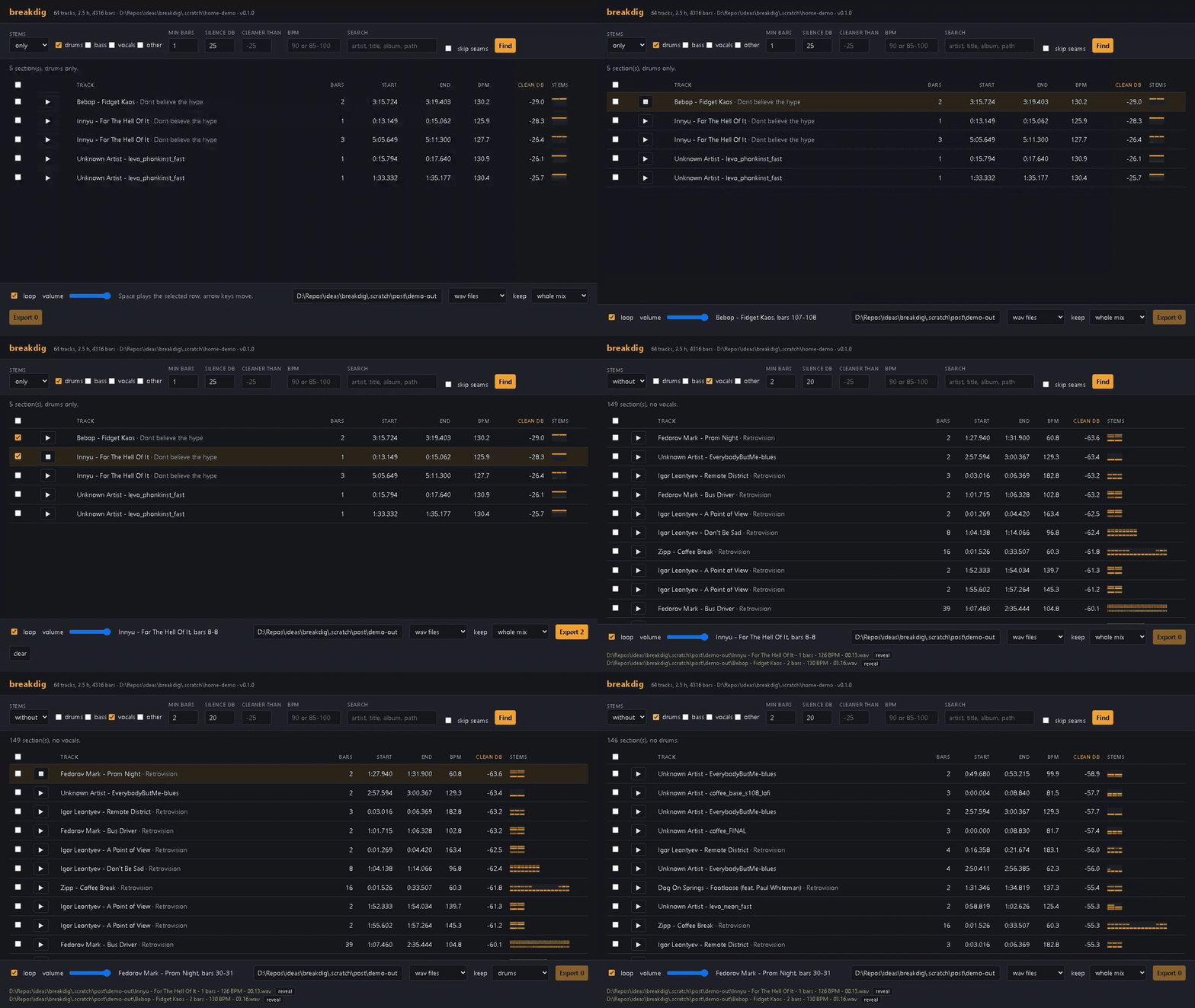
The web UI
breakdig ui serves on http://127.0.0.1:8765 and opens your browser. Pick stems, set the
filters and press Find. The play button loads just that section and loops it with no gap
at the loop point, so you hear how it will loop in a sampler. Space plays or stops the
selected row and the arrow keys move through the list. Tick rows and press Export to
write them to the folder at the bottom, then use "reveal" to open the file in Explorer.
Ticked rows stay ticked when you sort or search again, so one export can collect sections
from several searches; "clear" unticks them all, and an export unticks what it handled. The
filters, volume and loop setting are remembered for next time.
The Stems column draws each bar of a section as four small cells, drums, bass, vocals and
other from top to bottom, brighter the louder that stem is against the mix. The keep menu
next to Export does what --keep does, for previews as well as exports, so you can hear the
drums on their own before you write them out.
--port picks another port and --no-browser skips opening a tab. Previews are cached in
the index folder, up to about 500 MB, and the oldest go first.
It only listens on localhost. --host 0.0.0.0 works but prints a warning, because anyone
who can reach the port can browse your index and write exports anywhere you can.
Configuration
| Setting | Default | |
|---|---|---|
--home or BREAKDIG_HOME |
%LOCALAPPDATA%\breakdig |
Index folder: index.sqlite, per-track profiles, index.log, the UI's clip cache |
BREAKDIG_MODELS |
%LOCALAPPDATA%\breakdig\models |
Separation models, shared by every index |
index --model |
htdemucs_ft.yaml |
Any audio-separator Demucs model |
index --shifts |
1 | Demucs random shifts; 2 is slightly cleaner and twice as slow |
index --retry-failed |
off | Try files that failed last time again |
index --exclude GLOB |
none | Skip files and folders whose name matches, e.g. "*.removed.*" or stems. Repeatable |
--home goes before or after the command: breakdig --home D:\breakdig-index find. For
anything but index, a --home folder with no index in it is an error rather than an empty
result, so a typo does not look like an empty index.
Speed
Measured on an RTX 4090 with the default model:
- 64 tracks, 2.5 hours of audio: 11.3 s per track, 12.6x realtime (
breakdig stats). - A 50-track folder, 1.8 hours of audio, indexed unattended: 9.4 s per separated track.
- A 21-minute MP3: 89 s.
- Exporting with
--keep: the first clip takes about 9 s, most of it loading the model, and after that about 6x realtime. Eight sections, 7.5 minutes of audio in all, took 78 s. - Re-running on an indexed folder: a second or two. Files whose size and modified time have not changed are not read at all, and neither are unchanged byte-for-byte copies.
The index is small: about 25 KB per minute of audio, so 90 KB or so for a typical track.
Files it handles and skips
MP3, FLAC, WAV, AIFF, M4A (AAC or ALAC), AAC, OGG Vorbis, Opus and WMA. Mono, 8-bit, 24-bit, float and odd sample rates are fine. The same audio at two paths or in two formats is only separated once; the copy is recorded as a duplicate and takes over if the original is deleted. An original on a drive that is not plugged in counts as still there. The exception is a raw .aac file, which does not record its encoder delay, next to the same track in another format. A file that moves or is renamed keeps its index entry, and so does one you retag. One you trim or edit is analysed again.
Skipped, logged, and listed by breakdig stats --failures: files that will not decode,
DRM-protected iTunes files (.m4p), and tracks with fewer than 8 downbeats (no_grid; mostly
speech, ambient and very short files).
Vinyl rips with crackle can go through grooveclean
first. Its batch mode writes a .removed difference file next to each cleaned side, which
has enough of a beat to get indexed, so leave those out:
breakdig index D:\Rips\cleaned --exclude "*.removed.*".
Files over 20 minutes are separated in 10-minute chunks. A section that crosses a chunk
boundary is marked seam because the separation can glitch there; --skip-seams drops
them.
Limitations
- On most commercial records the drums are almost never truly alone for two bars. Expect a
handful of hits per album at the default setting, and use
--silence-db 25and--min-bars 1to see near misses, or--keep drumsto take the drums out of busier bars. - Downbeat tracking can be wrong on rubato, very old recordings and music with no clear pulse. Bars far off a track's usual length are ignored rather than exported as nonsense.
- Separation quality is Demucs quality. Sections are judged on separated stems but cut from
the original mix, so what you export is exactly what was on the record, unless you ask
for
--keep. - Tested on Windows 11 with Python 3.11. It should run on Linux; macOS will only have the CPU, which is slow.
Development
py -3.11 -m venv .venv
.venv\Scripts\pip install -e .[test]
.venv\Scripts\python -m pytest -q
The gpu tests run real Demucs separation and are skipped without CUDA. Set
BREAKDIG_MODELS to reuse a model folder between runs. CI runs everything else on Windows
and Linux with the CPU build of torch.
Releasing
python -m build
python packaging\make_windows_zip.py
twine upload dist\breakdig-0.1.0-py3-none-any.whl dist\breakdig-0.1.0.tar.gz
make_windows_zip.py writes dist\breakdig-0.1.0-windows.zip for the GitHub release.
Credits
The demo uses Creative Commons music from the Internet Archive: "Retrovision" (MIXG032, CC BY-NC 3.0) with tracks by Zipp, Dog On Springs, Astat, Fedorov Mark, VAD and Igor Leontyev, and "Dont Believe The Hype" (SOSLP008, CC BY-NC-ND 2.5 IT) with tracks by Bebop and Innyu.
Separation is Demucs through audio-separator. Downbeats come from beat_this.
License
MIT
1 maintainer

Metadata
1 maintainer
Release files for breakdig 0.1.0
For a detailed explanation of source distributions (sdists) and built distributions (wheels), please see the package formats documentation.
Source distribution (sdist)
| File | Size | Uploaded | |
|---|---|---|---|
| breakdig-0.1.0.tar.gz | 81.6 kB | Details |
Built distribution (wheel)
| File | Interpreter | ABI | Platform | Reset |
|---|---|---|---|---|
| breakdig-0.1.0-py3-none-any.whl | Python 3 | none | any | Details |
Total release size: 138.0 kB
Release files / breakdig-0.1.0.tar.gz
| Download URL | breakdig-0.1.0.tar.gz |
|---|---|
| Size | 81.6 kB |
| Tags | Source |
|
SHA-256 checksum How to use checksums |
aefdaa4313a16f8af28fde63882ac74c207e279cad221072a9243ac5310a3ce6
|
|
BLAKE2b-256 checksum How to use checksums |
b1c4177eeb97afec1a8aae83b6ef3c5ffbaeeea6cb7a69328348cef372292c43
|
| Upload date | |
|
Uploaded using Trusted Publishing? What is trusted publishing? |
No |
| Uploaded via |
twine/7.0.0 CPython/3.11.9
|
Release files / breakdig-0.1.0-py3-none-any.whl
| Download URL | breakdig-0.1.0-py3-none-any.whl |
|---|---|
| Size | 56.3 kB |
| Tags | Python 3 |
|
SHA-256 checksum How to use checksums |
dea2935ddafb96f0ea398c533ff2f8e8e778373177aa71c5610bb60abf796157
|
|
BLAKE2b-256 checksum How to use checksums |
b4ee67183940c4cc59bd6442c1aeac794554b08972895072700d354c3b4e3344
|
| Upload date | |
|
Uploaded using Trusted Publishing? What is trusted publishing? |
No |
| Uploaded via |
twine/7.0.0 CPython/3.11.9
|














