
breptile
Reconstruct clean, editable STEP BREP models from meshes and engineering drawings.
Analytic surfaces stay analytic, and every drawing-derived parameter retains its provenance.




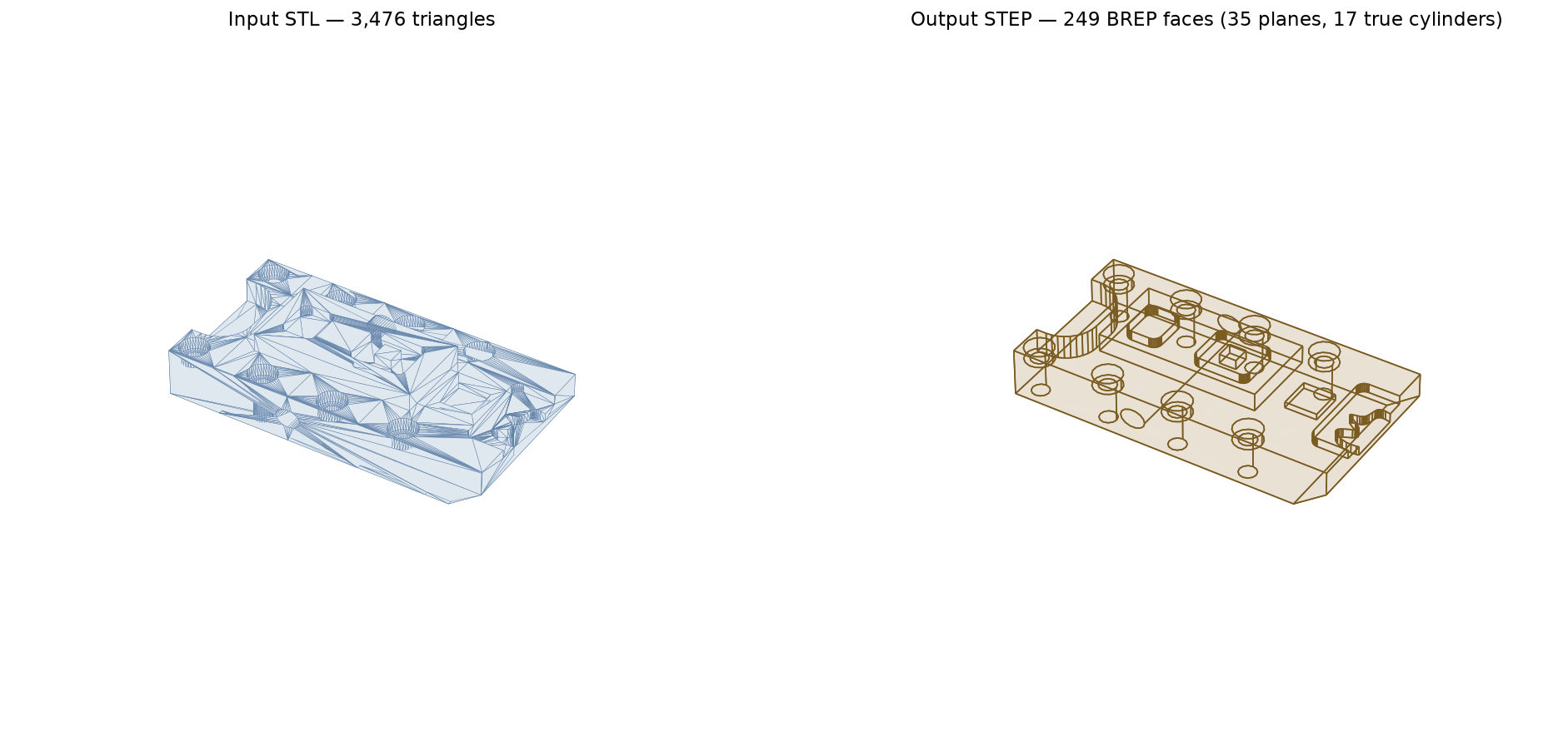
Left: input STL (3,476 triangles). Right: converted STEP — 249 BREP faces, 35 planes and 17 true cylinders. Every hole selects as a single cylindrical face in CAD.
Contents
- Why breptile
- Installation
- Quick start
- Command-line reference
- Drawing to CAD
- Python API
- Conversion report
- How it works
- Benchmark
- Hybrid LLM workflow
- Limitations
- Development
- License
Why breptile
STL files carry no topology and no analytic surfaces, so most "STL to STEP" converters emit one planar face per triangle. The result opens in CAD but is unusable for editing, CAM, or feature recognition.
breptile reconstructs analytic surfaces instead, under a hard guarantee: every fitted surface passes through the mesh vertices within a configurable tolerance, and dimensions are never snapped to "nice" values. Regions that cannot be fitted within tolerance fall back to faceted geometry and are flagged in a JSON report, so a conversion never silently invents geometry that isn't in the mesh.
Installation
pip install breptile
Requires Python 3.10–3.13 (bounded by the availability of OCP/build123d wheels). Dependencies — build123d, trimesh, lxml, numpy, scipy, manifold3d, rtree, networkx, matplotlib, ezdxf, and Pillow — install automatically.
Optional PDF drawing dependencies can be installed with:
pip install "breptile[drawing]"
PDF/vector extraction is not implemented in the current release; this extra installs the dependencies reserved for that upcoming stage.
From a checkout:
python3 -m venv .venv
.venv/bin/pip install -e ".[dev]"
Quick start
breptile input.stl output.step
That runs the default auto mode: fit primitives where they hold within tolerance, fall back
per region where they don't. Add --report and --verify to see exactly what happened:
breptile input.stl output.step --tol 0.01 --report report.json --verify
Generate a side-by-side PNG preview while converting:
breptile input.stl output.step --preview
breptile input.stl output.step --preview comparison.png
Inspect an existing mesh or STEP model in the local browser CAD viewer, or render it to a PNG:
breptile view output.step
breptile view output.step --compare input.3mf
breptile view output.step --compare reference.webp
breptile view output.step --output preview.png
breptile view output.step --compare input.stl --output comparison.png
The browser viewer runs entirely on 127.0.0.1 and includes orbit, pan, zoom, standard
views, face/edge selection, measurement, clipping planes, material controls, and a model
tree. Its JavaScript and CSS are bundled with breptile, so it does not need a network
connection. Geometry comparisons share one camera, with the source in blue and result in
amber; image references use a dedicated panel beside the 3D model. Keep the terminal
command running while viewing and press Ctrl-C to stop it.
Use --no-open to print and serve the URL without launching a browser, --port 8080 to
choose a port, or --backend matplotlib for the original desktop viewer. Static PNG and
side-by-side comparison output continue to use Matplotlib.
Command-line reference
breptile INPUT OUTPUT [--mode MODE] [--tol TOL] [--schema SCHEMA]
                      [--report JSON] [--max-triangles N] [--force] [--verify]
                      [--preview [PNG]]
| Flag | Default | Meaning |
|---|---|---|
--mode |
auto |
auto — fit primitives with per-region fallback; prismatic — planes only; tessellated — one face per triangle (always succeeds) |
--tol |
bbox diagonal × 1e-4 | Maximum deviation of any fitted surface from the mesh vertices |
--schema |
AP214 |
STEP application protocol: AP214 or AP242 |
--report |
— | Write the conversion report to this JSON file |
--max-triangles |
— | Decimate inputs above this triangle count before converting |
--force |
off | Convert non-watertight meshes as open shells instead of erroring |
--verify |
off | Re-tessellate the written STEP and report two-sided sampled deviation vs the input mesh |
--preview [PNG] |
off | Render a side-by-side source/STEP PNG; without a path, use OUTPUT.preview.png |
Input may be any mesh format trimesh reads — STL, OBJ, 3MF, PLY. The report is printed to
stdout as JSON in all cases; exit code 2 signals a mesh error (for example, non-watertight
input without --force).
Drawing to CAD
breptile draw is a second, provenance-first front door for dimensioned engineering
drawings. Dimension text is authoritative; sheet geometry is supporting evidence. The
pipeline uses editable, versioned JSON between every stage.
breptile does not invoke Codex, Claude Code, or any other LLM. In the current release,
raster dimension sheets use an explicit agent handoff: breptile prepares the page image and
a starter Drawing IR, then exits with status 1 and raster_input_requires_agent. An
external visual coding agent (or a person) must read the sheet and author the Drawing IR and
parametric recipe. breptile then builds and verifies the STEP deterministically.
Milestone 1 supports hand-authored Drawing IR and recipe files, parametric STEP building, render-back verification, and this raster review handoff:
# 1. Prepare page-1.png, ir.json, and report.json, then stop for agent review.
breptile draw scan.png part.step --workdir part.work

# 2. After the agent or user completes part.work/ir.json and part.work/recipe.json:
breptile draw build part.work/recipe.json part.step --schema AP242
breptile draw verify part.step part.work/ir.json \
  --recipe part.work/recipe.json --png part.work/compare.png
During the handoff, the agent identifies the drawing views, transcribes dimensions and
modifiers such as Ø, R, THRU, depth, tolerance, and feature count, and associates each
modeled parameter with its source dimension. Ambiguities remain recorded in the JSON instead
of being silently guessed. Verification checks the BREP and dimensions and writes a
render-back comparison for the next iteration.
Stage commands are extract, reconstruct, build, verify, synth, and run. Automatic
PDF/vector extraction, raster view and dimension understanding, and deterministic
IR-to-recipe reconstruction are planned for later milestones. Supplying the optional drawing
dependencies does not make those stages automatic in the current release.
breptile draw synth generates a Drawing IR from a finished recipe by building the part and
projecting it back into views (breptile draw synth part.work/recipe.json out/). It powers
the spec-sheet parts corpus in benchmark/drawings/parts/: canonical parts that publish a
dimensioned drawing but no CAD model — N20 and 28BYJ-48 gearmotors, the SG90 servo, the
NEMA 17 mounting envelope, HC-SR04 and LCD1602 modules, Raspberry Pi HAT and Arduino Uno
board outlines — each verified against the sheet's nominal dimensions, closed-form volume,
and exact analytic face counts. python benchmark/drawings/run_benchmark.py sweeps the
corpus; see benchmark/drawings/parts/README.md for the contract and how to add a part.
Drawing commands emit one JSON report on stdout. Exit 0 means verified, 1 means
reviewable artifacts were written, and 2 means an input, schema, or dependency error.
Python API
from breptile import convert

report = convert(
    "input.stl",
    "output.step",
    mode="auto",          # "auto" | "prismatic" | "tessellated"
    tol=0.01,             # None → bbox diagonal * 1e-4
    schema="AP214",       # or "AP242"
    force=False,
    max_triangles=None,
)

print(report["faces"], report["segmentation"])
Verification is a separate call, so it can be run against any STEP file:
from breptile.mesh import load_mesh
from breptile.verify import deviation

print(deviation("output.step", load_mesh("input.stl", force=True)))
# {'max': 0.0043, 'mean': 0.0006}
Conversion report
convert() returns — and --report writes — a dict of the form:
{
  "input": "input.stl",
  "output": "output.step",
  "mode": "auto",
  "tolerance": 0.0182,
  "triangles": 3476,
  "watertight": true,
  "segmentation": { "plane": 35, "cylinder": 17, "sphere": 0, "freeform": 41 },
  "fit_residuals": { "max_plane": 1.2e-14, "max_cylinder": 0.0031 },
  "regions": { "plane": 35, "cylinder": 17, "sphere": 0,
               "freeform_triangles": 1902, "fallback": 3 },
  "valid_brep": true,
  "faces": 249,
  "deviation": { "max": 0.0043, "mean": 0.0006 }   // only with --verify
}
fallback counts regions whose analytic fit was rejected — the geometry they describe is
still exported, faceted. Those are the regions worth rebuilding by hand (see below).
How it works
- Load and repair (trimesh + manifold3d) — fix normals, holes, and degenerate faces;
raise a clear error on non-watertight input unless
--forceis given. - Segment — region-grow smooth patches by dihedral angle, then classify each by
least-squares fit (plane → cylinder → sphere), validated against
--tol. Cylinder axes come from the facet-normal cloud; fits are refined with Levenberg–Marquardt. - Rebuild BREP (OpenCascade via OCP):
- planar regions become single faces with hole wires;
- full-wrap cylinders and spherical bands/caps become analytic faces with exact circular rims shared with neighboring faces, so sewing closes analytically;
- partial cylinders and sphere patches become trimmed patches with the parametric seam rotated into the region's angular gap;
- a u/v coverage check prevents a fit from claiming surface the mesh doesn't cover;
- everything else stays faceted — an honest fallback rather than a forced fit.
- Finalize — sew → solid →
ShapeUpgrade_UnifySameDomain→ShapeFix→BRepCheck→ STEP (AP214 or AP242).
Benchmark
Run against the trimesh model corpus
with python benchmark/run_benchmark.py:
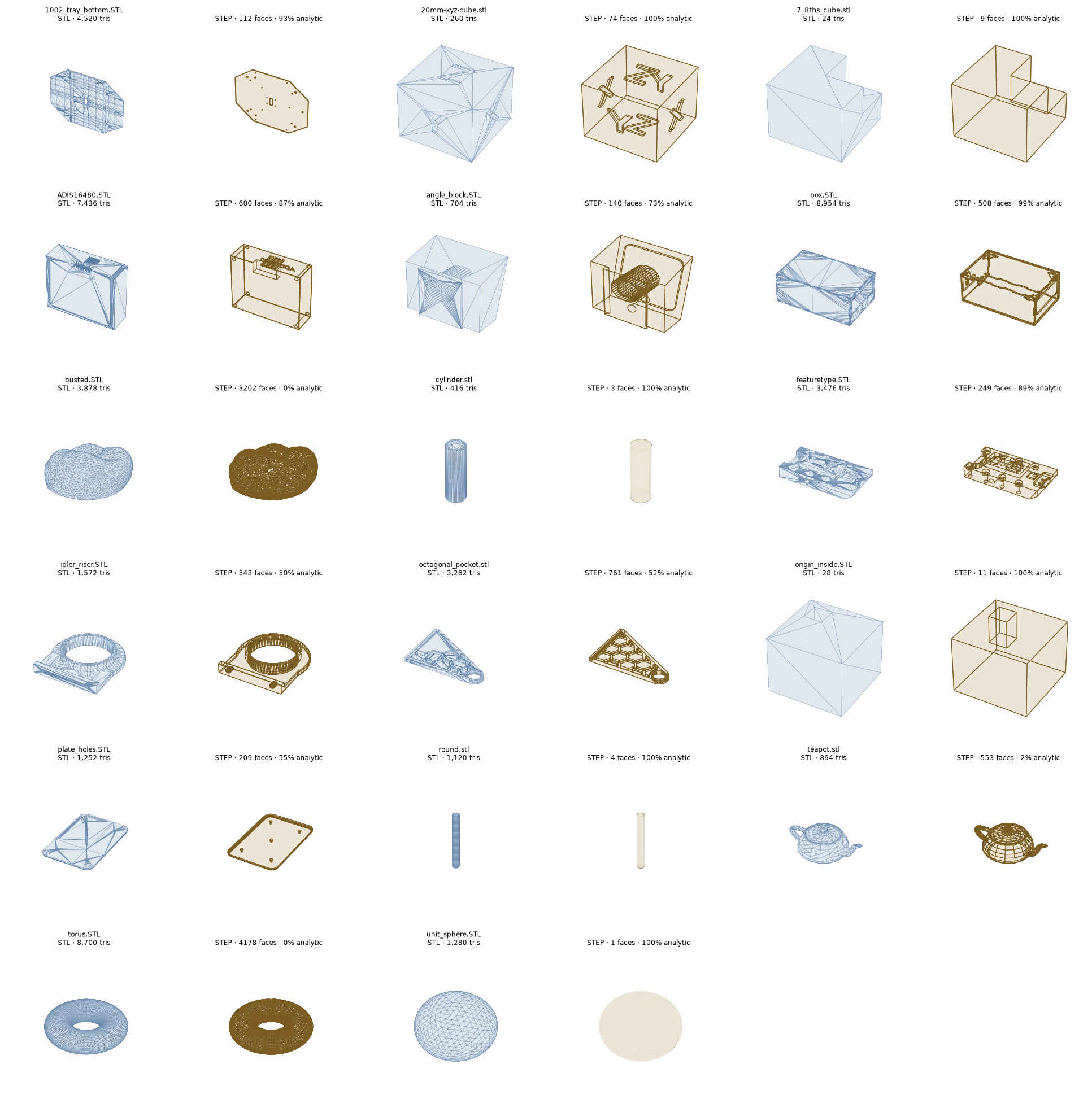
17 of 18 models produce a valid STEP solid; the 18th is deliberately random triangle soup, which degrades to a flagged open shell.
| Model | Triangles → faces | Analytic | Notes |
|---|---|---|---|
| cylinder | 416 → 3 | 100% | 2 planes + 1 cylinder |
| unit_sphere | 1,280 → 1 | 100% | single spherical face |
| featuretype | 3,476 → 249 | 89% | 17 true cylinders |
| ADIS16480 | 7,436 → 600 | 87% | 24 cylinders, 20 spheres |
| 1002_tray_bottom | 4,520 → 112 | 93% | 22 cylinders |
| teapot / torus | — | ~0% | organic → faceted fallback |
Verified deviation stays at or below the input mesh's own chord error in every case — on coarse meshes the analytic surface is more accurate than the STL that described it.
Hybrid LLM workflow
breptile is not an agent harness: it never starts Codex or Claude Code and makes no model API calls. Instead, an external agent can harness breptile's CLI, editable JSON, reports, and verification loop:
.claude/skills/breptile/SKILL.mdcovers hybrid mesh-to-BREP conversion. The agent runs the automatic fitter, reads its report, rebuilds rejected regions as build123d code, and verifies the result against the source mesh. Rejected regions retain measured parameters such as axis, center, and radius, giving the agent evidence instead of guesses..claude/skills/breptile-drawing/SKILL.mdcovers dimension sheets. The agent authors or repairs Drawing IR and recipes at the explicit review boundaries; breptile remains responsible for deterministic modeling, STEP export, provenance, and render-back verification.
These are Claude Code project skills, but the workflow and file contracts are agent-agnostic; Codex or another visual coding agent can follow the same loop without any model-specific code inside breptile.
Limitations
- Cones, tori, fillet blends, and freeform surfaces fall back to facets. Cone and NURBS fitting are on the roadmap.
- Organic and scanned shapes convert tessellated — a valid STEP, but not parametric.
- Coplanar but disconnected regions are not merged across bodies.
Development
.venv/bin/pytest                    # round-trip tests on generated fixtures
python benchmark/run_benchmark.py   # regenerate the benchmark grid
Issues and pull requests are welcome at github.com/David-Feldt/breptile.
License
MIT — see LICENSE.
1 maintainer

Release files for breptile 0.2.0
For a detailed explanation of source distributions (sdists) and built distributions (wheels), please see the package formats documentation.
Source distribution (sdist)
| File | Size | Uploaded | |
|---|---|---|---|
| breptile-0.2.0.tar.gz | 500.8 kB | Details |
Built distribution (wheel)
| File | Interpreter | ABI | Platform | Reset |
|---|---|---|---|---|
| breptile-0.2.0-py3-none-any.whl | Python 3 | none | any | Details |
Total release size: 1.0 MB
Release files / breptile-0.2.0.tar.gz
| Download URL | breptile-0.2.0.tar.gz |
|---|---|
| Size | 500.8 kB |
| Tags | Source |
|
SHA-256 checksum How to use checksums |
dbe0edb5f5c5a9104540ca73810f15c9c75899ada773ef37e338d5ac81568e96
|
|
BLAKE2b-256 checksum How to use checksums |
4546c8331b51fd3b775b4fdec6acb7f87e73fcc56782379e1a491397167d08fc
|
| Upload date | |
|
Uploaded using Trusted Publishing? What is trusted publishing? |
Yes |
| Uploaded via |
twine/7.0.0 CPython/3.13.14
|
Provenance
Provenance describes where a file came from. On PyPI, provenance is shared via attestations, which provide a verifiable record of the build or publishing details. View details, limitations and caveats.


PyPI Publish Attestation
PyPI verified that this artifact, at this checksum, originated from the publisher listed below.
Signed by GitHub Actions, verified by PyPI on Aug 23, 2026.
Transparency logRelease files / breptile-0.2.0-py3-none-any.whl
| Download URL | breptile-0.2.0-py3-none-any.whl |
|---|---|
| Size | 502.4 kB |
| Tags | Python 3 |
|
SHA-256 checksum How to use checksums |
1cceb8ff22fb92881d03758e292904fb7af8d92c76910d3f764b4d7f6e882ed3
|
|
BLAKE2b-256 checksum How to use checksums |
190fc6b737487347f4c195cce7d69a31f79dfa073491cb1f4ce9b91579a035e4
|
| Upload date | |
|
Uploaded using Trusted Publishing? What is trusted publishing? |
Yes |
| Uploaded via |
twine/7.0.0 CPython/3.13.14
|
Provenance
Provenance describes where a file came from. On PyPI, provenance is shared via attestations, which provide a verifiable record of the build or publishing details. View details, limitations and caveats.
PyPI Publish Attestation
PyPI verified that this artifact, at this checksum, originated from the publisher listed below.
Signed by GitHub Actions, verified by PyPI on Aug 23, 2026.
Transparency log













