
A progress bar for Python that brews beer while your code runs

Project description
🍺 brewbar
A progress bar for Python that brews beer while your code runs
No configuration | No dependencies | CI-safe | Just beer
🍻 Demo
from brewbar import bar
import time

for _ in bar(range(50)):
    time.sleep(0.05)
Output:
🍺🍺🍺🍺░░░░ 50% fermenting
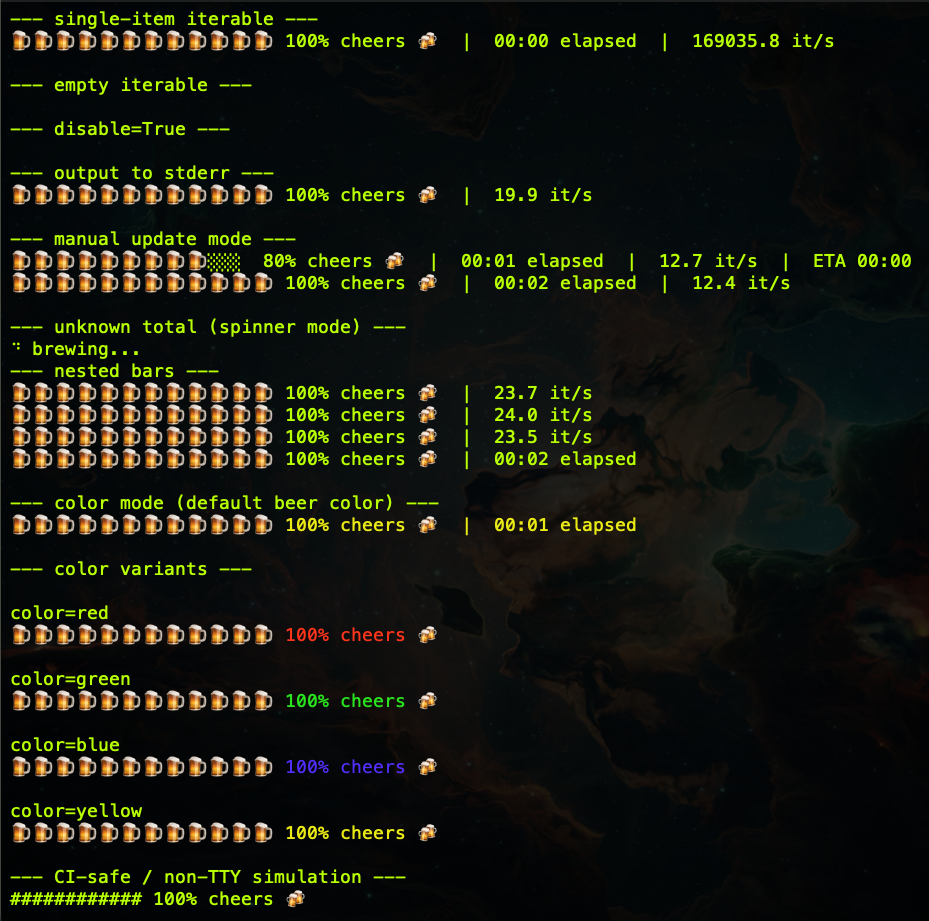
As progress increases, the beer fills and the brew stage changes:
- mashing
- boiling
- fermenting
- conditioning
- cheers 🍻
📦 Installation
pip install brewbar
🍺 Usage
from brewbar import bar
import time

for _ in bar(range(100)):
    time.sleep(0.1)
✨ Features
- 🍺 Beer-brewing themed progress bar
- 🧠 Simple API (
bar(iterable)) - ⚡ Lightweight (no dependencies)
- 🖥 Works in standard terminals
- 🤖 Auto-disables in CI / non-TTY environments
What’s new in v1.2.2
ETA & Speed
ETA 00:08 | 12.5 it/s
ASCII mode (CI-safe)
bar(range(100), ascii=True)
Output:
    ##########  100%  cheers 🍻
Disable output completely
bar(range(100), disable=True)
Log to stderr
bar(range(100), file=sys.stderr)
Manual update mode
For non-iterable workflows:
from brewbar import BrewBar
import time

with BrewBar(total=10, elapsed=True, rate=True) as b:
    for _ in range(10):
        time.sleep(0.2)
        b.update()
Unknown total = spinner mode
for _ in bar(iter(int, 1)):
    time.sleep(0.05)
Displays:
    ⠙ brewing...
Nested progress bars
for _ in bar(range(3), elapsed=True):
    for _ in bar(range(10), rate=True):
        ...
Beer-color mode 🎨
# default beer color (yellow)
bar(range(50), color=True)

# explicit colors
bar(range(50), color="red")
bar(range(50), color="green")
bar(range(50), color="blue")
bar(range(50), color="yellow")
🛠 Requirements
- Python 3.8+
❓ Why brewbar?
Because sometimes you don't want:
- ❌ giant APIs
- ❌ heavy deps
- ❌ walls of logs
You just want to know when your code is done…
and have a beer while waiting. 🍻
Example with timing options
from brewbar import bar
import time

for _ in bar(
    range(200),
    eta=True,
    elapsed=True,
    rate=True,
    ascii=True,
):
    time.sleep(0.05)
Release history Release notifications | RSS feed


Download files
Download the file for your platform. If you're not sure which to choose, learn more about installing packages.
Source Distribution
Built Distribution
Filter files by name, interpreter, ABI, and platform.
If you're not sure about the file name format, learn more about wheel file names.
Copy a direct link to the current filters
File details
Details for the file brewbar-1.2.2.tar.gz.
File metadata
- Download URL: brewbar-1.2.2.tar.gz
- Upload date:
- Size: 823.8 kB
- Tags: Source
- Uploaded using Trusted Publishing? No
- Uploaded via: twine/6.2.0 CPython/3.10.19
File hashes
| Algorithm | Hash digest | |
|---|---|---|
| SHA256 |
b6ce3522c944ac1db8dcdeb98893f74b7518b15fe4813a63beac65c0f2d5ccb3
|
|
| MD5 |
876174fb862fc7a775a8389c7b19de7d
|
|
| BLAKE2b-256 |
2e7fe1639823e264328b469d62feeae5f6012e4ad02739277f41781b0c35e566
|
File details
Details for the file brewbar-1.2.2-py3-none-any.whl.
File metadata
- Download URL: brewbar-1.2.2-py3-none-any.whl
- Upload date:
- Size: 5.2 kB
- Tags: Python 3
- Uploaded using Trusted Publishing? No
- Uploaded via: twine/6.2.0 CPython/3.10.19
File hashes
| Algorithm | Hash digest | |
|---|---|---|
| SHA256 |
f3102dd84856e87f0704b8fd1db06d5bff7f5aec5871059e2afe0f9b8f4dbd99
|
|
| MD5 |
ba896c7dad09807076d4736329228e81
|
|
| BLAKE2b-256 |
9440f447f9e2cc4430c68ea44c8a59973a5bb2c0d68df1a3c852d85e11635d59
|






