
briar
briar is a command-line tool that runs on your own machine. It does two things:
- It reads what is going on in your team's tools (GitHub or Bitbucket, Jira or Linear, AWS, Fireflies) and saves it as markdown "knowledge".
- It runs AI coding agents that use that knowledge. One agent takes a ticket and opens a draft PR. Another fixes the review comments on a PR.
There is no briar server and no account. briar talks only to the services you set up: your code host, your tracker, your cloud, and your LLM provider. Your credentials stay in a file on your machine.
Where the knowledge comes from, and where the work goes
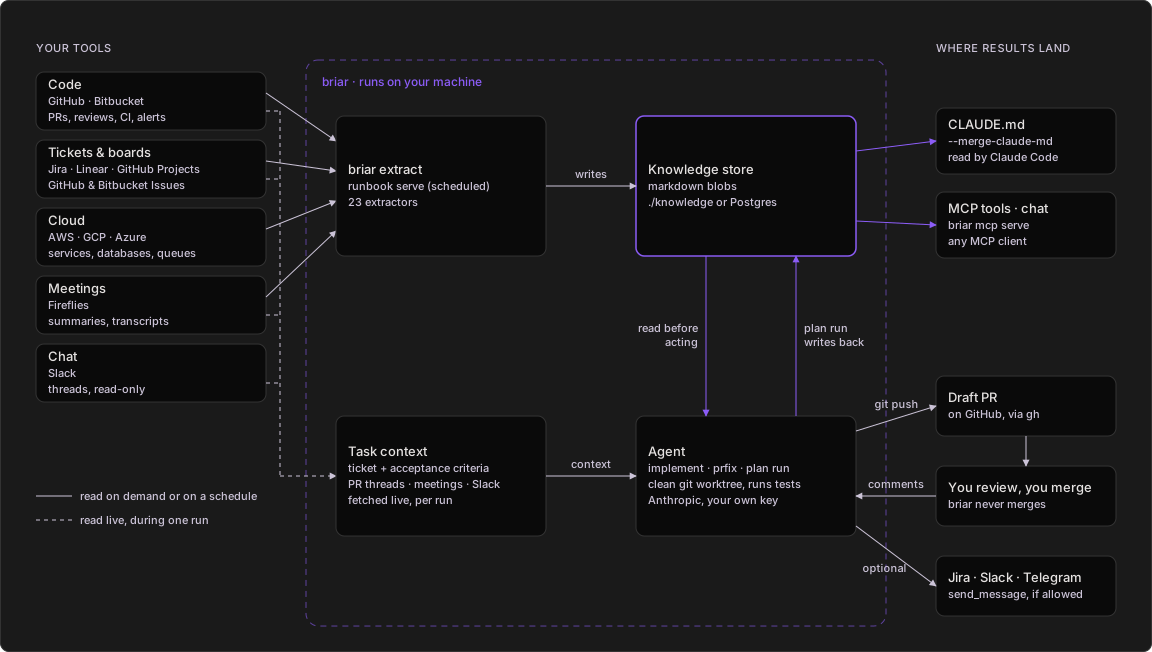
Everything in the dashed box runs on your machine and reads from your
tools. Agents push branches, open draft PRs and reply on reviews; their
send_message tool only reaches the channels you list in the runbook.
- Extractors read your tools, on demand or on a schedule, and write markdown knowledge to a local folder or to Postgres.
- You point an agent at a ticket or a PR. It fetches the ticket, the PR's review threads, and matching meeting notes and Slack messages live.
- In a clean git worktree it first reads the knowledge sections that fit its job (conventions, hotspots, reviewers, PR history), writes the code on a new branch and runs your tests. Coding agents run on Anthropic with your own key.
- It pushes and opens a draft PR. If you allow those channels in the runbook, it can also comment on the ticket or post in Slack or Telegram.
- You review.
briar agent prfixanswers the comments with one commit per thread. You merge; briar never does. - A plan run writes what each card taught into the plan's knowledge, which
its selector reads before the next pick. All knowledge also feeds Claude
Code (
CLAUDE.md) and any MCP client.
More diagrams are in See it run.
Install
pip install briar-cli
briar version
You get briar-cli 1.1.75 (or newer). briar needs Python 3.10 or later.
The base install covers GitHub, Bitbucket, AWS, Jira, Linear, Fireflies, Anthropic (Claude) and AWS Bedrock, with a file or Postgres store. It also runs the coding agents. Extras add more:
pip install 'briar-cli[mcp]'      # briar mcp serve, briar chat, MCP tools for agents
pip install 'briar-cli[all]'      # everything below
The extras are [openai], [gemini], [mcp], [gcp], [azure] and
[vault].
To run briar agent or briar plan run you also need git and the
GitHub CLI gh, because the agent runs them.
The [mcp] extra adds three things:
briar mcp serveandbriar chat. They do not start without it.- The tool servers listed under
mcp:in a runbook. An agent run with such a runbook stops without the extra. - Two small helper tools for agents, "think" and "time". Without the extra, briar skips them, logs one warning and goes on.
Since 1.1.74 a plain install runs agents. Older versions stopped with
MCP support requires the `mcp` package unless you passed
--no-default-mcp.
Quickstart
# 1. Save a GitHub token and Jira login. They go to ~/.config/briar/secrets.env
briar auth login github-pat --company acme
briar auth login jira-token --company acme

# 2. Give briar a Claude key. It reads it from your shell.
export ANTHROPIC_API_KEY=sk-ant-your-key

# 3. Read the repo's recent PRs and its tools into the blob knowledge:acme
briar extract --company acme --repo acme-co/acme-app \
    --include pr-archaeology --include codebase-conventions --max 50

# 4. Read what was saved
briar context get knowledge:acme

# 5. Print the agent's prompt for ticket ACME-42. No cost, nothing pushed.
briar agent implement --company acme --repo acme-co/acme-app \
    --ticket-key ACME-42 --tracker jira --dry-run

# 6. Run it for real: clone, branch, code, test, open a draft PR
briar agent implement --company acme --repo acme-co/acme-app \
    --ticket-key ACME-42 --tracker jira
After step 3 you have ./knowledge/knowledge/acme.md. After step 6 you
have a branch chore/acme-42 and a draft PR on acme-co/acme-app.
Less typing with .briar.toml
Every setting is looked up in this order: the flag you type, then an
environment variable, then .briar.toml, then the built-in default. The
repo owner and name can also come from the git origin remote.
Write a starter file in your repo:
briar init --company acme
You get a .briar.toml with the company, the store, and the repo taken
from git. The [agent] part comes commented out. Uncomment it to set
agent defaults:
company = "acme"
store   = "file"

[repo]
owner    = "acme-co"
repo     = "acme-app"
provider = "github"

[agent]
model          = "claude-sonnet-4-6"
git_user_name  = "Acme Bot"
git_user_email = "bot@acme.com"
Inside that repo the commands get short:
briar extract --include pr-archaeology
briar agent implement --ticket-key ACME-42
briar config show prints each setting and where it came from.
briar doctor checks the config, git, credentials and store.
eval "$(briar completion bash)" turns on tab completion (zsh works too).
See setup.md.
Run with Docker
The image iklob1/briar has briar, the [mcp] extra, git and gh.
Nothing else to install:
docker run --rm iklob1/briar version
To work on a repo, mount it and your briar config folder:
docker run --rm \
    -v "$PWD":/work -w /work \
    -v "$HOME/.config/briar":/home/briar/.config/briar \
    -e ANTHROPIC_API_KEY \
    iklob1/briar extract --company acme --include pr-archaeology
-v "$PWD":/work -w /workmounts your repo, so.briar.tomland./knowledgework as on your machine.-v "$HOME/.config/briar":/home/briar/.config/briarmounts the credentials thatbriar auth loginsaved.-e ANTHROPIC_API_KEYpasses a variable from your shell. Repeat-efor others. Saved credentials need no-e.
Some commands need more:
| Command | Add |
|---|---|
auth login |
-it, because it asks you to paste a token. |
dashboard |
-p 8080:8080, and --host 0.0.0.0 at the end. |
mcp serve over stdio |
-i, so the MCP client can talk to it. |
docker run --rm -it -v "$HOME/.config/briar":/home/briar/.config/briar \
    iklob1/briar auth login github-pat --company acme

docker run --rm -p 8080:8080 -v "$PWD":/work -w /work \
    iklob1/briar dashboard --host 0.0.0.0
Run an agent in Docker
Since 1.1.75 the image can run briar agent and briar plan run. Add
two keys and your git name and email:
docker run --rm \
    -v "$PWD":/work -w /work \
    -v "$HOME/.config/briar":/home/briar/.config/briar \
    -e GITHUB_TOKEN -e ANTHROPIC_API_KEY \
    iklob1/briar agent implement --company acme --repo acme-co/acme-app \
    --ticket-key ACME-42 --tracker jira \
    --git-user-name "Dana Lee" --git-user-email dana@acme.com
It runs the same steps as on your machine: a branch chore/acme-42 and a
draft PR on acme-co/acme-app. Add --dry-run to see the prompt first.
--git-user-nameand--git-user-emailgive the commits your name and email. You can mount~/.gitconfiginstead, read-only:-v "$HOME/.gitconfig":/home/briar/.gitconfig:ro.-e GITHUB_TOKENletsgit pushandghlog in to GitHub. In the image, git asksghfor the login, andghreadsGITHUB_TOKEN.-e ANTHROPIC_API_KEYis the Claude key.-e CLAUDE_CODE_OAUTH_TOKENworks too.- The Jira keys come from the mounted config folder.
--repocan also come from[repo]in the mounted.briar.toml.
Good to know:
- A
~/.gitconfigfrom a Mac works.gh auth setup-gitwrites the path ofghon your machine into it (/usr/local/bin/ghor/opt/homebrew/bin/gh). Since 1.1.79 the image hasghat both paths. Before that, the push failed with "gh: not found". - briar can also read owner and repo from the mounted repo's git
originremote. Since 1.1.79 this works whoever owns the folder. Before that, on Linux, git refused a folder not owned by uid 1000 ("detected dubious ownership"), and you had to pass--repo. - The image sets up the git login for GitHub only. For Bitbucket, run agents from a local install.
- The image sets
BRIAR_NO_DEFAULT_MCP=1, because it has nonpxoruvxfor the agent's helper tools. An image of your own that adds them can pass-e BRIAR_NO_DEFAULT_MCP=0. - The image is built for
linux/amd64only. On Apple Silicon, Docker runs it with emulation. - The container runs as user
briar(uid 1000). On Linux, the folders you mount must be writable by that uid. - Tags are
latestand each version, for exampleiklob1/briar:1.1.75.
Commands
Each command has a manual in agents/.
The same reference, with more examples, is at
usebriar.com/docs.
| Command | What it does | Manual |
|---|---|---|
briar extract |
Reads your tools into a knowledge blob (23 extractors). | extract.md |
briar agent implement |
Takes one ticket and opens a draft PR. | agent.md |
briar agent prfix |
Fixes and answers the review comments on one PR. | agent.md |
briar plan |
Turns a Jira or GitHub Projects board into a plan, then runs it card by card. | plan.md |
briar runbook |
Runs extractors from a YAML file, once or on a schedule. | runbook.md |
briar context |
Reads, writes, lists and deletes knowledge blobs. | context.md |
briar scaffold |
Writes a JSON config bundle for an agent workflow. | scaffold.md |
briar auth |
Saves credentials (login, logout, list, status, refresh). |
auth.md |
briar secrets |
Shows which credentials are missing (doctor, bootstrap). |
creds.md |
briar journal |
Shows the decisions that plan run and scaffold recorded. |
journal.md |
briar dashboard |
Serves a read-only status page. | dashboard.md |
briar mcp serve, briar chat |
Serves briar as MCP tools, or drives them from a chat in your terminal. | mcp.md |
briar init, config show, doctor, completion |
Setup helpers. | setup.md |
briar telemetry |
Shows or changes what usage data is sent. | telemetry.md |
briar version |
Prints the version. | version.md |
Recipes that chain these commands are in flows.md. A runbook that uses every feature is examples/all_features.yaml.
Three flags work with every command, anywhere on the line:
| Flag | What it does |
|---|---|
--format table|json|yaml|csv|quiet |
Output shape. Lists default to table, single records to json. |
--verbose, -v |
Debug logs on stderr. BRIAR_VERBOSE=1 does the same. |
--version, -V |
Print the version and exit. |
See it run
Which command?
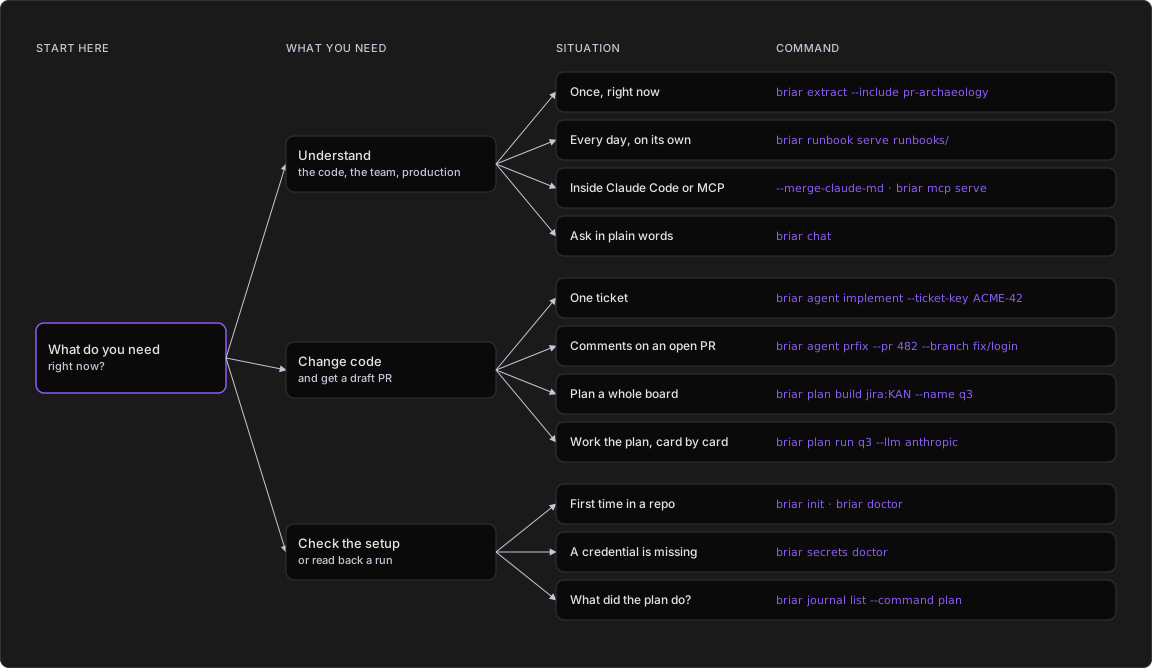
- Want to know something about the code, the team or production? Read it
once with
briar extract, every day withrunbook serve, from Claude Code or any MCP client, or askbriar chat. - Want code changed? One ticket is
agent implement, an open PR with review comments isagent prfix, and a whole board isplan buildonce, thenplan run. - Setting up or checking?
briar initandbriar doctorfirst,secrets doctorwhen a credential is missing, andjournal listto read back what a plan run decided.
Inside an agent run
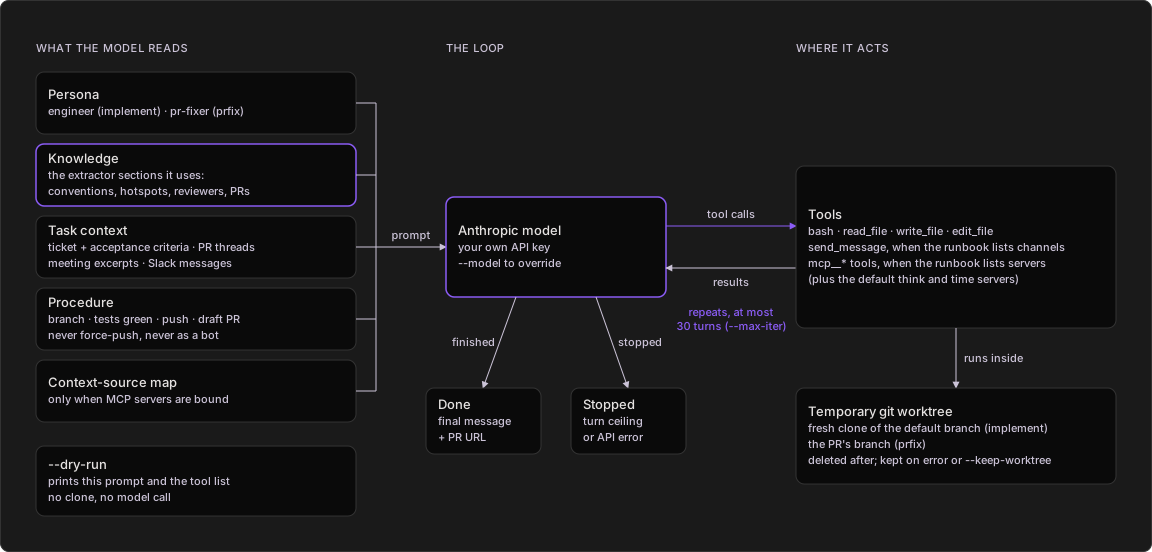
- briar builds one system prompt: the agent's persona, the knowledge sections that persona reads (for implement: codebase conventions, code hotspots, reviewer profiles, active work, PR history and the meeting digest), the ticket or PR context, and the procedure to follow.
- The Anthropic model answers with tool calls. briar runs them inside a
temporary git worktree and sends back the results. This repeats for at
most 30 turns (
--max-iter). - The tools are bash and file read, write and edit.
send_messageand MCP tools are added only when the runbook lists channels or servers. - When the model finishes, briar prints its final message (ending with the PR URL) and deletes the worktree. On an error or the turn ceiling the worktree is kept so you can look.
--dry-runprints the prompt and the tool list and stops there: no clone, no model call.
Answering a review
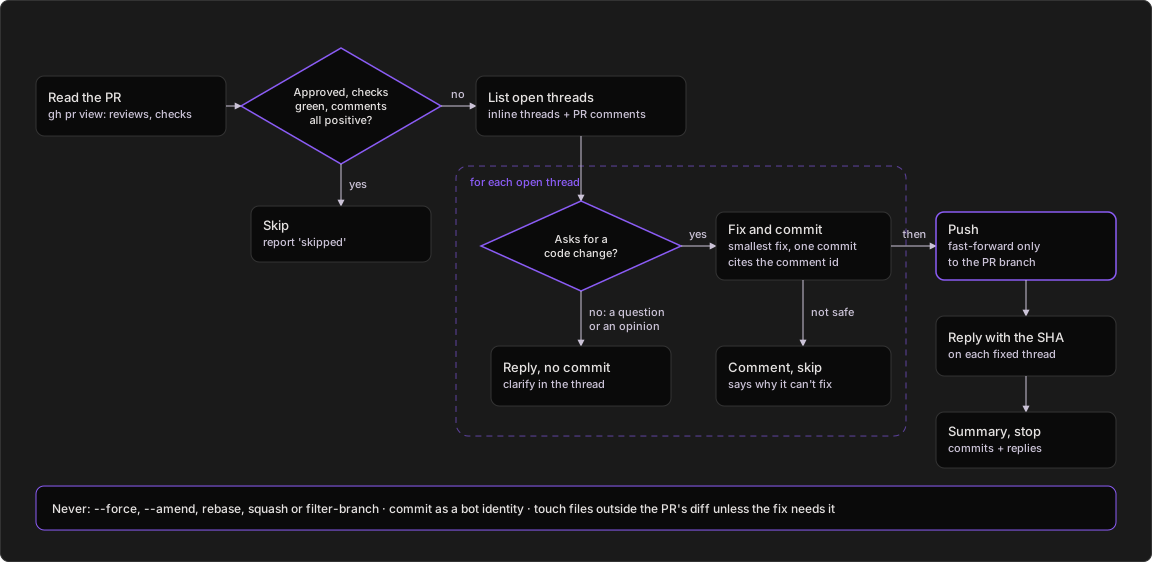
- prfix reads the PR with
gh pr view: review decision, branch and checks. - If it is approved, every required check is green and every open thread is positive, it reports "skipped" and stops.
- Otherwise it lists every open review thread and PR comment and handles them one at a time.
- A requested code change gets the smallest fix and its own commit citing the comment. A question or opinion gets a reply, no commit. A fix that isn't safe gets a comment saying why.
- Then it pushes fast-forward to the PR branch and replies on each thread it addressed with the commit SHA.
- It never force-pushes, amends, rebases or squashes, and never commits as a bot identity.
Working a board
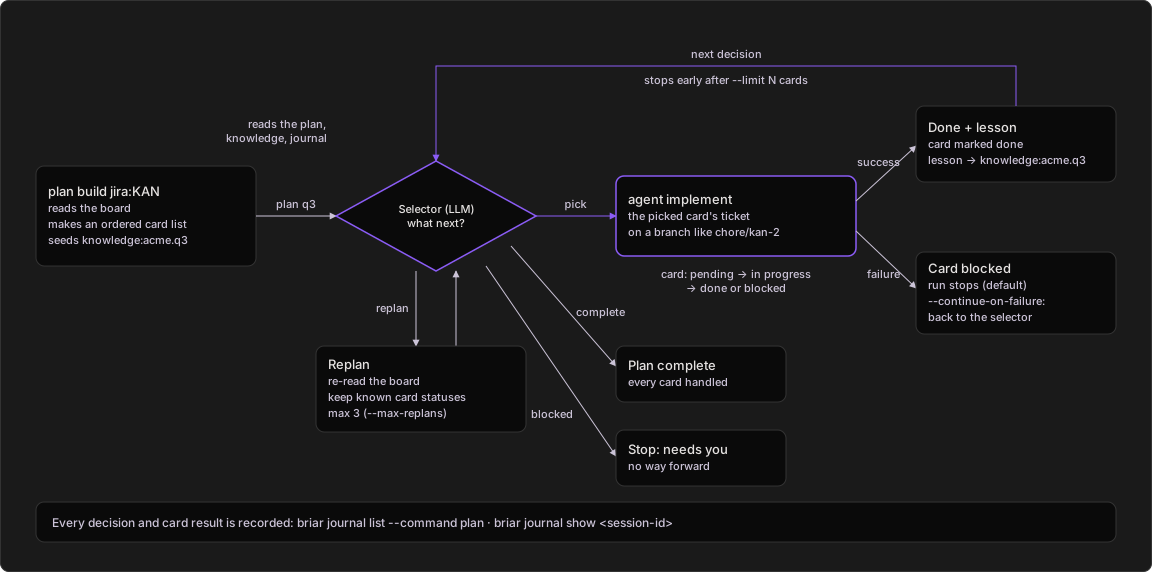
plan buildreads a Jira board or GitHub Project and turns it into an ordered card list (with--with-knowledge, using your knowledge too). It also seeds aknowledge:acme.q3blob for the plan.plan runasks the selector (an LLM) what to do next. It reads the plan, the knowledge and the journal of earlier decisions.- Pick: the card's ticket goes to
agent implement, on the card's branch (chore/kan-2when built without an LLM), from the card's parent branch. Success marks it done and writes a lesson intoknowledge:acme.q3, which the selector reads before its next pick. - A failed card is marked blocked. The run stops there, unless
--continue-on-failure. - Replan: briar re-reads the board, keeps the status of cards it already
knew, and adds new ones as pending. At most 3 times per run
(
--max-replans). - Complete ends the run. Blocked stops it until you step in.
--limit Nstops after N cards. Every decision lands in the journal.
The diagrams are copies of the ones on usebriar.com.
Telemetry
briar sends error reports and usage counts by default. No prompts, file
contents, ticket keys, repo names, paths or secret values leave your
machine. Turn it off with briar telemetry off, BRIAR_TELEMETRY=off
or DO_NOT_TRACK=1.
License
MIT. See LICENSE.
1 maintainer

Metadata
1 maintainer
Release files for briar-cli 1.1.99
For a detailed explanation of source distributions (sdists) and built distributions (wheels), please see the package formats documentation.
Source distribution (sdist)
| File | Size | Uploaded | Provenance | Actions |
|---|---|---|---|---|
| briar_cli-1.1.99.tar.gz | 716.7 kB | Without provenance | Details for briar_cli-1.1.99.tar.gz |
Built distribution (wheel)
| File | Interpreter | ABI | Platform | Actions Reset |
|---|---|---|---|---|
| briar_cli-1.1.99-py3-none-any.whl | Python 3 | none | any | Details for briar_cli-1.1.99-py3-none-any.whl |
Total release size: 1.2 MB
Release files / briar_cli-1.1.99.tar.gz
| Download URL | briar_cli-1.1.99.tar.gz |
|---|---|
| Size | 716.7 kB |
| Tags | Source |
|
SHA-256 checksum How to use checksums |
08beff30bbade57f0996e767c9af7d6ec72273040316f2cf81815671c6f3e618
|
|
BLAKE2b-256 checksum How to use checksums |
cba39dfcdb4d0eff1cc77492046bfc3f5988143bc5319f1b48aa3a40364446fb
|
| Upload date | |
|
Uploaded using Trusted Publishing? What is trusted publishing? |
No |
| Uploaded via |
twine/7.0.0 CPython/3.13.16
|
Release files / briar_cli-1.1.99-py3-none-any.whl
| Download URL | briar_cli-1.1.99-py3-none-any.whl |
|---|---|
| Size | 497.7 kB |
| Tags | Python 3 |
|
SHA-256 checksum How to use checksums |
a1c3b96cb9055e93ca78634183080a13c51f2c7fa78d5b77ffd33e8ef7215419
|
|
BLAKE2b-256 checksum How to use checksums |
f1f0b40820fb2e0716b31463374925006fa03556c88d10ee224264ac519c7070
|
| Upload date | |
|
Uploaded using Trusted Publishing? What is trusted publishing? |
No |
| Uploaded via |
twine/7.0.0 CPython/3.13.16
|
Security for briar-cli 1.1.99
Provenance
Provenance describes where a file came from. On PyPI, provenance is shared via attestations, which provide a verifiable record of the build or publishing details. View details, limitations and caveats.
No provenance found
None of the files in this release were uploaded with provenance metadata.
A note on package security
PyPI is a repository for distributing packages, not a service for auditing them. While third-party security researchers and our staff do their best to detect and remove malicious packages, PyPI cannot guarantee the quality, security or suitability of any given package.
To learn more about protecting yourself from malicious actors, visit our package security documentation.














