
BrickAgent: Programmatic LEGO Design
Peter Kulits Yiqing Xu R. Kenny Jones Cordelia Schmid Jiajun Wu
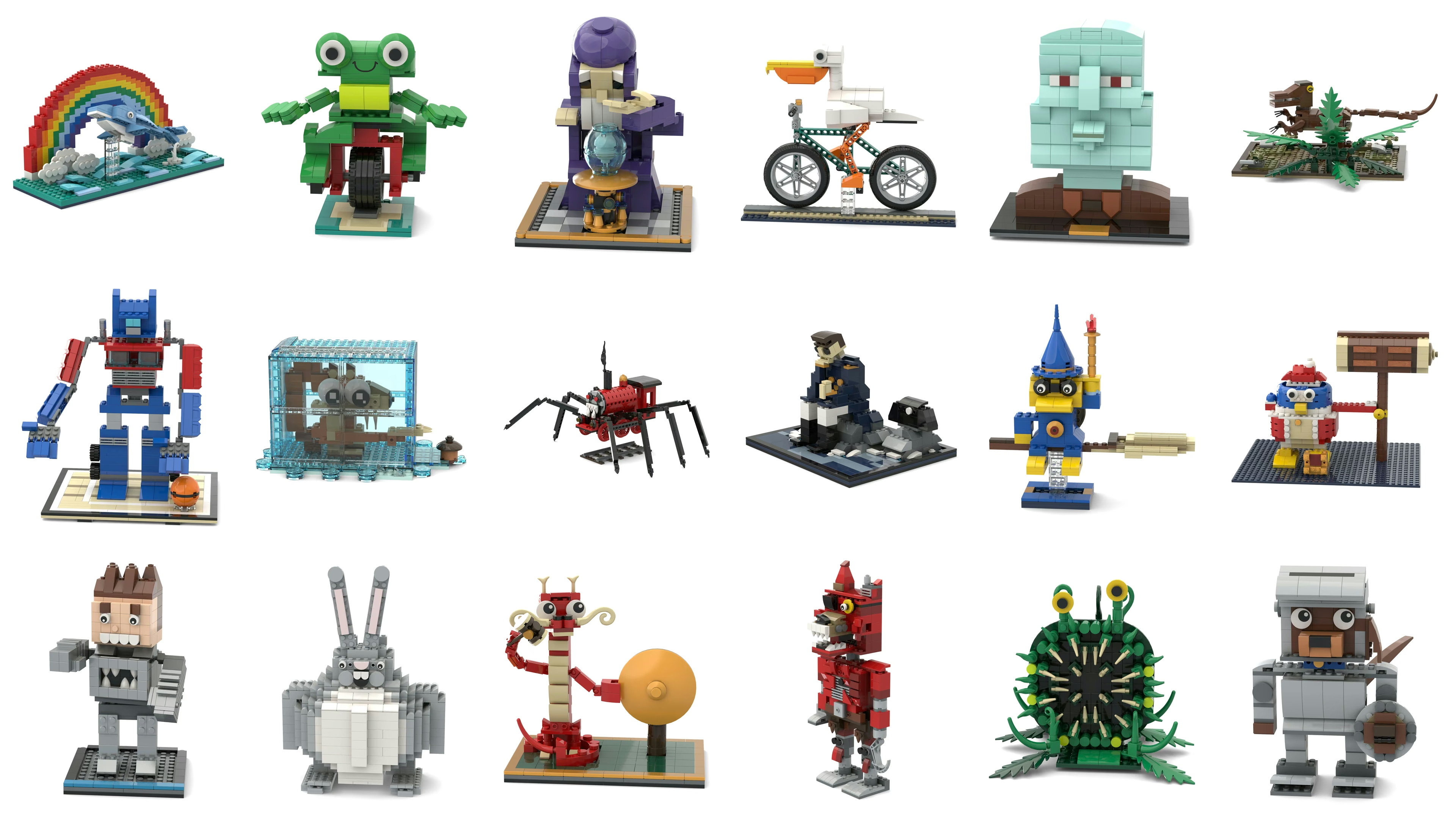
BrickAgent is the environment of BrickBench, a benchmark for agentic text-conditioned LEGO-set design. Coding agents use it to programmatically construct, inspect, and validate LEGO assemblies, placing parts through the connector system of BrickNet.
This repository contains:
brickagent(src/brickagent/), the environment, on PyPI.- BrickBench: 300 task prompts (
benchmark/), the agent prompt, validator, and evaluation (scripts/), and the agent container (Dockerfile).
Install
pip install brickagent
python -m bricknet fetch-meshes
fetch-meshes downloads BrickNet's convex colliders (1 GB), which collision and stability checks need, into the
platform user-data directory; to use another location, export BRICKNET_DATA before fetching and keep it set.
Usage
from brickagent import Assembly

wall = Assembly("wall")
base = wall.add("plate 2x8", color="dark gray")
top = base.stud
for course in range(4):
    next_top, column = [], 0
    for width in (4, 4) if course % 2 == 0 else (2, 4, 2):
        brick = wall.attach(f"brick 2x{width}", to=top[2 * column], by=("hole", 0), color="tan")
        next_top.extend(brick.stud)
        column += width
    top = next_top
wall.write("wall.mpd", check=True)
add places a part or subassembly at a pose; attach places it by an exact connector fit. Connectors are indexed in
BrickNet order (part.stud[i], part.hole[i], ...).
# continues the example above
from brickagent import find, describe, name, connectors, check, view

beams = [stem for stem in find("technic beam") if len(connectors(stem, "socket")) == 5]
print(beams[0], name(beams[0]))
print(describe("6629"))
check(wall)
view(wall, "wall.png")  # needs the Rendering setup below
check raises ValueError on collisions, inexact connections, exceeded inventory, or instability, naming the parts
involved. Each connected component is simulated as a rigid body under gravity in PyBullet. Only parts that BrickNet
supports can be used; find lists them. The full API guide, with examples, is the agent prompt, scripts/prompt.md.
Building from a Restricted Part Set
BRICKAGENT_SET limits building to an inventory that maps LDraw part numbers to color names and maximum quantities
(null for any); check enforces the colors and counts:
{"3001": {"red": 8, "blue": 6}, "3020": {"tan": 2}, "3062b": {"white": null}}
Rendering
view needs Node 22.14+ or 23.6+, Mesa (libegl1, libgles2, libegl-mesa0, libgl1-mesa-dri), a C++ runtime
from GCC 11 or newer (Ubuntu 22.04+), the viewer's npm packages, and the LDraw snapshot used in the experiments:
npm ci --prefix "$(python -c 'from importlib.resources import files; print(files("brickagent") / "viewer")')"
curl -L https://codeload.github.com/kulits/ldraw-parts/tar.gz/b61b905f1173f120f528be9521bb870619c36785 | tar -xz
export BRICKAGENT_LDRAW="$PWD/ldraw-parts-b61b905f1173f120f528be9521bb870619c36785/ldraw"
# Render with Mesa, as in the experiments; NVIDIA's EGL driver currently renders washed-out colors.
export EGL_PLATFORM=surfaceless LIBGL_ALWAYS_SOFTWARE=1
export __EGL_VENDOR_LIBRARY_FILENAMES=/usr/share/glvnd/egl_vendor.d/50_mesa.json
To explore a model in a browser instead, see the viewer README.
BrickBench
Settings
| Setting | Prompts | Questions | Requirement |
|---|---|---|---|
Model |
100 | 1,719 | At most 400 parts |
Set |
100 | 2,369 | 400–4000 parts |
Alt-Build |
100 | 1,182 | Only the pieces of retail set 10698 (benchmark/alt-build/inventory.json) |
Each setting's benchmark/<setting>/tasks.json lists its prompts, each decomposed into a question graph in the style of
DSG: every question has a key, its text, a kind and subtype, and the keys it
depends on.
Running an Agent
The agent needs the setup above, either installed directly or through the container used in the experiments. Render the prompt for a task:
pip install jinja2
python scripts/prompt.py "$(jq -r '.[0].prompt' benchmark/model/tasks.json)" --split model > prompt.txt
Give it to a coding agent in an empty workspace outside this repository, without web search, in a shell where the variables above are exported. The experiments ran Codex in the container:
docker build -t brickagent .
docker build -t brickagent-codex - <<< $'FROM brickagent\nRUN npm install --global @openai/codex'
mkdir -p work
docker run --rm -v "$PWD/work:/work" -e OPENAI_API_KEY brickagent-codex \
    codex exec --skip-git-repo-check --dangerously-bypass-approvals-and-sandbox -c web_search=disabled \
    "$(cat prompt.txt)"
For Alt-Build, export BRICKAGENT_SET=$PWD/benchmark/alt-build/inventory.json (in Docker, also pass
-v "$BRICKAGENT_SET:$BRICKAGENT_SET:ro" -e BRICKAGENT_SET). The agent delivers build.py, whose build() returns the assembly, and model.mpd.
Evaluation
Valid. verify.py rebuilds the assembly from build.py and checks the setting's part requirements, collisions,
and stability (for Alt-Build, with the same BRICKAGENT_SET):
python scripts/verify.py work --split model # or set, alt-build; writes work/verification.json, exits 1 if invalid
Assemblies are rendered from eight views with BrickNet-Render and judged
by Gemma 4 31B (google/gemma-4-31B-it, revision 842da37), loaded
with Transformers (about 62 GB of GPU memory). The scripts read RENDERS/<system>/<task id>/, e.g.
RENDERS/my-agent/alt-001/. BrickNet-Render needs Python 3.13:
pip install bricknet-render "bpy>=5.1" transformers torch torchvision accelerate pillow
python -m bricknet_render fetch-glbs
python scripts/flatten.py work/model.mpd work/model.ldr
bricknet-render work/model.ldr RENDERS/my-agent/model-001 --views 8 --resolution 1024x1024 --samples 64
VQA. The judge answers each assembly's question graph from its eight views; a question counts only if the questions it depends on also hold.
python scripts/vqa.py RENDERS --out vqa.jsonl
ELO. For each prompt, every pair of assemblies from different systems is judged from four views each, in both
orders, on alignment with the prompt and on design by the standard of an official set. A Bradley--Terry fit gives
Align ELO and Design ELO; ELO is their average after rescaling to a common spread over the --core systems.
python scripts/judge.py RENDERS --question align --out align.jsonl
python scripts/judge.py RENDERS --question design --out design.jsonl
python scripts/elo.py align.jsonl design.jsonl
Submitting Results
Submit through the form. Upload one zip of at most 10 MB with a folder per task,
named by task id (model-001/, set-001/, alt-001/, ...), holding build.py, model.mpd, or both; build.py is
preferred. Missing tasks count as invalid. Check the zip first:
python scripts/check_submission.py submission.zip
1 maintainer

Metadata
1 maintainer
Release files for brickagent 0.1.0
For a detailed explanation of source distributions (sdists) and built distributions (wheels), please see the package formats documentation.
Source distribution (sdist)
| File | Size | Uploaded | |
|---|---|---|---|
| brickagent-0.1.0.tar.gz | 584.6 kB | Details |
Built distribution (wheel)
| File | Interpreter | ABI | Platform | Reset |
|---|---|---|---|---|
| brickagent-0.1.0-py3-none-any.whl | Python 3 | none | any | Details |
Total release size: 1.2 MB
Release files / brickagent-0.1.0.tar.gz
| Download URL | brickagent-0.1.0.tar.gz |
|---|---|
| Size | 584.6 kB |
| Tags | Source |
|
SHA-256 checksum How to use checksums |
32a40d012a0309000603661149b2c74575ae7536d9e6e1e15817ccaea9b452d2
|
|
BLAKE2b-256 checksum How to use checksums |
e885a778384b9dd674a6018f274e496295d95720e860be0fa5acda93490df32f
|
| Upload date | |
|
Uploaded using Trusted Publishing? What is trusted publishing? |
No |
| Uploaded via |
twine/7.0.0 CPython/3.13.7
|
Release files / brickagent-0.1.0-py3-none-any.whl
| Download URL | brickagent-0.1.0-py3-none-any.whl |
|---|---|
| Size | 589.6 kB |
| Tags | Python 3 |
|
SHA-256 checksum How to use checksums |
b8d374b40ea37d12bf486a550a42764e3be8f4ee5c2577d148686086f884b75c
|
|
BLAKE2b-256 checksum How to use checksums |
da48ceee6ffd8f7ee2ae64cd2e53c2837b4aad4153527e0f49e7345b98e43a54
|
| Upload date | |
|
Uploaded using Trusted Publishing? What is trusted publishing? |
No |
| Uploaded via |
twine/7.0.0 CPython/3.13.7
|













