
Deploy scalable workflows to databricks using python

Project description
Brickflow








BrickFlow is specifically designed to enable the development of Databricks workflows using Python, streamlining the process through a command-line interface (CLI) tool.

Contributors
Thanks to all the contributors who have helped ideate, develop and bring Brickflow to its current state.
Contributing
We're delighted that you're interested in contributing to our project! To get started, please carefully read and follow the guidelines provided in our contributing document.
Documentation
Brickflow documentation can be found here.
Getting Started
Prerequisites
- Install brickflows
pip install brickflows
- Install Databricks CLI
curl -fsSL https://raw.githubusercontent.com/databricks/setup-cli/main/install.sh | sudo sh
- Configure Databricks cli with workspace token. This configures your
~/.databrickscfgfile.
databricks configure --token
Hello World workflow
- Create your first workflow using brickflow
mkdir hello-world-brickflow
cd hello-world-brickflow
brickflow projects add
- Provide the following inputs
Project name: hello-world-brickflow
Path from repo root to project root (optional) [.]: .
Path from project root to workflows dir: workflows
Git https url: https://github.com/Nike-Inc/brickflow.git
Brickflow version [auto]:<hit enter>
Spark expectations version [0.5.0]: 0.8.0
Skip entrypoint [y/N]: N
Note: You can provide your own github repo url.
- Create a new file hello_world_wf.py in the workflows directory
touch workflows/hello_world_wf.py
- Copy the following code in hello_world_wf.py file
from brickflow import (
    ctx,
    Cluster,
    Workflow,
    NotebookTask,
)
from airflow.operators.bash import BashOperator


cluster = Cluster(
    name="job_cluster",
    node_type_id="m6gd.xlarge",
    spark_version="13.3.x-scala2.12",
    min_workers=1,
    max_workers=2,
)

wf = Workflow(
    "hello_world_workflow",
    default_cluster=cluster,
    tags={
        "product_id": "brickflow_demo",
    },
    common_task_parameters={
        "catalog": "<uc-catalog-name>",
        "database": "<uc-schema-name>",
    },
)

@wf.task
# this task does nothing but explains the use of context object
def start():
    print(f"Environment: {ctx.env}")

@wf.notebook_task
# this task runs a databricks notebook
def example_notebook():
    return NotebookTask(
        notebook_path="notebooks/example_notebook.py",
        base_parameters={
            "some_parameter": "some_value",  # in the notebook access these via dbutils.widgets.get("some_parameter")
        },
    )


@wf.task(depends_on=[start, example_notebook])
# this task runs a bash command
def list_lending_club_data_files():
    return BashOperator(
        task_id=list_lending_club_data_files.__name__,
        bash_command="ls -lrt /dbfs/databricks-datasets/samples/lending_club/parquet/",
    )

@wf.task(depends_on=list_lending_club_data_files)
# this task runs the pyspark code
def lending_data_ingest():
    ctx.spark.sql(
        f"""
        CREATE TABLE IF NOT EXISTS
        {ctx.dbutils_widget_get_or_else(key="catalog", debug="development")}.\
        {ctx.dbutils_widget_get_or_else(key="database", debug="dummy_database")}.\
        {ctx.dbutils_widget_get_or_else(key="brickflow_env", debug="local")}_lending_data_ingest
        USING DELTA -- this is default just for explicit purpose
        SELECT * FROM parquet.`dbfs:/databricks-datasets/samples/lending_club/parquet/`
    """
    )
Note: Modify the values of catalog/database for common_task_parameters.
- Create a new file example_notebook.py in the notebooks directory
mkdir notebooks
touch notebooks/example_notebook.py
- Copy the following code in the example_notebook.py file
# Databricks notebook source

print("hello world")
Deploy the workflow to databricks
brickflow projects deploy --project hello-world-brickflow -e local
Run the demo workflow
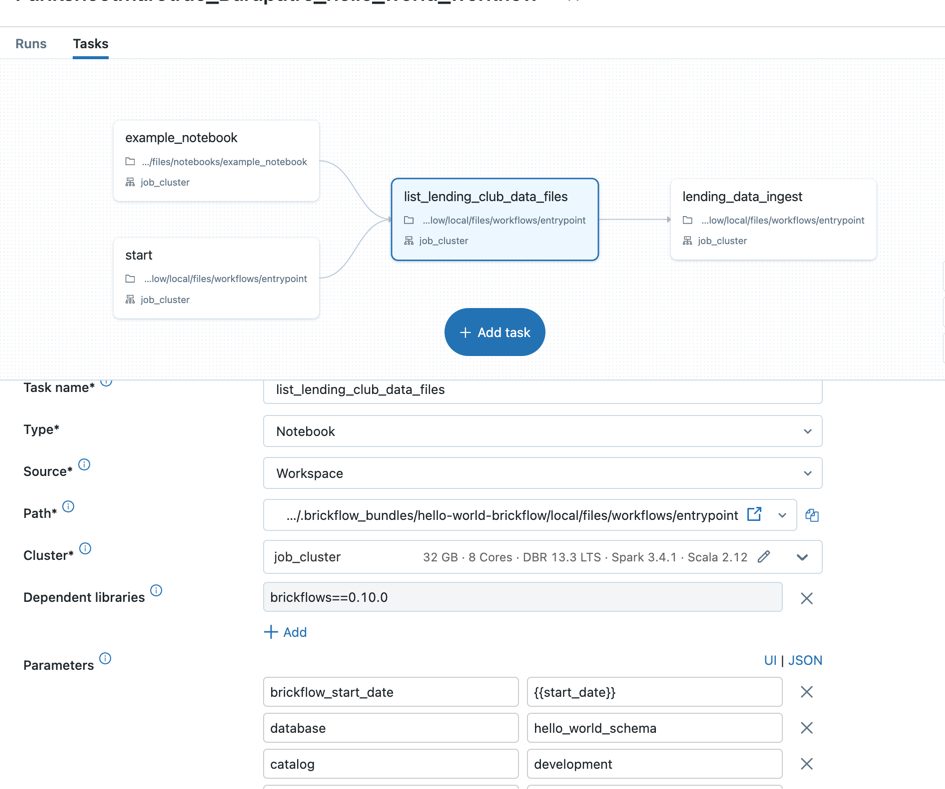
- Login to databricks workspace
- Go to the workflows and select the workflow
Examples
Refer to the examples for more examples.
Release history Release notifications | RSS feed


Download files
Download the file for your platform. If you're not sure which to choose, learn more about installing packages.
Source Distribution
Built Distribution
Filter files by name, interpreter, ABI, and platform.
If you're not sure about the file name format, learn more about wheel file names.
Copy a direct link to the current filters
File details
Details for the file brickflows-1.7.1.tar.gz.
File metadata
- Download URL: brickflows-1.7.1.tar.gz
- Upload date:
- Size: 141.3 kB
- Tags: Source
- Uploaded using Trusted Publishing? No
- Uploaded via: twine/6.2.0 CPython/3.10.20
File hashes
| Algorithm | Hash digest | |
|---|---|---|
| SHA256 |
a535a2dc7cf38e9897d657f45e4a8ae3c5831f46ac8b65ea1435c774e14cbf95
|
|
| MD5 |
3e2c065e176814eb69ef1fd6aa1208a5
|
|
| BLAKE2b-256 |
35144f5fb1a94ea130b5bee3acaa9ec96d9ec1aad6ac551187849272df287337
|
File details
Details for the file brickflows-1.7.1-py3-none-any.whl.
File metadata
- Download URL: brickflows-1.7.1-py3-none-any.whl
- Upload date:
- Size: 160.2 kB
- Tags: Python 3
- Uploaded using Trusted Publishing? No
- Uploaded via: twine/6.2.0 CPython/3.10.20
File hashes
| Algorithm | Hash digest | |
|---|---|---|
| SHA256 |
bade43e0d3afb48702c4c8a64bc7caf8a9900e7ea380ef6f40c9ab6656ef99aa
|
|
| MD5 |
3dff4a7989a0744552fa59fffb783d2b
|
|
| BLAKE2b-256 |
41344a91afea7e1e36b507595223a50bb237525e7f802ae7514db0a1ac86755d
|






