
brickremote
Website for kids and parents: https://surak.github.io/brickremote/
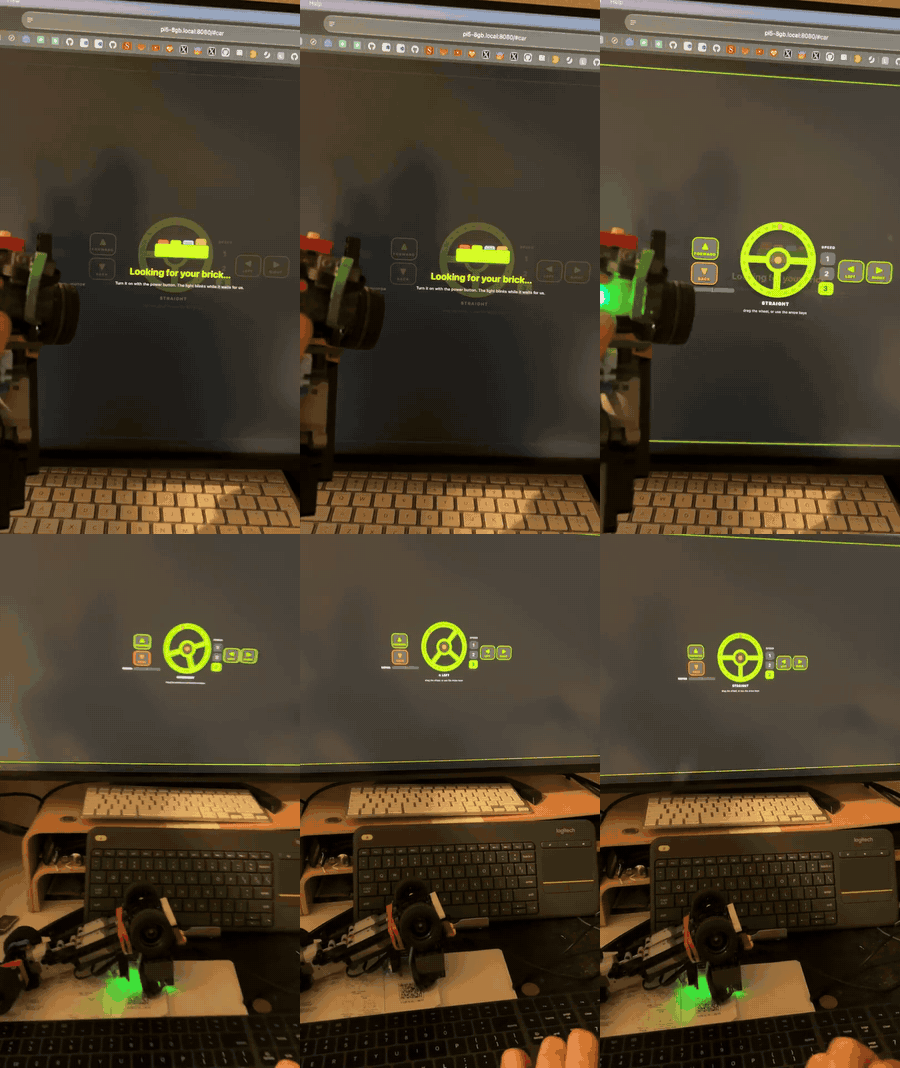
Python library for the cheap Lego-compatible Bluetooth LE motor bricks that advertise as
JG_JMC-xxxx and are normally driven by the XP Block phone app ("Smart creative module",
four motor ports A–D). Works anywhere bleak does: Linux
(incl. Raspberry Pi), macOS and Windows.
pip install brickremote          # library and terminal app
pip install "brickremote[web]"     # plus the web remote control
Or from a checkout, without installing anything yourself:
./run.sh          # creates .venv on first run, then starts the remote control app
./run.sh scan     # any other command works the same way
Remote control app
Run brickremote with no arguments for a terminal version of the phone app (everything except the
phone-only gyroscope and voice modes):
| Tab | Keys |
|---|---|
| Car | arrows: forward/back, steer left/right (drive port A, steering port D; change with --drive/--steer) |
| Ports | like two game sticks: W/S port A, A/D port B, I/K port C, J/L port D |
| Program | e edit in $EDITOR, Enter run (see below) |
| Path | e edit, Enter run, [ ] / { } calibrate speed and turn rate |
Everywhere: Tab switch screen, 1-3 speed (60/120/255), space STOP, q quit, and
hhold: motors keep running after you let go of the key (steering still springs back)ppair: one port copies another (off → A+B → A+C), for builds with two motors that should always move together, like a tankr+ port letter reverse: that port turns the other way round, for a motor that was mounted backwards
Settings, programs and paths are saved in ~/.config/brickremote.json.
Terminals report key presses but not releases, so a motor runs while its key auto-repeats and stops a moment after you let go. Steering always springs back to centre, even with hold on.
Web remote control
./run.sh web # or: brickremote web (needs `pip install 'brickremote[web]'`)
This starts a small web server and prints its address. Open it in any browser: on the same computer, or on a tablet or laptop on the same Wi-Fi, which then becomes the remote control. It has the same four screens as the terminal app, plus things a browser is good at:
- buttons you hold down, a steering wheel you can drag, and two joysticks for the ports
- program blocks you tap to build a program
- a grid where you draw the route for path mode
If the browser stops talking to the server (tab closed, Wi-Fi gone), the motors stop by themselves.
Command line
brickremote scan                         # list modules nearby
brickremote run a=255 --time 2           # port A forward, full speed, 2 s
brickremote run a=-120 d=255 --time 1.5  # A reverse at medium speed, D forward
brickremote program dance.txt            # run a program script
brickremote path route.txt --mps 0.6     # drive a path script
brickremote --invert d run d=255         # global options: --address, --slot, --invert, --drive, --steer
Program scripts (the app's block programming)
gear 2              # speed for + and -: 1 = 60, 2 = 120, 3 = 255
repeat 3
  a + 1.5           # port A forward for 1.5 s
  ac - 1            # ports A and C reverse for 1 s
  wait 0.5
end
d 200               # port D at speed 200, keep running
forever             # until Ctrl-C / space
  b + 1
  b - 1
end
Path scripts (the app's path mode)
forward 1.5   # metres
left 90       # degrees, driving forward with full steering
back 0.5
right 45
Distances and angles become times through a calibration (--mps, --dps, or [ ] { } in the
app): measure how far the car goes in one second at full speed, and how many degrees it turns.
Library
import asyncio
from brickremote import JMCModule

async def main():
    async with JMCModule() as m:          # connects to the first module found
        await m.drive(a=255, d=-120)      # speeds -255..255, negative = reverse
        await asyncio.sleep(2)
        await m.stop()
        print("battery:", m.battery, "%")

asyncio.run(main())
JMCModule(address) targets a specific module, discover() lists all of them. While connected,
the current state is resent every 0.2 s, which keeps the module from going to sleep.
JMCModule(inverted="d", links={"a": "c"})   # reverse port D; C follows A
await m.run(2, a=255)                       # A forward for 2 s, then stop
brickremote.script has the program and path engines (parse_program, run_program,
parse_path, run_path) if you want them from your own code.
For the stock car (drive motor on A, steering on D) there is a small wrapper:
from brickremote import Car, JMCModule

async with JMCModule() as m:
    car = Car(m)
    await car.left(speed=200)   # forward while steering left
Protocol
Reverse-engineered from the XP Block Android app. The module exposes service FFF0;
commands go to FFF2 and must be written with response (write-without-response is
silently ignored):
5A 6B 02 00 05 dirAB speedAB dirCD speedCD slot SUM
| Field | Meaning |
|---|---|
| dirAB | A: 1 forward, 2 reverse; B: +4 forward, +8 reverse |
| speedAB | 0–255, shared by A and B (the app's gears are 60 / 120 / 255) |
| dirCD, speedCD | same for C and D |
| slot | 1–3, module slot (the app can drive three modules at once) |
| SUM | sum of all previous bytes, modulo 256 |
Six-port modules use length 08 and append dirEF speedE speedF.
The module reports on FFF1 with 5A 6B 01 00 01 <battery %> SUM. It switches itself off
after about ten minutes without commands.
Limitations
- The two ports of a pair share one speed byte, so A and B (or C and D) cannot run at different speeds at the same time; the faster one wins.
- Only tested with a four-port module. Six-port support follows the app's code but is unverified.
License
MIT
1 maintainer

Metadata
1 maintainer
Release files for brickremote 0.4.0
For a detailed explanation of source distributions (sdists) and built distributions (wheels), please see the package formats documentation.
Source distribution (sdist)
| File | Size | Uploaded | Provenance | Actions |
|---|---|---|---|---|
| brickremote-0.4.0.tar.gz | 4.1 MB | With provenance | Details for brickremote-0.4.0.tar.gz |
Built distribution (wheel)
| File | Interpreter | ABI | Platform | Actions Reset |
|---|---|---|---|---|
| brickremote-0.4.0-py3-none-any.whl | Python 3 | none | any | Details for brickremote-0.4.0-py3-none-any.whl |
Total release size: 4.1 MB
Release files / brickremote-0.4.0.tar.gz
| Download URL | brickremote-0.4.0.tar.gz |
|---|---|
| Size | 4.1 MB |
| Tags | Source |
|
SHA-256 checksum How to use checksums |
3e54d536e090c087c2962347123be0fce30166a2d641441ba05515158a51aa70
|
|
BLAKE2b-256 checksum How to use checksums |
cd5f11e5b128f81080258cf35ee3c991f1b28316f540ed35219be86b4e536595
|
| Upload date | |
|
Uploaded using Trusted Publishing? What is trusted publishing? |
Yes |
| Uploaded via |
twine/7.0.0 CPython/3.13.16
|
Provenance
Provenance describes where a file came from. On PyPI, provenance is shared via attestations, which provide a verifiable record of the build or publishing details. View details, limitations and caveats.


PyPI Publish Attestation
PyPI verified that this artifact, at this checksum, originated from the publisher listed below.
Signed by GitHub Actions, verified by PyPI on Nov 12, 2026.
Transparency logRelease files / brickremote-0.4.0-py3-none-any.whl
| Download URL | brickremote-0.4.0-py3-none-any.whl |
|---|---|
| Size | 37.8 kB |
| Tags | Python 3 |
|
SHA-256 checksum How to use checksums |
40b3b73940e3d3e26042985b1054d692c3324e661a3a54469c28593d3d1ad3d8
|
|
BLAKE2b-256 checksum How to use checksums |
dbc8bc92bfa5d2b51b59d3894f9972252fdbbea14b5b4e89c423b1030c888815
|
| Upload date | |
|
Uploaded using Trusted Publishing? What is trusted publishing? |
Yes |
| Uploaded via |
twine/7.0.0 CPython/3.13.16
|
Provenance
Provenance describes where a file came from. On PyPI, provenance is shared via attestations, which provide a verifiable record of the build or publishing details. View details, limitations and caveats.
PyPI Publish Attestation
PyPI verified that this artifact, at this checksum, originated from the publisher listed below.
Signed by GitHub Actions, verified by PyPI on Nov 12, 2026.
Transparency logSecurity for brickremote 0.4.0
Provenance
Provenance describes where a file came from. On PyPI, provenance is shared via attestations, which provide a verifiable record of the build or publishing details. View details, limitations and caveats.
Full provenance
Both files in this release have been uploaded with provenance metadata.
Attestation for brickremote-0.4.0.tar.gz
PyPI Publish Attestation
PyPI verified that this artifact, at this checksum, originated from the publisher listed below.
Signed by GitHub Actions, verified by PyPI on Nov 12, 2026.
Transparency logA note on package security
PyPI is a repository for distributing packages, not a service for auditing them. While third-party security researchers and our staff do their best to detect and remove malicious packages, PyPI cannot guarantee the quality, security or suitability of any given package.
To learn more about protecting yourself from malicious actors, visit our package security documentation.














