
BrickScape


Landscape, but for bricks. An MCP server that lets an AI design LEGO builds that can actually be built.
Ask a language model for a LEGO model and you usually get a file with parts floating in the air, bricks pushed through each other, and part numbers that don't exist. BrickScape gives the model a better way to work: it describes what it wants in a short JSON plan (a terraced hill here, a cobbled path there, an oak by the stream), and BrickScape places every part on real studs, checks the result against the parts' real shapes and connection points, repairs what it can, and hands back a BrickLink Studio file, renders, a part list and step-by-step instructions.
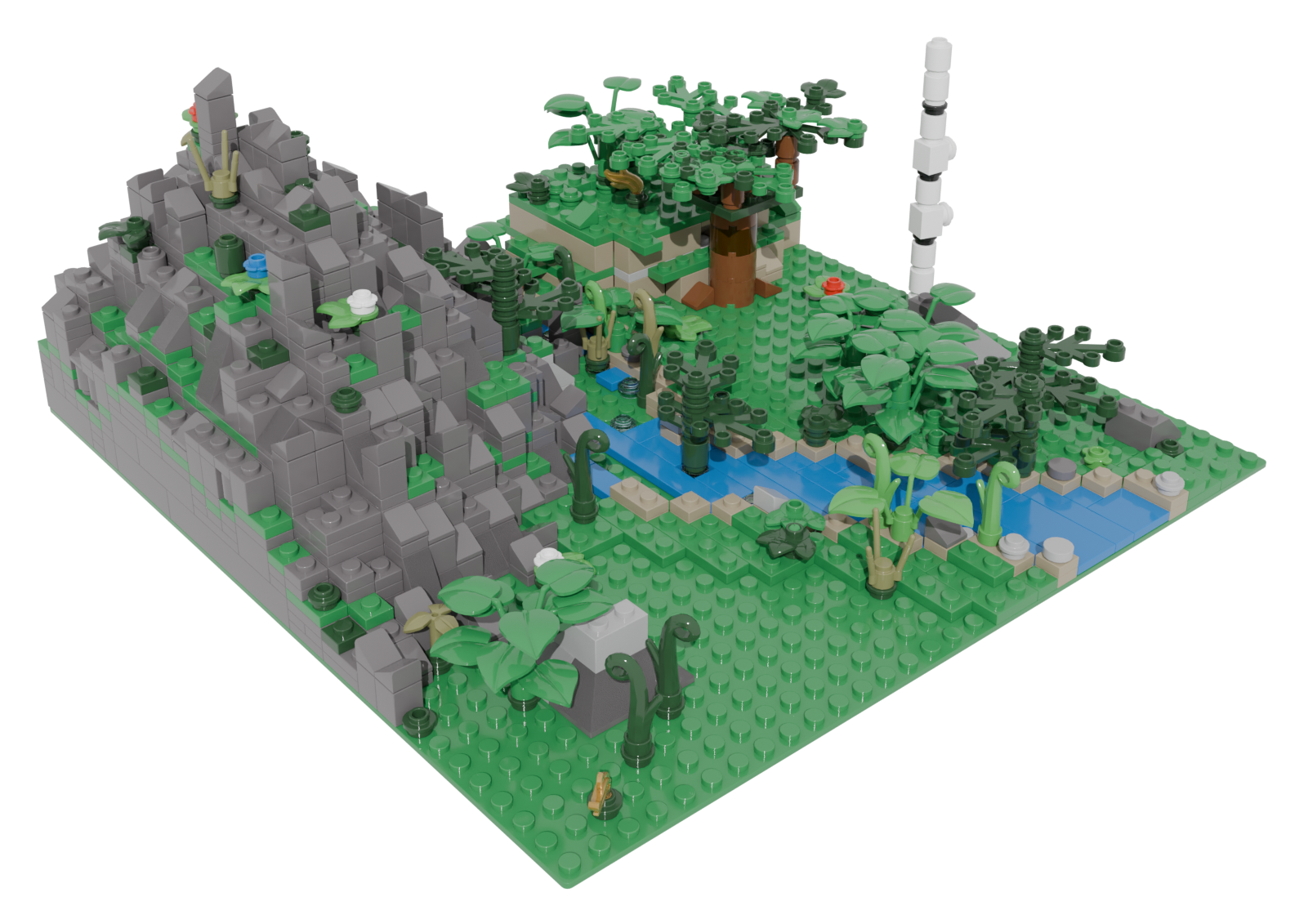
Built by BrickScape from a seven-operation plan: 1,466 parts, every one held by a real connection, no two parts intersecting.
Benchmark (blind, position-swapped judging against plain Claude on 6 briefs): BrickScape was 8.9x cheaper and 7.9x faster, all 6 of its builds pass the strict checker (plain Claude: 0 of 6), and it won accuracy 5-1-0 and looks 5-1-0 (wins-ties-losses), with average judge scores of 8.2 vs 4.2 and 7.4 vs 4.8 out of 10. Details.
Contents
- How it works
- Install
- Tools
- Brick companies
- Using references
- Build plans
- What "buildable" means here
- Benchmark
- Command line
- Limitations
- Credits
How it works

- Plan, don't place. The client never computes LDraw coordinates. It sends operations
such as
hill,path,water,treeorblockwith areas in studs. The compiler turns each one into parts using terrain and plant generators written against real building techniques (hollow frames, leaning cliff faces, paths set into the ground, leaves on studs). A height map means later operations land on top of earlier ones. - Fit as you go. Every decorative part (leaves, stems, flowers) is checked against its neighbours as it is placed. If it clashes it is turned about its stud, and if no turn fits it is left out. Bar-ended stems are slid down their stud until the bar is really held.
- Repair. After compiling, parts that are loose or clash are removed when nothing depends on them, and every part/colour pair that doesn't exist in real LEGO is moved to the nearest colour (by perceived colour distance) that does.
- Validate. The strict checker runs on everything that leaves the server (details below). The report says what was removed, recoloured or still fails, and what was not checked.
- Deliver. A Studio
.iofile, four renders from fixed angles, a part list (CSV and BrickLink wanted-list XML), and on request PDF instructions.
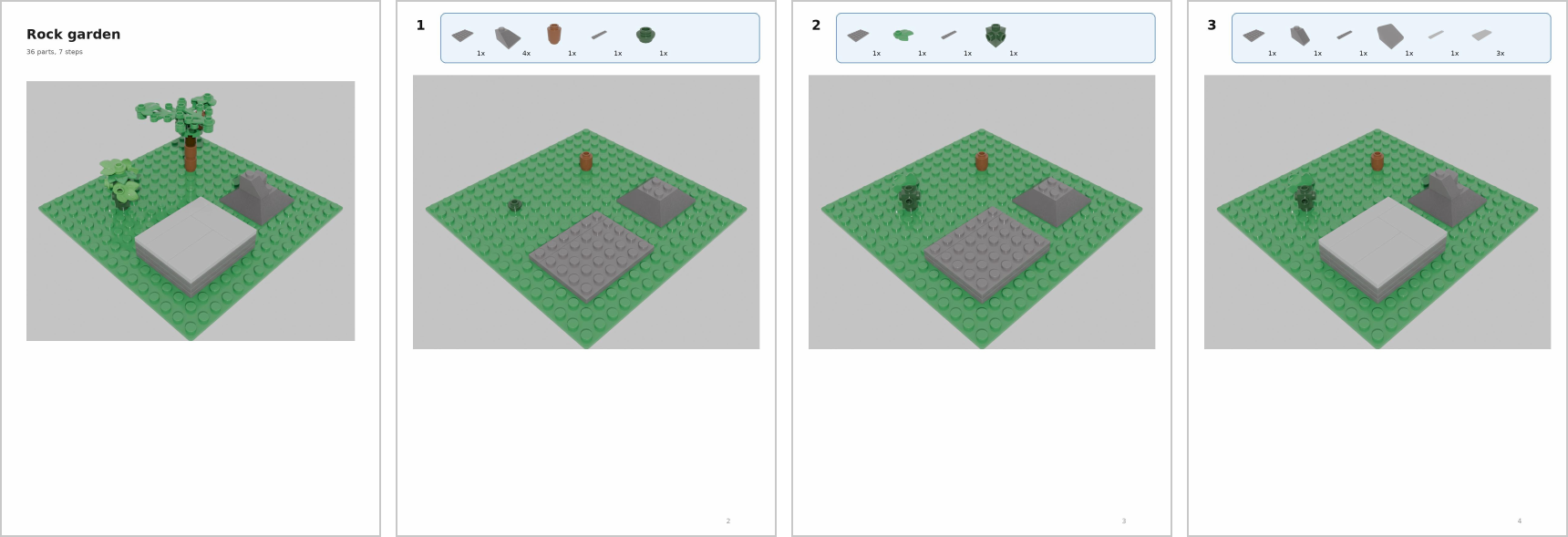
Generated instructions: the build order follows the connection graph, so every step can really be built.
Install
Requires Python 3.10+ and Blender 4.x (for renders and instructions).
pip install git+https://github.com/xanzure/brickscape
brickscape setup
brickscape setup downloads the LDraw parts library and the ImportLDraw Blender add-on (through
ldraw-mcp), the LDCad connection data, and
Rebrickable's part and colour tables into ~/.cache/brickscape. None of these are bundled.
Add the server to your MCP client:
claude mcp add brickscape -- brickscape-mcp # Claude Code
{ "mcpServers": { "brickscape": { "command": "brickscape-mcp" } } }
(Claude Desktop and other clients: add the block above to the client's MCP config.)
| Environment variable | Default | Meaning |
|---|---|---|
BRICKSCAPE_OUT |
./brickscape-out |
where builds are saved |
BRICKSCAPE_SOURCE |
lego |
default part source: lego or gobricks |
LDRAW_LIBRARY_PATH |
~/.ldraw |
LDraw parts library |
LDRAW_MCP_BLENDER |
blender on PATH |
Blender binary |
Tools
| Tool | What it does |
|---|---|
guide |
The planning guide: coordinates, every operation, style tips, an example. Read first. |
search_parts |
Find parts by description, with availability and colour count at the part source. |
part_info |
A part's size, its connection points (studs, anti-studs, bars, clips, hinges) and real colours. |
build |
Compile a plan, repair it, validate it, save it. Returns the validation report. |
render |
The four standard views (front-left, front-right, back-right, back-left) as one image. |
compare |
The build rendered from a reference photo's viewpoint, side by side with the photo. |
study_reference |
Analyse a reference build (.io / .ldr): size, density, hollowness, SNOT share, colours, most used parts. |
parts_list |
parts.csv and bricklink.xml (a BrickLink wanted list); prices in GoBricks mode. |
export |
A BrickLink Studio .io file. |
instructions |
Step-by-step building instructions as a PDF (plus an .ldr with STEPs for Studio). |
check |
Strictly validate any .ldr, .mpd or .io file, including ones not made by BrickScape. |
Brick companies
BrickScape isn't tied to one brick maker. Every build is checked against a part source: the
list of parts, and of the colours each part comes in, that a company actually makes. Pass
source to build, check, search_parts, part_info and parts_list, or set
BRICKSCAPE_SOURCE.
| Source | Company | What it knows | Data |
|---|---|---|---|
lego (default) |
LEGO | Every part/colour pair LEGO has produced as an element | Rebrickable's free downloads, fetched by brickscape setup |
gobricks |
GoBricks / Brickwith | GoBricks moulds, the colours each is sold in, prices | a GoBricks catalog file in ~/.cache/brickscape/gobricks (not distributed) |
What changes with the source:
- Validation: parts the company doesn't make, and colours a part doesn't come in, are reported. A part that GoBricks makes under a different mould number is matched to it.
- Repair: a colour that doesn't exist for a part is swapped for the closest colour that does at that company, so a GoBricks build only uses GoBricks colours.
- Parts lists: GoBricks mode adds a price for each part and an estimated total.
- Search:
search_partsandpart_infoshow availability and colours for that company.
Adding another company (Mould King, Cada, BrickLink stock, your own collection) is one small
class in src/brickscape/catalog/ with four methods: resolve(part), colours(part),
price(part) and substitute(part).
Using references
You can give the builder reference pictures or reference builds, and it uses them to get much
closer to what you want. Hand your AI client a photo or a Studio .io / .ldr along with the brief:
- Photos: the client reads the layout from the picture (where the rock, water and trees are,
roughly how big in studs), plans it, then uses
compareto look at its build from the photo's viewpoint next to the photo and fix the biggest differences. - Builds:
study_referencemeasures the reference (footprint, height, parts per stud, how hollow it is, colours, the parts it relies on) so the client can match its proportions, palette and techniques instead of guessing.
The benchmark includes a reference prompt for exactly this (below).
Build plans
{
  "name": "forest clearing",
  "board": {"width": 32, "depth": 32},
  "seed": 1,
  "ops": [
    {"op": "hill", "area": {"ellipse": [22, 24, 9, 7], "rough": 0.5}, "height": 8, "style": "terraces"},
    {"op": "hill", "area": {"ellipse": [6, 26, 5, 4]}, "height": 12, "style": "rock"},
    {"op": "path", "points": [[0, 10], [14, 13], [31, 9]], "width": 3, "style": "cobble"},
    {"op": "boulder", "at": [[12, 3, 4], [20, 4, 2]]},
    {"op": "tree", "kind": "oak", "size": "medium", "at": [27, 4]},
    {"op": "scatter", "area": {"rect": [0, 0, 32, 32]}, "kinds": ["tuft", "flower", "bush"], "density": 0.06}
  ]
}
Coordinates are studs: x runs left to right, z from the front edge (0) to the back; heights
are plates (3 plates = 1 brick). Boards of any size work: multiples of 16 get baseplates,
other sizes a floor of plates.
| Operation | Builds |
|---|---|
hill |
Raised ground: terraces (grass treads, earth and stone risers) or rock (an outcrop with cliff faces that lean back, grass on top). |
block |
A raised area built like real LEGO: hollow brick frame, crossed plate decks, tiles, studs or grass on top. |
path |
A cobbled or dirt path set into the ground, with raised verges. |
water |
A stream along points or a pond over an area: smooth tiles, ripples, banks raised 1-2 plates. |
boulder |
Rounded boulders of 1, 2, 4 or 6 studs. |
tree |
Oak (small, medium, tall, fat, big), birch, pine, palm, cypress; moves up to 2 studs to find room. |
plant / scatter |
Single plants, or plants scattered over an area: tufts, flowers, bushes, ferns, reeds, bamboo, cactus, succulents, stones, trees. |
brick |
One part at an exact stud position. |
ldraw |
Raw LDraw part lines, for anything the generators don't cover (still validated). |
Areas are rect, ellipse, polygon or a cells list, with an optional rough edge.
What "buildable" means here
The checker works on the parts' real geometry, not their bounding boxes:
| Check | How |
|---|---|
| Real parts | Every part exists in the LDraw library and at the part source. |
| Real colours | Every part/colour pair exists (LEGO: produced elements; GoBricks: sold colours). |
| Rotations | Proper rotations only: no mirrored or scaled parts. |
| No duplicates | No two identical parts in the same place. |
| No intersections | Each part's mesh is ray-cast into a stack of solid boxes (1.25 LDU columns, hollow undersides and tubes kept hollow). Two parts clash if they interpenetrate deeper than 0.8 LDU. Leaves may rest on each other up to 4 LDU, since real leaves bend. |
| Connected | Typed connection points from the LDCad shadow library: studs into anti-studs, bars into holes and clips, hinge fingers, pins and balls. A connection needs coaxial, overlapping, size-compatible points of opposite gender. Every part must reach the baseplate through these connections. |
It does not check balance under gravity or how firmly parts clutch, and it says so in every report.
The checker was tuned on real models made by human designers in BrickLink Studio (their remaining reports are mostly parts the connection data doesn't cover, such as some flower stems), and it immediately found real problems in this project's own earlier generators:
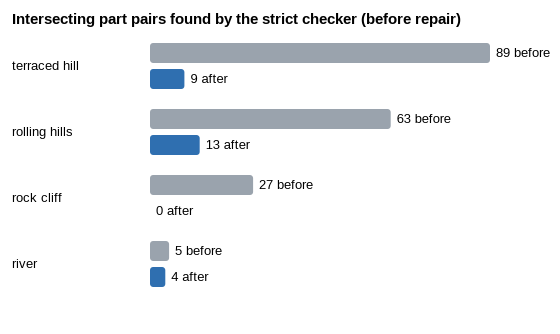
Those remaining pairs are what the repair step then removes. All 25 plant and rock generators
pass the strict check on their own (pytest).
Benchmark
Does an AI design better LEGO with BrickScape than without it? Six briefs, each built twice by
fresh Claude Code sessions (one with BrickScape, one without), then scored with blind,
position-swapped judging. Run v1, 2026-11-27.
Results
| BrickScape | plain Claude | |
|---|---|---|
| total build time (6 builds) | 21.5 min | 170.5 min (7.9x longer) |
| total cost, API-equivalent | $2.06 | $18.35 (8.9x more) |
| builds passing the strict checker | 6 / 6 | 0 / 6 |
| accuracy (wins-ties-losses for BrickScape) | 5-1-0, average score 8.2 / 10 | 4.2 / 10 |
| looks (wins-ties-losses for BrickScape) | 5-1-0, average score 7.4 / 10 | 4.8 / 10 |
| efficiency (cheaper and faster) | 6-0-0 |
Win rate / win-or-tie rate: efficiency 100% / 100%, accuracy 83% / 100%, looks 83% / 100%.
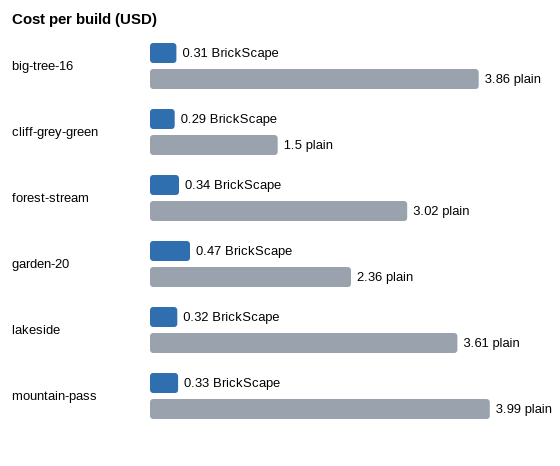
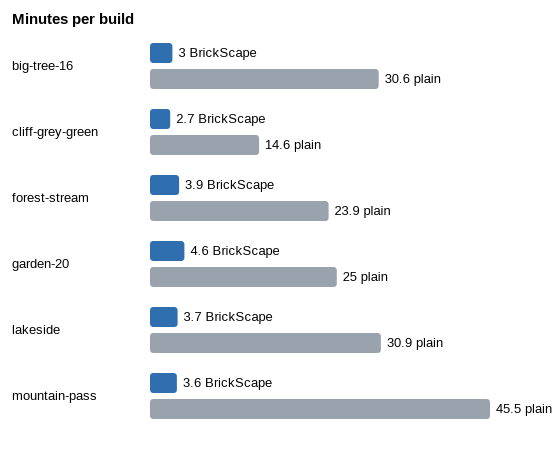
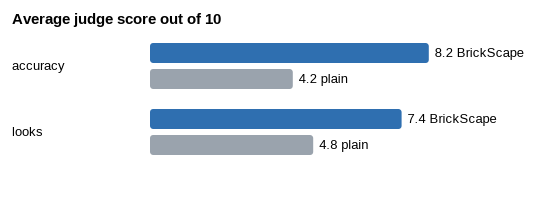
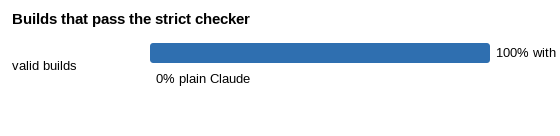
| prompt | kind | cheaper | faster | accuracy (scores) | looks (scores) | BrickScape: parts, valid, min, $ | plain: parts, valid, min, $ |
|---|---|---|---|---|---|---|---|
| big-tree-16 | constrained | 12.4x | 10.2x | win (8.5 vs 3.0) | tie (6.5 vs 6.5) | 180, yes, 3.0, 0.31 | 127, no, 30.6, 3.86 |
| cliff-grey-green | constrained | 5.2x | 5.4x | tie (6.5 vs 7.5) | win (7.0 vs 2.0) | 910, yes, 2.7, 0.29 | 120, no, 14.6, 1.50 |
| forest-stream | broad | 9.0x | 6.1x | win (8.5 vs 2.5) | win (7.5 vs 5.5) | 665, yes, 3.9, 0.34 | 103, no, 23.9, 3.02 |
| garden-20 | constrained | 5.0x | 5.4x | win (9.0 vs 2.5) | win (8.0 vs 5.0) | 229, yes, 4.6, 0.47 | 121, no, 25.0, 2.36 |
| lakeside | broad | 11.3x | 8.4x | win (8.5 vs 5.0) | win (8.0 vs 4.5) | 518, yes, 3.7, 0.32 | 82, no, 30.9, 3.61 |
| mountain-pass | broad | 12.1x | 12.6x | win (8.0 vs 4.5) | win (7.5 vs 5.5) | 1868, yes, 3.6, 0.33 | 220, no, 45.5, 3.99 |
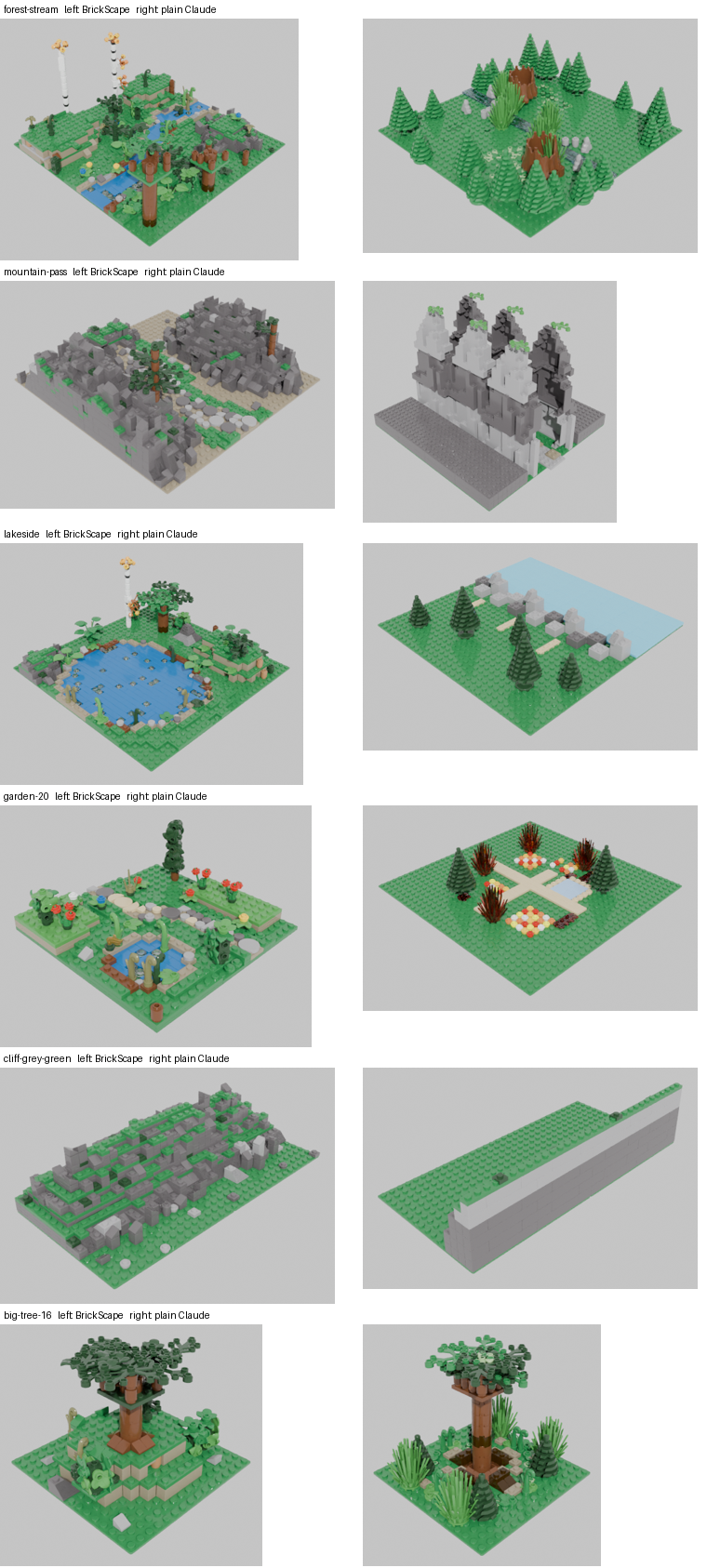
Every benchmark build from the same front-left camera: BrickScape left, plain Claude right.
What the judges said, in short: plain Claude's builds are much simpler (a flat blue slab for a lake, a single grey wall for a cliff, columns for a mountain pass) and none of them is buildable as delivered: every one has intersecting or floating parts, or colours LEGO doesn't make. The two ties are fair calls: on the cliff, one judge felt BrickScape's rock spread over the whole board instead of forming a clear wall along the back; on the big tree, each judge preferred a different tree.
Costs are Claude Code's API-equivalent estimates per session; with a Claude subscription they count against the plan's usage instead of being billed.
Prompts
bench/prompts.json: three broad briefs, three with constraints, and one recreation from a reference photo.
| id | kind | brief |
|---|---|---|
| forest-stream | broad | A small forest clearing with a stream running through it. |
| mountain-pass | broad | A rocky mountain pass with a path winding between the rocks. |
| lakeside | broad | A peaceful lakeside scene with a rocky shore and some trees. |
| garden-20 | constrained | On a 20 x 20 flat space: a garden with a pond, flower beds and a path; at most 400 parts. |
| cliff-grey-green | constrained | On 32 x 16: a cliff along the back at least 4 bricks tall; only grey and green parts. |
| big-tree-16 | constrained | On 16 x 16: one large tree with roots and undergrowth; fewer than 250 parts. |
| waterfall-ref | reference | Recreate the diorama in a photo: a rock cliff with a waterfall, a stream, a large tree. (in the benchmark, not in run v1 yet) |
The reference photo is "Waterfall" by Fuchs (MOC-59853) on Rebrickable, used with credit as the target for the recreation prompt. Both builders get the same photo, and the accuracy judges compare each build against it.
Method
Code: bench/run.py.
- For each prompt, two fresh headless Claude Code sessions get the same brief and the same
requirements (real parts and colours, physically buildable, deliver
model.ldr). Each runs in its own empty folder with no project instructions, no memory and no other MCP servers. One has BrickScape; the other has the same file and shell tools and the LDraw library path. - Both models go through the same renderer (the same four camera angles) and the same strict checker.
- Each prompt is scored in three categories, each a win, tie or loss for BrickScape:
- Efficiency (measured, no judge): cost and wall-clock time of the build session. Cheaper and faster is a win, worse on both is a loss, a mix is a tie.
- Accuracy (judged): how closely the build delivers the brief and keeps its limits (board size, part count, colours, required features), and whether it can be built. The judge sees the renders plus measured facts about each build: size, part count, colours used and the strict checker's results.
- Looks (judged): the renders only, nothing else, and the judge is told to score appearance alone.
- Every judged category uses two fresh Claude sessions with A and B swapped, so the position can't decide it: BrickScape wins both rounds = win, one each = tie, neither = loss. A prompt where neither side produced a model is left out rather than scored.
- Reported per category: win rate and win-or-tie rate, plus how many builds of each side pass the strict checker, and total cost and time.
Run it yourself (it resumes where it stopped, e.g. after hitting a usage limit):
python bench/run.py --run myrun                 # build, render, judge, report
python bench/run.py --run myrun --prompts waterfall-ref
The report writes bench/results/<run>/results.json and the charts and table in docs/bench/.
Command line
brickscape guide                         # the planning guide
brickscape build examples/forest-clearing.json
brickscape render forest-clearing        # 4 standard views
brickscape export forest-clearing        # Studio .io
brickscape parts forest-clearing         # parts.csv + bricklink.xml
brickscape instructions forest-clearing  # PDF
brickscape check some_model.io           # validate any model
Limitations
- Generators are landscape-focused: terrain, rock, water, paths and plants. Buildings and
vehicles have to come from
brick/ldrawoperations. - Connection checking is only as complete as the LDCad data. Parts without detailed data get studs on top and anti-studs under their bottom face, and the report lists them.
- No gravity or clutch-strength check.
- Studio
.ioexport writes the LDraw model (model.ldr, LDraw colours) in Studio's encrypted zip format; it round-trips through Python's zip reader but has not yet been tested in every Studio version.
Credits
- LDraw parts library (CC BY 4.0).
- ldraw-mcp by Jaret Arnold (MIT): Blender rendering pipeline and setup.
- ImportLDraw by Toby Nelson: the Blender add-on.
- LDCad shadow library by Roland Melkert (CC BY-SA 4.0): connection data, downloaded at setup.
- Rebrickable: part, colour and element tables, downloaded at setup.
- Benchmark reference photo: "Waterfall" by Fuchs (MOC-59853).
MIT licensed. LEGO is a trademark of the LEGO Group, which does not sponsor or endorse this project.
1 maintainer

Metadata
1 maintainer
Release files for brickscape 0.1.0
For a detailed explanation of source distributions (sdists) and built distributions (wheels), please see the package formats documentation.
Source distribution (sdist)
| File | Size | Uploaded | Provenance | Actions |
|---|---|---|---|---|
| brickscape-0.1.0.tar.gz | 132.9 kB | With provenance | Details for brickscape-0.1.0.tar.gz |
Built distribution (wheel)
| File | Interpreter | ABI | Platform | Actions Reset |
|---|---|---|---|---|
| brickscape-0.1.0-py3-none-any.whl | Python 3 | none | any | Details for brickscape-0.1.0-py3-none-any.whl |
Total release size: 272.9 kB
Release files / brickscape-0.1.0.tar.gz
| Download URL | brickscape-0.1.0.tar.gz |
|---|---|
| Size | 132.9 kB |
| Tags | Source |
|
SHA-256 checksum How to use checksums |
b393325caee6673bb0a5a923c9b88bbd61b2d7d776adcf976c41a69f6dab400e
|
|
BLAKE2b-256 checksum How to use checksums |
690df0068c9e2da87906498b14dc25ac50f1694b31ab436b6108e52841e7d99c
|
| Upload date | |
|
Uploaded using Trusted Publishing? What is trusted publishing? |
Yes |
| Uploaded via |
twine/7.0.0 CPython/3.13.16
|
Provenance
Provenance describes where a file came from. On PyPI, provenance is shared via attestations, which provide a verifiable record of the build or publishing details. View details, limitations and caveats.


PyPI Publish Attestation
PyPI verified that this artifact, at this checksum, originated from the publisher listed below.
Signed by GitHub Actions, verified by PyPI on Nov 27, 2026.
Transparency logRelease files / brickscape-0.1.0-py3-none-any.whl
| Download URL | brickscape-0.1.0-py3-none-any.whl |
|---|---|
| Size | 139.9 kB |
| Tags | Python 3 |
|
SHA-256 checksum How to use checksums |
d10d68597e792385798316488afef827ad305eeb28533ad5257205230072a852
|
|
BLAKE2b-256 checksum How to use checksums |
2ffeee7983adad94cbf754c5c1a0695d9aaaf624c39176f3947f3223ffe75a51
|
| Upload date | |
|
Uploaded using Trusted Publishing? What is trusted publishing? |
Yes |
| Uploaded via |
twine/7.0.0 CPython/3.13.16
|
Provenance
Provenance describes where a file came from. On PyPI, provenance is shared via attestations, which provide a verifiable record of the build or publishing details. View details, limitations and caveats.
PyPI Publish Attestation
PyPI verified that this artifact, at this checksum, originated from the publisher listed below.
Signed by GitHub Actions, verified by PyPI on Nov 27, 2026.
Transparency logSecurity for brickscape 0.1.0
Provenance
Provenance describes where a file came from. On PyPI, provenance is shared via attestations, which provide a verifiable record of the build or publishing details. View details, limitations and caveats.
Full provenance
Both files in this release have been uploaded with provenance metadata.
Attestation for brickscape-0.1.0.tar.gz
PyPI Publish Attestation
PyPI verified that this artifact, at this checksum, originated from the publisher listed below.
Signed by GitHub Actions, verified by PyPI on Nov 27, 2026.
Transparency logA note on package security
PyPI is a repository for distributing packages, not a service for auditing them. While third-party security researchers and our staff do their best to detect and remove malicious packages, PyPI cannot guarantee the quality, security or suitability of any given package.
To learn more about protecting yourself from malicious actors, visit our package security documentation.













