
briefing


Build beautiful, self-contained reports from Python, authored by a person, a coding agent, or both.
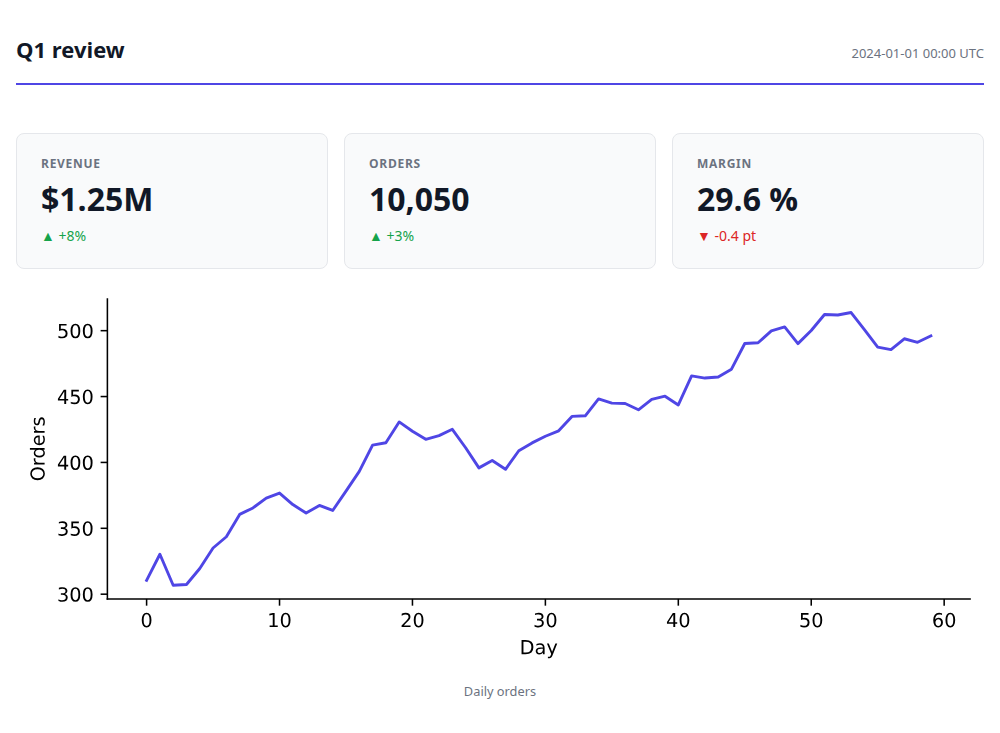
A report is a short list of blocks (Text, BigNumber, Plot, DataTable, Group, Select, …),
saved as one HTML file with every script, style and image inside it: no CDN, no server, no
account. It opens offline, forever, and prints, or exports to PNG and PDF, cleanly.
Why briefing exists
Three things led me here:
- Coding agents are good at making something to show you, not at making it consistently. A few months of building with coding agents surfaced the same gap every time: they're happy to produce an artifact, but each one comes out with its own structure, and nothing tracks how a piece of content evolved across a project. There was no shared grammar a person and an agent could both build reports from as the report generation was opaque.
- datapane was the cleanest report builder I'd used. Block-based, self-contained HTML output, a dead-simple API. I relied on it constantly to turn Python analysis into reports for stakeholders and to monitor pipelines. It was decommissioned in 2023 when the SaaS behind it shut down, and nothing since has replaced it.
- No visualization tool covers everything, and the ones that push furthest often don't stick around. Years of building visualizations taught me that every tool, however good, eventually falls short of the next thing you want to show. The niche packages that do push past that, like Facets (PAIR / Google) and its Facets Dive explorer, bring real value but rarely stay maintained. I wanted a place of my own to keep building and sharing that kind of custom, interactive visualization, without depending on someone else's side project staying alive.
briefing is built to close all three gaps at once: a block grammar solid enough for me and my coding agents to build reports from consistently, with datapane's simplicity and a home for the custom, interactive visualization that inspired it. All of it self-contained, offline, with no cloud account required.
Install
pip install briefing                 # the block grammar and the HTML renderer
pip install "briefing[pandas]"       # tables from dataframes
pip install "briefing[lab]"          # DataProfile, DataDive, CalendarHeatmap
pip install "briefing[image]"        # save_image / save_pdf (then: playwright install chromium)
The core has no plotting or dataframe dependency. Plot takes a Plotly, Altair, Matplotlib or
Bokeh figure and imports only the library you pass; install [plotly], [altair], [bokeh],
[matplotlib] or all of them with [charts]. Python 3.11+, pandas 2 and 3; polars and pyarrow
tables are converted for you.
Quick start
import briefing as bf

report = bf.Briefing(
    bf.Text("# Sales Analysis, Q1 2024"),
    bf.Group(
        bf.BigNumber("Revenue", "$4.2M", change="-12%", is_upward_change=False),
        bf.BigNumber("Active Users", "142K", change="+3%", is_upward_change=True),
        columns=2,
    ),
    bf.Select(
        bf.Plot(fig, label="Trend"),
        bf.DataTable(df, label="Raw Data"),
        bf.lab.DataProfile(df, label="Profile"),
    ),
)

bf.save(report, "q1_analysis.html", name="Sales, Q1 2024")
Here df is a dataframe and fig a chart from any supported library. In a notebook, any block
previews itself as the last expression of a cell.
With briefing[image], bf.save_image(report, "q1.png", size="og") renders a 1200×630 social
card and bf.save_pdf(report, "q1.pdf") a PDF of every page, both offline in headless Chromium.
Documentation
briefing.readthedocs.io has a guide for each block family
with live examples, themes, notebooks, printing and export, the briefing.lab blocks, recipes and
the full API reference.
- Changelog
examples/notebook_walkthrough.ipynb: build a report cell by cell, then save it (the report it saves)- Issues: bugs, ideas and the roadmap
1 maintainer

Metadata
1 maintainer
Release files for briefing 0.2.1
For a detailed explanation of source distributions (sdists) and built distributions (wheels), please see the package formats documentation.
Source distribution (sdist)
| File | Size | Uploaded | Provenance | Actions |
|---|---|---|---|---|
| briefing-0.2.1.tar.gz | 150.7 kB | With provenance | Details for briefing-0.2.1.tar.gz |
Built distribution (wheel)
| File | Interpreter | ABI | Platform | Actions Reset |
|---|---|---|---|---|
| briefing-0.2.1-py3-none-any.whl | Python 3 | none | any | Details for briefing-0.2.1-py3-none-any.whl |
Total release size: 245.5 kB
Release files / briefing-0.2.1.tar.gz
| Download URL | briefing-0.2.1.tar.gz |
|---|---|
| Size | 150.7 kB |
| Tags | Source |
|
SHA-256 checksum How to use checksums |
3f29fc83d5b8993ce47c9ae913fc04eed9e56d8f3c37c72b7f846b7c31612abf
|
|
BLAKE2b-256 checksum How to use checksums |
14f0037ed7927f198f669e4f60f272ea3f7e47cbbec60ec236fd380d5389e127
|
| Upload date | |
|
Uploaded using Trusted Publishing? What is trusted publishing? |
Yes |
| Uploaded via |
twine/7.0.0 CPython/3.13.16
|
Provenance
Provenance describes where a file came from. On PyPI, provenance is shared via attestations, which provide a verifiable record of the build or publishing details. View details, limitations and caveats.


PyPI Publish Attestation
PyPI verified that this artifact, at this checksum, originated from the publisher listed below.
Signed by GitHub Actions, verified by PyPI on Nov 4, 2026.
Transparency logRelease files / briefing-0.2.1-py3-none-any.whl
| Download URL | briefing-0.2.1-py3-none-any.whl |
|---|---|
| Size | 94.8 kB |
| Tags | Python 3 |
|
SHA-256 checksum How to use checksums |
6ce4030e1bad0b0bb4bca37bd8449444eb65535b29d47282abe0233a8692afa0
|
|
BLAKE2b-256 checksum How to use checksums |
c685fa47af8ae60c80874a63d3ecc2ae33953bc46e919f23b426ec1f9650fa14
|
| Upload date | |
|
Uploaded using Trusted Publishing? What is trusted publishing? |
Yes |
| Uploaded via |
twine/7.0.0 CPython/3.13.16
|
Provenance
Provenance describes where a file came from. On PyPI, provenance is shared via attestations, which provide a verifiable record of the build or publishing details. View details, limitations and caveats.
PyPI Publish Attestation
PyPI verified that this artifact, at this checksum, originated from the publisher listed below.
Signed by GitHub Actions, verified by PyPI on Nov 4, 2026.
Transparency logSecurity for briefing 0.2.1
Provenance
Provenance describes where a file came from. On PyPI, provenance is shared via attestations, which provide a verifiable record of the build or publishing details. View details, limitations and caveats.
Full provenance
Both files in this release have been uploaded with provenance metadata.
Attestation for briefing-0.2.1.tar.gz
PyPI Publish Attestation
PyPI verified that this artifact, at this checksum, originated from the publisher listed below.
Signed by GitHub Actions, verified by PyPI on Nov 4, 2026.
Transparency logA note on package security
PyPI is a repository for distributing packages, not a service for auditing them. While third-party security researchers and our staff do their best to detect and remove malicious packages, PyPI cannot guarantee the quality, security or suitability of any given package.
To learn more about protecting yourself from malicious actors, visit our package security documentation.














