



brinicle
brinicle is a disk-first HNSW retrieval engine for vector search, structured item search, hybrid search, and autocomplete. It gives you a simple Python API for building search over embeddings, product catalogs, structured records, and query suggestions without running a heavy search database.
On 1.2 Million Amazon products, brinicle achieved sub-millisecond p99 latency and 1,731 MB peak search memory, the lowest among brinicle, Meilisearch, OpenSearch, Typesense, and Weaviate. It also achieved the best Hit@1 and nDCG@10 in that benchmark.
pip install brinicle
import numpy as np
import brinicle

D = 384
n = 1000

X = np.random.randn(n, D).astype(np.float32)
q = np.random.randn(D).astype(np.float32)

engine = brinicle.VectorEngine("vector_index", dim=D)

engine.init(mode="build")

for i in range(n):
    engine.ingest(str(i), X[i])

engine.finalize()

print(engine.search(q, k=10))
["42", "318", "7", "901", "114", "68", "529", "203", "771", "16"]
Benchmark
brinicle has two public benchmark suites:
- Vector search benchmark: compares brinicle with Chroma, Weaviate, Milvus, Qdrant, FAISS, and hnswlib on vector search workloads.
- Hybrid search benchmark: compares brinicle with Meilisearch, OpenSearch, Typesense, and Weaviate on hybrid product search over Amazon ESCI and WANDS.
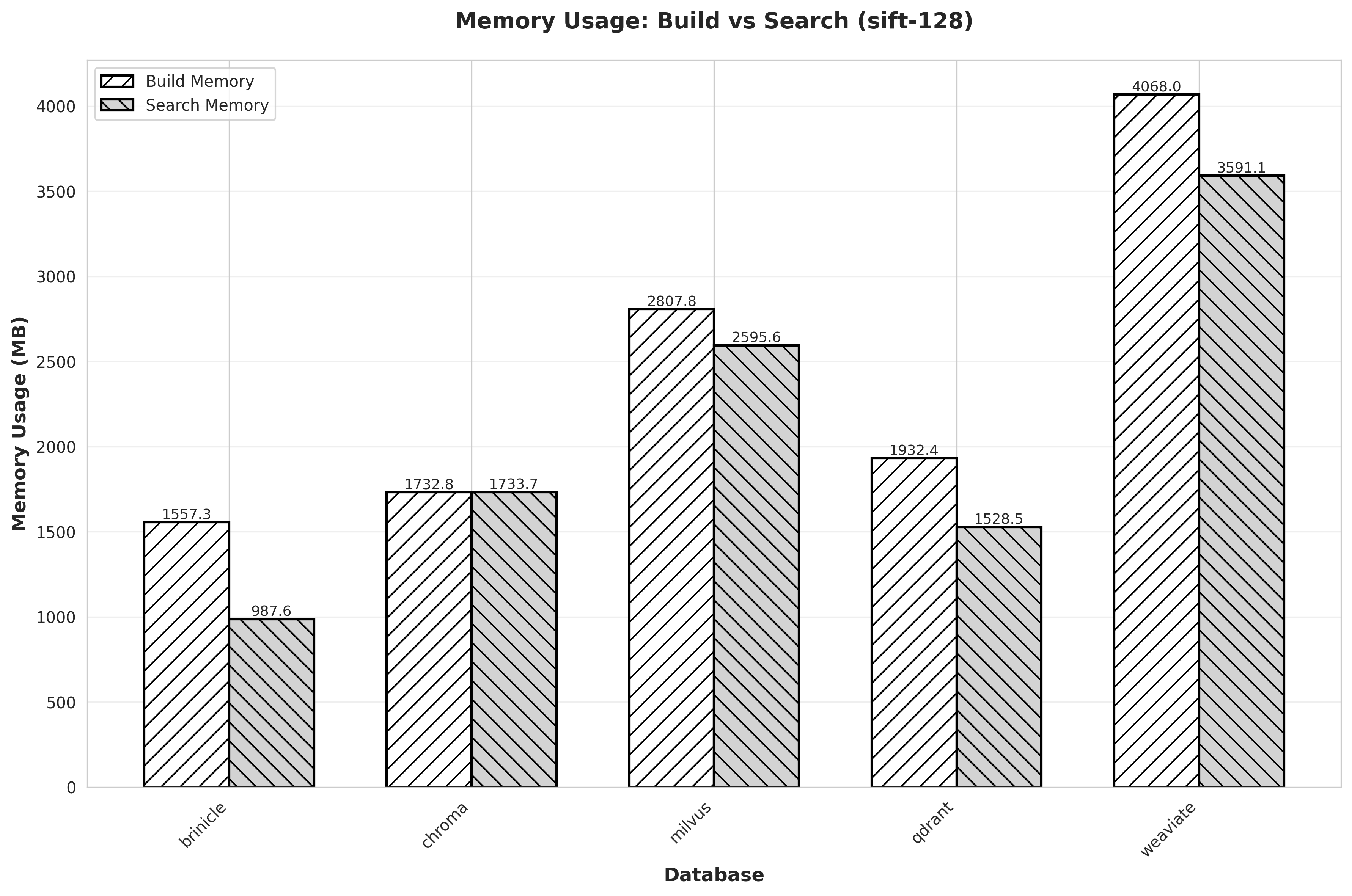
In a 256MB RAM / 1 CPU container using MNIST 60K vectors:
| System | Outcome |
|---|---|
| brinicle | PASS |
| chroma | PASS |
| qdrant | OOMKilled |
| weaviate | OOMKilled |
| milvus | OOMKilled |
On SIFT 1M vectors, using the same in-process deployment model as FAISS and hnswlib:
| System | Build (s) | Recall@10 | Avg latency (ms) | QPS |
|---|---|---|---|---|
| faiss | 237.282 | 0.96999 | 0.092 | 10857.43 |
| hnswlib | 241.301 | 0.96364 | 0.093 | 10711.86 |
| brinicle | 234.572 | 0.97004 | 0.095 | 10563.05 |
In this benchmark suite, brinicle stays close to FAISS and hnswlib latency while using a disk-backed index design.
Install
Install from PyPI:
pip install brinicle
Or build from source:
git clone https://github.com/bicardinal/brinicle.git
cd brinicle
pip install -e .
Engines
brinicle exposes three high-level engines with the same lifecycle:
engine.init(...)
engine.ingest(...)
engine.finalize()
engine.search(...)
| Engine | Use case | Input |
|---|---|---|
VectorEngine |
Raw ANN vector search | float32 vectors |
ItemSearchEngine |
Lexical, semantic, and hybrid item search | title, category, subcategory, attributes, optional vectors |
AutocompleteEngine |
Query/title suggestions | suggestion text |
All engines support the same operational model:
| Operation | VectorEngine |
ItemSearchEngine |
AutocompleteEngine |
|---|---|---|---|
| Build | Yes | Yes | Yes |
| Insert | Yes | Yes | Yes |
| Upsert | Yes | Yes | Yes |
| Delete | Yes | Yes | Yes |
| Search | Yes | Yes | Yes |
| Batch search | Yes | Yes | Yes |
| Search with distance | Yes | Yes | Yes |
| Compact rebuild | Yes | Yes | Yes |
| Graph optimization | Yes | Yes | Yes |
Features
- Disk-first HNSW search
- Low-RAM indexing and querying
- Streaming-first ingest: one vector, item, or suggestion at a time
- Raw vector search through
VectorEngine - Structured item search through
ItemSearchEngine - Lexical, semantic, and hybrid item search through one HNSW index
- Alpha-controlled item search: lexical-only, semantic-only, or hybrid
- Autocomplete and query suggestion search through
AutocompleteEngine - Insert, upsert, delete, compact rebuild, and graph optimization
- Simple Python API backed by a C++ search core
Core lifecycle
brinicle uses the same lifecycle across all engines.
Build a new index:
engine.init(mode="build")

for record in records:
    engine.ingest(...)

engine.finalize()
Insert new records into an existing index:
engine.init(mode="insert")

for record in new_records:
    engine.ingest(...)

engine.finalize()
Upsert records by external id:
engine.init(mode="upsert")

for record in updated_records:
    engine.ingest(...)

engine.finalize()
Search after the index is finalized:
results = engine.search(query, k=10)
Delete records by external id:
deleted_count, not_found = engine.delete_items(
    ["id1", "id2", "missing-id"],
    return_not_found=True,
)
Compact and rebuild the index when needed:
if engine.needs_rebuild():
    engine.rebuild_compact()
Optimize graph layout:
engine.optimize_graph()
Vector search
Use VectorEngine for vector search.
import numpy as np
import brinicle

D = 384
n = 1000

X = np.random.randn(n, D).astype(np.float32)
q = np.random.randn(D).astype(np.float32)

engine = brinicle.VectorEngine(
    "vector_index",
    dim=D,
)

engine.init(mode="build")

for i in range(n):
    engine.ingest(str(i), X[i])

engine.finalize()

results = engine.search(q, k=10)

print(results)
search(...) returns external ids:
["42", "318", "7", "901", "114", "68", "529", "203", "771", "16"]
To return distances too:
results = engine.search_with_distance(q, k=10)

print(results)
Example output:
[
    ("42", 0.1842),
    ("318", 0.2075),
    ("7", 0.2198),
]
To run batch search:
Q = np.random.randn(32, D).astype(np.float32)

results = engine.search_batch(
    Q,
    k=10,
    n_jobs=4,
)

print(results)
Vector insert
Use insert mode to add new vectors to an existing index.
Y = np.random.randn(5, D).astype(np.float32)

engine.init(mode="insert")

for i in range(5):
    engine.ingest(f"new-{i}", Y[i])

engine.finalize()

print(engine.search(q, k=10))
Vector upsert
Use upsert mode to replace existing records or insert them if they do not exist.
Y = np.random.randn(5, D).astype(np.float32)

engine.init(mode="upsert")

for i in range(5):
    engine.ingest(str(i), Y[i])

engine.finalize()

print(engine.search(q, k=10))
Vector delete
Delete records by external id:
deleted_count, not_found = engine.delete_items(
    ["1", "4", "missing"],
    return_not_found=True,
)

print(deleted_count)
print(not_found)
Vector rebuild and optimize
After many inserts, upserts, or deletes, the index may need a compact rebuild.
if engine.needs_rebuild():
    engine.rebuild_compact(
        M=48,
        ef_construction=1024,
        ef_search=512,
        build_n_threads=4,
    )
You can also optimize the graph:
engine.optimize_graph()
Vector configuration
VectorEngine exposes common HNSW parameters:
engine = brinicle.VectorEngine(
    "vector_index",
    dim=384,
    M=48,
    ef_construction=1024,
    ef_search=512,
    delta_ratio=0.1,
)
| Parameter | Meaning |
|---|---|
dim |
Vector dimensionality |
M |
Maximum graph degree used by HNSW |
ef_construction |
Construction-time search width |
ef_search |
Query-time search width |
build_n_threads |
Build n threads, higher, faster build |
delta_ratio |
Delta segment ratio before rebuild is recommended |
Item search
Use ItemSearchEngine for catalog-like records with titles, metadata, and optional semantic vectors.
Each item can contain:
titlecategorysubcategoryattributes- an optional semantic vector
Only title is required.
ItemSearchEngine supports three practical modes:
| Mode | How to use it |
|---|---|
| Lexical-only item search | Use structured fields only and set alpha=0.0 |
| Semantic-only item search | Provide vectors and set alpha=1.0 |
| Hybrid item search | Provide structured fields and vectors, then use 0.0 < alpha < 1.0 |
brinicle does not build separate lexical and vector indexes for item search. Structured lexical signals and optional semantic vectors are encoded into one numeric representation and searched through the same HNSW graph.
Lexical item search
Use lexical item search when you want structured catalog search without external embeddings.
import brinicle

engine = brinicle.ItemSearchEngine(
    "item_index",
    dim=96,
    alpha=0.0,  # lexical-only
)

engine.init(mode="build")

engine.ingest(
    external_id="p1",
    title="Apple iPhone 15 Pro Max 256GB Natural Titanium",
    category="Electronics",
    subcategory="Smartphones",
    attributes={
        "brand": "Apple",
        "storage": "256GB",
        "color": "Natural Titanium",
    },
)

engine.ingest(
    external_id="p2",
    title="Samsung Galaxy S24 Ultra 512GB Black",
    category="Electronics",
    subcategory="Smartphones",
    attributes={
        "brand": "Samsung",
        "storage": "512GB",
        "color": "Black",
    },
)

engine.finalize()

print(engine.search("iphone 15 pro max", k=10))
Example output:
["p1", "p2"]
You can also pass query-side metadata:
results = engine.search(
    "iphone 15 pro max",
    category="Electronics",
    subcategory="Smartphones",
    attributes={
        "brand": "Apple",
        "storage": "256GB",
    },
    k=10,
)
Hybrid item search
Use hybrid item search when you want exact structured signals and semantic similarity in the same retrieval path.
import numpy as np
import brinicle

VECTOR_DIM = 384

engine = brinicle.ItemSearchEngine(
    "hybrid_item_index",
    dim=96,
    vector_dim=VECTOR_DIM,
    alpha=0.95,  # mostly semantic, with lexical correction
    vector_normalized=True,
    M=48,
    ef_construction=1024,
    ef_search=512,
)

engine.init(mode="build")

engine.ingest(
    external_id="p1",
    title="Apple iPhone 15 Pro Max 256GB Natural Titanium",
    category="Electronics",
    subcategory="Smartphones",
    attributes={
        "brand": "Apple",
        "storage": "256GB",
        "color": "Natural Titanium",
    },
    vector=np.random.randn(VECTOR_DIM).astype("float32"),
    normalize=True,
)

engine.ingest(
    external_id="p2",
    title="Samsung Galaxy S24 Ultra 512GB Black",
    category="Electronics",
    subcategory="Smartphones",
    attributes={
        "brand": "Samsung",
        "storage": "512GB",
        "color": "Black",
    },
    vector=np.random.randn(VECTOR_DIM).astype("float32"),
    normalize=True,
)

engine.finalize()

query_vector = np.random.randn(VECTOR_DIM).astype("float32")

results = engine.search(
    "iphone 15 pro max",
    category="Electronics",
    subcategory="Smartphones",
    attributes={
        "brand": "Apple",
    },
    vector=query_vector,
    normalize=True,
    k=10,
)

print(results)
Item batch search
ItemSearchEngine.search_batch(...) runs multiple independent item searches.
For text-only batch search:
queries = [
    "iphone 15 pro max",
    "samsung s24 ultra",
    "wireless mouse",
]

results = engine.search_batch(
    queries,
    k=10,
    n_jobs=4,
)
For batch search with per-query metadata:
queries = [
    "iphone 15 pro max",
    "running shoes size 42",
    "wireless mouse",
]

categories = [
    "Electronics",
    "Fashion",
    "Electronics",
]

subcategories = [
    "Smartphones",
    "Shoes",
    "Computer Accessories",
]

attributes_list = [
    {"brand": "Apple", "storage": "256GB"},
    {"size": "42", "gender": "men"},
    {"connection": "wireless"},
]

results = engine.search_batch(
    queries,
    categories=categories,
    subcategories=subcategories,
    attributes_list=attributes_list,
    k=10,
    n_jobs=4,
)
For hybrid batch search, pass one vector per query:
vectors = np.random.randn(len(queries), VECTOR_DIM).astype("float32")

results = engine.search_batch(
    queries,
    categories=categories,
    subcategories=subcategories,
    attributes_list=attributes_list,
    vectors=vectors,
    normalize=True,
    k=10,
    n_jobs=4,
)
Item insert
Use insert mode to add new items to an existing index.
engine.init(mode="insert")

engine.ingest(
    external_id="p3",
    title="Google Pixel 8 Pro 256GB Bay",
    category="Electronics",
    subcategory="Smartphones",
    attributes={
        "brand": "Google",
        "storage": "256GB",
        "color": "Bay",
    },
)

engine.finalize()
Item upsert
Use upsert mode to replace existing items or insert them if they do not exist.
engine.init(mode="upsert")

engine.ingest(
    external_id="p1",
    title="Apple iPhone 15 Pro Max 512GB Natural Titanium",
    category="Electronics",
    subcategory="Smartphones",
    attributes={
        "brand": "Apple",
        "storage": "512GB",
        "color": "Natural Titanium",
    },
)

engine.finalize()
Item delete, rebuild, and optimize
Delete items by external id:
deleted_count, not_found = engine.delete_items(
    ["p1", "p9"],
    return_not_found=True,
)
Compact the index when needed:
if engine.needs_rebuild():
    engine.rebuild_compact(
        M=48,
        ef_construction=1024,
        ef_search=512,
        build_n_threads=4,
    )
Optimize graph layout:
engine.optimize_graph()
Understanding alpha
alpha controls the balance between semantic vector similarity and structured lexical matching.
alpha |
Behavior |
|---|---|
0.0 |
lexical-only |
0.5 |
balanced lexical + semantic |
0.95 |
mostly semantic, with lexical correction |
1.0 |
semantic-only |
For semantic-only and hybrid search, pass vector_dim during engine construction and provide vectors during ingest(...) and search(...).
Choose alpha before building the index. In brinicle, alpha affects graph construction as well as search scoring; it is not only a query-time reranking parameter.
Autocomplete
Use AutocompleteEngine for low-RAM autocomplete and query suggestion search.
It can be used to index:
- popular queries
- item titles
- category names
- curated suggestions
import brinicle

ac = brinicle.AutocompleteEngine(
    "autocomplete_index",
    dim=48,
)

ac.init(mode="build")

ac.ingest("iphone 15 pro max", "iphone 15 pro max")
ac.ingest("iphone 15 case", "iphone 15 case")
ac.ingest("samsung s24 ultra", "samsung s24 ultra")

ac.finalize()

print(ac.search("iph", k=5))
Example output:
["iphone 15 pro max", "iphone 15 case"]
Autocomplete currently works best for prefix-aligned query and title suggestions.
Autocomplete batch search
queries = [
    "iph",
    "sams",
    "iphone ca",
]

results = ac.search_batch(
    queries,
    k=5,
    n_jobs=4,
)

print(results)
Autocomplete insert
Use insert mode to add suggestions to an existing autocomplete index.
ac.init(mode="insert")

ac.ingest("iphone 16 pro", "iphone 16 pro")
ac.ingest("iphone 16 pro case", "iphone 16 pro case")

ac.finalize()
Autocomplete upsert
Use upsert mode to replace existing suggestions or insert them if they do not exist.
ac.init(mode="upsert")

ac.ingest("iphone 15 pro max", "iphone 15 pro max 256gb")

ac.finalize()
Autocomplete delete, rebuild, and optimize
Delete suggestions by external id:
deleted_count, not_found = ac.delete_items(
    ["iphone 15 case", "missing-suggestion"],
    return_not_found=True,
)
Compact the index when needed:
if ac.needs_rebuild():
    ac.rebuild_compact(
        M=32,
        ef_construction=512,
        ef_search=128,
        build_n_threads=4,
    )
Optimize graph layout:
ac.optimize_graph()
Streaming-first ingest
brinicle ingests records one at a time, so the full dataset does not need to fit in memory.
engine.init(mode="build")

for item in stream_items():
    engine.ingest(...)

engine.finalize()
This applies to all engines:
VectorEngineItemSearchEngineAutocompleteEngine
Configuration
brinicle exposes common HNSW parameters:
engine = brinicle.VectorEngine(
    "vector_index",
    dim=384,
    M=48,
    ef_construction=1024,
    ef_search=512,
    delta_ratio=0.1,
)
| Parameter | Meaning |
|---|---|
M |
Maximum graph degree used by HNSW |
ef_construction |
Construction-time search width |
ef_search |
Query-time search width |
delta_ratio |
Delta segment ratio before rebuild is recommended |
ItemSearchEngine supports alpha-controlled lexical, semantic, and hybrid scoring.
engine = brinicle.ItemSearchEngine(
    "item_index",
    dim=96,
    vector_dim=384,
    alpha=0.95,
)
Advanced users can pass a custom LexicalConfig.
cfg = brinicle.LexicalConfig()

cfg.search_title_weight = 0.60
cfg.search_category_weight = 0.15
cfg.search_subcategory_weight = 0.15
cfg.search_attr_weight = 0.10

cfg.build_title_weight = 0.60
cfg.build_category_weight = 0.15
cfg.build_subcategory_weight = 0.15
cfg.build_attr_weight = 0.10

engine = brinicle.ItemSearchEngine(
    "item_index",
    dim=96,
    lexical_config=cfg,
)
AutocompleteEngine also supports its own scoring configuration.
cfg = brinicle.AutocompleteConfig()

cfg.search_position_decay = 0.5
cfg.search_length_penalty = 0.2

ac = brinicle.AutocompleteEngine(
    "autocomplete_index",
    dim=48,
    autocomplete_config=cfg,
)
Index files
For an index path such as:
engine = brinicle.VectorEngine("my_index", dim=128)
brinicle stores index files beside that base path:
my_index.main
my_index.delta
my_index.lock
Which engine should I use?
Use VectorEngine when you already have embeddings or numeric vectors.
Use ItemSearchEngine for catalog-like records with titles, metadata, and optional semantic vectors:
alpha=0.0for lexical-only searchalpha=1.0for semantic-only search0.0 < alpha < 1.0for hybrid search
Use AutocompleteEngine for low-RAM query or title suggestions.
License
brinicle is licensed under the Apache License, Version 2.0.
See the LICENSE file.
1 maintainer

Metadata
1 maintainer
Release files for brinicle 0.1.3
For a detailed explanation of source distributions (sdists) and built distributions (wheels), please see the package formats documentation.
Built distributions (wheels)
| File | Reset | |||
|---|---|---|---|---|
| brinicle-0.1.3-cp314-cp314t-musllinux_1_2_x86_64.whl | CPython 3.14 | CPython 3.14 free-threading | Linux musl 1.2+ x86-64 | Details |
| brinicle-0.1.3-cp314-cp314t-manylinux_2_27_x86_64.manylinux_2_28_x86_64.whl | CPython 3.14 | CPython 3.14 free-threading | Linux glibc 2.27+ x86-64, Linux glibc 2.28+ x86-64 | Details |
| brinicle-0.1.3-cp314-cp314-musllinux_1_2_x86_64.whl | CPython 3.14 | CPython 3.14 | Linux musl 1.2+ x86-64 | Details |
| brinicle-0.1.3-cp314-cp314-manylinux_2_27_x86_64.manylinux_2_28_x86_64.whl | CPython 3.14 | CPython 3.14 | Linux glibc 2.28+ x86-64, Linux glibc 2.27+ x86-64 | Details |
| brinicle-0.1.3-cp313-cp313-musllinux_1_2_x86_64.whl | CPython 3.13 | CPython 3.13 | Linux musl 1.2+ x86-64 | Details |
| brinicle-0.1.3-cp313-cp313-manylinux_2_27_x86_64.manylinux_2_28_x86_64.whl | CPython 3.13 | CPython 3.13 | Linux glibc 2.28+ x86-64, Linux glibc 2.27+ x86-64 | Details |
| brinicle-0.1.3-cp312-cp312-musllinux_1_2_x86_64.whl | CPython 3.12 | CPython 3.12 | Linux musl 1.2+ x86-64 | Details |
| brinicle-0.1.3-cp312-cp312-manylinux_2_27_x86_64.manylinux_2_28_x86_64.whl | CPython 3.12 | CPython 3.12 | Linux glibc 2.27+ x86-64, Linux glibc 2.28+ x86-64 | Details |
| brinicle-0.1.3-cp311-cp311-musllinux_1_2_x86_64.whl | CPython 3.11 | CPython 3.11 | Linux musl 1.2+ x86-64 | Details |
| brinicle-0.1.3-cp311-cp311-manylinux_2_27_x86_64.manylinux_2_28_x86_64.whl | CPython 3.11 | CPython 3.11 | Linux glibc 2.28+ x86-64, Linux glibc 2.27+ x86-64 | Details |
| brinicle-0.1.3-cp310-cp310-musllinux_1_2_x86_64.whl | CPython 3.10 | CPython 3.10 | Linux musl 1.2+ x86-64 | Details |
| brinicle-0.1.3-cp310-cp310-manylinux_2_27_x86_64.manylinux_2_28_x86_64.whl | CPython 3.10 | CPython 3.10 | Linux glibc 2.28+ x86-64, Linux glibc 2.27+ x86-64 | Details |
Total release size: 21.3 MB
Release files / brinicle-0.1.3-cp314-cp314t-musllinux_1_2_x86_64.whl
| Download URL | brinicle-0.1.3-cp314-cp314t-musllinux_1_2_x86_64.whl |
|---|---|
| Size | 2.3 MB |
| Tags | CPython 3.14 CPython 3.14 free-threading Linux musl 1.2+ x86-64 |
|
SHA-256 checksum How to use checksums |
a387b637446fed6103f72080f2c7669bbe59e124bc07ab181397851081eefc31
|
|
BLAKE2b-256 checksum How to use checksums |
d0eef6811f89c9647e0f3143b50e873d4745865a24d8f1ad30ce0e6e3227b11b
|
| Upload date | |
|
Uploaded using Trusted Publishing? What is trusted publishing? |
No |
| Uploaded via |
twine/6.2.0 CPython/3.14.4
|
Release files / brinicle-0.1.3-cp314-cp314t-manylinux_2_27_x86_64.manylinux_2_28_x86_64.whl
| Download URL | brinicle-0.1.3-cp314-cp314t-manylinux_2_27_x86_64.manylinux_2_28_x86_64.whl |
|---|---|
| Size | 1.2 MB |
| Tags | CPython 3.14 CPython 3.14 free-threading Linux glibc 2.27+ x86-64 Linux glibc 2.28+ x86-64 |
|
SHA-256 checksum How to use checksums |
8d697c6e202e559477cec8362d0fe2e3554cff31a5d31d2de2b93509399b11e0
|
|
BLAKE2b-256 checksum How to use checksums |
8932568687a8ab9d5042466ead70cfe43eb3880380eaab9a292d38cc9cae6958
|
| Upload date | |
|
Uploaded using Trusted Publishing? What is trusted publishing? |
No |
| Uploaded via |
twine/6.2.0 CPython/3.14.4
|
Release files / brinicle-0.1.3-cp314-cp314-musllinux_1_2_x86_64.whl
| Download URL | brinicle-0.1.3-cp314-cp314-musllinux_1_2_x86_64.whl |
|---|---|
| Size | 2.3 MB |
| Tags | CPython 3.14 Linux musl 1.2+ x86-64 |
|
SHA-256 checksum How to use checksums |
e16ca5e13495e9f2a2a1e5742cf5275d73aa78554ff3932294784d7d5925f691
|
|
BLAKE2b-256 checksum How to use checksums |
e15e5edfbbcfae2b80ab107166d994bcd57b1a751095fd888439cfd43998bfe5
|
| Upload date | |
|
Uploaded using Trusted Publishing? What is trusted publishing? |
No |
| Uploaded via |
twine/6.2.0 CPython/3.14.4
|
Release files / brinicle-0.1.3-cp314-cp314-manylinux_2_27_x86_64.manylinux_2_28_x86_64.whl
| Download URL | brinicle-0.1.3-cp314-cp314-manylinux_2_27_x86_64.manylinux_2_28_x86_64.whl |
|---|---|
| Size | 1.2 MB |
| Tags | CPython 3.14 Linux glibc 2.27+ x86-64 Linux glibc 2.28+ x86-64 |
|
SHA-256 checksum How to use checksums |
12fbf9763e1d5987b6d7f590fbaff9a5f363492f18cb9dfd158d80c838dc385c
|
|
BLAKE2b-256 checksum How to use checksums |
35c060d5fc08492ea203dd07667ffec15087daf9842a52ec93fd269156c8766f
|
| Upload date | |
|
Uploaded using Trusted Publishing? What is trusted publishing? |
No |
| Uploaded via |
twine/6.2.0 CPython/3.14.4
|
Release files / brinicle-0.1.3-cp313-cp313-musllinux_1_2_x86_64.whl
| Download URL | brinicle-0.1.3-cp313-cp313-musllinux_1_2_x86_64.whl |
|---|---|
| Size | 2.3 MB |
| Tags | CPython 3.13 Linux musl 1.2+ x86-64 |
|
SHA-256 checksum How to use checksums |
910ee3cd788ce5920a153a3c8fc020ab6e6e4856134b6fe36398ccbc8b7f5f47
|
|
BLAKE2b-256 checksum How to use checksums |
afd6a2f34164449d7d2aa51abae53064be9906d8f004927e1d2c6cd55145d73b
|
| Upload date | |
|
Uploaded using Trusted Publishing? What is trusted publishing? |
No |
| Uploaded via |
twine/6.2.0 CPython/3.14.4
|
Release files / brinicle-0.1.3-cp313-cp313-manylinux_2_27_x86_64.manylinux_2_28_x86_64.whl
| Download URL | brinicle-0.1.3-cp313-cp313-manylinux_2_27_x86_64.manylinux_2_28_x86_64.whl |
|---|---|
| Size | 1.2 MB |
| Tags | CPython 3.13 Linux glibc 2.27+ x86-64 Linux glibc 2.28+ x86-64 |
|
SHA-256 checksum How to use checksums |
a339a4d0617f0e6df4c339ce4cbee514bed6f5aff9aee10074c373ea1dee6e67
|
|
BLAKE2b-256 checksum How to use checksums |
b47ee3eef35f6a605e1e93cf81aa67e59b20d99a4e80292f7384dde00de32ca6
|
| Upload date | |
|
Uploaded using Trusted Publishing? What is trusted publishing? |
No |
| Uploaded via |
twine/6.2.0 CPython/3.14.4
|
Release files / brinicle-0.1.3-cp312-cp312-musllinux_1_2_x86_64.whl
| Download URL | brinicle-0.1.3-cp312-cp312-musllinux_1_2_x86_64.whl |
|---|---|
| Size | 2.3 MB |
| Tags | CPython 3.12 Linux musl 1.2+ x86-64 |
|
SHA-256 checksum How to use checksums |
bb144661f6ffe903c43151b8e18077eb3d82cef0de5b9c0fdad89e1ee7fbda22
|
|
BLAKE2b-256 checksum How to use checksums |
65f693a37bc32d4617254fae3f43afe3504096a6c362716b8cd7ee2a437f56b6
|
| Upload date | |
|
Uploaded using Trusted Publishing? What is trusted publishing? |
No |
| Uploaded via |
twine/6.2.0 CPython/3.14.4
|
Release files / brinicle-0.1.3-cp312-cp312-manylinux_2_27_x86_64.manylinux_2_28_x86_64.whl
| Download URL | brinicle-0.1.3-cp312-cp312-manylinux_2_27_x86_64.manylinux_2_28_x86_64.whl |
|---|---|
| Size | 1.2 MB |
| Tags | CPython 3.12 Linux glibc 2.27+ x86-64 Linux glibc 2.28+ x86-64 |
|
SHA-256 checksum How to use checksums |
eeba88b1ecce469c5155850976ebf30df0ed62018920d8e0fcbc9476169cfff9
|
|
BLAKE2b-256 checksum How to use checksums |
3619d5ea3081710a0a5d3474492da41ff6f9d7b3755c768963b09632988e481b
|
| Upload date | |
|
Uploaded using Trusted Publishing? What is trusted publishing? |
No |
| Uploaded via |
twine/6.2.0 CPython/3.14.4
|
Release files / brinicle-0.1.3-cp311-cp311-musllinux_1_2_x86_64.whl
| Download URL | brinicle-0.1.3-cp311-cp311-musllinux_1_2_x86_64.whl |
|---|---|
| Size | 2.3 MB |
| Tags | CPython 3.11 Linux musl 1.2+ x86-64 |
|
SHA-256 checksum How to use checksums |
ac7c310a43d54939be43687e37840de50276afcec5311e3a3a26a41ed967279e
|
|
BLAKE2b-256 checksum How to use checksums |
bfd04431a5395b38381a622eddcb1953caa59e6e826c5b96c22e57e42e001e90
|
| Upload date | |
|
Uploaded using Trusted Publishing? What is trusted publishing? |
No |
| Uploaded via |
twine/6.2.0 CPython/3.14.4
|
Release files / brinicle-0.1.3-cp311-cp311-manylinux_2_27_x86_64.manylinux_2_28_x86_64.whl
| Download URL | brinicle-0.1.3-cp311-cp311-manylinux_2_27_x86_64.manylinux_2_28_x86_64.whl |
|---|---|
| Size | 1.2 MB |
| Tags | CPython 3.11 Linux glibc 2.27+ x86-64 Linux glibc 2.28+ x86-64 |
|
SHA-256 checksum How to use checksums |
b18b84989166213694aac1a15c532b3194f9c8c59c0175500cb4955907bda2a3
|
|
BLAKE2b-256 checksum How to use checksums |
5952fc12c675c030bc9441f0ecbb7fa00c5178603352508d5831a2cb9a59b91c
|
| Upload date | |
|
Uploaded using Trusted Publishing? What is trusted publishing? |
No |
| Uploaded via |
twine/6.2.0 CPython/3.14.4
|
Release files / brinicle-0.1.3-cp310-cp310-musllinux_1_2_x86_64.whl
| Download URL | brinicle-0.1.3-cp310-cp310-musllinux_1_2_x86_64.whl |
|---|---|
| Size | 2.3 MB |
| Tags | CPython 3.10 Linux musl 1.2+ x86-64 |
|
SHA-256 checksum How to use checksums |
83fda833d7d68da06cd3d55cbad6566e3fa705befbe198c36731193a00206a75
|
|
BLAKE2b-256 checksum How to use checksums |
e6cca3a0728487cb9d4e7d4f338c919c28a9f31fb949a226a931f24afaa073f8
|
| Upload date | |
|
Uploaded using Trusted Publishing? What is trusted publishing? |
No |
| Uploaded via |
twine/6.2.0 CPython/3.14.4
|
Release files / brinicle-0.1.3-cp310-cp310-manylinux_2_27_x86_64.manylinux_2_28_x86_64.whl
| Download URL | brinicle-0.1.3-cp310-cp310-manylinux_2_27_x86_64.manylinux_2_28_x86_64.whl |
|---|---|
| Size | 1.2 MB |
| Tags | CPython 3.10 Linux glibc 2.27+ x86-64 Linux glibc 2.28+ x86-64 |
|
SHA-256 checksum How to use checksums |
46edec3e0a0561cbfee10ede9162ce4126fa02c4263bf2bb03d1143a2271925d
|
|
BLAKE2b-256 checksum How to use checksums |
0a115bc99a622af7febf47f8c29b88f47eba925eab7ceaa46c41e92f4557b89f
|
| Upload date | |
|
Uploaded using Trusted Publishing? What is trusted publishing? |
No |
| Uploaded via |
twine/6.2.0 CPython/3.14.4
|














