
Broadcaster (broadcaster-ng)
Maintained fork of encode/broadcaster, which is archived. Same API, same import name: replace
broadcasterwithbroadcaster-ngin your requirements and your code keeps working.
- Install:
pip install "broadcaster-ng[redis]"(or[postgres],[psycopg],[kafka]).broadcaster-ngand the originalbroadcasterboth install thebroadcasterpackage, so they cannot be installed together. Uninstallbroadcasterfirst, and check that none of your dependencies pulls it back in.- Focus: reliable connection-loss handling (reconnect, re-subscribe, half-open detection) for the Redis pub/sub and Postgres backends. Redis Streams and Kafka are kept as is.
- Status: 0.4.0 is the first release of the fork. See CHANGELOG.md.
Broadcaster helps you develop realtime streaming functionality by providing a simple broadcast API onto a number of different backend services.
It currently supports Redis PUB/SUB, Redis Streams, Apache Kafka, and Postgres LISTEN/NOTIFY, plus a simple in-memory backend, that you can use for local development or during testing.
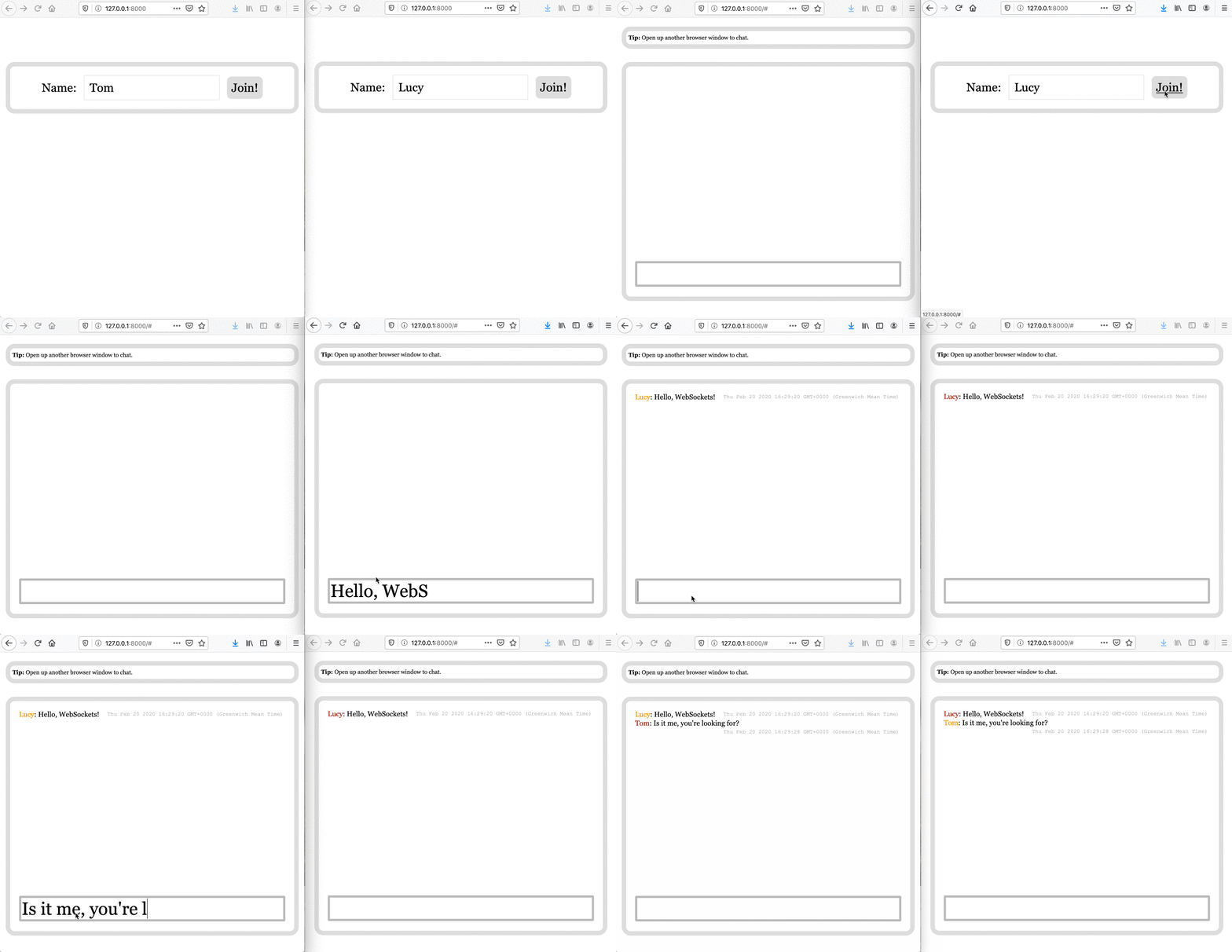
Here's a complete example of the backend code for a simple websocket chat app:
app.py
# Requires: `starlette`, `uvicorn`, `jinja2`
# Run with `uvicorn example:app`
import anyio
from broadcaster import Broadcast
from starlette.applications import Starlette
from starlette.routing import Route, WebSocketRoute
from starlette.templating import Jinja2Templates


broadcast = Broadcast("redis://localhost:6379")
templates = Jinja2Templates("templates")


async def homepage(request):
    template = "index.html"
    context = {"request": request}
    return templates.TemplateResponse(template, context)


async def chatroom_ws(websocket):
    await websocket.accept()

    async with anyio.create_task_group() as task_group:
        # run until first is complete
        async def run_chatroom_ws_receiver() -> None:
            await chatroom_ws_receiver(websocket=websocket)
            task_group.cancel_scope.cancel()

        task_group.start_soon(run_chatroom_ws_receiver)
        await chatroom_ws_sender(websocket)


async def chatroom_ws_receiver(websocket):
    async for message in websocket.iter_text():
        await broadcast.publish(channel="chatroom", message=message)


async def chatroom_ws_sender(websocket):
    async with broadcast.subscribe(channel="chatroom") as subscriber:
        async for event in subscriber:
            await websocket.send_text(event.message)


routes = [
    Route("/", homepage),
    WebSocketRoute("/", chatroom_ws, name="chatroom_ws"),
]


app = Starlette(
    routes=routes,
    on_startup=[broadcast.connect],
    on_shutdown=[broadcast.disconnect],
)
The HTML template for the front end is available here, and is adapted from Pieter Noordhuis's PUB/SUB demo.
Requirements
Python 3.8+
Installation
pip install broadcasterpip install broadcaster[redis]pip install broadcaster[postgres]pip install broadcaster[kafka]
Available backends
Broadcast('memory://')Broadcast("redis://localhost:6379")Broadcast("redis-stream://localhost:6379")Broadcast("postgres://localhost:5432/broadcaster")Broadcast("postgres+psycopg://localhost:5432/broadcaster")(psycopg 3 instead of asyncpg; installbroadcaster-ng[psycopg])Broadcast("kafka://localhost:9092")
Connection loss and delivery semantics
The Redis pub/sub (redis://, rediss://) and Postgres (postgres://, or
postgres+psycopg:// for psycopg 3) backends keep working through connection
loss:
-
Reconnect by default. When the connection drops (server restart, network failure,
CLIENT KILL,pg_terminate_backend()), the backend reconnects with capped backoff and re-subscribes every channel that still has subscribers. Existing subscribers keep receiving messages afterwards; you do not need to re-subscribe.subscribe()returns once the server has confirmed the subscription, so messages published after it returns are delivered. -
Half-open connections are detected. If the connection stays open but nothing gets through, an idle-time
PING(Redis) orSELECT 1heartbeat (Postgres) notices and triggers a reconnect. -
Delivery is at-most-once. Redis pub/sub and Postgres
NOTIFYdo not store messages, so anything published while a backend is reconnecting is lost. Every reconnect is logged with how long the connection was down. If your application cannot tolerate gaps, reload state from your source of truth after a reconnect. -
Reacting to a reconnect. Pass
on_reconnectto get called after a backend has reconnected and re-subscribed:async def on_reconnect(channels: list[str], downtime: float) -> None: # Messages published during the last `downtime` seconds were lost. await reload_state(channels) broadcast = Broadcast("redis://localhost:6379", on_reconnect=on_reconnect)
It runs after the channels are subscribed again, so state reloaded in it cannot miss later messages. Plain functions are called directly (keep them quick); async functions run in their own task. Errors are logged.
-
subscribe()during an outage waits for the reconnect for up to 10 seconds, then raisesConnectionError.connect()still fails immediately if the server cannot be reached at startup.
Slow subscribers
A subscriber's queue is unbounded by default, so a consumer that cannot keep up
makes memory grow. Pass max_queue_size to bound it:
async with broadcast.subscribe("chatroom", max_queue_size=100) as subscriber:
    ...
When the queue is full, the oldest queued message is dropped to make room for
the newest, so the subscriber stays current instead of falling further behind.
Drops are logged (at most once a minute) and counted in
subscriber.dropped_messages. A slow subscriber never holds up the others.
Timeouts and keepalive
- Redis clients created from a URL use
socket_connect_timeout=5andsocket_timeout=5seconds by default. Override them in the URL, for exampleredis://localhost:6379?socket_timeout=10. A client passed in withRedisBackend(conn=...)is used as configured. - Postgres URLs (both drivers) accept the libpq keepalive parameters
keepalives,keepalives_idle,keepalives_intervalandkeepalives_count. TCP keepalive is on by default, as in libpq;keepalives=0turns it off. - The Postgres listener connection is named
broadcaster-listenerinpg_stat_activity, unless the URL setsapplication_name. Publishing uses one separate connection, so eachBroadcastholds two server connections. - The psycopg backend needs psycopg 3.2.4 or newer.
Logging
Connection problems are logged, never silently ignored, on the broadcaster
logger (broadcaster.redis, broadcaster.postgres for the backends): a
WARNING when a connection is lost and when it is restored, and an ERROR when
reconnecting fails (repeated failures are logged at most once a minute).
The Redis Streams (redis-stream://) and Kafka backends recover from
connection loss too: errors are logged and retried, and the clients reconnect.
Both store messages, so nothing published during the outage is lost: Redis
Streams continues from the last message ID it read. Redis Streams clients get
the same default socket timeouts as Redis pub/sub. The Kafka backend checks
subscribed topics for added partitions every minute and reads new partitions
from their beginning.
Using custom backends
You can create your own backend and use it with broadcaster.
To do that you need to create a class which extends from BroadcastBackend
and pass it to the broadcaster via backend argument.
from broadcaster import Broadcast, BroadcastBackend, Event


class MyBackend(BroadcastBackend):
    async def connect(self) -> None: ...
    async def disconnect(self) -> None: ...
    async def subscribe(self, channel: str) -> None: ...
    async def unsubscribe(self, channel: str) -> None: ...
    async def publish(self, channel: str, message: str) -> None: ...
    async def next_published(self) -> Event: ...


broadcast = Broadcast(backend=MyBackend())
If next_published() raises, Broadcast logs the error, backs off and calls it
again, so a backend can recover by itself instead of stopping delivery.
Where next?
This fork focuses on reliability and compatibility. The public API is the same as encode/broadcaster 0.3.x. See CHANGELOG.md for what changed.
Ideas from the upstream roadmap that are not planned yet: serialization of
structured data, a RabbitMQ backend, reading recent history
(subscribe('chatroom', history=100)) for backends with persistence, and
pattern subscribes.
Third Party Packages
MQTT backend
Integrates MQTT with Broadcaster
1 maintainer

Metadata
1 maintainer
Release files for broadcaster-ng 0.4.0
For a detailed explanation of source distributions (sdists) and built distributions (wheels), please see the package formats documentation.
Source distribution (sdist)
| File | Size | Uploaded | Provenance | Actions |
|---|---|---|---|---|
| broadcaster_ng-0.4.0.tar.gz | 24.5 kB | With provenance | Details for broadcaster_ng-0.4.0.tar.gz |
Built distribution (wheel)
| File | Interpreter | ABI | Platform | Actions Reset |
|---|---|---|---|---|
| broadcaster_ng-0.4.0-py3-none-any.whl | Python 3 | none | any | Details for broadcaster_ng-0.4.0-py3-none-any.whl |
Total release size: 60.0 kB
Release files / broadcaster_ng-0.4.0.tar.gz
| Download URL | broadcaster_ng-0.4.0.tar.gz |
|---|---|
| Size | 24.5 kB |
| Tags | Source |
|
SHA-256 checksum How to use checksums |
d2f353d3f44bd4b0dd77d743c1625ce6c3073601cd445cf791510c0d0df19bc5
|
|
BLAKE2b-256 checksum How to use checksums |
bfc927d8a85a9bf524eddc80ab414ac9dbe517cde108ea554f2c5b4d7a1496ff
|
| Upload date | |
|
Uploaded using Trusted Publishing? What is trusted publishing? |
Yes |
| Uploaded via |
twine/7.0.0 CPython/3.13.16
|
Provenance
Provenance describes where a file came from. On PyPI, provenance is shared via attestations, which provide a verifiable record of the build or publishing details. View details, limitations and caveats.


PyPI Publish Attestation
PyPI verified that this artifact, at this checksum, originated from the publisher listed below.
Signed by GitHub Actions, verified by PyPI on Nov 9, 2026.
Transparency logRelease files / broadcaster_ng-0.4.0-py3-none-any.whl
| Download URL | broadcaster_ng-0.4.0-py3-none-any.whl |
|---|---|
| Size | 35.5 kB |
| Tags | Python 3 |
|
SHA-256 checksum How to use checksums |
f712fb07bf3a21af527cbaa16a7a5986643a3ac145b3e3d2548a82d254d93766
|
|
BLAKE2b-256 checksum How to use checksums |
a7e43081356903f4a2b5ca7096180ba3d0be3b9ec8aa2e19d4f048b28fd37419
|
| Upload date | |
|
Uploaded using Trusted Publishing? What is trusted publishing? |
Yes |
| Uploaded via |
twine/7.0.0 CPython/3.13.16
|
Provenance
Provenance describes where a file came from. On PyPI, provenance is shared via attestations, which provide a verifiable record of the build or publishing details. View details, limitations and caveats.
PyPI Publish Attestation
PyPI verified that this artifact, at this checksum, originated from the publisher listed below.
Signed by GitHub Actions, verified by PyPI on Nov 9, 2026.
Transparency logSecurity for broadcaster-ng 0.4.0
Provenance
Provenance describes where a file came from. On PyPI, provenance is shared via attestations, which provide a verifiable record of the build or publishing details. View details, limitations and caveats.
Full provenance
Both files in this release have been uploaded with provenance metadata.
Attestation for broadcaster_ng-0.4.0.tar.gz
PyPI Publish Attestation
PyPI verified that this artifact, at this checksum, originated from the publisher listed below.
Signed by GitHub Actions, verified by PyPI on Nov 9, 2026.
Transparency logA note on package security
PyPI is a repository for distributing packages, not a service for auditing them. While third-party security researchers and our staff do their best to detect and remove malicious packages, PyPI cannot guarantee the quality, security or suitability of any given package.
To learn more about protecting yourself from malicious actors, visit our package security documentation.














