
BroH5
(Bro)wser-based GUI (H)DF(5) Viewer in Python
Web browser-based GUI software is increasingly popular for its cross-platform compatibility, but typically requires web programming knowledge.
The Nicegui framework simplifies this, enabling pure Python development of browser-based GUIs. This project uses Nicegui to create an HDF viewer, showcasing its effectiveness for local app development. Unlike other apps such as Hdfviewer, Vitables, Nexpy, or H5web, which are built using C, Java, Qt/PyQt, or HTML/JavaScript; this project is unique in being a browser-based GUI, but written entirely in Python with a minimal codebase.
Features
-
A browser-based GUI software for viewing HDF (Hierarchical Data Format) file written in pure Python with minimal codebase.
-
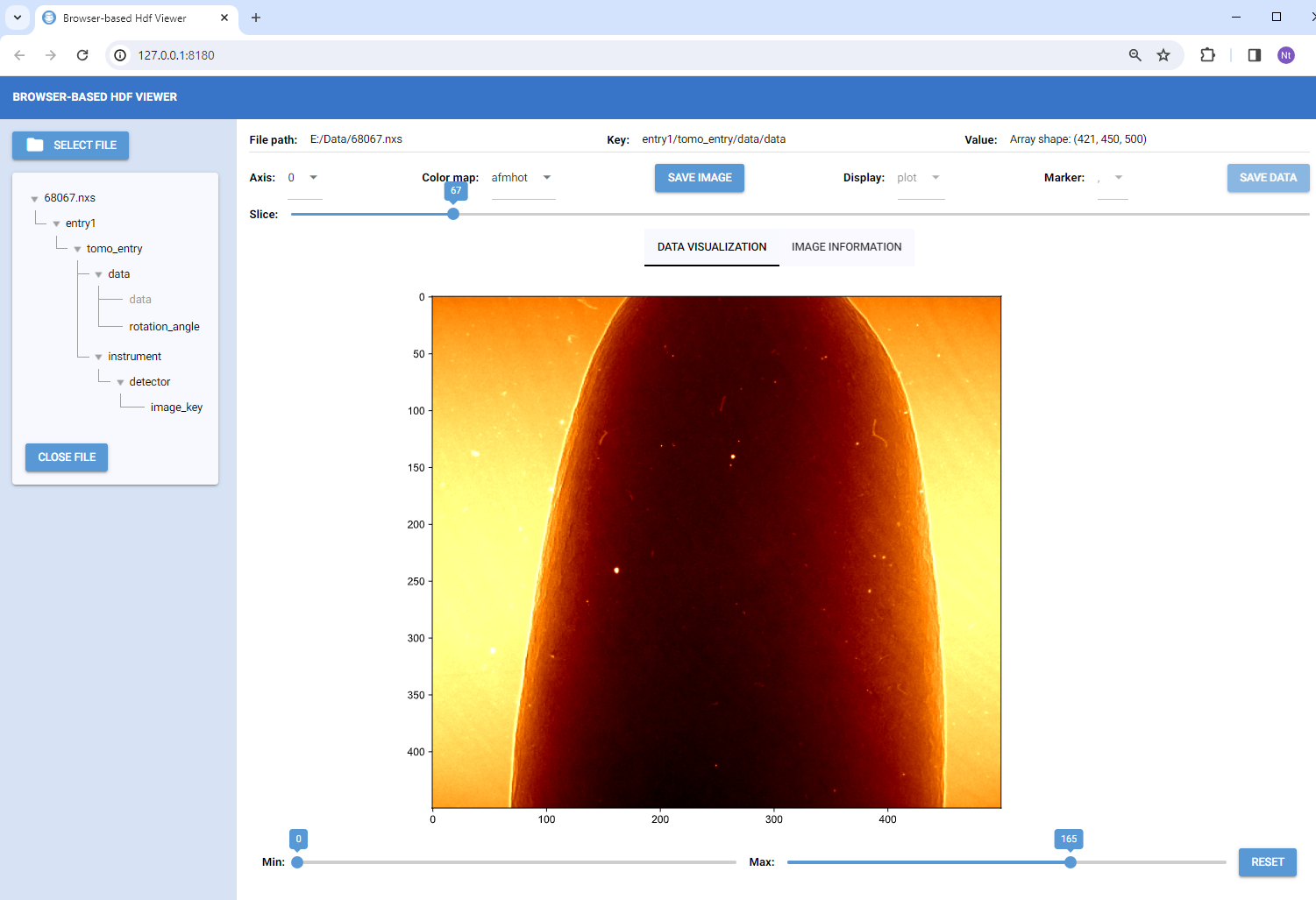
The software provides essential tools for viewing hdf files such as: displaying tree structures or paths to datasets/groups; and presenting datasets as values, images, plots, or tables. Users also can save datasets to images or csv formats.
-
Broh5 can view compressed hdf files by using compressors from hdf5plugin.
-
The codebase is designed using the RUI (Rendering-Utilities-Interactions) concept, which is known as the MVC (Model-View-Controller) pattern in the GUI development community. This design allows for the development of complex software and makes it easier to extend its capabilities.


Installation
Broh5 can be installed using pip, conda, or directly from the source. Users can also generate a standalone executable file for convenient usage. Details are at:
Documentation
Documentation page is at: https://broh5.readthedocs.io. Brief functionalities of broh5:
-
Users can open a hdf file by clicking the "Select file" button. Multiple hdf files can be opened sequentially.
-
Upon opening, the tree structure of the current hdf file is displayed, allowing users to navigate different branches (hdf groups) or leaves (hdf datasets). The path to datasets/groups is also displayed. If a dataset contains a string or a single float/integer value, it will be shown.
-
If dataset is a 3D array, it's presented as an image. Users can slice through various images and adjust the contrast. Slicing is available for different axes; however, for large datasets, slicing along axis 2 is disabled due to processing time. Starting from version 1.3.0, users can choose to display a zoomed area of the current image or the intensity profile across a mouse-clicked location.
-
Datasets that are 1D or 2D arrays will be shown as plots or tables, selectively.
-
Users have the option to save images or tables to disk.
Update notes
- 30/10/2023: Published codes, deployed on pip and conda.
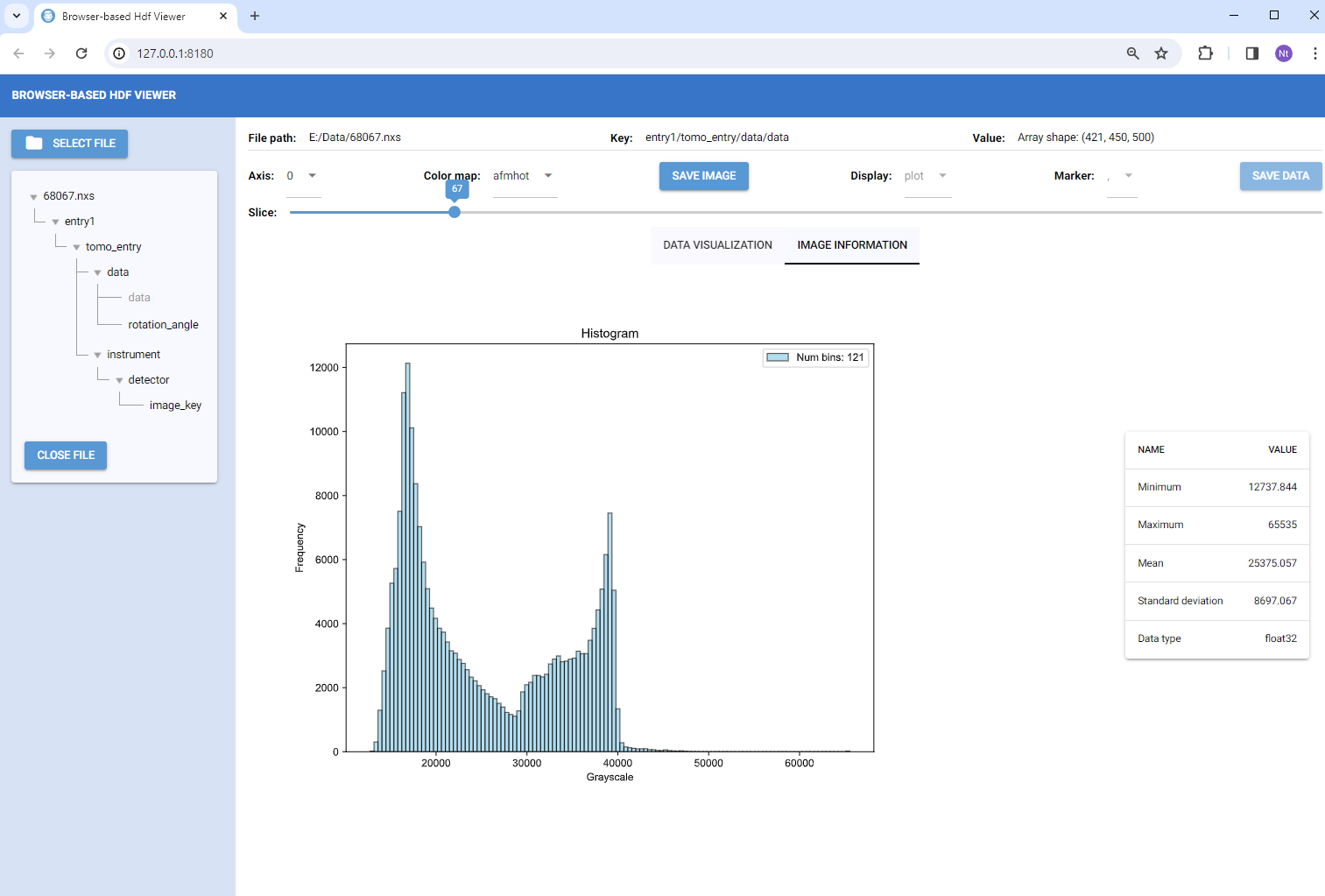
- 11/02/2024: Added tab for displaying image histogram and statistical information.
- 30/04/2024: Allow to open/save from the last opened folder.
- 04/07/2024: Added features for image zooming and intensity profile plotting
- 01/02/2025: Fixed a bug related to the OK button in FilePicker.
- 05/02/2025: Updated the table-format method for nicegui 2.0 and later.
- 01/06/2025: Fixed mouse-clicked location problem for nicegui>2.14
- 25/12/2025: Updated main.py to work with nicegui>=3.0
Author
Nghia T. Vo - NSLS-II, Brookhaven National Lab, USA.
1 maintainer

Metadata
1 maintainer
Release files for broh5 1.4.2
For a detailed explanation of source distributions (sdists) and built distributions (wheels), please see the package formats documentation.
Source distribution (sdist)
| File | Size | Uploaded | Provenance | Actions |
|---|---|---|---|---|
| broh5-1.4.2.tar.gz | 24.6 kB | Without provenance | Details for broh5-1.4.2.tar.gz |
Built distribution (wheel)
| File | Interpreter | ABI | Platform | Actions Reset |
|---|---|---|---|---|
| broh5-1.4.2-py3-none-any.whl | Python 3 | none | any | Details for broh5-1.4.2-py3-none-any.whl |
Total release size: 48.9 kB
Release files / broh5-1.4.2.tar.gz
| Download URL | broh5-1.4.2.tar.gz |
|---|---|
| Size | 24.6 kB |
| Tags | Source |
|
SHA-256 checksum How to use checksums |
91cfe824b7720a2b709ac88eab227e5e9c0c81df1124d004699481b15b2003a4
|
|
BLAKE2b-256 checksum How to use checksums |
c9201dbfb1bb8c238bb14245c8f74aa61dc4babf56c081d726e217e461454686
|
| Upload date | |
|
Uploaded using Trusted Publishing? What is trusted publishing? |
No |
| Uploaded via |
twine/6.2.0 CPython/3.11.14
|
Release files / broh5-1.4.2-py3-none-any.whl
| Download URL | broh5-1.4.2-py3-none-any.whl |
|---|---|
| Size | 24.4 kB |
| Tags | Python 3 |
|
SHA-256 checksum How to use checksums |
7f048fc9625ea8e06fe6e953d8458c05b3487331b0a419328b2a9dbe676d89b3
|
|
BLAKE2b-256 checksum How to use checksums |
1d4ab06970ba8de18884fd4b25617201a59d5a9546642b2d4b04689fe3ca0e5f
|
| Upload date | |
|
Uploaded using Trusted Publishing? What is trusted publishing? |
No |
| Uploaded via |
twine/6.2.0 CPython/3.11.14
|
Security for broh5 1.4.2
Provenance
Provenance describes where a file came from. On PyPI, provenance is shared via attestations, which provide a verifiable record of the build or publishing details. View details, limitations and caveats.
No provenance found
None of the files in this release were uploaded with provenance metadata.
A note on package security
PyPI is a repository for distributing packages, not a service for auditing them. While third-party security researchers and our staff do their best to detect and remove malicious packages, PyPI cannot guarantee the quality, security or suitability of any given package.
To learn more about protecting yourself from malicious actors, visit our package security documentation.














