
browscreen


简体中文 | English
A browser screenshot and mouse pointer preview service. browscreen (browser + screen) connects to an existing Chrome instance through the Chrome DevTools Protocol (CDP), combines viewport screenshots with externally supplied pointer coordinates, and shares each PNG through a web preview, screenshot API, and webhooks.
Preview in action
The screenshot below shows DSH-Test-Plugin integrating browscreen: a floating window displays the target browser's live image and pointer while tests run. The experience is similar to Codex's floating preview of browser activity.
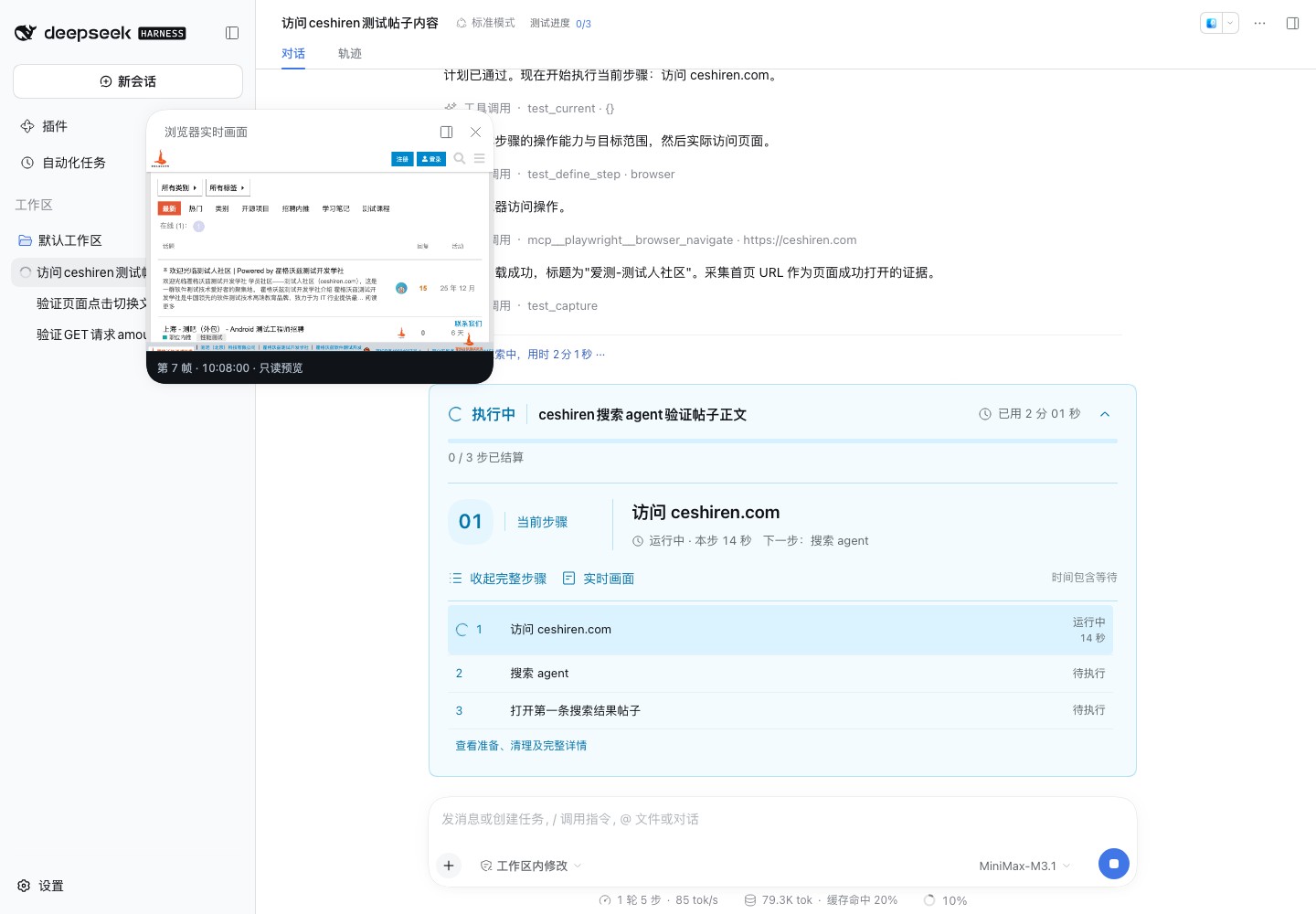
The host plugin provides the conversation, test steps, and window controls. The host drives browser actions, while browscreen captures images and overlays the pointer; the preview remains read-only. Embed the preview page in your own website with an iframe and add dragging, resizing, maximize/restore, and close controls using the floating preview example.
Features
- Capture the current viewport every 300 ms by default, with one shared latest frame.
- Read the browser endpoint from
.cdpand overlay CSS viewport coordinates from.mouse. - Clear stale images and recover browser connections within a bounded waiting budget.
- Clear an existing
.mouseduring graceful shutdown, preserving.cdpand the external browser. - Optionally record composed screenshots to MP4 and report the file path on shutdown.
The service uses Python 3.14, FastAPI, and Pydantic v2, with one capture loop per process. The host application manages browser startup, navigation, and environment isolation. The read-only preview does not forward mouse or keyboard input.
Installation
Install from PyPI
Create a .venv in your deployment directory and install the published package:
uv venv --python 3.14 .venv
uv pip install --python .venv/bin/python browscreen \
  -i http://mirrors.aliyun.com/pypi/simple/ --trusted-host mirrors.aliyun.com
.venv/bin/browscreen version
Install browscreen[video] for recording. Mirrors may lag an initial upload; official PyPI is the source of publication status.
Install from source
With uv and Python 3.14 available, clone and install the source:
git clone https://github.com/Pegasus-Yang/Browscreen.git
cd Browscreen
uv sync --locked --no-dev \
  -i http://mirrors.aliyun.com/pypi/simple/ \
  --trusted-host mirrors.aliyun.com
.venv/bin/browscreen version
If needed, install Python first with uv python install 3.14. See installation and deployment for published packages, source installations, and local wheels.
Quick start
Prepare an existing working directory and a Chrome instance with remote debugging enabled and an open page. Write its actual debugging address to .cdp:
work_dir="/absolute/path/to/workspace"
printf '%s\n' 'http://127.0.0.1:9222' > "$work_dir/.cdp"
uv run --no-sync browscreen --work-dir "$work_dir"
Open http://127.0.0.1:8000/. From another terminal, write 320,180 to the same directory's .mouse file to display the pointer in the next frame. Replace the example path and ports with those managed by your application.
HTTP stays available while the browser is unavailable. The default 60-second startup budget includes connection and creation of the first valid PNG. After timeout, correct the endpoint and restart the service.
Optional video recording
The base installation does not install video dependencies or enable recording. Install the video extra and explicitly enable recording:
uv sync --locked --no-dev --extra video \
  -i http://mirrors.aliyun.com/pypi/simple/ \
  --trusted-host mirrors.aliyun.com
uv run --no-sync browscreen --work-dir /absolute/path/to/workspace --record
By default, a unique MP4 is saved in the system temporary directory and retained after normal shutdown, when its absolute path is logged. Add --record-output /absolute/path/to/recordings/session.mp4 to select a file. Its parent directory must exist; existing files are never overwritten. Enabling recording without its dependencies prints an installation hint for browscreen[video] and exits with code 1.
The video preserves actual sampling times. Encoding can reduce the capture rate. Send SIGINT or SIGTERM and wait for shutdown to finalize the video. See the user guide for timing, resizing, and failure behavior.
Command line
Installation provides one browscreen command. For a source installation, use .venv/bin/browscreen or uv run --no-sync browscreen.
| Command | Purpose |
|---|---|
browscreen --help |
Show all commands and options |
browscreen version / browscreen --version |
Print the installed version and exit; no working directory required |
browscreen --work-dir <directory> |
Start the service with INFO logging |
browscreen -v --work-dir <directory> |
Start with DEBUG and HTTP access logs |
Default logs omit preview polling, HTTPX requests, and repeated retry details. State changes, timeouts, and exceptions remain visible. A webhook's consecutive failures produce one warning followed by a recovery message; delivery is still attempted for every frame. See the command-line reference for all options and logging behavior.
HTTP interfaces
| Endpoint | Purpose |
|---|---|
GET / |
Read-only web preview |
GET /api/screenshot |
Latest composed PNG, with frame ID, UTC capture start time, and no-store |
POST /api/webhooks |
Register an HTTP(S) receiver for subsequent frames |
Each capture waits for concurrent delivery attempts to all registered receivers. Slow receivers reduce the capture rate. Each delivery has a three-second total timeout, with no automatic retries or redirect following. Registrations last until process exit. See the user guide for protocols and error codes.
Documentation
- Installation and deployment: prerequisites, installation, startup, shutdown, and building.
- Command-line reference: commands, options, and logging levels.
- User guide: exchange files, preview, screenshots, and webhooks.
- Floating preview example: show live screenshots with dragging, resizing, maximize/restore, and close controls.
- Documentation index: reading routes and Chinese technical design documents.
- Publishing workflow: GitHub Actions, Release artifacts, and separate PyPI publication and verification.
- Changelog: additions, changes, and fixes by version, in Simplified Chinese.
The preview UI, CLI help, and runtime messages are currently in Simplified Chinese. Use the stable API error code values for programmatic handling.
Development and contributions
The full suite requires Node.js 22 or later for the preview-script tests; no npm dependencies are needed:
uv sync --locked --group dev \
  -i http://mirrors.aliyun.com/pypi/simple/ \
  --trusted-host mirrors.aliyun.com
.venv/bin/python -m pytest -q -W error
Standard tests use simulated browser endpoints. Real-Chrome verification is a separate procedure. Without Node.js, the preview test is explicitly skipped, so the result does not confirm frontend coverage.
Add --extra video to the development sync command to test recording. Without it, actual video tests are skipped and recording has not been validated.
Report bugs and suggestions through GitHub Issues. Read the contribution guide before submitting changes. Maintained by Pegasus-Yang.
License
Licensed under the MIT License.
1 maintainer

Metadata
1 maintainer
Release files for browscreen 0.3.2
For a detailed explanation of source distributions (sdists) and built distributions (wheels), please see the package formats documentation.
Source distribution (sdist)
| File | Size | Uploaded | Provenance | |
|---|---|---|---|---|
| browscreen-0.3.2.tar.gz | 242.6 kB | Without provenance | Details |
Built distribution (wheel)
| File | Interpreter | ABI | Platform | Reset |
|---|---|---|---|---|
| browscreen-0.3.2-py3-none-any.whl | Python 3 | none | any | Details |
Total release size: 269.7 kB
Release files / browscreen-0.3.2.tar.gz
| Download URL | browscreen-0.3.2.tar.gz |
|---|---|
| Size | 242.6 kB |
| Tags | Source |
|
SHA-256 checksum How to use checksums |
ab9a33ced78fd6a5b7bb304264768360ced3d3f19e63e363ccf269dbaf893f6c
|
|
BLAKE2b-256 checksum How to use checksums |
fe61085298e7419b7ce0782c381d6c5327a6f6fe307fd720997db456c613160c
|
| Upload date | |
|
Uploaded using Trusted Publishing? What is trusted publishing? |
No |
| Uploaded via |
uv/0.13.5 {"installer":{"name":"uv","version":"0.13.5","subcommand":["publish"]},"python":null,"implementation":{"name":null,"version":null},"distro":{"name":"macOS","version":null,"id":null,"libc":null},"system":{"name":null,"release":null},"cpu":null,"openssl_version":null,"setuptools_version":null,"rustc_version":null,"ci":null}
|
Release files / browscreen-0.3.2-py3-none-any.whl
| Download URL | browscreen-0.3.2-py3-none-any.whl |
|---|---|
| Size | 27.1 kB |
| Tags | Python 3 |
|
SHA-256 checksum How to use checksums |
da1457df13301bc252952097fd6d101057b8f2569d7cf86845e5881ba5ddcc86
|
|
BLAKE2b-256 checksum How to use checksums |
65f49989e47f939ba5eed8f33759d299e4c088600c77c8c6d6b7f7f78b344e4e
|
| Upload date | |
|
Uploaded using Trusted Publishing? What is trusted publishing? |
No |
| Uploaded via |
uv/0.13.5 {"installer":{"name":"uv","version":"0.13.5","subcommand":["publish"]},"python":null,"implementation":{"name":null,"version":null},"distro":{"name":"macOS","version":null,"id":null,"libc":null},"system":{"name":null,"release":null},"cpu":null,"openssl_version":null,"setuptools_version":null,"rustc_version":null,"ci":null}
|
Security for browscreen 0.3.2
Provenance
Provenance describes where a file came from. On PyPI, provenance is shared via attestations, which provide a verifiable record of the build or publishing details. View details, limitations and caveats.
No provenance found
None of the files in this release were uploaded with provenance metadata.
A note on package security
PyPI is a repository for distributing packages, not a service for auditing them. While third-party security researchers and our staff do their best to detect and remove malicious packages, PyPI cannot guarantee the quality, security or suitability of any given package.
To learn more about protecting yourself from malicious actors, visit our package security documentation.














