
brunette
🟤 A best practice Python code formatter

This is the "black" formatter but with some improvements:
--configoption supportssetup.cfgformat.- Where a
single-quotesoption enables single quotes as the preferred.
- Where a
--single-quotesoption to make single quotes the preferred.
Installation
pip install brunette
Usage
Use in the same way you would the 'black' formatter.
brunette **/*.py
brunette *.py --config=setup.cfg
brunette *.py --line-length=79 --single-quotes
Example setup.cfg:
[tool:brunette]
line-length = 79
verbose = true
single-quotes = false
# etc, etc...
This can also be combined with Flake8's configuration:
[flake8]
# This section configures `flake8`, the python linting utility.
# See also https://flake8.pycqa.org/en/latest/user/configuration.html
ignore = E201,E202,E203
# E201 - whitespace after ‘(‘
# E202 - whitespace before ‘)’
# E203 - whitespace before ‘:’

# Exclude the git directory and virtualenv directory (as `.env`)
exclude = .git,.env

[tool:brunette]
line-length = 79
# etc, etc...
Why does this need to exist?
-
The current maintainer of Black, refuses to allow a single-quotes option. Due to his own personal preference (a preference which most of the Python community do not share).
-
The current maintainer of Black, refuses to add setup.cfg support. Setup.cfg is the most widely used configuration file for Python projects. The maintainer of that library prefers "pyproject.toml" few people use at this time due to it's inflexibility and it requiring you to use Poetry, whatever that is.
-
The current configuration file format as adopted by Black may conflict with the new build isolation context with
pip. To avoid this, the use of asetup.cfgfile is preferred but the policy is under review by the maintainers (https://github.com/pypa/pip/issues/8437#issuecomment-644196428).
How to configure in VSCode
- Get the full path to your brunette installation. In your terminal type:
which brunette(Linux)where brunette(Windows)
In my case this looks like /home/work/.pyenv/shims/brunette. On Windows thats more like C:\Python39\Scripts\brunette.exe. Now copy whatever that value is.\
-
Open the setttings UI.
-
Search for black.
- Paste that path into Black Path.
- Set
blackas the Python Formatting Provider. - Add arguments as
--single-quotesyou like to the Black Args
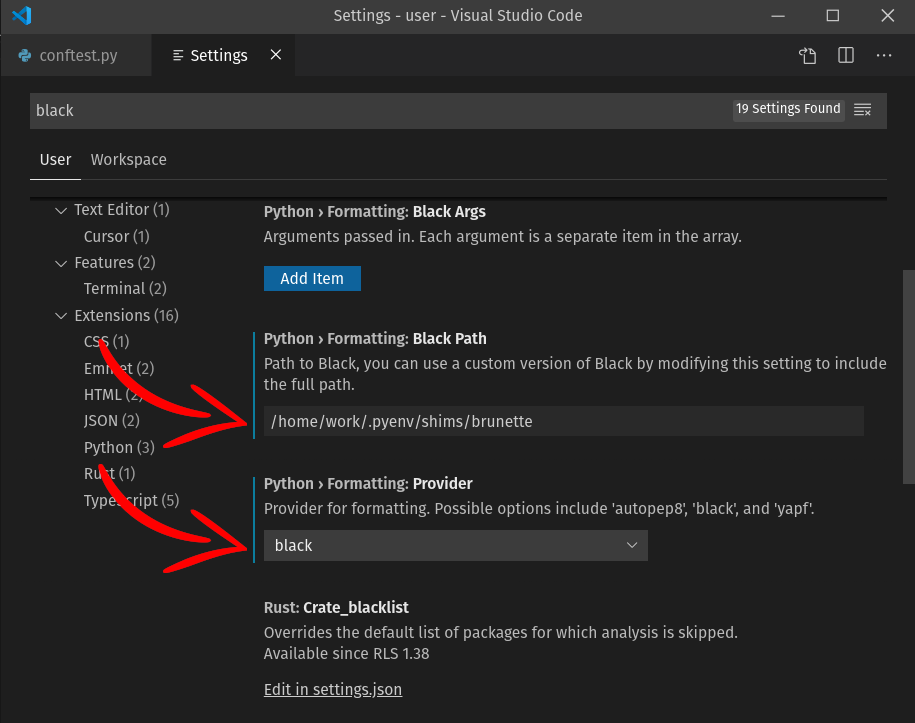
- That's it! Now whenever you format your Python code brunette will be used.
How to configure with Pre-Commit (https://pre-commit.com)
-
Run
pip install pre-committo install -
Add a local repo option for brunette in
.pre-commit-config.yaml
# See https://pre-commit.com for more information
# See https://pre-commit.com/hooks.html for more hooks
repos:
  - repo: https://github.com/odwyersoftware/brunette
    rev: 0.2.7
    hooks:
      - id: brunette
  # Drop-in replacement for black with brunette
  # - repo: https://github.com/psf/black
  #   rev: stable
  #   hooks:
  #     - id: black
  #       language_version: python3.6
  - repo: https://gitlab.com/pycqa/flake8
    rev: 3.8.1
    hooks:
      - id: flake8
-
Run
pre-commit installto install the Git pre-commit hook -
Run
pre-commit runto validate all files
Release History
0.2.8 (2022-11-07)
- Fixed setup.py description.
0.2.7 (2022-05-30)
- Fix black version to black==21.12b0, versions above do not function.
0.2.6 (2022-05-26)
- Fix black version to black<22.0.0, versions above do not function.
0.2.5 (2022-03-30)
- Fix for black version
22.1.0+.
0.2.4 (2022-03-09)
- Fix for black breaking change
black.find_project_root.
0.2.3 (2022-03-01)
- Bugfix, require black>=21.5b1
0.2.2 (2021-10-26)
- Bugfix, support for "black" version >=21.
0.2.1 (2021-10-01)
- Loosen requirements pin on "black" version.
0.2.0 (2020-12-18)
- Adds
--single-quotesCLI option.
0.1.9 (2020-12-16)
- Bugfixes, fix black version to black==20.8b1.
0.1.8 (2020-12-16)
- Bugfix for single-quote formatting not working.
0.1.7 (2020-06-26)
- Fix configuration file reading when multiple option variable.
- Update
normalize_string_quotesfrom black.
0.1.6 (2020-06-26)
- Documentation updates.
0.1.5 (2020-06-18)
- Documentation updates.
0.1.4 (2020-06-16)
- Handle when setup.cfg is missing.
0.1.3 (2020-06-16)
- Handle when setup.cfg is missing.
0.1.2 (2020-06-16)
- Added
__main__for CLI exec.
0.1.1 (2020-06-15)
- Adds wheels.
0.1.0 (2020-06-15)
- Initial release.
1 maintainer

Download files
Download the file for your platform. If you're not sure which to choose, learn more about installing packages.
Source Distribution
Built Distribution
Filter files by name, interpreter, ABI, and platform.
If you're not sure about the file name format, learn more about wheel file names.
Copy a direct link to the current filters
File details
Details for the file brunette-0.2.8.tar.gz.
File metadata
- Download URL: brunette-0.2.8.tar.gz
- Upload date:
- Size: 11.3 kB
- Tags: Source
- Uploaded using Trusted Publishing? No
- Uploaded via:
twine/4.0.0 CPython/3.9.9
File hashes
| Algorithm | Hash digest | |
|---|---|---|
| SHA256 |
e7d0766d3a4b0d18bf0f8830b4bc98a4af4ebcccf89c3b145fc92f9d4727d79b
|
|
| MD5 |
3bfa30c75006453d3686a46534f7a61a
|
|
| BLAKE2b-256 |
33c89d890d7d9ac93c8e9a66fa6e3b3f9518eec850609cc3556d28df259f3202
|
File details
Details for the file brunette-0.2.8-py2.py3-none-any.whl.
File metadata
- Download URL: brunette-0.2.8-py2.py3-none-any.whl
- Upload date:
- Size: 8.8 kB
- Tags: Python 2, Python 3
- Uploaded using Trusted Publishing? No
- Uploaded via:
twine/4.0.0 CPython/3.9.9
File hashes
| Algorithm | Hash digest | |
|---|---|---|
| SHA256 |
288e963a423a495fbe69019e101e621773bb758c990d32b2173c0381830abdc0
|
|
| MD5 |
69093b3d66ac63eff644d9e47b57d6f5
|
|
| BLAKE2b-256 |
1ff86f98e77a741df490fb82aa3af1c0d1faef3d788c322497c85ae6c33fd73c
|







