


Tired of thinking?
Are you in the business of establishing empirical relationships and then interpolating wildly? Do you struggle to work out which of umpteen different models that describes your data might be 'best'? If so...
Try BruteFit!
BruteFit is an inelegant solution to the age-old question of "Which polynomial best describes my data?"
If you've got the time and knowledge, you should definitely use a more elegant solution... but if not, BruteFit is for you!
BruteFit attempts to fit your data with all combinations and permutations of multivariate polynomials (up to a specified order), with and without permutations of interactive terms (also up to a specified order).
If you have a lot of independent variables, the number of permutations can obviously get out of hand pretty quickly, and this can jam up your computer pretty well for a good while. Beware.
It uses multi-threading to speed things up, but the code is messy and hilariously inneficient... so... well... fix it yourself. Or implement something better.
Installation
pip install brutefit
How it actually works
You give BruteFit:
- Your independent variables as an (M,N) array, where M is the number of covariates (=independent variables) and N is the number of datapoints.
- Your dependent variable as an array with shape (N,).
- Weights used in fitting (
) as an array with shape (N,).
- The maximum order of polynomial terms you'd like to test (
poly_max). - The maximum order of interaction terms (
max_interaction_order). - Whether or not to test interaction permutations (
permute_interactions). - Whether or not to include an intercept term in the fits (
include_bias).
Brutefit will then loop through all permutations of these polynomials, with and without interactive terms.
To evaluate these models it calculates the Bayes Factor relative to a null model (i.e. y = c) using a this handy little method.
What is this Bayes Factor thing?
The Bayes Factor is a number that tells you the probability of observing your data if [model X] is true relative to the probability of observing your data if the null model is true. Or, if you prefer: 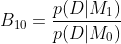
Because all these Bayes Factors are calculated relative to the same null model, we can then calculate the relative probability of the data given any two other models by 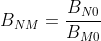
Using this convenient feature, we calculate Bayes Factors for all models relative to the 'best' model.
So, what does this number actually mean? To massively over-simplify, your frequentist p=0.05 nonsense (or this or this or even this) would (assuming all assumptions behind the p value are valid) correspond to a Bayes Factor of ~20. That is, your alternate hypothesis (H1) is 20 times more probable than your null hypothesis (H0). But as I said, this is an enormous and fundamentally invalid comparison... it's just to put the intimidating-sounding Bayes Factor in a possibly more familiar frame of reference.
So K>20 = ExcellentSignificantPublishInNature and K<20 = Weep? No... The point here is to get away from arbitrary 'significance' cut-offs. But if you really want someone else to guide you on this, we can turn to a wonderfully phrased table in Kass and Raftery (1995), which says:
| K | Stength of Evidence |
|---|---|
| 1 to 3.2 | Not worth mor than a bare mention |
| 3.2 to 10 | Substantial |
| 10 to 100 | Strong |
| >100 | Decisive |
Brutefit does this for you, placing these hugely subjective categories in a handy column for over-interpretation. Note (interestingly) that the criteria for 'decisive' is quite a lot more than a 'significant' p value. Make of that what you will.
I've run my bazillion models, now what?
At the end of all this, you'll be presented with a wonderful table containing a summary of all models. The important columns to glance at are K and evidence_against, which give the Bayes Factor relative to the 'best' model, and the subjective interpretation of this Bayes Factor. For example, A K of 2 for model MX will mean that the 'best' model is twice as probable as MX.
1 maintainer

Metadata
1 maintainer
Release files for brutefit 0.2.2
For a detailed explanation of source distributions (sdists) and built distributions (wheels), please see the package formats documentation.
Source distribution (sdist)
| File | Size | Uploaded | Provenance | Actions |
|---|---|---|---|---|
| brutefit-0.2.2.tar.gz | 213.2 kB | Without provenance | Details for brutefit-0.2.2.tar.gz |
Built distribution (wheel)
| File | Interpreter | ABI | Platform | Actions Reset |
|---|---|---|---|---|
| brutefit-0.2.2-py3-none-any.whl | Python 3 | none | any | Details for brutefit-0.2.2-py3-none-any.whl |
Total release size: 230.1 kB
Release files / brutefit-0.2.2.tar.gz
| Download URL | brutefit-0.2.2.tar.gz |
|---|---|
| Size | 213.2 kB |
| Tags | Source |
|
SHA-256 checksum How to use checksums |
0571ae95beeac260138c6589d55546223613661a7abbf0f27c028ffebab18839
|
|
BLAKE2b-256 checksum How to use checksums |
a3f92b2d2b581e5bd21659e68ca316ee2812af5dc4199c798f9c42cdec284d40
|
| Upload date | |
|
Uploaded using Trusted Publishing? What is trusted publishing? |
No |
| Uploaded via |
twine/4.0.2 CPython/3.10.9
|
Release files / brutefit-0.2.2-py3-none-any.whl
| Download URL | brutefit-0.2.2-py3-none-any.whl |
|---|---|
| Size | 16.9 kB |
| Tags | Python 3 |
|
SHA-256 checksum How to use checksums |
a39bbd343374adc127293858b71ffdde0ce1cb16477638fc84f8891d11773293
|
|
BLAKE2b-256 checksum How to use checksums |
f2e022f9a6081e5ff1c5b1cf15d10ee05946a39c93e94ee5e33f2daa4e4a37b2
|
| Upload date | |
|
Uploaded using Trusted Publishing? What is trusted publishing? |
No |
| Uploaded via |
twine/4.0.2 CPython/3.10.9
|
Security for brutefit 0.2.2
Provenance
Provenance describes where a file came from. On PyPI, provenance is shared via attestations, which provide a verifiable record of the build or publishing details. View details, limitations and caveats.
No provenance found
None of the files in this release were uploaded with provenance metadata.
A note on package security
PyPI is a repository for distributing packages, not a service for auditing them. While third-party security researchers and our staff do their best to detect and remove malicious packages, PyPI cannot guarantee the quality, security or suitability of any given package.
To learn more about protecting yourself from malicious actors, visit our package security documentation.














