
Floating windows for use as pop-ups, modal or separate sources of information in a user graphical interface.

Project description
Floating windows for use as pop-ups, modal or separate sources of information in a user graphical interface.
Detailed documentation is in the “docs” directory.
Quick start
Add “floating_windows” to your INSTALLED_APPS setting like this:
INSTALLED_APPS = (
    ...
    'floating_windows',
)
Add static files css/js:
<link type="text/css" rel="stylesheet" href="{% static 'floating_windows/css/windows.css' %}">
<script src="{% static 'floating_windows/js/windows.js' %}"></script>
Create and add window(s) template(s) to the base template:
<!-- Separate template "sign_in_modal.html" -->
{% extends 'floating_windows/windows/default.html' %}

{% block body_content %}
    <!-- window body -->
{% endblock %}

<!-- In base template -->
{% include 'blocks/floating_windows/sign_in_modal.html' with fw_id='auth' %}
You can load windows content dynamically through ajax, in this case, you need to add basic window template that will be used by the script to copy and create new windows:
<!-- In base template -->
{% include 'floating_windows/windows/default.html' %}
Initialize windows script:
const fw = new FloatingWindows();
// you can disable / enable some functionality
fw.set_windows_ids_to_url = false;  // you can disable automatic window opening
fw.push_windows_events_to_history = false; // you can disable window opening when moving forward or backward
                                           // through browser history
// etc. see code for thin setup
// here you need to list the id of windows, separated by commas
fw.initWindows('auth', 'register');

$(document).on('floating-window:opened', function (event, window_id, options) {
    // tracking of signals about the opening of windows for loading content in them.
    // configure content load here
});
Setup trigger in template. For several windows with background on same page, which can display in same time, you must specify data-floating-window-z-index attribute for background and window correct display:
<button type="button" class="js-floating_window_open"
     data-floating-window="#w1"
     data-floating-window-title="Title"
     data-floating-window-show-footer="true"
     data-floating-window-set-background="body"          background parent container (bcg of popups is ignoring)
     data-floating-window-z-index="200"                  set this attr to set windows hierarchy
     data-floating-window-hide-on-outside-click="true"   popup
     data-floating-window-position="40px,50px">
    Trigger
</button>
Example:
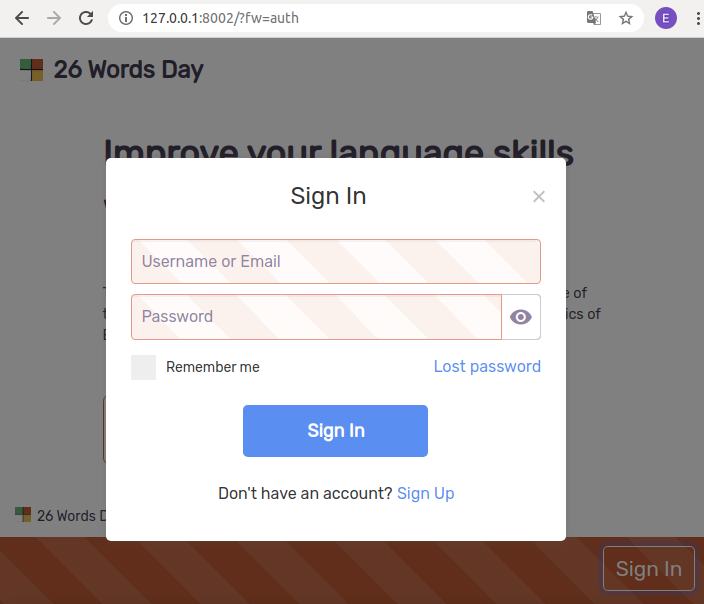


Download files
Download the file for your platform. If you're not sure which to choose, learn more about installing packages.
Source Distribution
File details
Details for the file btc-floating-windows-0.7.tar.gz.
File metadata
- Download URL: btc-floating-windows-0.7.tar.gz
- Upload date:
- Size: 16.2 kB
- Tags: Source
- Uploaded using Trusted Publishing? No
- Uploaded via: twine/3.1.1 pkginfo/1.5.0.1 requests/2.22.0 setuptools/41.6.0 requests-toolbelt/0.9.1 tqdm/4.40.0 CPython/3.7.5
File hashes
| Algorithm | Hash digest | |
|---|---|---|
| SHA256 |
86ca45e3f6aee87293ba3ef676cb3fe09e8be50f12af27e36a99a7a02a62363a
|
|
| MD5 |
f225973fd48ac4699ef47c0219a73743
|
|
| BLAKE2b-256 |
0d99824dce9769550d744e950e2758bc8d215d793a6572cfb0dcfc2982be1161
|






