

Bitcoin CLI toolkit — zero dependencies, no Bitcoin Core required.
Query the Bitcoin network via the Mempool.space public API, or your own Mempool instance.








The $320M Liquid Network drain was negotiated on-chain. Two of its messages, decoded live — read the whole story.
Commands
| Command | Description |
|---|---|
btc-toolkit opreturn <txid> |
Decode OP_RETURN messages from a transaction |
btc-toolkit tx <txid> |
Transaction details: status, fees, size, input/output totals, RBF |
btc-toolkit address <address> |
Aggregated overview: type, balance, lifetime totals |
btc-toolkit balance <address> |
Confirmed + unconfirmed balance of any address |
btc-toolkit fees |
Recommended fee rates + mempool backlog |
btc-toolkit block <height|hash|latest> |
Block metadata by height, hash, or latest |
btc-toolkit utxo <address> |
Unspent outputs of any address |
Installation
Requirements: Python 3.11+. Supported versions follow CPython's own support window: a Python version is dropped in the first minor release after it reaches end of life (policy).
pip install btc-toolkit
Or isolated, via pipx:
pipx install btc-toolkit
Or via Homebrew on macOS and Linux, with shell completion included:
brew install devdavidejesus/tap/btc-toolkit
From source:
git clone https://github.com/devdavidejesus/btc-toolkit.git
cd btc-toolkit
pip install -e .
Shell completion (optional): static scripts in
completions/ for bash and zsh — tab-complete
commands, networks and flags, zero dependencies as always. The Homebrew formula installs them for you.
Usage
tx — inspect any transaction
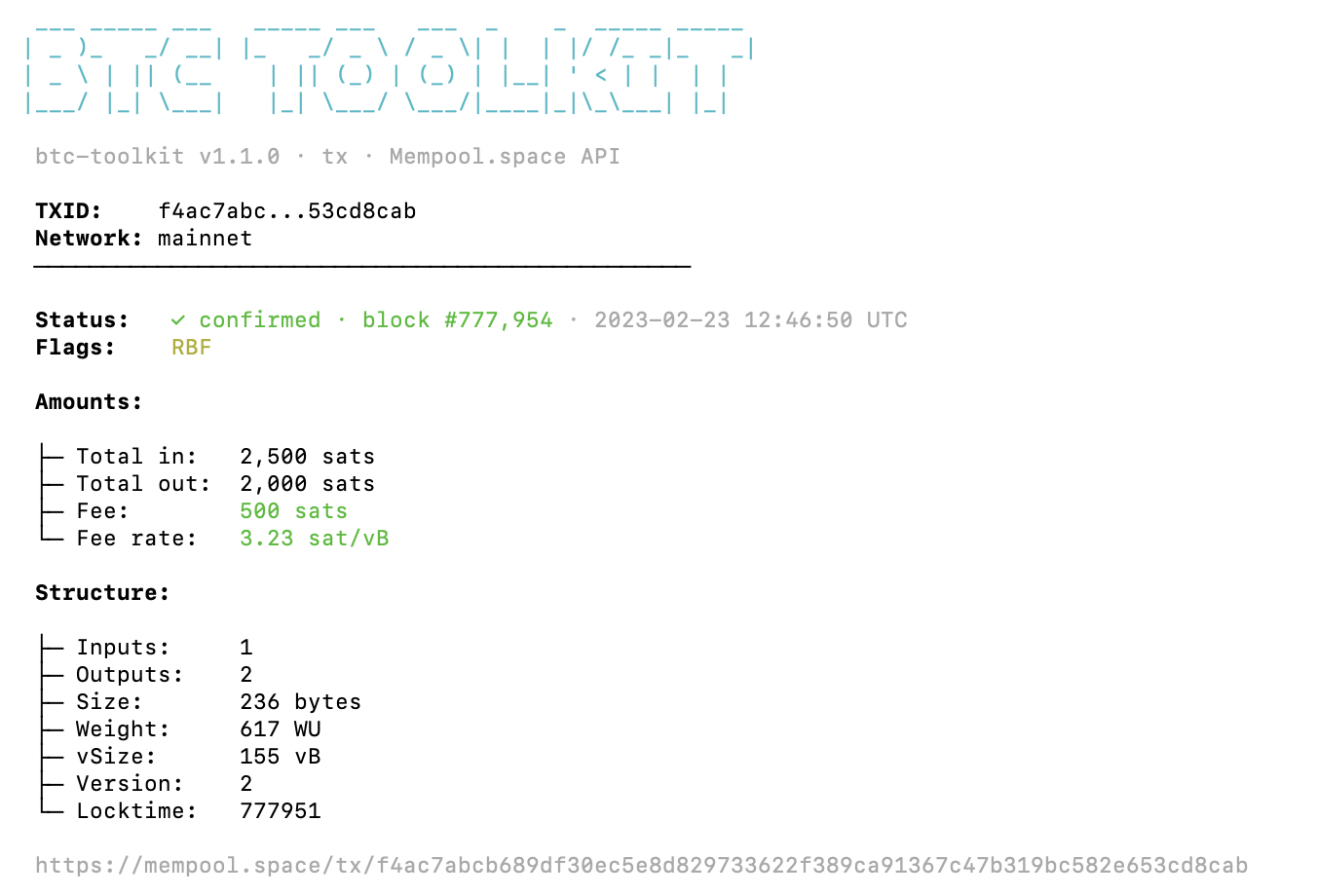
btc-toolkit tx f4ac7abcb689df30ec5e8d829733622f389ca91367c47b319bc582e653cd8cab
Shows confirmation status and block, fee and fee rate (sat/vB), total input/output, size/weight/vsize, version, locktime — and flags coinbase and RBF-signaling transactions.
# JSON output for scripting
btc-toolkit tx <txid> --json
address — aggregated overview
btc-toolkit address 1A1zP1eP5QGefi2DMPTfTL5SLmv7DivfNa
One call, full picture: address type (P2PKH, P2SH, P2WPKH, P2WSH, P2TR — detected offline from the prefix and length, per BIP 13/173/350), confirmed and unconfirmed balance, lifetime received/spent, and transaction counts.
# JSON output for scripting
btc-toolkit address <address> --json
balance — check any address
btc-toolkit balance 1A1zP1eP5QGefi2DMPTfTL5SLmv7DivfNa
Shows the confirmed balance in BTC and satoshis and, when the address has a non-zero unconfirmed amount, that amount and the total, plus confirmed and mempool transaction counts. Supports all address types: Legacy (P2PKH), P2SH, SegWit (Bech32), and Taproot.
# JSON output for scripting
btc-toolkit balance <address> --json

# Testnet or signet
btc-toolkit balance <address> --network testnet
btc-toolkit balance <address> --network signet
BTC conversion uses integer arithmetic (no floats) — satoshi-exact, always.
fees — current rates and mempool backlog
btc-toolkit fees
Shows the five recommended fee tiers (sat/vB) — fastest, half hour, hour, economy, minimum — plus mempool backlog: pending tx count, size in vMB, and a rough estimate of blocks needed to clear it.
# JSON output for scripting
btc-toolkit fees --json

# Testnet
btc-toolkit fees --network testnet
block — inspect any block
btc-toolkit block latest          # chain tip
btc-toolkit block 0               # by height (genesis)
btc-toolkit block 000000000019d6689c085ae165831e934ff763ae46a2a6c172b3f1b60a8ce26f   # by hash
Shows height, hash, mined timestamp (UTC), tx count, size, weight, difficulty, nonce, and previous block hash.
# JSON output for scripting
btc-toolkit block latest --json

# Testnet
btc-toolkit block latest --network testnet
utxo — unspent outputs of any address
btc-toolkit utxo bc1qar0srrr7xfkvy5l643lydnw9re59gtzzwf5mdq
Lists every UTXO sorted by value (largest first), with txid:vout, value in BTC and sats, confirmation status, and block height. Shows aggregate count and total value.
Known limitation: addresses with tens of thousands of UTXOs (e.g. Satoshi's genesis address, which has received over 80,000 outputs) exceed the upstream electrs response limit and return HTTP 400. Use
balancefor aggregate stats on such addresses — discovered and verified in production.
# Only confirmed UTXOs
btc-toolkit utxo <address> --confirmed-only

# Show more than 15 entries
btc-toolkit utxo <address> --limit 50

# JSON output (always includes all UTXOs)
btc-toolkit utxo <address> --json
opreturn — decode embedded messages
btc-toolkit opreturn f4ac7abcb689df30ec5e8d829733622f389ca91367c47b319bc582e653cd8cab
# JSON output
btc-toolkit opreturn <txid> --json

# Raw hex only
btc-toolkit opreturn <txid> --raw
Seen in the wild: the $320M Liquid Network drain (Sept 2026) was negotiated on-chain via OP_RETURN — every message of it decoded with this command, transaction IDs included: I Read a $320M Ransom Negotiation From My Terminal. And the wallet holding 562 BTC from the Coldcard hack (July 2026) became a message board: 49 OP_RETURN messages, read with opreturn --file: 49 Messages to a Thief.
Transactions to Try
Real, verified OP_RETURN transactions on mainnet. Verify each one yourself on mempool.space.
| TXID | Description |
|---|---|
f4ac7abcb689df30ec5e8d829733622f389ca91367c47b319bc582e653cd8cab |
"Craig Wright is a liar and a fraud" — 34 bytes (verify on-chain) |
2033435de7ce307341231e818ed937cd3a5e8597381fd83a7e5b0234f61b38d3 |
"learnmeabitcoin" — 75-byte OP_RETURN with null-padded ASCII (verify on-chain) |
Note: Satoshi's famous "Chancellor on brink of second bailout for banks" message is in the coinbase scriptSig of the genesis block — NOT in an OP_RETURN output. That's a common misconception. This tool reads OP_RETURN outputs only, which is the standard mechanism for embedding data in Bitcoin transactions (introduced as standard in Bitcoin Core v0.9.0, March 2014).
Architecture
btc-toolkit/
├── btc_toolkit/
│   ├── __init__.py       # Package version
│   ├── __main__.py       # python -m entry point
│   ├── cli.py            # Unified CLI: subcommands, batch mode, env vars, exit codes
│   ├── api.py            # Shared Mempool HTTP client: retry, timeout, custom base URL
│   ├── colors.py         # Shared terminal color helpers
│   ├── opreturn.py       # OP_RETURN decoder
│   ├── balance.py        # Address balance
│   ├── fees.py           # Fee estimator
│   ├── block.py          # Block explorer
│   ├── utxo.py           # UTXO inspector
│   ├── tx.py             # Transaction inspector
│   ├── address.py        # Address overview + offline type detection
│   └── py.typed          # PEP 561 marker: the package ships its types
├── tests/                # One file per module, plus CLI, completion and robustness tests — all API calls mocked
├── fuzz/                 # Atheris fuzzer for the parsers of untrusted data
├── completions/          # Static bash + zsh completions
├── assets/               # Logo, social preview and the README demos
├── .github/
│   ├── workflows/        # CI, release, CodeQL, fuzz, Scorecard, weekly live smoke test
│   ├── scripts/          # Release notes, live smoke test, demo recorder
│   └── requirements/     # Hash-pinned CI tools
├── docs/
│   ├── json-schema.md    # --json output per command + stability policy
│   ├── python-api.md     # Using the toolkit as a typed Python library
│   └── releases.md       # How releases are built and verified
├── SECURITY.md           # Threat model + vulnerability reporting
├── CONTRIBUTING.md       # How changes are made and what they must include
├── CHANGELOG.md          # Every release, newest first
├── pyproject.toml
├── LICENSE               # MIT
└── README.md
Every subcommand shares one HTTP client (api.py) — a new command adds a module, a subcommand, its completions and tests; the HTTP layer stays untouched.
Zero external dependencies — Python standard library only (urllib, json, argparse).
Reliability
- Retry with backoff — transient failures (HTTP 429, 500, 502, 503, 504 and network errors) get up to 3 attempts, with exponential backoff between them (0.5s, then 1s). Any other HTTP error (e.g. 400, 404) fails immediately.
- Sovereignty —
--api-urlpoints every command at your own Mempool instance;--networkcovers mainnet, testnet and signet. - Bounded waits —
--timeout(default 15s) applies to each network operation of each attempt, so with retries a command can wait longer than the timeout. - Exit codes —
0success,1network/API error,2invalid input. Script accordingly. - Verifiable releases — since v1.5.0, published from GitHub Actions via PyPI Trusted Publishing, with PEP 740 attestations tying each file to this repo; since v1.6.1, every GitHub Release also carries Sigstore-signed files (how to verify).
Testing
python -m unittest discover -s tests -t . -v
Every command is tested with all API calls mocked — the suite runs offline, from the source tree, with nothing to install (pytest works too if you prefer it). Every pull request measures line and branch coverage and fails if it drops below 90%. The package is type-checked with mypy --strict and ships py.typed. A separate weekly job reads known on-chain facts from mainnet, and an Atheris fuzzer exercises every parser of untrusted data on each change.
How balance is computed
The Mempool.space /address endpoint returns chain_stats (confirmed) and mempool_stats (unconfirmed), each with funded_txo_sum and spent_txo_sum in satoshis.
confirmed   = chain_stats.funded_txo_sum   - chain_stats.spent_txo_sum
unconfirmed = mempool_stats.funded_txo_sum - mempool_stats.spent_txo_sum
total       = confirmed + unconfirmed
This is the same model used by Esplora/Electrs. Don't trust this README — verify against https://mempool.space/api/address/<address> yourself.
Automation
btc-toolkit is built to sit inside pipelines. Every command takes --json,
and the inspecting commands read one item per line from stdin (-) or a
file (--file), emitting JSON Lines you can pipe straight into jq:
# many txids -> one JSON object per line
cat txids.txt | btc-toolkit tx - --json | jq -r '.fee_rate_sat_vb'

# or from a file (blank lines and # comments are ignored)
btc-toolkit balance --file addresses.txt --json
Configuration through the environment — for Docker, CI, cron:
| Variable | Effect |
|---|---|
BTC_TOOLKIT_API_URL |
Default for --api-url (your own Mempool instance) |
BTC_TOOLKIT_NETWORK |
Default for --network (mainnet, testnet, signet; anything else is an error, exit 2; ignored when an API URL is set) |
BTC_TOOLKIT_TIMEOUT |
Default for --timeout (seconds, default 15) |
NO_COLOR |
Any non-empty value disables colors (no-color.org) |
Flags always win over environment variables. Exit codes are a contract
(0 ok · 1 network/API failure · 2 invalid input) in both text and JSON
mode; in batch mode the worst code wins. Full output schemas and the
stability policy: docs/json-schema.md.
Use it as a Python library
Every command is also a plain, typed function — the package ships py.typed, so your type checker sees real types:
from btc_toolkit.opreturn import decode_op_return

for out in decode_op_return("c103de95817b43f2df635ec6f35ff126ca26a7c6d20570c4b01866b2b3e69a19"):
    print(out.decoded_text)   # we are whitehats. contact us on chain
Functions, result types and errors: docs/python-api.md.
Use your own Mempool instance
Every command accepts --api-url pointing to any self-hosted
Mempool instance, which runs on top of your
own Bitcoin node (Umbrel, Start9, RaspiBlitz and similar node stacks offer it as an app):
btc-toolkit balance <address> --api-url http://umbrel.local:3006/api
With your own instance, no third party sees your queries — the public mempool.space API is the zero-setup default, not a requirement.
What this is / What this isn't
The full threat model — what the tool protects against and what it does not — lives in SECURITY.md; how releases are built and how to verify one yourself is in docs/releases.md.
This is an explorer client for the terminal — a fast, scriptable way to inspect the Bitcoin blockchain without running infrastructure. Ideal for learning, scripting, quick lookups, and teaching how Bitcoin data is structured.
This isn't a substitute for a full node. All data comes from a Mempool API (mempool.space by default, or your own instance): this tool does not validate blocks, verify merkle proofs, or check consensus rules. You are trusting the API's view of the chain — that's the explicit trade-off for requiring zero infrastructure. For sovereign, trustless verification, run Bitcoin Core and query it directly.
Roadmap
- Phase 1 — OP_RETURN Reader
- Phase 2 — Address Balance Checker
- Phase 3 — Fee Estimator (mempool-based)
- Phase 4 — Block Info Explorer
- Phase 5 — UTXO Set Inspector
The original roadmap shipped in v1.0.0; every release since is in the CHANGELOG. What's next lives in the issues — one philosophy throughout: zero dependencies, no Bitcoin Core, verify everything on-chain.
Don't Trust, Verify
Every txid, address, hex value, and technical claim in this README can be independently verified:
- Transaction data:
https://mempool.space/api/tx/<txid> - Address data:
https://mempool.space/api/address/<address> - Fee data:
https://mempool.space/api/v1/fees/recommended - Block data:
https://mempool.space/api/block/<hash> - UTXO data:
https://mempool.space/api/address/<address>/utxo - OP_RETURN spec: learnmeabitcoin.com/technical/script/return
- Esplora API model: github.com/Blockstream/esplora/blob/master/API.md
Support
btc-toolkit is free, MIT-licensed and has no sponsor. If it's useful to you, you can support its development on-chain:
Bitcoin: bc1qulq8xfcmgxxumjx3yndkfktqgw2exh0rym45sn
(Public address — donations are visible on-chain, as everything here is.)
Contributing
Found a bug or want to propose or build a new command? Open an issue or a PR. Every contribution keeps the core rules — stdlib only, tests with every change, claims verifiable on-chain. The process and requirements are in CONTRIBUTING.md.
Licensed under MIT · Built by @devdavidejesus
"Don't Trust, Verify."
1 maintainer

Metadata
1 maintainer
Release files for btc-toolkit 1.7.2
For a detailed explanation of source distributions (sdists) and built distributions (wheels), please see the package formats documentation.
Source distribution (sdist)
| File | Size | Uploaded | |
|---|---|---|---|
| btc_toolkit-1.7.2.tar.gz | 53.9 kB | Details |
Built distribution (wheel)
| File | Interpreter | ABI | Platform | Reset |
|---|---|---|---|---|
| btc_toolkit-1.7.2-py3-none-any.whl | Python 3 | none | any | Details |
Total release size: 87.0 kB
Release files / btc_toolkit-1.7.2.tar.gz
| Download URL | btc_toolkit-1.7.2.tar.gz |
|---|---|
| Size | 53.9 kB |
| Tags | Source |
|
SHA-256 checksum How to use checksums |
7e4069dd8725d09ccb625c654ed019179c811c3f81035645e2d20c7eccd41fe5
|
|
BLAKE2b-256 checksum How to use checksums |
4c56a6e53e9daff8e0009a4f053b37607095205aea2b7d45e53accdea7da0b77
|
| Upload date | |
|
Uploaded using Trusted Publishing? What is trusted publishing? |
Yes |
| Uploaded via |
twine/7.0.0 CPython/3.13.14
|
Provenance
Provenance describes where a file came from. On PyPI, provenance is shared via attestations, which provide a verifiable record of the build or publishing details. View details, limitations and caveats.


PyPI Publish Attestation
PyPI verified that this artifact, at this checksum, originated from the publisher listed below.
Signed by GitHub Actions, verified by PyPI on Oct 10, 2026.
Transparency logRelease files / btc_toolkit-1.7.2-py3-none-any.whl
| Download URL | btc_toolkit-1.7.2-py3-none-any.whl |
|---|---|
| Size | 33.2 kB |
| Tags | Python 3 |
|
SHA-256 checksum How to use checksums |
f96ecd9646a82481d2df87e444f14bae32f088523a95e116aec23e87382469d3
|
|
BLAKE2b-256 checksum How to use checksums |
c67591ae1a23e928807caf642b3279d2bbf8a4221831d8165c30165d06a58134
|
| Upload date | |
|
Uploaded using Trusted Publishing? What is trusted publishing? |
Yes |
| Uploaded via |
twine/7.0.0 CPython/3.13.14
|
Provenance
Provenance describes where a file came from. On PyPI, provenance is shared via attestations, which provide a verifiable record of the build or publishing details. View details, limitations and caveats.
PyPI Publish Attestation
PyPI verified that this artifact, at this checksum, originated from the publisher listed below.
Signed by GitHub Actions, verified by PyPI on Oct 10, 2026.
Transparency log













