
btcmonitor
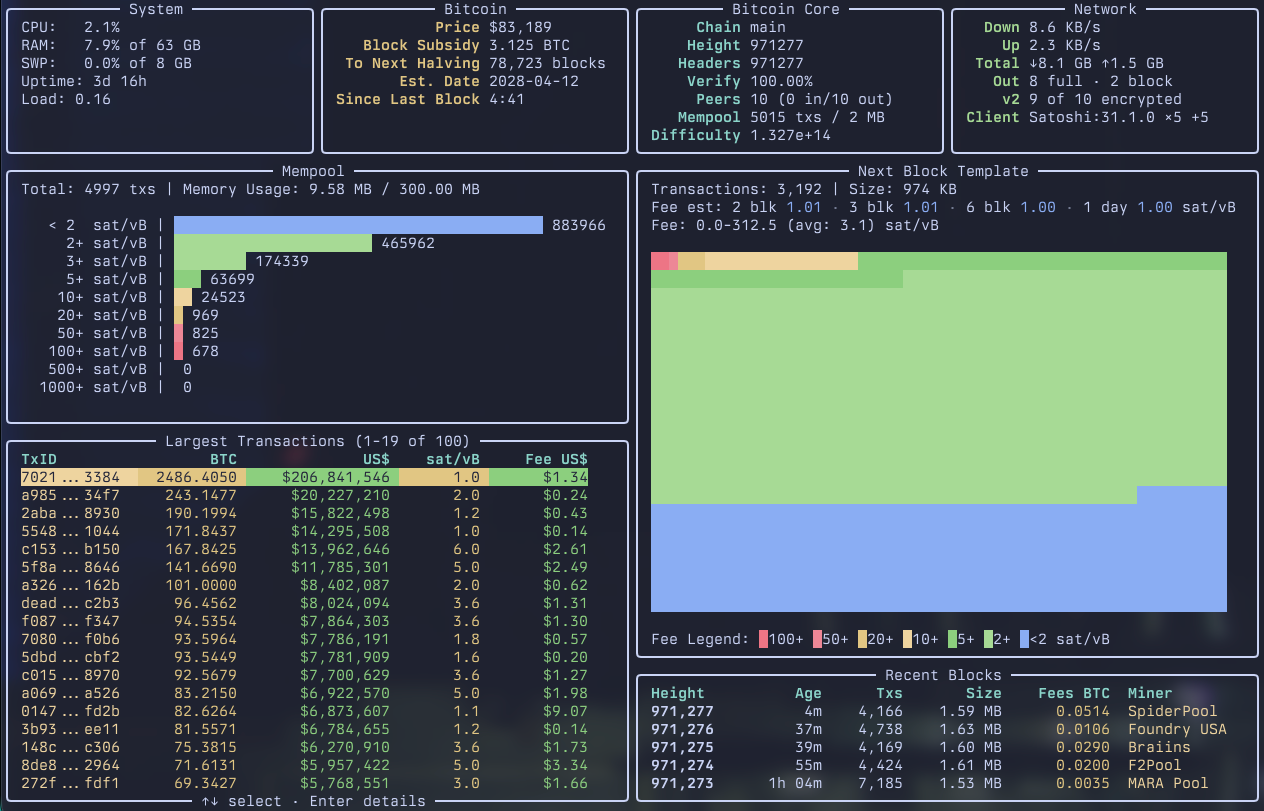
A terminal dashboard (TUI) that monitors a local Bitcoin Core node using its JSON-RPC interface.
- Cross-platform using Python3 and Rich: tested on macOS, Ubuntu, Windows
- Reads RPC credentials from the auth cookie or
bitcoin.conf, with optional command-line overrides - Visualizes the following data about your bitcoin node in a dashboard:
- Node health, blockchain height, peer information
- Network traffic, connection types, encrypted (v2) transport and peer client versions
- Bitcoin price, block subsidy, # of blocks until next halving, time since last block
- Mempool transaction count, memory size and fee histogram
- Next block template as well as expected tx count, weight, and fee rate bands
- Fee estimates from Bitcoin Core for confirmation within 2, 3 and 6 blocks and one day
- The last five blocks with age, transactions, size, fees and mining pool
- Scrollable list of the 100 largest transactions in the mempool sorted by BTC output
- While the node is syncing: progress, blocks per second and estimated time to completion
Installation
btcmonitor needs Python 3.11 or later. Ubuntu 24.04 and later ship a recent enough Python; on older releases install a newer Python first.
With pipx (recommended)
pipx installs command-line tools into their own environment and puts them on your PATH:
pipx install btcmonitor
To upgrade later, run pipx upgrade btcmonitor. If you don't have pipx yet: sudo apt install pipx on Ubuntu/Debian, brew install pipx on macOS, or python -m pip install --user pipx on Windows, followed by pipx ensurepath.
From source
On macOS and Linux, pip needs a virtual environment:
git clone https://github.com/afalk42/btcmonitor
python3 -m venv ~/.venv/
source ~/.venv/bin/activate
cd btcmonitor
pip install -e .
On Windows 11 a virtual environment is not required:
git clone https://github.com/afalk42/btcmonitor
cd btcmonitor
pip install -e .
Usage
btcmonitor --help
By default it auto-discovers the datadir and cookie file for the default network (mainnet). You can override:
btcmonitor --network mainnet --rpc-host 127.0.0.1 --rpc-port 8332 --rpc-user user --rpc-password pass
Settings are resolved in this order: command-line options (or the BITCOIN_* environment variables), then bitcoin.conf, then defaults. From bitcoin.conf btcmonitor reads rpcuser, rpcpassword, rpcport, rpccookiefile and datadir, honoring network sections such as [signet]. It looks for bitcoin.conf in the data directory; use --conf to point elsewhere.
If no user and password are configured, cookie authentication will be attempted. If your node uses a non-default data directory, pass it with --datadir (or BITCOIN_DATADIR) so the cookie can be found.
--network accepts mainnet, testnet (alias testnet3), testnet4, signet and regtest. Unless --rpc-port is given, the network's standard RPC port is used (8332, 18332, 48332, 38332 and 18443 respectively).
Price and privacy
The BTC price comes from the public CoinGecko API, queried about once a minute. That request reveals this machine's IP address to CoinGecko. To avoid it, run with --no-price (or set BTCMONITOR_NO_PRICE=1): no price request is made and the fiat columns are hidden.
--currency (or BTCMONITOR_CURRENCY) selects the currency for the price and the transaction values, e.g. --currency eur. Any currency CoinGecko quotes works; an unsupported one is reported in the Bitcoin panel.
Requirements
- Python 3.11+
- A running
bitcoindwith JSON-RPC enabled (default on loopback)
Features
- Node summary: block height, headers, verification progress, peers, mempool bytes/txs, difficulty
- System stats: CPU, memory, swap, uptime, load average
- Network: download/upload rate (10-second average), traffic since node start, outbound connection types, peers using BIP324 encrypted v2 transport, and the most common peer client
- Mempool visualization: fee buckets with ASCII bars
- Next block projection: approximate composition derived from
getblocktemplateor mempool fees - Recent blocks: the last five blocks with height, age, transaction count, size, total fees and the mining pool read from the coinbase tag (best effort; unknown pools show their raw tag)
- Fee estimates:
estimatesmartfeefor 2, 3 and 6 blocks and one day (144 blocks), in sat/vB; Bitcoin Core's shortest target is 2 blocks - Bitcoin price, block subsidy, # of blocks until next halving, time since last block
- Scrollable list of the 100 largest transactions in the mempool sorted by BTC output
- Initial block download view: replaces the mempool panels while the node syncs, with progress, blocks remaining, blocks per second, estimated time left (extrapolated from verification progress over the last two minutes), the date of the block being validated and size on disk
Keys
↑/↓,PgUp/PgDn,Home/End: select a transaction in the largest-transactions listEnter: show the selected transaction's details: size, fee, time in the mempool, RBF signalling, unconfirmed ancestors and descendants, and its inputs and outputs with addresses and amountsEsc,←orEnter: back from the detailsqorCtrl+C: quit
Refresh rate
--refresh sets how often the display redraws and the node is polled (default 2 Hz). The mempool histogram and the next-block projection, which require fetching the whole mempool and a block template, are refreshed every 5 seconds and whenever a new block arrives. The largest-transactions list looks up new mempool transactions in the background about once a minute.
Tests and linting
After installing the project with its development extras in your virtual environment, run:
pip install -e ".[dev]"
python -m unittest discover -v
ruff check .
ruff format --check .
The tests run offline and do not require a Bitcoin Core node. GitHub Actions runs the same checks on every push and pull request.
See CHANGELOG.md for what changed in each version and RELEASING.md for how releases are published to PyPI.
Project layout
| Module | Purpose |
|---|---|
__main__.py, conf.py, paths.py |
Command line, bitcoin.conf and data directory discovery |
rpc.py |
JSON-RPC client with cookie and password authentication |
collector.py |
Polls the node on a background thread and assembles DashboardData |
transactions.py |
Background lookups for the largest-transactions list |
txdetail.py |
Details of one mempool transaction, including the coins its inputs spend |
blocks.py |
Recent blocks and mining pool tags |
network.py |
Traffic rates and peer summaries |
sync.py |
Sync speed and time-left estimates during initial block download |
price.py |
Cached BTC/USD price |
fees.py, chain.py, formatting.py |
Pure calculations: fee buckets, next-block projection, subsidy and halving, text formatting |
models.py |
Data classes passed from the collector to the panels |
panels.py, app.py, keyboard.py |
Rendering, layout, render loop and keyboard input |
1 maintainer

Metadata
1 maintainer
Release files for btcmonitor 0.9.0
For a detailed explanation of source distributions (sdists) and built distributions (wheels), please see the package formats documentation.
Source distribution (sdist)
| File | Size | Uploaded | |
|---|---|---|---|
| btcmonitor-0.9.0.tar.gz | 56.7 kB | Details |
Built distribution (wheel)
| File | Interpreter | ABI | Platform | Reset |
|---|---|---|---|---|
| btcmonitor-0.9.0-py3-none-any.whl | Python 3 | none | any | Details |
Total release size: 95.8 kB
Release files / btcmonitor-0.9.0.tar.gz
| Download URL | btcmonitor-0.9.0.tar.gz |
|---|---|
| Size | 56.7 kB |
| Tags | Source |
|
SHA-256 checksum How to use checksums |
292e820281d0b6b46bc73ed6c56309229a3cba35019a41f053128a2c502848f4
|
|
BLAKE2b-256 checksum How to use checksums |
b4a25c4b43877b1aeee06dc00fed368642fec36b4ca2dad2efc9ce3ab839fe34
|
| Upload date | |
|
Uploaded using Trusted Publishing? What is trusted publishing? |
Yes |
| Uploaded via |
twine/7.0.0 CPython/3.13.14
|
Provenance
Provenance describes where a file came from. On PyPI, provenance is shared via attestations, which provide a verifiable record of the build or publishing details. View details, limitations and caveats.


PyPI Publish Attestation
PyPI verified that this artifact, at this checksum, originated from the publisher listed below.
Signed by GitHub Actions, verified by PyPI on Oct 13, 2026.
Transparency logRelease files / btcmonitor-0.9.0-py3-none-any.whl
| Download URL | btcmonitor-0.9.0-py3-none-any.whl |
|---|---|
| Size | 39.1 kB |
| Tags | Python 3 |
|
SHA-256 checksum How to use checksums |
787b00614cc2abab85eb7340bf973d3b83bc63d53f3accd99fc060f43c64cbc0
|
|
BLAKE2b-256 checksum How to use checksums |
983e4c3afbae3d9a2c04c179614cec1102fbdbb2023c088db9751d6b4f0f8953
|
| Upload date | |
|
Uploaded using Trusted Publishing? What is trusted publishing? |
Yes |
| Uploaded via |
twine/7.0.0 CPython/3.13.14
|
Provenance
Provenance describes where a file came from. On PyPI, provenance is shared via attestations, which provide a verifiable record of the build or publishing details. View details, limitations and caveats.
PyPI Publish Attestation
PyPI verified that this artifact, at this checksum, originated from the publisher listed below.
Signed by GitHub Actions, verified by PyPI on Oct 13, 2026.
Transparency log












