
NLP command line powered by openai.
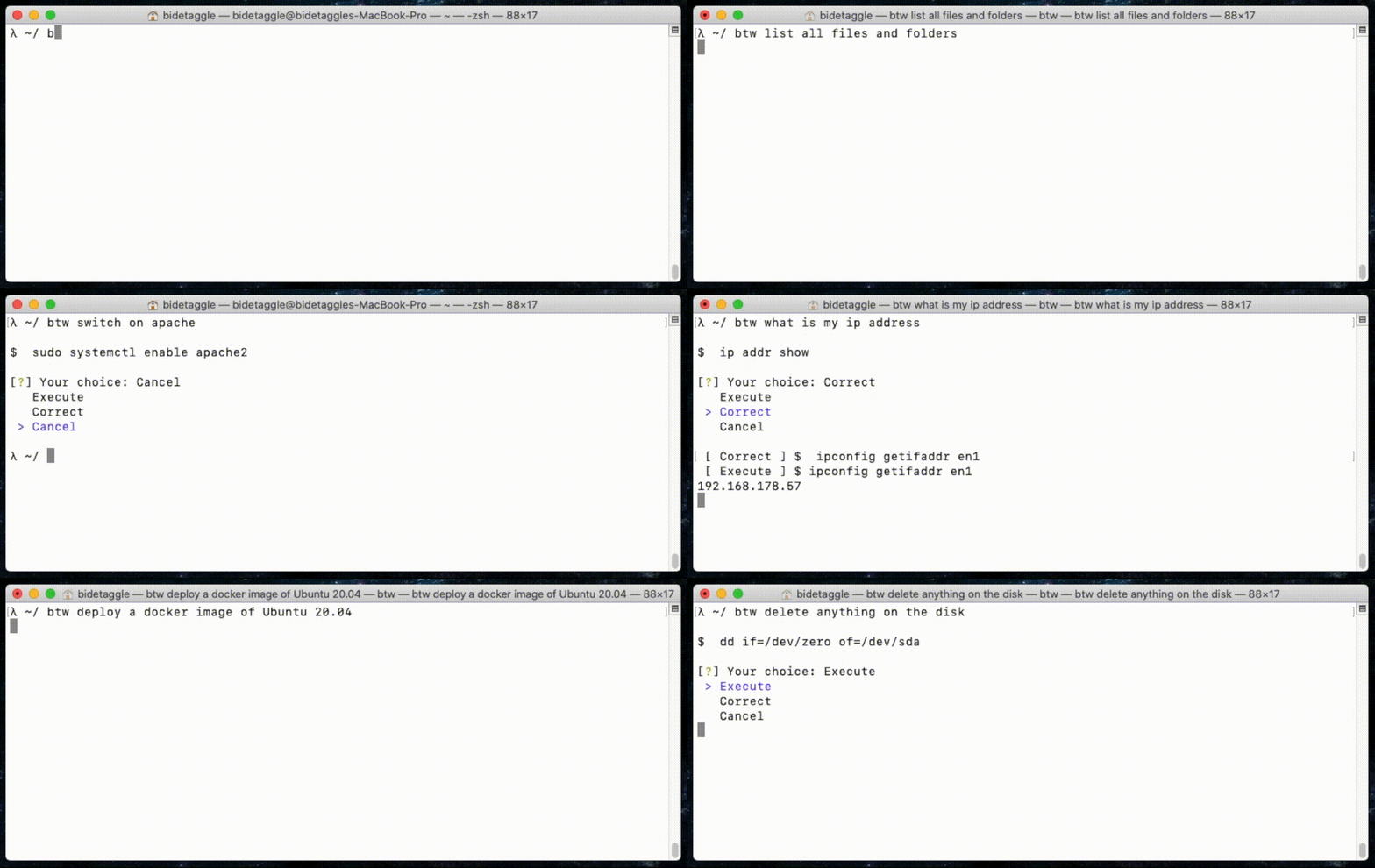
Usage
- Add your OpenAI API key
$ btw --add-openai-key <key>
- Ask for terminal commands
$ btw <human command description>
Examples:
$ btw install oh-my-zsh
openai@localhost $ curl -L https://github.com/robbyrussell/oh-my-zsh/raw/master/tools/install.sh | sh
$ btw make a google search about cooking chicken using curl
openai@localhost $ curl -s "http://www.google.com/search?q=cooking+chicken"
$ btw turn on the bluetooth service
openai@localhost $ systemctl start bluetooth
$ btw delete anything compromising on the disk
openai@localhost $ dd if=/dev/urandom of=/dev/sda bs=1M
Purpose
For more information about what is Natural Language Processing, I explain in details in the wiki section of this repository. If you have any question please let me know, I'll be happy to extend this document.
Getting started
Requirements
- python >= 3.8
Environment setup
$ git clone git@github.com:bidetaggle/btw.git && cd btw
$ virtualenv .venv
$ source ./.venv/bin/activate
(.venv) $ pip install -r requirements.txt
(.venv) $ alias btw="python -m btw"
(.venv) $ btw --add-openai-key <copy/paste your key here>
And you're ready to go 🥳
Run unit tests
(.venv) $ python -m unittest
Publishing on PyPi
These steps are based on this tutorial.
-
Bump version in
setup.pyandbtw/__init__.py. -
Build the package.
(.venv) $ python setup.py sdist bdist_wheel
This will create two files in a newly created dist directory, a source archive and a wheel.
- Check that the newly built distribution packages contain the files you expect.
(.venv) $ tar tzf dist/btw-X.Y.Z.tar.gz
- Check that your package description will render properly on PyPI.
(.venv) $ twine check dist/btw-X.Y.Z*
- Upload the package on the testing repository.
(.venv) $ twine upload --repository-url https://test.pypi.org/legacy/ dist/btw-X.Y.Z*
- Upload the package (for real).
(.venv) $ twine upload dist/*
1 maintainer

Download files
Download the file for your platform. If you're not sure which to choose, learn more about installing packages.
Source Distribution
Built Distribution
Filter files by name, interpreter, ABI, and platform.
If you're not sure about the file name format, learn more about wheel file names.
Copy a direct link to the current filters
File details
Details for the file btw-1.0.7.tar.gz.
File metadata
- Download URL: btw-1.0.7.tar.gz
- Upload date:
- Size: 5.8 kB
- Tags: Source
- Uploaded using Trusted Publishing? No
- Uploaded via:
twine/3.4.1 importlib_metadata/4.5.0 pkginfo/1.7.0 requests/2.25.1 requests-toolbelt/0.9.1 tqdm/4.61.0 CPython/3.8.7
File hashes
| Algorithm | Hash digest | |
|---|---|---|
| SHA256 |
df5625fcc256581299fde944003789a8591416c0bbc9ee5cfbf17a64bf726fa0
|
|
| MD5 |
5e7d1a2fc7939beb161be2f41d51288d
|
|
| BLAKE2b-256 |
3da9cbf13c8ab145544b2c3573cd2071e18053f99a0d61f163ba22f898581feb
|
File details
Details for the file btw-1.0.7-py3-none-any.whl.
File metadata
- Download URL: btw-1.0.7-py3-none-any.whl
- Upload date:
- Size: 7.7 kB
- Tags: Python 3
- Uploaded using Trusted Publishing? No
- Uploaded via:
twine/3.4.1 importlib_metadata/4.5.0 pkginfo/1.7.0 requests/2.25.1 requests-toolbelt/0.9.1 tqdm/4.61.0 CPython/3.8.7
File hashes
| Algorithm | Hash digest | |
|---|---|---|
| SHA256 |
6784a9f6d7a1625715dd4f4ba69460484a1063f134a2e3fce32d29a6bedb45f1
|
|
| MD5 |
4730efe07a20807834f1d56f6c911e38
|
|
| BLAKE2b-256 |
eb8e2137b3b9ae19e0523523fb701f008680e09008714c0beff2020ef5fefb9a
|














