
Buckaroo - The Data Table for Jupyter



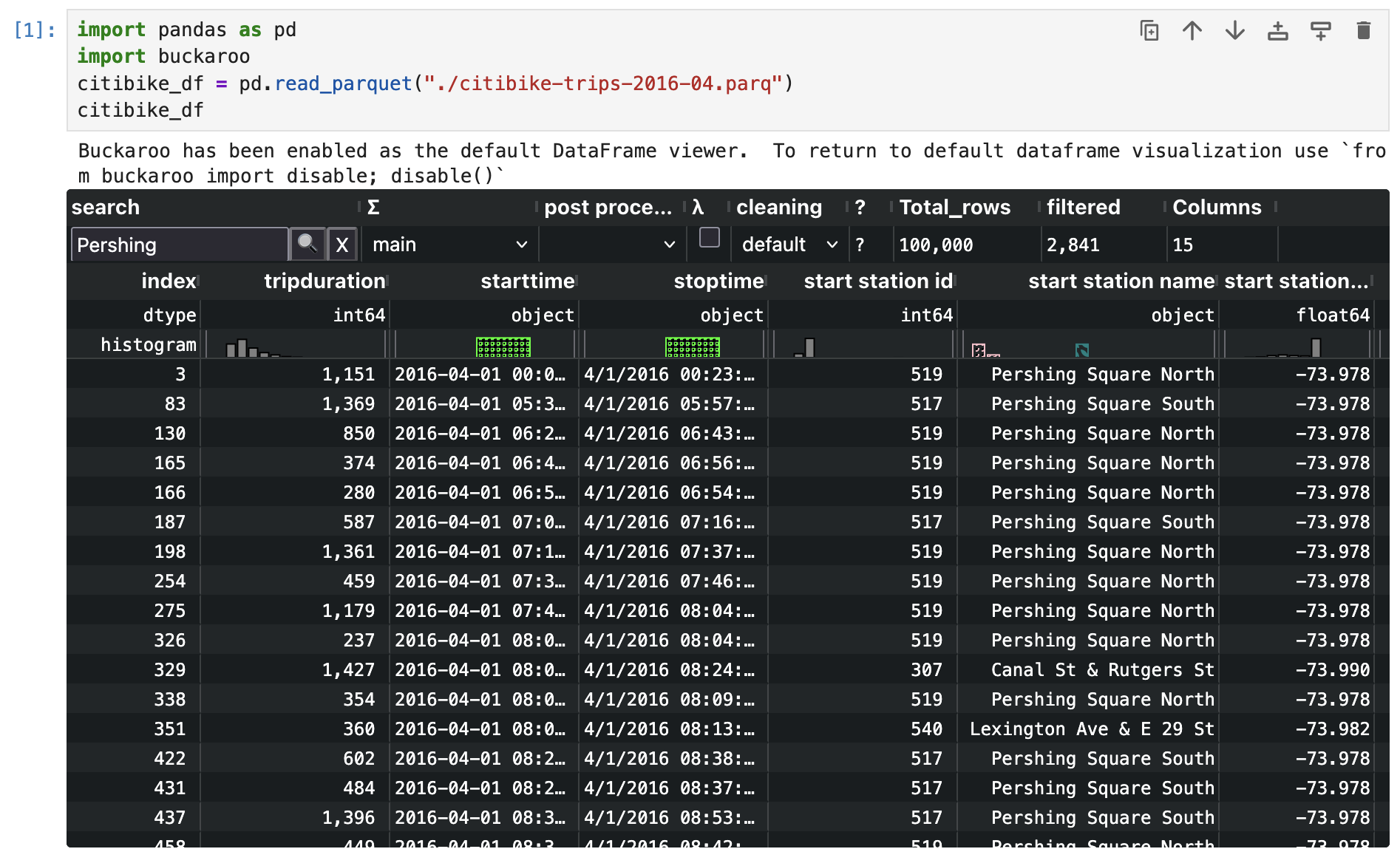
Buckaroo is a modern data table for Jupyter that expedites the most common exploratory data analysis tasks. The most basic data analysis task - looking at the raw data, is cumbersome with the existing pandas tooling. Buckaroo starts with a modern performant data table that is sortable, has value formatting, and scrolls infinitely. On top of the core table experience, extra features like summary stats, histograms, smart sampling, auto-cleaning, and a low code UI are added. All of the functionality has sensible defaults that can be overridden to customize the experience for your workflow.
Try it now with Marimo in your browser
Play with Buckaroo without any installation. Full Tour
Quick start
pip install buckaroo
Then in a Jupyter notebook:
import pandas as pd
import buckaroo
pd.DataFrame({'a': [1, 2, 10, 30, 50, 60, 50], 'b': ['foo', 'foo', 'bar', pd.NA, pd.NA, pd.NA, pd.NA]})
When you import buckaroo, it becomes the default display for Pandas and Polars DataFrames.
Claude Code MCP Integration
Buckaroo can be used as an MCP server in Claude Code, giving Claude the ability to open data files in an interactive table viewer.
Install
claude mcp add buckaroo-table -- uvx --from "buckaroo[mcp]" buckaroo-table
That's it. This downloads Buckaroo from PyPI into an isolated environment and registers the MCP server. No other installation steps are needed.
Usage
Once installed, ask Claude Code to view any CSV, TSV, Parquet, or JSON file:
show me sales_data.csv
Claude will call the view_data tool, which opens the file in Buckaroo's interactive table UI in your browser.
Compatibility
Buckaroo works in the following notebook environments:
jupyter lab(version >=3.6.0)jupyter notebook(version >=7.0)- Marimo
VS Code notebooks(with extra install)- Jupyter Lite
Google ColabClaude Code(via MCP)
Buckaroo works with the following DataFrame libraries:
- pandas (version >=1.3.5)
- polars (optional,
pip install buckaroo[polars])
Features
High performance table
The core data grid is based on AG-Grid. It loads thousands of cells in under a second, with highly customizable display, formatting and scrolling. Data is loaded lazily into the browser as you scroll, and serialized with parquet. You no longer have to use df.head() to poke at portions of your data.
Fixed width formatting by default
By default numeric columns are formatted to use a fixed width font and commas are added. This allows quick visual confirmation of magnitudes in a column.
Histograms
Histograms for every column give you a very quick overview of the distribution of values, including uniques and N/A.
Summary stats
The summary stats view can be toggled by clicking on the 0 below the Σ icon. Summary stats are similar to df.describe and extensible.
Sorting
All visible data is sortable by clicking on a column name; further clicks change sort direction then disable sort for that column. Because extreme values are included with sample rows, you can see outlier values too.
Search
Search is built into Buckaroo so you can quickly find the rows you are looking for.
Lowcode UI
Buckaroo has a simple low code UI with Python code gen. This view can be toggled by clicking the checkbox below the λ (lambda) icon.
Autocleaning
Select a cleaning method from the status bar. The autocleaning system inspects each column and runs statistics to decide if cleaning should be applied (parsing dates, stripping non-integer characters, parsing implied booleans like "yes"/"no"), then adds those operations to the low code UI. Different cleaning methods can be tried because dirty data isn't deterministic. Access it with BuckarooWidget(df, auto_clean=True).
Read more: Autocleaning docs
Extensibility at the core
Summary stats are built on the Pluggable Analysis Framework that allows individual summary stats to be overridden, and new summary stats to be built in terms of existing ones. Care is taken to prevent errors in summary stats from preventing display of a dataframe.
Learn More
Interactive Styling Gallery
The interactive styling gallery lets you see different styling configurations. You can live edit code and play with different configs.
Videos
- Buckaroo Full Tour 6m50s - A broad introduction to Buckaroo
- The Column's the limit - PyData Boston 2025 43m - How LazyBuckaroo reliably processes laptop-large data
- 19 Million row scrolling and stats demo 58s
- Buckaroo PyData Boston 2025 49m - Full tour with audience Q&A
- Using Buckaroo and pandas to investigate large CSVs 9m
- Autocleaning quick demo 2m38s
- Writing your own autocleaning functions 10m10s
- Extending Buckaroo 12m56s
- Styling Buckaroo 8m18s
- Understanding JLisp in Buckaroo 12m42s
Articles
- Using Buckaroo and pandas to investigate large CSVs
- Speed up exploratory data analysis with Buckaroo
Example Notebooks
- Full Tour (Marimo) - Start here. Broad overview of Buckaroo's features. Also available on Google Colab and JupyterLite
- Notebook on GitHub
- Live Styling Gallery - Examples of all the formatters and styling available
- Live Autocleaning - How autocleaning works and how to implement your own
- Live Histogram Demo - Explanation of the embedded histograms
- Live JLisp overview - The small lisp interpreter powering the lowcode UI
- Extending Buckaroo - Adding post processing methods and custom styling
- Styling Howto - In depth custom styling guide
- Pluggable Analysis Framework - Adding new summary stats
- Solara Buckaroo - Using Buckaroo with Solara
Example apps built on Buckaroo
- Buckaroo Compare - Join two dataframes and highlight visual differences
- Buckaroo Pandera - Validate a dataframe with Pandera, then visually highlight where it fails
Contributing
See CONTRIBUTING.md for development setup, build instructions, and release process.
We welcome issue reports; be sure to choose the proper issue template so we get the necessary information.
1 maintainer

Metadata
1 maintainer
Release files for buckaroo 0.15.11
For a detailed explanation of source distributions (sdists) and built distributions (wheels), please see the package formats documentation.
Source distribution (sdist)
| File | Size | Uploaded | Provenance | |
|---|---|---|---|---|
| buckaroo-0.15.11.tar.gz | 1.8 MB | With provenance | Details |
Built distribution (wheel)
| File | Interpreter | ABI | Platform | Reset |
|---|---|---|---|---|
| buckaroo-0.15.11-py3-none-any.whl | Python 3 | none | any | Details |
Total release size: 3.4 MB
Release files / buckaroo-0.15.11.tar.gz
| Download URL | buckaroo-0.15.11.tar.gz |
|---|---|
| Size | 1.8 MB |
| Tags | Source |
|
SHA-256 checksum How to use checksums |
0be1ea2a8a1b0d080e14181d49cf7bab490c2b71410556a485131e9a68f7a467
|
|
BLAKE2b-256 checksum How to use checksums |
59581f3fb3bf216046e32fefee29e02f020f19727d2db271e5b279b65acdc184
|
| Upload date | |
|
Uploaded using Trusted Publishing? What is trusted publishing? |
Yes |
| Uploaded via |
twine/7.0.0 CPython/3.13.16
|
Provenance
Provenance describes where a file came from. On PyPI, provenance is shared via attestations, which provide a verifiable record of the build or publishing details. View details, limitations and caveats.


PyPI Publish Attestation
PyPI verified that this artifact, at this checksum, originated from the publisher listed below.
Signed by GitHub Actions, verified by PyPI on Oct 21, 2026.
Transparency logRelease files / buckaroo-0.15.11-py3-none-any.whl
| Download URL | buckaroo-0.15.11-py3-none-any.whl |
|---|---|
| Size | 1.6 MB |
| Tags | Python 3 |
|
SHA-256 checksum How to use checksums |
4633fec82b08aca6dae0e5f79c085c0f00879c37002a5dbd0adf1dcfa64fb180
|
|
BLAKE2b-256 checksum How to use checksums |
3b002d9254675ede1fd3f333a93e32f08a289c37ccc304eab1cef41ff1ec714a
|
| Upload date | |
|
Uploaded using Trusted Publishing? What is trusted publishing? |
Yes |
| Uploaded via |
twine/7.0.0 CPython/3.13.16
|
Provenance
Provenance describes where a file came from. On PyPI, provenance is shared via attestations, which provide a verifiable record of the build or publishing details. View details, limitations and caveats.
PyPI Publish Attestation
PyPI verified that this artifact, at this checksum, originated from the publisher listed below.
Signed by GitHub Actions, verified by PyPI on Oct 21, 2026.
Transparency logSecurity for buckaroo 0.15.11
Provenance
Provenance describes where a file came from. On PyPI, provenance is shared via attestations, which provide a verifiable record of the build or publishing details. View details, limitations and caveats.
Full provenance
All 2 files in this release have been uploaded with provenance metadata.
Attestation for buckaroo-0.15.11.tar.gz
PyPI Publish Attestation
PyPI verified that this artifact, at this checksum, originated from the publisher listed below.
Signed by GitHub Actions, verified by PyPI on Oct 21, 2026.
Transparency logA note on package security
PyPI is a repository for distributing packages, not a service for auditing them. While third-party security researchers and our staff do their best to detect and remove malicious packages, PyPI cannot guarantee the quality, security or suitability of any given package.
To learn more about protecting yourself from malicious actors, visit our package security documentation.














