
BudouX



Standalone. Small. Language-neutral.
BudouX is the successor to Budou, the machine learning powered line break organizer tool.
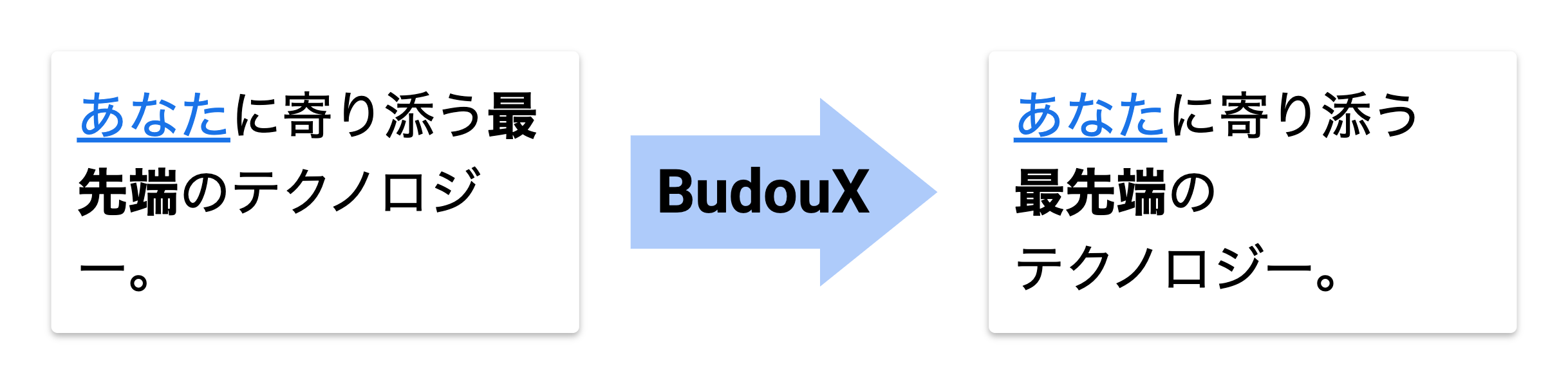
It is standalone. It works with no dependency on third-party word segmenters such as Google cloud natural language API.
It is small. It takes only around 15 KB including its machine learning model. It's reasonable to use it even on the client-side.
It is language-neutral. You can train a model for any language by feeding a dataset to BudouX’s training script.
Last but not least, BudouX supports HTML inputs.
Demo
https://google.github.io/budoux
Natural languages supported by pretrained models
- Japanese
- Simplified Chinese
- Traditional Chinese
- Thai
Korean support?
Korean uses spaces between words, so you can generally prevent words from being split across lines by applying the CSS property word-break: keep-all to the paragraph, which should be much more performant than installing BudouX.
That said, we're happy to explore dedicated Korean language support if the above solution proves insufficient.
Supported Programming languages
- Python
- JavaScript
- Java
Python module
Install
$ pip install budoux
Usage
Library
You can get a list of phrases by feeding a sentence to the parser. The easiest way is to get a parser is loading the default parser for each language.
Japanese:
import budoux
parser = budoux.load_default_japanese_parser()
print(parser.parse('今日は天気です。'))
# ['今日は', '天気です。']
Simplified Chinese:
import budoux
parser = budoux.load_default_simplified_chinese_parser()
print(parser.parse('今天是晴天。'))
# ['今天', '是', '晴天。']
Traditional Chinese:
import budoux
parser = budoux.load_default_traditional_chinese_parser()
print(parser.parse('今天是晴天。'))
# ['今天', '是', '晴天。']
Thai:
import budoux
parser = budoux.load_default_thai_parser()
print(parser.parse('วันนี้อากาศดี'))
# ['วัน', 'นี้', 'อากาศ', 'ดี']
You can also translate an HTML string to wrap phrases with non-breaking markup. The default parser uses zero-width space (U+200B) to separate phrases.
print(parser.translate_html_string('今日は<b>とても天気</b>です。'))
# <span style="word-break: keep-all; overflow-wrap: anywhere;">今日は<b>\u200bとても\u200b天気</b>です。</span>
Please note that separators are denoted as \u200b in the example above for
illustrative purposes, but the actual output is an invisible string as it's a
zero-width space.
If you have a custom model, you can use it as follows.
with open('/path/to/your/model.json') as f:
  model = json.load(f)
parser = budoux.Parser(model)
A model file for BudouX is a JSON file that contains pairs of a feature and its score extracted by machine learning training. Each score represents the significance of the feature in determining whether to break the sentence at a specific point.
For more details of the JavaScript model, please refer to JavaScript module README.
CLI
You can also format inputs on your terminal with budoux command.
$ budoux 本日は晴天です。 # default: japanese
本日は
晴天です。

$ budoux -l ja 本日は晴天です。
本日は
晴天です。

$ budoux -l zh-hans 今天天气晴朗。
今天
天气
晴朗。

$ budoux -l zh-hant 今天天氣晴朗。
今天
天氣
晴朗。

$ budoux -l th วันนี้อากาศดี
วัน
นี้
อากาศ
ดี
$ echo $'本日は晴天です。\n明日は曇りでしょう。' | budoux
本日は
晴天です。
---
明日は
曇りでしょう。
$ budoux 本日は晴天です。 -H
<span style="word-break: keep-all; overflow-wrap: anywhere;">本日は\u200b晴天です。</span>
Please note that separators are denoted as \u200b in the example above for
illustrative purposes, but the actual output is an invisible string as it's a
zero-width space.
If you want to see help, run budoux -h.
$ budoux -h
usage: budoux [-h] [-H] [-m JSON | -l LANG] [-d STR] [-V] [TXT]

BudouX is the successor to Budou,
the machine learning powered line break organizer tool.

positional arguments:
  TXT                    text (default: None)

optional arguments:
  -h, --help             show this help message and exit
  -H, --html             HTML mode (default: False)
  -m JSON, --model JSON  custom model file path (default: /path/to/budoux/models/ja.json)
  -l LANG, --lang LANG   language of custom model (default: None)
  -d STR, --delim STR    output delimiter in TEXT mode (default: ---)
  -V, --version          show program's version number and exit

supported languages of `-l`, `--lang`:
- ja
- zh-hans
- zh-hant
- th
Caveat
BudouX supports HTML inputs and outputs HTML strings with markup that wraps phrases, but it's not meant to be used as an HTML sanitizer. BudouX doesn't sanitize any inputs. Malicious HTML inputs yield malicious HTML outputs. Please use it with an appropriate sanitizer library if you don't trust the input.
Background
English text has many clues, like spacing and hyphenation, that enable beautiful and readable line breaks. However, some CJK languages lack these clues, and so are notoriously more difficult to process. Line breaks can occur randomly and usually in the middle of a word or a phrase without a more careful approach. This is a long-standing issue in typography on the Web, which results in a degradation of readability.
Budou was proposed as a solution to this problem in 2016. It automatically translates CJK sentences into HTML with lexical phrases wrapped in non-breaking markup, so as to semantically control line breaks. Budou has solved this problem to some extent, but it still has some problems integrating with modern web production workflow.
The biggest barrier in applying Budou to a website is that it has dependency on third-party word segmenters. Usually a word segmenter is a large program that is infeasible to download for every web page request. It would also be an undesirable option making a request to a cloud-based word segmentation service for every sentence, considering the speed and cost. That’s why we need a standalone line break organizer tool equipped with its own segmentation engine small enough to be bundled in a client-side JavaScript code.
BudouX is the successor to Budou, designed to be integrated with your website with no hassle.
How it works
BudouX uses the AdaBoost algorithm to segment a sentence into phrases by considering the task as a binary classification problem to predict whether to break or not between all characters. It uses features such as the characters around the break point, their Unicode blocks, and combinations of them to make a prediction. The output machine learning model, which is encoded as a JSON file, stores pairs of the feature and its significance score. The BudouX parser takes a model file to construct a segmenter and translates input sentences into a list of phrases.
Building a custom model
You can build your own custom model for any language by preparing training data in the target language. A training dataset is a large text file that consists of sentences separated by phrases with the separator symbol "▁" (U+2581) like below.
私は▁遅刻魔で、▁待ち合わせに▁いつも▁遅刻してしまいます。
メールで▁待ち合わせ▁相手に▁一言、▁「ごめんね」と▁謝れば▁どうにか▁なると▁思っていました。
海外では▁ケータイを▁持っていない。
Assuming the text file is saved as mysource.txt, you can build your own custom model by running the following commands.
$ pip install .[dev]
$ python scripts/encode_data.py mysource.txt -o encoded_data.txt
$ python scripts/train.py encoded_data.txt -o weights.txt
$ python scripts/build_model.py weights.txt -o mymodel.json
Please note that train.py takes time to complete depending on your computer resources.
Good news is that the training algorithm is an anytime algorithm, so you can get a weights file even if you interrupt the execution. You can build a valid model file by passing that weights file to build_model.py even in such a case.
Constructing a training dataset from the KNBC corpus for Japanese
The default model for Japanese (budoux/models/ja.json) is built using the KNBC corpus.
You can create a training dataset, which we name source_knbc.txt below for example, from the corpus by running the following commands:
$ curl -o knbc.tar.bz2 https://nlp.ist.i.kyoto-u.ac.jp/kuntt/KNBC_v1.0_090925_utf8.tar.bz2
$ tar -xf knbc.tar.bz2  # outputs KNBC_v1.0_090925_utf8 directory
$ python scripts/prepare_knbc.py KNBC_v1.0_090925_utf8 -o source_knbc.txt
Author
Disclaimer
This is not an officially supported Google product.
1 maintainer

Metadata
1 maintainer
Release files for budoux 0.9.1
For a detailed explanation of source distributions (sdists) and built distributions (wheels), please see the package formats documentation.
Source distribution (sdist)
| File | Size | Uploaded | |
|---|---|---|---|
| budoux-0.9.1.tar.gz | 111.4 kB | Details |
Built distribution (wheel)
| File | Interpreter | ABI | Platform | Reset |
|---|---|---|---|---|
| budoux-0.9.1-py3-none-any.whl | Python 3 | none | any | Details |
Total release size: 217.2 kB
Release files / budoux-0.9.1.tar.gz
| Download URL | budoux-0.9.1.tar.gz |
|---|---|
| Size | 111.4 kB |
| Tags | Source |
|
SHA-256 checksum How to use checksums |
fc2243099c7ee42627858f06a4c6dabbd3f63b566ae3283be3869a93500b1efd
|
|
BLAKE2b-256 checksum How to use checksums |
6a9987012ebd2aecf1506c52a219abe1d3a1328e84fd0c418cf98c7ba8802c94
|
| Upload date | |
|
Uploaded using Trusted Publishing? What is trusted publishing? |
Yes |
| Uploaded via |
twine/6.2.0 CPython/3.11.2
|
Provenance
Provenance describes where a file came from. On PyPI, provenance is shared via attestations, which provide a verifiable record of the build or publishing details. View details, limitations and caveats.


PyPI Publish Attestation
PyPI verified that this artifact, at this checksum, originated from the publisher listed below.
Signed by Google Cloud, verified by PyPI on Aug 28, 2026.
Transparency logRelease files / budoux-0.9.1-py3-none-any.whl
| Download URL | budoux-0.9.1-py3-none-any.whl |
|---|---|
| Size | 105.7 kB |
| Tags | Python 3 |
|
SHA-256 checksum How to use checksums |
760fc96304bcd2eff1f2bec03406990974cdd5dc8e709b4eda5f3720f9ab0b1e
|
|
BLAKE2b-256 checksum How to use checksums |
720ffcb8f66a66d1f97a76650a3e451d509acfcc52bfcd6c47446c93ff09b956
|
| Upload date | |
|
Uploaded using Trusted Publishing? What is trusted publishing? |
Yes |
| Uploaded via |
twine/6.2.0 CPython/3.11.2
|
Provenance
Provenance describes where a file came from. On PyPI, provenance is shared via attestations, which provide a verifiable record of the build or publishing details. View details, limitations and caveats.
PyPI Publish Attestation
PyPI verified that this artifact, at this checksum, originated from the publisher listed below.
Signed by Google Cloud, verified by PyPI on Aug 28, 2026.
Transparency log













