

bugcap
Bug reports your AI agent can actually read.
Annotated screenshots and notes, stored on your machine, readable by coding agents over MCP, and synced to GitHub issues when you choose.



Website · Usage guide · Quick start · Agents (MCP) · Changelog
Why bugcap
Reviewing an app for bugs usually leaves you with two disconnected things: a screenshot and a
mental note. By the time you file the issue, the context is gone. Once the screenshot is attached
to a GitHub issue, it becomes unreadable to an API token. The CDN only resolves in a browser
session, so an agent using gh can read the text but never the picture that explains the bug.
bugcap keeps the whole loop in one place:
| 📸 Capture at the moment | Annotated screenshots through flameshot, satty or screencapture. No new annotation UI. |
| 🗂️ Local record | A SQLite index and PNGs on disk. Nothing depends on GitHub being reachable. |
| 🤖 Agent-readable | A stdio MCP server hands reports, images included, to Claude Code and other agents. |
| 🔁 Sync when ready | Push to a GitHub issue with the usual inline image, plus a plain copy agents can read. |
| 🎞️ Record what happens | Short screen recordings as animated GIF, video or keyframes, with size caps. |
| 🖥️ Triage in a browser | A local dashboard on 127.0.0.1 to browse, filter and set statuses. |
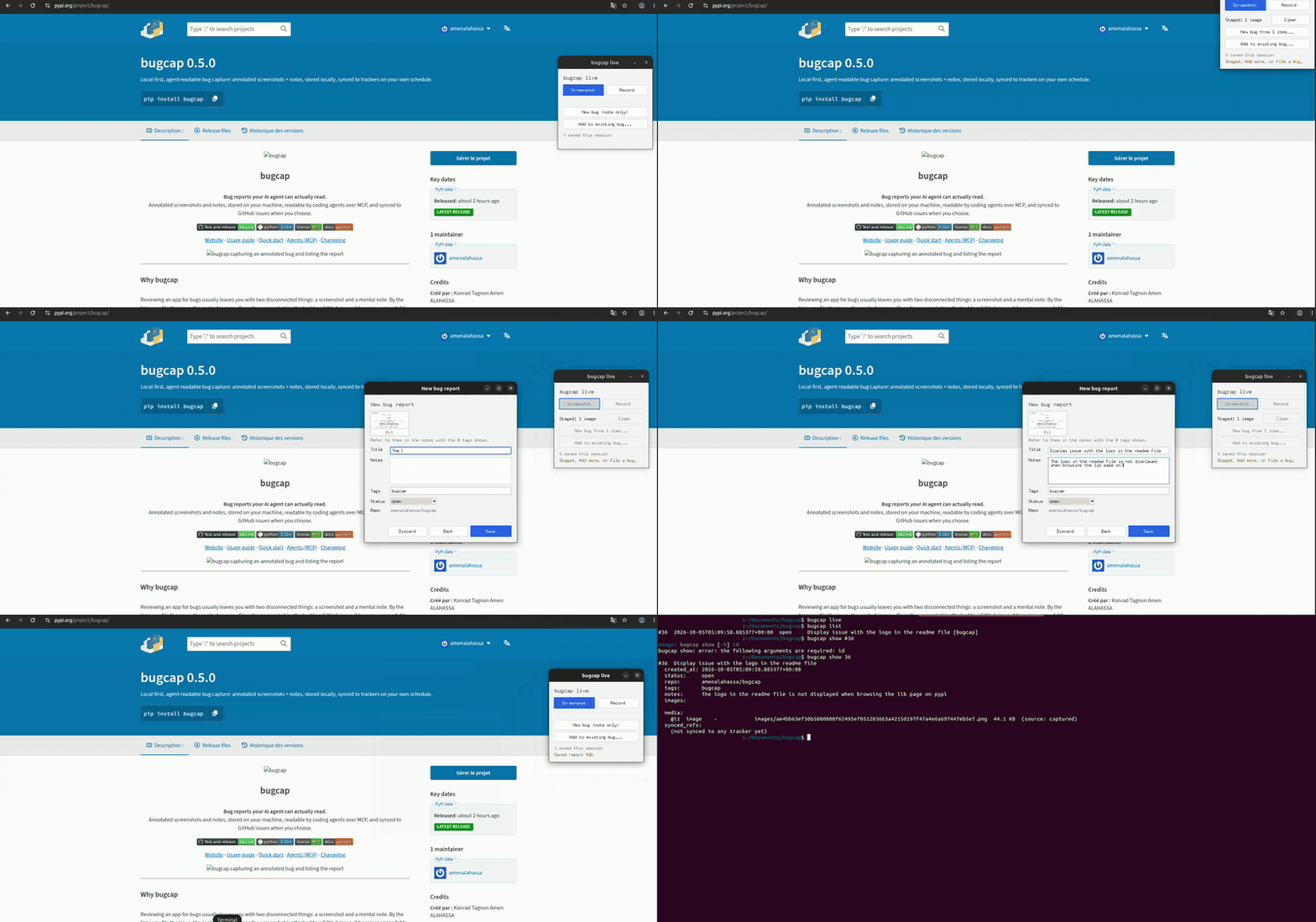
| 🪟 Live mode | An always-on-top window (top-right) to capture or record, stage several items, then file a new bug, add to an existing one, or log a note-only bug. |
Quick start
# install from PyPI
pipx install 'bugcap[mcp]'

bugcap setup --yes                      # detects or installs a capture tool
cd ~/code/myproject && bugcap init      # scope reports to this repo

bugcap capture --title "Login fails" --note "Error toast after submit" --tag auth
bugcap list
bugcap dashboard --open                 # browse and triage in the browser
The usage guide covers every command: images
and labels, recording, live mode, @ references, GitHub pull and sync, and the MCP tools.
If a report ID is not found, the error suggests bugcap list --all to see report IDs across all repos.
Connect your agent (MCP)
Requires the mcp extra. Then give your agent access to the reports:
claude mcp add bugcap -- bugcap mcp-serve
Or in a project's .mcp.json:
{ "mcpServers": { "bugcap": { "command": "bugcap", "args": ["mcp-serve"] } } }
The server exposes six tools: list_reports, get_report (returns the screenshot), request_screenshot,
pull_issues, attach_image, attach_file and update_notes. Logs go to logs/mcp-server.log in the data
directory, never to stdout.
Ask your agent something like "list the open bugcap reports for this repo and fix the one with the error toast". It can read the picture because it's a local file, not a CDN link.
How it works
 capture ──► local store (SQLite + images/) ──► MCP / dashboard / CLI   (read by agents and you)
                       │
                       └──► sync ──► GitHub issue  +  committed image copy  (readable with gh api)
capture/attach/recordwrite to the store.mcp-serve,dashboard,list,showread from it.syncis the only thing that talks to a tracker, and only when you run it.
Status
Working. Roadmap items 1–5, 7 and 8 are implemented and tested, along with spec 002 (images,
@ references, recording, live mode and the dashboard). S3/R2 object storage (item 6) and other
trackers (item 9) are deferred. The Destination seam is in place, so they can be added without
changing the CLI. See ROADMAP.md.
Installation
Requires Python 3.10 or newer. The core CLI uses only the standard library (plus tomli before
Python 3.11). The MCP server is an optional extra.
pipx install 'bugcap[mcp]'   # recommended
uv tool install 'bugcap[mcp]'
pip install -e '.[dev,mcp]'                                             # development
Supported capture backends: flameshot (cross-platform, recommended),
satty with grim (Linux/Wayland), and screencapture
(macOS). Run bugcap setup to see what's detected. You can always import an existing image with
bugcap capture --image PATH.
Documentation
Full guide: amenalahassa.github.io/bugcap/usage.html
covers capture, images, recording, live mode, triage, @ references, the dashboard, GitHub
pull and sync, MCP, and where data lives per OS.
Notes on the more involved behaviour:
- References. In a note,
@i1is image 1,@v2a video,@g3an animated GIF,@f4a frame set,@d5an attached file (attach --file, any type), and@login-errora labelled item.#3points at report 3 (a missing one is kept as text with a warning). Media references are validated on save, and relabelling or removing a referenced item needs--force. - Repo values (
init,sync,config repo set) are checked for format and, withgh, for existence. Changing the repo identity offers to move existing reports. - Media sync over
[sync] max_upload_mb(default 25) is skipped with a warning.
Contributing
Contributions are welcome. Read CONTRIBUTING.md for the workflow and project rules, and the Code of Conduct. Report security issues privately, see SECURITY.md.
Development
See DEVELOPMENT.md. Run the tests with:
uv run --extra dev --extra mcp pytest -q
Architecture
Module map (src/bugcap/):
| Module | Responsibility |
|---|---|
paths.py |
Per-OS data/config dirs; BUGCAP_HOME override. |
capture.py |
Import or capture images (flameshot/satty+grim/screencapture); has_display(). |
backends.py |
Capture-tool detection, per-OS install commands, manual guidance. |
store.py |
SQLite store (reports, media, media_frames; schema v2), PRAGMA user_version migrations, report API, transaction(). |
service.py |
Shared rules used by the CLI, MCP, dashboard and live mode: media add/relabel/remove, notes validation, reference rewrite, queries. Raises ServiceError. |
ingest.py |
Path/glob/URL inputs: magic-byte validation, size/timeout/redirect limits, atomic copy into images/. |
refs.py |
@ reference parsing (code/email aware), validation, rewrite, display. |
recorder.py |
ffmpeg/wf-recorder argv per OS, stop/caps watchdogs, animated/frames post-processing. |
live.py + live_session.py + drafts.py |
Tk control window (thin) over a pure state machine; drafts on disk. |
dashboard/ |
http.server UI + JSON API (loopback, Host/Origin checks, write token, Range media, static allowlist). |
repo.py + tomlio.py |
.bugcap.toml discovery/read/write (tag, github slug, [sync]). |
config.py |
Global config.toml: [sync] defaults, [consent] for image commits, [log]. |
validation.py |
Format checks for repo slugs, images path and branch names. |
logs.py |
mcp-serve logging (rotating file + stderr, never stdout). |
ghcli.py |
Thin gh wrapper (argv lists; large payloads via stdin). Transport. |
sync.py |
Destination protocol, GitHubDestination, pull_issues, sync_report. Policy. |
agent_api.py |
SDK-free tool logic for the six MCP tools. |
mcp_server.py |
Lazy-imports the mcp SDK; registers the agent_api tools over stdio. |
cli.py |
All subcommands. |
The store is the one shared surface. Capture writes to it; the CLI, the MCP server, and the
sync layer only read/update it — nothing talks to a tracker except sync.py (via ghcli.py), and
nothing requires a tracker to exist for capture to be useful.
Extension seam (roadmap 6 & 9): sync.py depends only on the small Destination protocol
(ensure_ready, repo_visibility, get_file, put_file, create_issue, comment,
supports_attach) and on the report's synced_refs. A future object store or tracker implements
that protocol — the CLI and store don't change. Refs are namespaced per destination:
github.issue→owner/repo#Ngithub.comment_hash→ sha256 of the last synced content (so re-sync comments only on change)github.image.<basename>/github.media.<basename>→owner/repo:path@commit(so each file is committed at most once)github.frame.<idx>.<n>andgithub.frames.<idx>→ keyframes of a recording (one commit per frame; GitHub's contents API commits one file at a time)
These refs also make pull and sync idempotent and resumable: each step is persisted as it succeeds, so a re-run skips what is already recorded.
Roadmap
See ROADMAP.md.
Design notes / deliberate non-goals
- No cloud storage by default, no vendor account. The store is plain files on your disk. Sync (GitHub, and optionally an S3/R2 object store) is opt-in and explicit, per report.
- Not a GitHub attachment replacement. The CDN-attached image stays for humans browsing the issue normally; the repo-committed copy exists purely so agents can read it. Both are written on sync, deliberately redundant.
- Not using Git LFS for synced copies. GitHub's Contents API returns LFS pointer files, not the real bytes, for LFS-tracked paths — which would silently defeat the entire point of committing the copy. Plain commits are used instead; if screenshot volume ever outgrows that, the right next step is an external object store with its own token-authable download URLs, not LFS.
- Annotation UI is not reinvented.
bugcapis glue around an existing capture/annotate tool, not a new one.
License
MIT — see LICENSE.
1 maintainer

Metadata
1 maintainer
Release files for bugcap 0.6.0
For a detailed explanation of source distributions (sdists) and built distributions (wheels), please see the package formats documentation.
Source distribution (sdist)
| File | Size | Uploaded | Provenance | Actions |
|---|---|---|---|---|
| bugcap-0.6.0.tar.gz | 132.2 kB | With provenance | Details for bugcap-0.6.0.tar.gz |
Built distribution (wheel)
| File | Interpreter | ABI | Platform | Actions Reset |
|---|---|---|---|---|
| bugcap-0.6.0-py3-none-any.whl | Python 3 | none | any | Details for bugcap-0.6.0-py3-none-any.whl |
Total release size: 224.4 kB
Release files / bugcap-0.6.0.tar.gz
| Download URL | bugcap-0.6.0.tar.gz |
|---|---|
| Size | 132.2 kB |
| Tags | Source |
|
SHA-256 checksum How to use checksums |
7e58c78032d9bade493bd18982be30410afa01dfadcd4d73706e59cd21f379ed
|
|
BLAKE2b-256 checksum How to use checksums |
a76a0d2abe1bc37e38718d079aef3af8353aa4206f9965fe02bc3e68b731ed5e
|
| Upload date | |
|
Uploaded using Trusted Publishing? What is trusted publishing? |
Yes |
| Uploaded via |
twine/7.0.0 CPython/3.13.14
|
Provenance
Provenance describes where a file came from. On PyPI, provenance is shared via attestations, which provide a verifiable record of the build or publishing details. View details, limitations and caveats.


PyPI Publish Attestation
PyPI verified that this artifact, at this checksum, originated from the publisher listed below.
Signed by GitHub Actions, verified by PyPI on Oct 10, 2026.
Transparency logRelease files / bugcap-0.6.0-py3-none-any.whl
| Download URL | bugcap-0.6.0-py3-none-any.whl |
|---|---|
| Size | 92.3 kB |
| Tags | Python 3 |
|
SHA-256 checksum How to use checksums |
979344c3b3b52ede80879e10a2c180267c7f108ea1157ecdf55d789d9b7f4a83
|
|
BLAKE2b-256 checksum How to use checksums |
1f0fe232cf32fe0afa0705d02b0bc54bd4b9aace93d9d05d443a40b7015bd7bd
|
| Upload date | |
|
Uploaded using Trusted Publishing? What is trusted publishing? |
Yes |
| Uploaded via |
twine/7.0.0 CPython/3.13.14
|
Provenance
Provenance describes where a file came from. On PyPI, provenance is shared via attestations, which provide a verifiable record of the build or publishing details. View details, limitations and caveats.
PyPI Publish Attestation
PyPI verified that this artifact, at this checksum, originated from the publisher listed below.
Signed by GitHub Actions, verified by PyPI on Oct 10, 2026.
Transparency logSecurity for bugcap 0.6.0
Provenance
Provenance describes where a file came from. On PyPI, provenance is shared via attestations, which provide a verifiable record of the build or publishing details. View details, limitations and caveats.
Full provenance
Both files in this release have been uploaded with provenance metadata.
Attestation for bugcap-0.6.0.tar.gz
PyPI Publish Attestation
PyPI verified that this artifact, at this checksum, originated from the publisher listed below.
Signed by GitHub Actions, verified by PyPI on Oct 10, 2026.
Transparency logA note on package security
PyPI is a repository for distributing packages, not a service for auditing them. While third-party security researchers and our staff do their best to detect and remove malicious packages, PyPI cannot guarantee the quality, security or suitability of any given package.
To learn more about protecting yourself from malicious actors, visit our package security documentation.














