
buildMyGPT



Build your own small GPT: swap in your data, pretrain, fine-tune it for a task and measure it — on a Mac for quick runs, on a Colab GPU (L4 / A100) for real ones, all from the terminal. The model and training loop follow nanoGPT; this project is not affiliated with it.
buildmygpt init mineGPT && cd mineGPT
scripts/title_demo.sh                                    # public data: a poem goes in, its title comes out
buildmygpt compose runs/tang_char_mac --title 夜雨思歸 --form 五言絕句
Features
- 🧪 Learn by building — micrograd, an annotated GPT, hand-written attention checked against PyTorch, ablation switches, tokenizer experiments
- 📚 Public, reproducible data — 全唐詩 (Complete Tang Poems) at a pinned commit, with a sha256 fingerprint so everyone trains on byte-identical data
- 🎯 Task models — pretrain, then fine-tune on input → output pairs (poem → title), evaluated against TF-IDF keyword extraction
- ✍️ Compose — generate candidate poems from a title and rank them like search results (form, imagery, originality, fluency)
- ☁️ Cloud GPU from the terminal — Google's official Colab CLI: preflight check, automatic retry when no GPU is free, early stopping, guaranteed shutdown, compute units recorded
- 📦 Export / import — trained models as one
.tar.xzwith a sha256 manifest (30M parameters → 54 MB) - 🤖 Workspace + Claude Code skill —
buildmygpt initcreates plan, journal, configs and scripts, and teaches an AI assistant the workflow
Installation
pip install buildMyGPT        # or: uv tool install buildMyGPT
buildmygpt doctor             # python / torch / cuda | mps check
Quick start
buildmygpt init mineGPT && cd mineGPT
scripts/quickstart.sh --quick     # the whole pipeline once: 16 s on a MacBook M1 Pro
scripts/title_demo.sh             # 全唐詩: prepare → pretrain → fine-tune poem → title → evaluate (~6 min on a MacBook M1 Pro)
quickstart.sh runs every stage once — doctor, micrograd and attention checks against PyTorch, tiny shakespeare, a
short training run — and files the log under notes/ with a JOURNAL.md draft built from the real numbers.
Mac or cloud GPU?
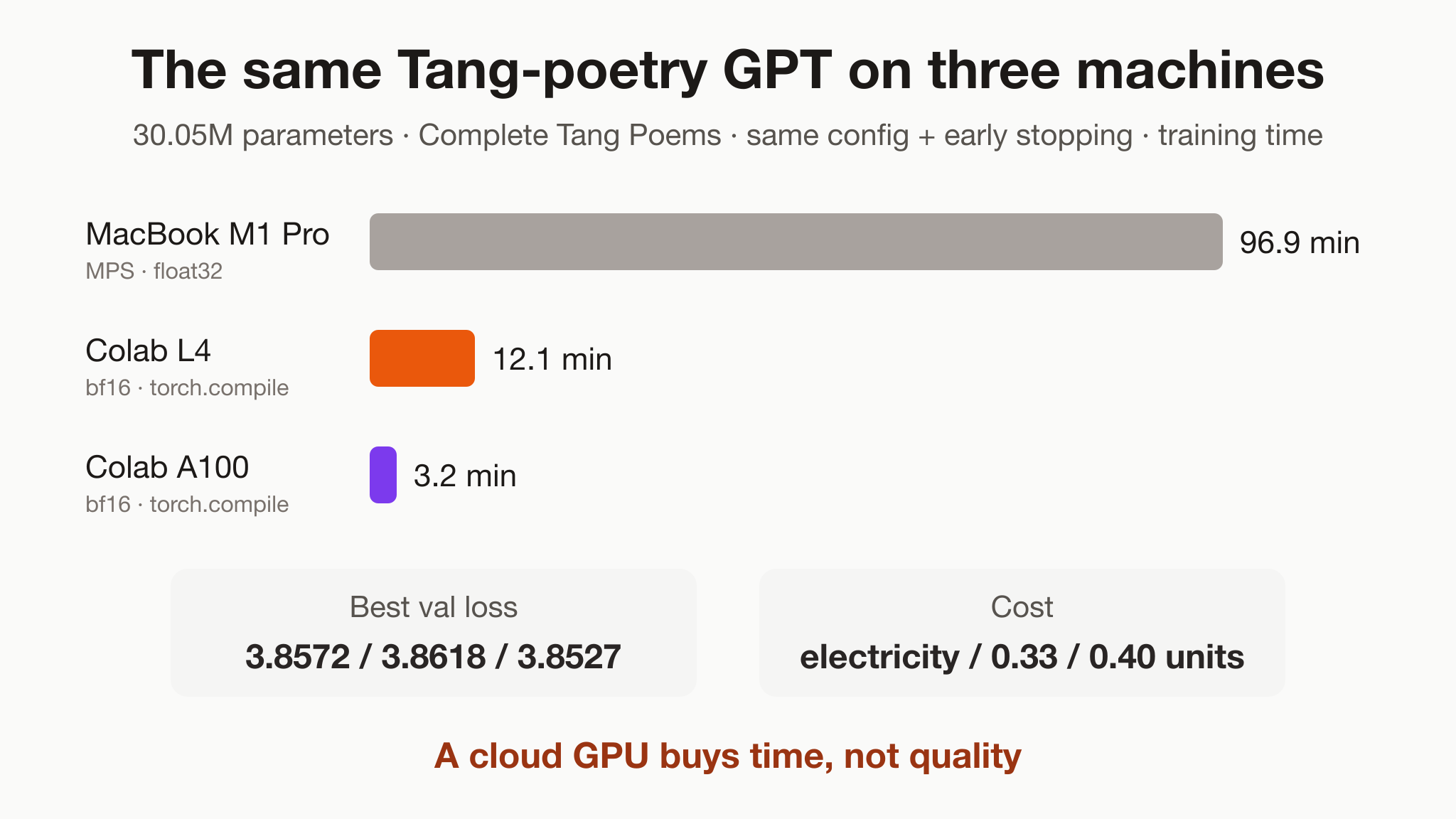
The same 唐詩GPT (30.05M parameters, 8 layers × 512 dims, 全唐詩, batch 64 × 256 characters, early stopping), trained from scratch on three machines:
| MacBook M1 Pro (32GB) | Colab L4 | Colab A100 (40GB) | |
|---|---|---|---|
| Precision | float32 (MPS) | bf16 + torch.compile |
bf16 + torch.compile |
| Time per step | 1,146 ms | 133 ms | 27 ms |
| Throughput | ~14k tokens/s | ~123k tokens/s | ~607k tokens/s |
| Training time | 96.9 min | 12.1 min | 3.2 min |
| Best val loss | 3.8572 | 3.8618 | 3.8527 |
| MFU | — | 17–22% | 29–39% |
| Cost | electricity | 0.33 compute units | 0.40 compute units |
| Waiting for a GPU (not billed) | — | 0–17 min | 19 min |
- The cloud buys time, not quality. All three reach the same val loss (within run-to-run noise) at step 2,500 and early-stop at 4,500.
- The data is the ceiling. 4.15M characters carry a 30M-parameter model for ~10 passes; after that it memorises. Without early stopping, the first L4 run took 24.9 min and 0.85 units for the same best model.
- Train in the cloud, use on the Mac. The model comes back as 70 MB of fp16 weights; sampling and
composerun locally. - Availability is the hidden cost. A100 requests returned "Service Unavailable" several times;
--retry-forgot one on the second round the next morning.
Full write-up (in Traditional Chinese): 同一個唐詩GPT,MacBook M1 Pro、Colab L4 與 A100 實測比較
Colab GPU from the terminal
Uses Google's official Colab CLI (macOS / Linux) and your own Colab compute units.
uv tool install google-colab-cli
colab usage                                          # one-time sign-in (paste the code from the browser)
buildmygpt colab check tang_char_a100                # preflight: CLI, sign-in + remaining units, data, package
buildmygpt colab run tang_char_a100                  # default GPU: L4 (cheaper, easier to get)
buildmygpt colab run tang_char_a100 --gpu A100,L4    # ask for an A100, fall back to L4
buildmygpt colab run tang_char_a100 --retry-for 2h   # no free GPU? keep trying every 5 min (waiting is free)
buildmygpt colab usage                               # remaining compute units
buildmygpt colab watch --until-idle                  # balance and running VMs every 5 min; warns about long-running VMs
colab run records your compute units, starts a GPU, runs a self-contained job on it (installs buildMyGPT, builds
public data on the VM, trains with early stopping), downloads the log, sample and model (fp16 weights + vocabulary) to
runs/<run>/, and always stops the VM — even on errors or Ctrl+C. The *_a100 configs only set model size, bf16 and
torch.compile; they run on any recent CUDA GPU. --wheel auto ships this source checkout instead of the PyPI release,
--upload-data sends a small private dataset, --dry-run only writes the job.
Use and keep your models
buildmygpt sample runs/tang_char_a100 --start $'春望\n'
buildmygpt compose runs/tang_char_a100 --title 夜雨思歸 --imagery 夜雨,孤燈,故園 --form 五言絕句 -n 40
buildmygpt export runs/tang_char_mac_full --pack     # → one .tar.xz: fp16 weights + vocabulary + log + sha256 manifest
buildmygpt import tang_char_mac_full.tar.xz          # → models/tang_char_mac_full/ (checksums verified)
Back up the exported model — it cannot be regenerated. The data does not need a backup: buildmygpt prepare poetry
rebuilds it in about a minute and checks the fingerprint (--no-cache deletes the downloaded JSON afterwards).
Your own data
- Corpus: write a small script in the workspace's
scripts/that producestrain.bin/val.bin/meta.pkl(format inscripts/README.md), thenbuildmygpt train <config> data_dir=data/<name>. - Task: write
{"input": ..., "output": ...}lines to a JSONL file,buildmygpt prepare pairsit with your corpus'smeta.pkl, fine-tune withtask="pairs"+init_from="finetune", and check it withbuildmygpt evaluate.
Workspace layout (buildmygpt init)
mineGPT/
├── PLAN.md / JOURNAL.md / CLAUDE.md
├── .claude/skills/build-my-gpt/SKILL.md   # Claude Code skill
├── configs/                                # copies of the builtin configs, edit freely
├── colab/train_on_a100.ipynb               # browser alternative to `colab run`
├── notes/                                  # per-stage notes and small results
├── data/  runs/                            # git-ignored
└── scripts/                                # quickstart.sh, title_demo.sh, keep_run.sh, a100_roundtrip.sh + your own
Commands
| command | what it does |
|---|---|
init [dir] [--name] |
create a workspace |
skill install [--user] |
install the Claude Code skill into ./.claude/skills or ~/.claude/skills |
eject [workspace] |
copy the whole package into lab/buildmygpt; python -m buildmygpt ... run from lab/ uses that copy |
where |
print the package source path (read nanogpt/model.py) |
micrograd gradcheck|moons |
autograd experiments |
attention check |
hand-written attention vs scaled_dot_product_attention and the model, causal-mask leak test |
attention show <run> --text T |
top attended positions per token (--layer, --head, --topk) |
prepare shakespeare |
download tiny shakespeare → train.bin / val.bin / meta.pkl |
prepare poetry [--collection tang|song] [--author 蘇軾] |
chinese-poetry (pinned commit) → LM corpus + content → title pairs; --no-cache, --expect |
prepare pairs --jsonl F --meta M --out D |
your {"input","output"} JSONL → pairs reusing an existing vocabulary |
tokenizers <corpus.txt> |
char unigram/bigram vs GPT-2 / cl100k / o200k BPE |
train <config> [k=v ...] |
train; --help-keys lists keys and builtin configs; ablations use_pos_emb=False, causal=False; fine-tune task=pairs init_from=finetune init_ckpt=...; early_stop_patience |
sample <run> |
generate text from a checkpoint |
compose <run> --title T [--imagery a,b] [--form 五言絕句] [-n 20] |
poems from a title, ranked by form / imagery / originality / fluency |
complete <run> --text T |
task model: input → output (e.g. poem → title) |
evaluate <run> [-n 300] |
task model on val pairs vs TF-IDF keywords and the most common title |
export <run> [--pack|--zip] |
fp16 weights + vocabulary + log in one folder; --pack .tar.xz / --zip with a sha256 manifest |
import <archive> |
unpack an exported model into models/<name>/ and verify every sha256 |
summary <run> |
JOURNAL.md entry draft from log.jsonl |
colab check|run <config> [k=v ...] |
Colab GPU from the terminal: preflight / run (--gpu, --retry-for, --wheel auto, --upload-data, --dry-run) |
colab usage / colab watch |
remaining compute units / periodic balance and running-VM check |
colab notebook [-o path] |
(re)generate the browser notebook (not yet run on a real Colab; colab run is the tested path) |
drive push <dataset> / drive pull <run> |
Google Drive sync via rclone (not yet run against a real Drive) |
Credits
Model and training loop follow Andrej Karpathy's nanoGPT and micrograd (MIT), rewritten with explanatory comments. 全唐詩 comes from chinese-poetry (MIT), downloaded at run time.
License
MIT — see LICENSE, which also carries the MIT notices of nanoGPT and micrograd.
1 maintainer

Metadata
1 maintainer
Release files for buildMyGPT 1.20261129.1105647
For a detailed explanation of source distributions (sdists) and built distributions (wheels), please see the package formats documentation.
Source distribution (sdist)
| File | Size | Uploaded | Provenance | Actions |
|---|---|---|---|---|
| buildmygpt-1.20261129.1105647.tar.gz | 184.2 kB | With provenance | Details for buildmygpt-1.20261129.1105647.tar.gz |
Built distribution (wheel)
| File | Interpreter | ABI | Platform | Actions Reset |
|---|---|---|---|---|
| buildmygpt-1.20261129.1105647-py3-none-any.whl | Python 3 | none | any | Details for buildmygpt-1.20261129.1105647-py3-none-any.whl |
Total release size: 270.6 kB
Release files / buildmygpt-1.20261129.1105647.tar.gz
| Download URL | buildmygpt-1.20261129.1105647.tar.gz |
|---|---|
| Size | 184.2 kB |
| Tags | Source |
|
SHA-256 checksum How to use checksums |
6e6436068a09520be1c804855e41c6c9b584d60e750477669865fa3ce50746dd
|
|
BLAKE2b-256 checksum How to use checksums |
c0168e5ee458563f171d5bd5e4df88d0b7da71489537dd09d7d6a45bfff1b851
|
| Upload date | |
|
Uploaded using Trusted Publishing? What is trusted publishing? |
Yes |
| Uploaded via |
twine/7.0.0 CPython/3.13.16
|
Provenance
Provenance describes where a file came from. On PyPI, provenance is shared via attestations, which provide a verifiable record of the build or publishing details. View details, limitations and caveats.


PyPI Publish Attestation
PyPI verified that this artifact, at this checksum, originated from the publisher listed below.
Signed by GitHub Actions, verified by PyPI on Nov 29, 2026.
Transparency logRelease files / buildmygpt-1.20261129.1105647-py3-none-any.whl
| Download URL | buildmygpt-1.20261129.1105647-py3-none-any.whl |
|---|---|
| Size | 86.4 kB |
| Tags | Python 3 |
|
SHA-256 checksum How to use checksums |
2d7caf643aa4c8b8d6e4c21a04def36a1e5b7fa02be9b37a65680e2d733d19db
|
|
BLAKE2b-256 checksum How to use checksums |
028d9bb793dade7700adcb200bab14840cdccfd03d9722e467977c13b73dfb18
|
| Upload date | |
|
Uploaded using Trusted Publishing? What is trusted publishing? |
Yes |
| Uploaded via |
twine/7.0.0 CPython/3.13.16
|
Provenance
Provenance describes where a file came from. On PyPI, provenance is shared via attestations, which provide a verifiable record of the build or publishing details. View details, limitations and caveats.
PyPI Publish Attestation
PyPI verified that this artifact, at this checksum, originated from the publisher listed below.
Signed by GitHub Actions, verified by PyPI on Nov 29, 2026.
Transparency logSecurity for buildMyGPT 1.20261129.1105647
Provenance
Provenance describes where a file came from. On PyPI, provenance is shared via attestations, which provide a verifiable record of the build or publishing details. View details, limitations and caveats.
Full provenance
Both files in this release have been uploaded with provenance metadata.
Attestation for buildmygpt-1.20261129.1105647.tar.gz
PyPI Publish Attestation
PyPI verified that this artifact, at this checksum, originated from the publisher listed below.
Signed by GitHub Actions, verified by PyPI on Nov 29, 2026.
Transparency logA note on package security
PyPI is a repository for distributing packages, not a service for auditing them. While third-party security researchers and our staff do their best to detect and remove malicious packages, PyPI cannot guarantee the quality, security or suitability of any given package.
To learn more about protecting yourself from malicious actors, visit our package security documentation.














