
A Python library for regularizing building footprints in geospatial data. This library helps clean up and standardize building polygon geometries by aligning edges to principal directions.

Project description
Building Regulariser
A Python library for regularizing building footprints in geospatial data. This library helps clean up and standardize building polygon geometries by aligning edges to principal directions. Built as an open source alternative to the ArcGIS Regularize Building Footprint (3D Analyst) tool.


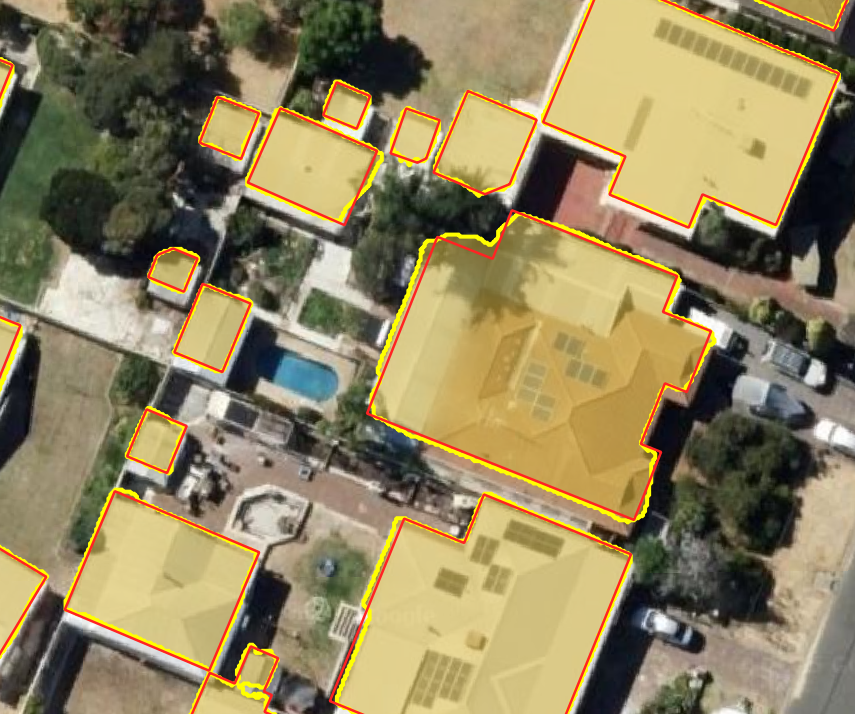
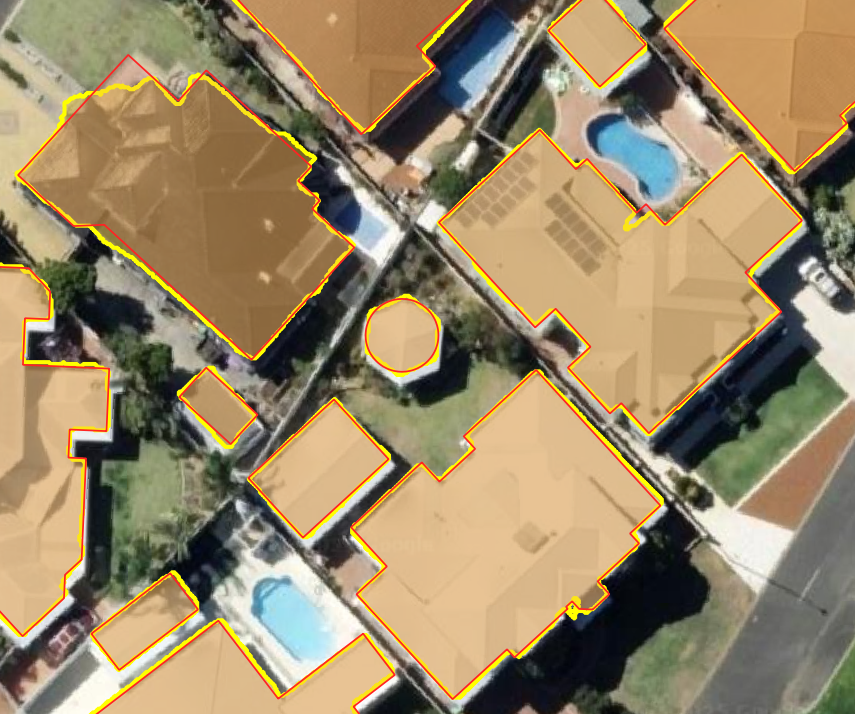
Example Results
Before and after regularization:
Overview
Building footprints extracted from remote sensing imagery often contain noise, irregular edges, and geometric inconsistencies. This library provides tools to regularize these footprints by:
- Aligning edges to principal directions (orthogonal and optional 45-degree angles)
- Converting near-rectangular buildings to perfect rectangles
- Converting near-circular buildings to perfect circles
- Simplifying complex polygons while maintaining their essential shape
- Supporting parallel processing for efficient computation with large datasets
Inspired by RS-building-regularization, this library takes a geometric approach to building regularization with improvements for usability and integration with the GeoPandas ecosystem.
Installation
pip install buildingregulariser
Quick Start
import geopandas as gpd
from buildingregulariser import regularize_geodataframe

# Load your building footprints
buildings = gpd.read_file("buildings.gpkg")

# Regularize the building footprints
regularized_buildings = regularize_geodataframe(
    buildings,
)

# Save the results
regularized_buildings.to_file("regularized_buildings.gpkg")
Features
- GeoDataFrame Integration: Works seamlessly with GeoPandas GeoDataFrames
- CRS Handling: Intelligently handles coordinate reference systems
- Polygon Regularization: Aligns edges to principal directions
- 45-Degree Support: Optional alignment to 45-degree angles
- Circle Detection: Identifies and converts near-circular shapes to perfect circles
- Edge Simplification: Reduces the number of vertices while preserving shape
- Geometry Cleanup: Fixes invalid geometries and removes artifacts
- Parallel Processing: Utilizes multiple CPU cores for faster processing of large datasets
Usage Examples
Basic Regularization
from buildingregulariser import regularize_geodataframe
import geopandas as gpd

buildings = gpd.read_file("buildings.gpkg")
regularized = regularize_geodataframe(buildings)
Fine-tuning Regularization Parameters
regularized = regularize_geodataframe(
    buildings,
    parallel_threshold=2.0,   # Higher values allow less edge alignment
    simplify_tolerance=0.5,   # Controls simplification level, should be 2-3 x the raster pixel size
    allow_45_degree=True,     # Enable 45-degree angles
    allow_circles=True,       # Enable circle detection
    circle_threshold=0.9      # IOU threshold for circle detection
)
Parallel Processing for Large Datasets
# Use multiple CPU cores for processing
regularized = regularize_geodataframe(
    buildings,
    num_cores=32 # Using 32 cores
)
Parameters
- geodataframe: Input GeoDataFrame with polygon geometries
- parallel_threshold: Distance threshold for handling parallel lines (default: 1.0)
- target_crs: Target CRS for reprojection. If None, uses the input CRS
- simplify: If True, applies simplification to the geometry (default: True)
- simplify_tolerance: Tolerance for simplification (default: 0.5)
- allow_45_degree: If True, allows edges to be oriented at 45-degree angles (default: True)
- allow_circles: If True, detects and converts near-circular shapes to perfect circles (default: True)
- circle_threshold: Intersection over Union (IoU) threshold for circle detection (default: 0.9)
- num_cores: Number of CPU cores to use for parallel processing (default: 1)
Returns
- A new GeoDataFrame with regularized polygon geometries
How It Works
- Edge Analysis: Analyzes each polygon to identify principal directions
- Edge Orientation: Aligns edges to be parallel, perpendicular, or at 45 degrees to the main direction
- Circle Detection: Optionally identifies shapes that are nearly circular and converts them to perfect circles
- Edge Connection: Ensures proper connectivity between oriented edges
- Angle Enforcement: Post-processing to ensure target angles are precisely maintained
License
This project is licensed under the MIT License
Acknowledgments
This library was inspired by the RS-building-regularization project, with improvements for integration with the GeoPandas ecosystem and enhanced regularization algorithms.
Release history Release notifications | RSS feed


Download files
Download the file for your platform. If you're not sure which to choose, learn more about installing packages.
Source Distribution
Built Distribution
Filter files by name, interpreter, ABI, and platform.
If you're not sure about the file name format, learn more about wheel file names.
Copy a direct link to the current filters
File details
Details for the file buildingregulariser-0.1.9.tar.gz.
File metadata
- Download URL: buildingregulariser-0.1.9.tar.gz
- Upload date:
- Size: 17.6 kB
- Tags: Source
- Uploaded using Trusted Publishing? No
- Uploaded via: uv/0.6.9
File hashes
| Algorithm | Hash digest | |
|---|---|---|
| SHA256 |
e426bdf286cc00ed0bf1ad4aaf3eb49648b5db7e1ab21175c6672369d6c33125
|
|
| MD5 |
c43cea2e3fbc245e5c3bfe3723dcab9e
|
|
| BLAKE2b-256 |
15d5936fbae91da2eee8a6fbe37a93eb65eff7b1ec661d53a382a59e25f9e7a4
|
File details
Details for the file buildingregulariser-0.1.9-py3-none-any.whl.
File metadata
- Download URL: buildingregulariser-0.1.9-py3-none-any.whl
- Upload date:
- Size: 18.5 kB
- Tags: Python 3
- Uploaded using Trusted Publishing? No
- Uploaded via: uv/0.6.9
File hashes
| Algorithm | Hash digest | |
|---|---|---|
| SHA256 |
a5c643b94f5f247b3f6364661777e2ed888bfc9525cb8ed196586ba1503b701a
|
|
| MD5 |
a2751adc090e6a4caa18a933c0da9c6e
|
|
| BLAKE2b-256 |
931eec03e90d395ea39d3cae8d696ec4164549ad70ea02e51a7af6141dfff461
|






