
Turn your git commits into social media posts using AI


Project description
BuildPost

Turn your git commits into engaging social media posts using AI
Free CLI tool that transforms your git commits into social media content. Perfect for developers who want to build in public but struggle with content creation.
Features
- AI-Powered: Works with OpenAI, Groq, or OpenRouter or Claude (Anthropic) LLMs
- Multiple Styles: Casual, professional, technical, learning-focused, and more
- Platform-Optimized: Twitter, LinkedIn, Dev.to, and generic formats
- Commit Message Generation: AI-powered commit messages from your changes with intelligent token management
- YAML Templates: Fully customizable prompt templates
- Zero Config: Works out of the box with sensible defaults
- Flexible Providers: Choose the LLM provider that fits your workflow and budget
- Smart Token Management: Automatic context window optimization with precise token counting
Quick Start
Installation
pip install buildpost
Setup
-
Pick your LLM provider:
openai: GPT-4o mini (default) or any compatible Chat Completions modelgroq: Lightning-fast Qwen3 and Llama-family modelsclaude: Claude Sonnet 4.5 or other Anthropic modelsopenrouter: GPT-4o mini (default) or any compatible Chat Completions model
-
Grab an API key:
- OpenAI: OpenAI dashboard
- Groq: Groq console
- Claude: Anthropic console
- OpenRouter: OpenRouter keys
-
Configure BuildPost:
buildpost config set-key YOUR_API_KEY           # saves key for the active provider (OpenAI by default)
# Optional: switch providers or customise the default model
buildpost config set-provider groq --model qwen/qwen3-32b
buildpost config set-key --provider groq gsk-XXXX
# Or use Claude
buildpost config set-provider claude --model claude-sonnet-4-5
buildpost config set-key --provider claude sk-ant-XXXX
Prefer environment variables?
export OPENAI_API_KEY=your_key # or GROQ_API_KEY=... or ANTHROPIC_API_KEY=... or OPENROUTER_API_KEY=...
Usage
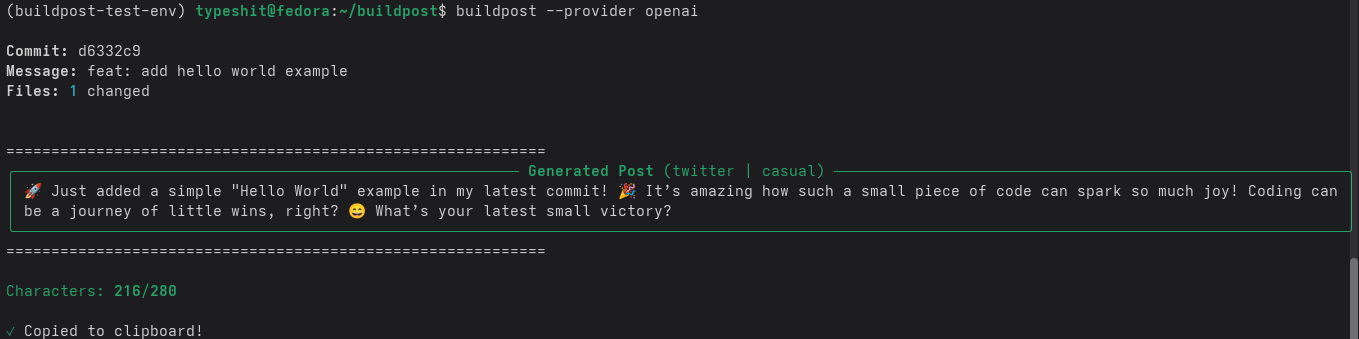
Generate a post from your latest commit:
buildpost
That's it! The post will be generated and copied to your clipboard.
Advanced Usage
Specify a Commit
# Use a specific commit
buildpost --commit abc123

# Use a commit range (summarizes multiple commits)
buildpost --range HEAD~5..HEAD
Choose a Style
# Available styles: casual, professional, technical, thread_starter, achievement, learning
buildpost --style professional
Target a Platform
# Available platforms: twitter, linkedin, devto, generic
buildpost --platform linkedin
Combine Options
buildpost --commit abc123 --style technical --platform devto --no-hashtags
Weekly Changelog
Generate a weekly changelog from recent commits:
# Default: last 7 days from HEAD
buildpost changelog

# Daily changelog (last 1 day)
buildpost changelog --daily

# Look back 14 days
buildpost changelog --days 14

# Specific date range
buildpost changelog --since 2026-01-01 --until 2026-01-07

# Git revision range
buildpost changelog --range main..HEAD

# Write to a file
buildpost changelog --output WEEKLY_CHANGELOG.md
AI-Powered Commit Messages
BuildPost now includes a powerful feature to generate commit messages from your code changes using AI! Instead of manually writing commit messages, let AI analyze your git diff and create clear, conventional commit messages.
The commit feature includes intelligent token management that automatically optimizes context window usage, ensuring your diffs fit within model limits while reserving sufficient space for detailed commit messages.
Basic Usage
# Generate and commit with AI-generated message
buildpost commit

# Stage all changes first, then generate commit message
buildpost commit --stage-all

# Generate message but don't commit (preview only)
buildpost commit --no-commit
Commit Message Styles
Choose from three commit message styles:
Conventional Commits (Default)
Follows the Conventional Commits specification:
buildpost commit --style commit_conventional
Example output:
feat(auth): add JWT token refresh mechanism
Detailed Commits
Includes a descriptive body explaining the changes:
buildpost commit --style commit_detailed
Example output:
Add user authentication with JWT

Implemented JWT-based authentication to replace session-based auth.
This provides better scalability and enables stateless authentication
across multiple servers. Added token refresh mechanism and middleware
for protecting routes.
Simple Commits
Concise, single-line messages:
buildpost commit --style commit_simple
Example output:
Add JWT authentication system
Token Management
BuildPost uses precise token counting (via tiktoken) to optimize context window usage:
# Use default settings (1500 tokens for output, auto-calculated diff limit)
buildpost commit

# Increase output token limit for very detailed commits
buildpost commit --output-tokens 3000

# Reduce output tokens for simpler commits or smaller models
buildpost commit --output-tokens 800

# Manually control diff token limit
buildpost commit --max-tokens 50000
How it works:
- Automatically calculates optimal token allocation based on your model's context window
- OpenAI models: up to 128K tokens
- Groq models: 32K-131K tokens depending on model
- Claude models: up to 200K tokens
- Intelligently truncates large diffs by preserving whole files when possible
- Shows clear feedback about token usage
Example output:
$ buildpost commit --style commit_detailed

Token allocation - Diff: 197,650 | Output: 1,500
Diff size: 3,245 tokens (within limit)

Generated Commit Message (commit_detailed)
...
Workflow
- Make your changes to the code
- Stage your changes (or use
--stage-all)
   git add .
   # or
   buildpost commit --stage-all
- Generate and commit
buildpost commit
-
Review the generated message - You'll see:
- Token allocation summary
- List of staged files
- AI-generated commit message
- Options to: commit (y), edit (e), or cancel (n)
-
Edit if needed - Choose 'e' to open your editor and modify the message
Examples
Example 1: Quick commit with staged changes
$ git add src/auth.py src/middleware.py
$ buildpost commit

Token allocation - Diff: 197,800 | Output: 1,500
Diff size: 1,234 tokens (within limit)

Staged files (2):
  ✓ src/auth.py
  ✓ src/middleware.py

Generated Commit Message (commit_conventional)

feat(auth): implement JWT authentication middleware

Do you want to commit with this message?
  y - Yes, commit now
  e - Edit message
  n - Cancel

Choice [y]: y

✓ Committed successfully!
Commit hash: a1b2c3d
Example 2: Large diff with intelligent truncation
$ buildpost commit --stage-all --style commit_detailed

Token allocation - Diff: 150,000 | Output: 1,500
⚠ Diff truncated: 175,432 → 149,856 tokens

Staged files (25):
  ✓ src/api/routes.py
  ✓ src/models/user.py
  ... and 23 more

Generated Commit Message (commit_detailed)

Refactor authentication system to use JWT

Replaced session-based authentication with JWT tokens for improved
scalability. Updated user model to store refresh tokens, added new
API routes for token refresh, and implemented comprehensive test
coverage. Documentation updated to reflect the new auth flow.

Do you want to commit with this message?
Example 3: Use Claude for detailed analysis
$ buildpost commit --provider claude --style commit_detailed --output-tokens 2000

Token allocation - Diff: 196,500 | Output: 2,000
Diff size: 8,432 tokens (within limit)

Generated Commit Message (commit_detailed)

[Comprehensive detailed message with extra context thanks to larger output limit]
Commit Command Options
buildpost commit [OPTIONS]

Options:
  -s, --style TEXT       Commit message style (commit_conventional,
                         commit_detailed, commit_simple)
                         [default: commit_conventional]
  -a, --stage-all        Stage all changes before committing
  --no-commit            Generate message only, don't commit
  --api-key TEXT         LLM API key (overrides config)
  --provider TEXT        LLM provider to use (openai, groq, claude)
  --max-tokens INTEGER   Maximum tokens for diff content (auto-calculated if not set)
  --output-tokens INTEGER Tokens reserved for AI response [default: 1500]
  --help                 Show this message and exit
Tips
- Review before committing: The tool shows you the message before committing, giving you a chance to edit or cancel
- Use conventional style for team projects: The
commit_conventionalstyle follows industry standards - Stage incrementally: Stage related changes together for more focused commit messages
- Edit when needed: Don't hesitate to choose 'e' and refine the AI-generated message
- Preview first: Use
--no-committo see what message would be generated - Adjust output tokens for style: Use
--output-tokens 3000for very detailed commits, or--output-tokens 500for simple ones - Claude for large changes: Claude's 200K context window is perfect for analyzing large diffs
- Watch token limits: The tool automatically truncates large diffs to fit within model limits
Configuration
View Configuration
buildpost config show
Set Default Style and Platform
Edit ~/.buildpost/config.yaml:
defaults:
  prompt_style: casual
  platform: twitter
  include_hashtags: true
  copy_to_clipboard: true
Customize Prompts
BuildPost uses YAML templates for prompts. Edit them:
buildpost prompts edit
Or manually edit ~/.buildpost/prompts.yaml.
Available Commands
Main Commands
buildpost                    # Generate post from latest commit
buildpost --commit <hash>    # Generate from specific commit
buildpost --range <range>    # Generate from commit range
buildpost --style <style>    # Use specific prompt style
buildpost --platform <name>  # Format for specific platform
buildpost --provider groq    # Use Groq for this run
buildpost --no-hashtags      # Exclude hashtags
buildpost --no-copy          # Don't copy to clipboard
Commit Commands
buildpost commit                              # Generate and commit with AI
buildpost commit --stage-all                  # Stage all changes first
buildpost commit --no-commit                  # Preview only
buildpost commit --style commit_detailed      # Use detailed style
buildpost commit --provider claude            # Use Claude
buildpost commit --output-tokens 2000         # More detailed output
buildpost commit --max-tokens 100000          # Control diff size
Configuration Commands
buildpost config show        # Show current configuration
buildpost config set-key     # Set API key for the current provider
buildpost config set-key --provider groq gsk-...    # Store key for Groq
buildpost config set-key --provider claude sk-ant-...  # Store key for Claude
buildpost config set-provider openai --model gpt-4o-mini
buildpost config set-provider claude --model claude-sonnet-4-5
buildpost config reset       # Reset to defaults
buildpost config init        # Initialize configuration
Prompt Commands
buildpost prompts list       # List available prompts
buildpost prompts edit       # Edit prompts in your editor
Platform Commands
buildpost platforms list # List available platforms
Other Commands
buildpost version            # Show version
buildpost --help             # Show help
Interactive Commit Selector
Use the interactive TUI to select commits and generate changelogs with a visual interface:
# Interactive commit selector
buildpost select

# Look back N days (default: 7)
buildpost select --days 14
Features
- Arrow keys to navigate commit list
- Space to toggle commit selection
- Enter to generate preview
- 'd' to set date filter
- 's' to select style (daily/weekly)
- 'p' to select platform
- 'q' to quit
Troubleshooting
"No API key found"
Make sure you've saved a key for the provider you're using:
buildpost config set-provider openai
buildpost config set-key --provider openai sk-...   # OpenAI key

buildpost config set-provider groq
buildpost config set-key --provider groq gsk-...    # Groq key

buildpost config set-provider claude
buildpost config set-key --provider claude sk-ant-...  # Claude key

buildpost config set-provider openrouter
buildpost config set-key --provider openrouter sk-or-v1-...    # OpenRouter key
Environment variable names:
| Provider | Environment variable | Notes |
|---|---|---|
openai |
OPENAI_API_KEY |
Works with GPT-4o mini, GPT-4o, GPT-3.5 |
groq |
GROQ_API_KEY |
Supports Qwen & Llama models |
claude |
ANTHROPIC_API_KEY |
Supports Claude 4 and Claude 3.5 models |
openrouter |
OPENROUTER_API_KEY |
Supports GPT-4o mini, Llama, Grok models |
Set it before running BuildPost:
export ANTHROPIC_API_KEY=sk-ant-...
"Model context window is too small"
If you see this error when using buildpost commit:
Error: Model 'model-name' context window (8,192 tokens) is too small.
Required: 10,350 tokens (prompt: 850, output: 1500, reserves: 600)
Available for diff: -2,158 tokens (need at least 500)
Solutions:
- Use a model with a larger context window (e.g., Claude with 200K tokens)
- Reduce output tokens:
--output-tokens 800 - Use a simpler commit style:
--style commit_simple - Stage fewer files at once
"Diff truncated" warning
This is normal for large changes. The tool intelligently truncates your diff to fit within the model's context window while preserving whole files when possible. The AI can still generate good commit messages from the truncated diff.
To reduce truncation:
- Use Claude (200K context window)
- Commit smaller changesets
- Use
--max-tokensto allow more diff content (if model supports it)
"Not a git repository"
Run BuildPost from within a git repository:
cd your-git-repo
buildpost
"Invalid commit reference"
Make sure the commit hash exists:
git log --oneline  # See available commits
buildpost --commit <hash>
Generated post is too long
Try a different platform or style:
buildpost --platform twitter  # Shorter format
buildpost --style casual       # Usually more concise
API rate limits
Each provider enforces its own rate/usage limits. If you hit them:
- OpenAI: check account limits or switch to a lighter model (gpt-4o-mini, gpt-3.5)
- Groq: review quota in the Groq console or pick a smaller model
- Claude: check your Anthropic console for usage limits
- OpenRouter: check credits available and usage limits for the API key
- Reduce how frequently you generate posts
Contributing
Contributions welcome! Please read CONTRIBUTING.md for details.
Development Setup
# Clone the repository
git clone https://github.com/Chukwuebuka-2003/buildpost.git
cd buildpost

# Install in development mode
pip install -e .

# Run from source
python -m buildpost.cli
Dependencies
BuildPost relies on these key libraries:
anthropic- Claude API integrationtiktoken- Precise token countingopenai- OpenAI API integrationgroq- Groq API integrationgitpython- Git repository operationsclick- CLI frameworkpyyaml- Configuration managementrich- Beautiful terminal output
License
MIT License - see LICENSE file for details.
Support
- Issues: GitHub Issues
- Twitter: @ebukagaus
Acknowledgments
- LLM support provided by OpenAI, Groq, and Anthropic
- LLM support provided by OpenAI and Groq and OpenRouter
- Powered by GitPython
- CLI built with Click
- Token counting by tiktoken
Example image of what i did


Download files
Download the file for your platform. If you're not sure which to choose, learn more about installing packages.
Source Distributions
Built Distribution
Filter files by name, interpreter, ABI, and platform.
If you're not sure about the file name format, learn more about wheel file names.
Copy a direct link to the current filters
File details
Details for the file buildpost-0.1.4-py3-none-any.whl.
File metadata
- Download URL: buildpost-0.1.4-py3-none-any.whl
- Upload date:
- Size: 42.4 kB
- Tags: Python 3
- Uploaded using Trusted Publishing? No
- Uploaded via: twine/6.2.0 CPython/3.13.11
File hashes
| Algorithm | Hash digest | |
|---|---|---|
| SHA256 |
2ec7fef4547db5622cdd173171ae7424c74045320b4b3794666fa704a6fefa5b
|
|
| MD5 |
6c033693ce3bef3aef12fd184174b07f
|
|
| BLAKE2b-256 |
50c8f298653d689742495ff633326ee79ae5d765dc97051af2d6ebeee7c3c9c3
|






