
Bunkr Uploader




Supports
- Bunkr accounts
- Parallel uploads
- Retries
- Progress bars

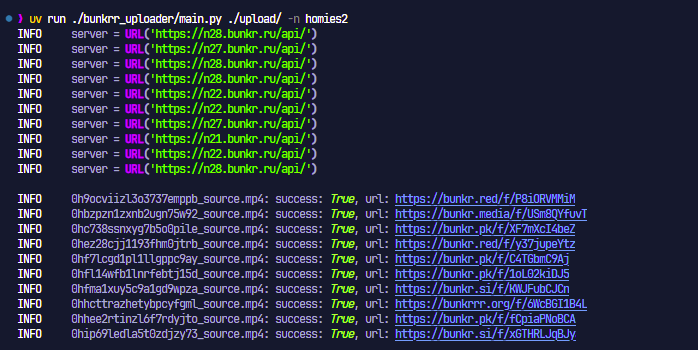
Usage: bunkr upload --token STR [OPTIONS] PATH

Upload a file or files to bunkr

╭─ Arguments ────────────────────────────────────────────────────────────────────────────────────────────────────────────────────────────────────────╮
│ *  PATH  File or directory to look for files in to upload [required]                                                                               │
╰────────────────────────────────────────────────────────────────────────────────────────────────────────────────────────────────────────────────────╯
╭─ Parameters ───────────────────────────────────────────────────────────────────────────────────────────────────────────────────────────────────────╮
│    --recurse                Read files in PATH recursely [default: False]                                                                          │
│ *  --token -t               API token for your account so that you can upload to a specific account/folder. You can also set the BUNKR_TOKEN       │
│                             environment variable for this [env var: BUNKR_TOKEN] [required]                                                        │
│    --album-name -n          Name to use for album. If an album with this name already exists, add the files to that album                          │
│    --concurrent-uploads -c  Maximum parallel uploads to do at once [default: 2]                                                                    │
│    --chunk-size             Size of chunks to use for uploads. 0 or None will use the server's maximum chunk size                                  │
│    --public --no-public     Make all uploaded files public [default: True]                                                                         │
│    --retries -R             How many times to retry a failed file upload [default: 1]                                                              │
│    --chunk-retries          How many times to retry a failed chunk upload [default: 2]                                                             │
│    --delay                  How many seconds to wait in between failed upload attempts [default: 1.0]
TODO
- Slit API and UploadClient
- Migrate to aiohttp
- Upload logging
- Replace tqdm with rich progress
- Skipping duplicate uploads
- Private and public directory uploads
- Update README
- Make it work
- Add file zipping and cleanup
- Add tests
- Add github runners for tests
- Recursive directory upload support
Original code by alexmi256
1 maintainer

Metadata
1 maintainer
Release files for bunkr 0.1.4
For a detailed explanation of source distributions (sdists) and built distributions (wheels), please see the package formats documentation.
Source distribution (sdist)
| File | Size | Uploaded | |
|---|---|---|---|
| bunkr-0.1.4.tar.gz | 12.8 kB | Details |
Built distribution (wheel)
| File | Interpreter | ABI | Platform | Reset |
|---|---|---|---|---|
| bunkr-0.1.4-py3-none-any.whl | Python 3 | none | any | Details |
Total release size: 29.6 kB
Release files / bunkr-0.1.4.tar.gz
| Download URL | bunkr-0.1.4.tar.gz |
|---|---|
| Size | 12.8 kB |
| Tags | Source |
|
SHA-256 checksum How to use checksums |
433141fc21f69f41645c7ce21a55eb7147ca5754282e04110ad963953d939e62
|
|
BLAKE2b-256 checksum How to use checksums |
68712ffe3003e02251967aa5a070c6eaa2bb48f056adcf9c0e07c3e458703d31
|
| Upload date | |
|
Uploaded using Trusted Publishing? What is trusted publishing? |
No |
| Uploaded via |
uv/0.9.26 {"installer":{"name":"uv","version":"0.9.26","subcommand":["publish"]},"python":null,"implementation":{"name":null,"version":null},"distro":{"name":"Fedora Linux","version":"43","id":"","libc":null},"system":{"name":null,"release":null},"cpu":null,"openssl_version":null,"setuptools_version":null,"rustc_version":null,"ci":null}
|
Release files / bunkr-0.1.4-py3-none-any.whl
| Download URL | bunkr-0.1.4-py3-none-any.whl |
|---|---|
| Size | 16.8 kB |
| Tags | Python 3 |
|
SHA-256 checksum How to use checksums |
df975530c205a0fbc119931296be2b18e9021b436982bb295cca53dbb22197e9
|
|
BLAKE2b-256 checksum How to use checksums |
a8b072e32b374fd66cab59bf7c3efe33d037241124a8c5b3e080ec2123c364ea
|
| Upload date | |
|
Uploaded using Trusted Publishing? What is trusted publishing? |
No |
| Uploaded via |
uv/0.9.26 {"installer":{"name":"uv","version":"0.9.26","subcommand":["publish"]},"python":null,"implementation":{"name":null,"version":null},"distro":{"name":"Fedora Linux","version":"43","id":"","libc":null},"system":{"name":null,"release":null},"cpu":null,"openssl_version":null,"setuptools_version":null,"rustc_version":null,"ci":null}
|














