






bup
bup backs up your cloud data to a local directory: every AWS S3 bucket, every AWS DynamoDB table and every GitHub repository your credentials can see. Point it at a backup directory, give it an AWS profile and a GitHub token, and it keeps a local copy up to date, either on demand or automatically every so many hours.
It has a GUI for everyday use and a command line for scripts and scheduled jobs.
- S3: each bucket is synced with
aws s3 sync, so only new and changed objects are downloaded. Objects deleted from S3 are kept locally. Each sync is checked against the bucket's contents. - DynamoDB: each table is saved in full, as both a pickle file and a JSON file.
- GitHub: each repository is cloned, and every branch is kept an exact mirror of the remote.
- Exclusions: skip particular buckets, tables or repos, with comments to say why.
- Transfer and cost: see how much each backup downloaded and approximately what AWS charges for it.
- Logs: warnings and errors are shown per backup type, with a detailed log of everything bup did.
Screen captures
These show made-up example data.
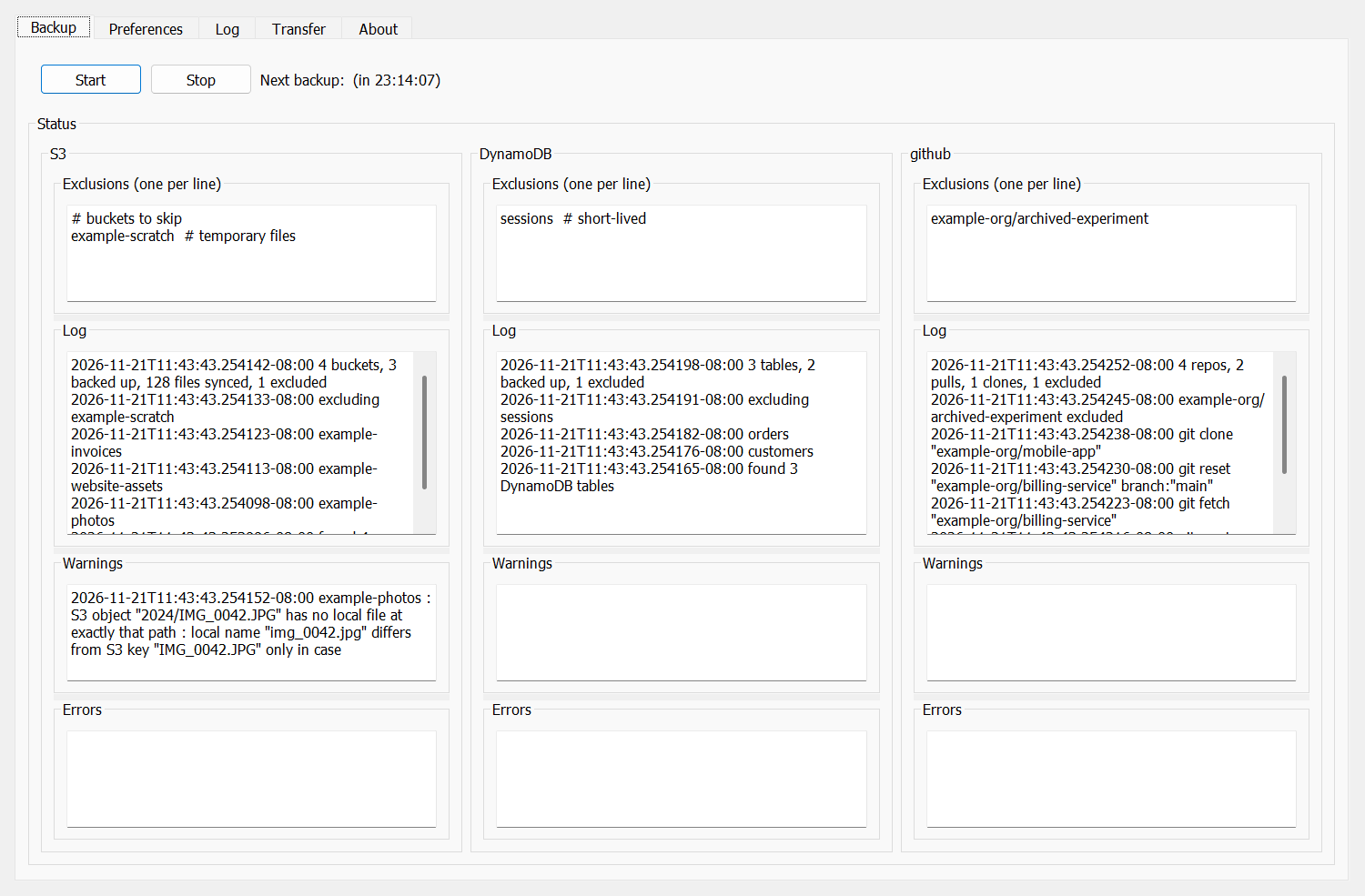
The Backup tab runs the backups and shows each backup type's exclusions, progress, warnings and errors:
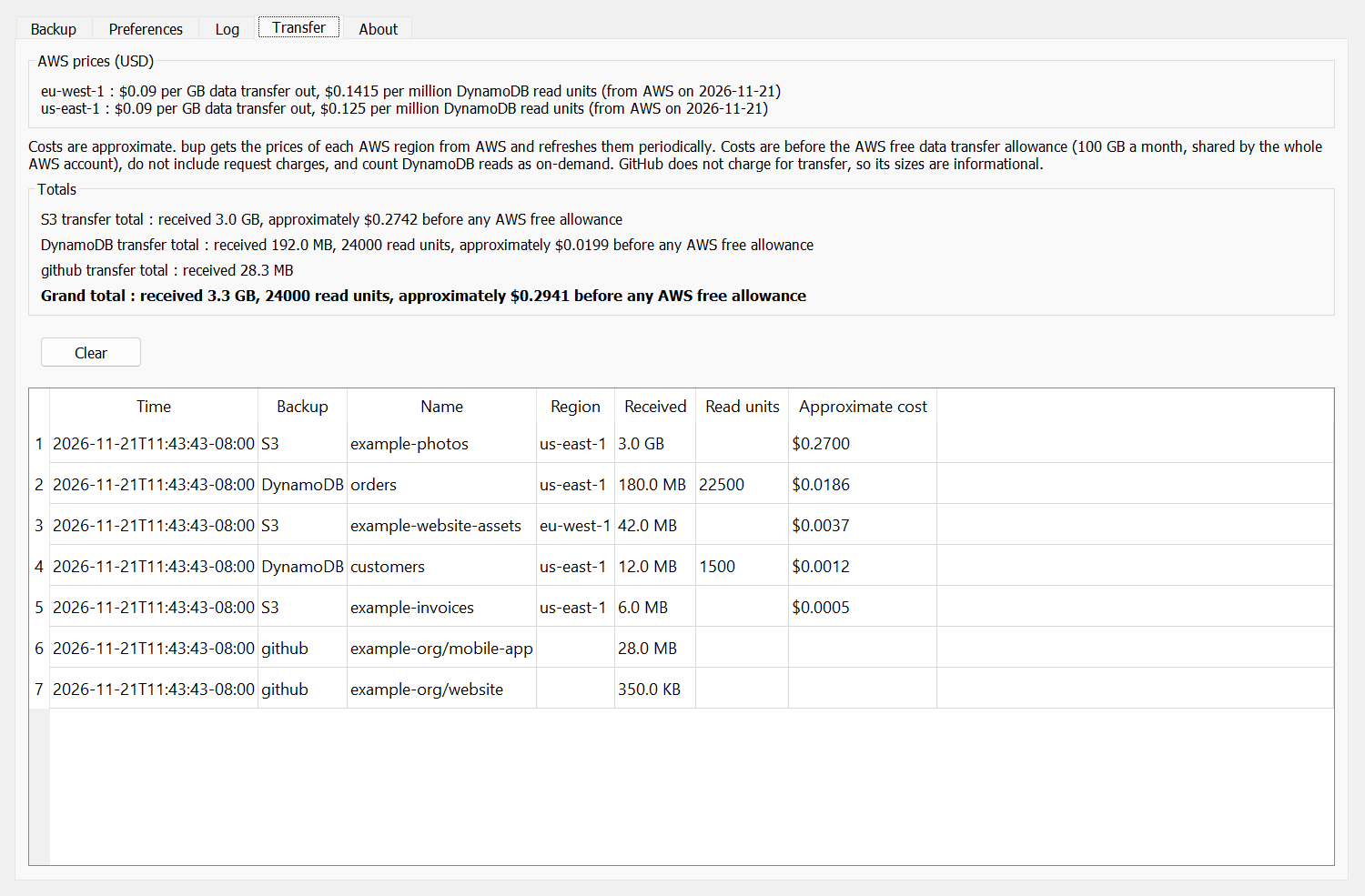
The Transfer tab shows what each bucket, table and repo downloaded, and the approximate AWS cost:
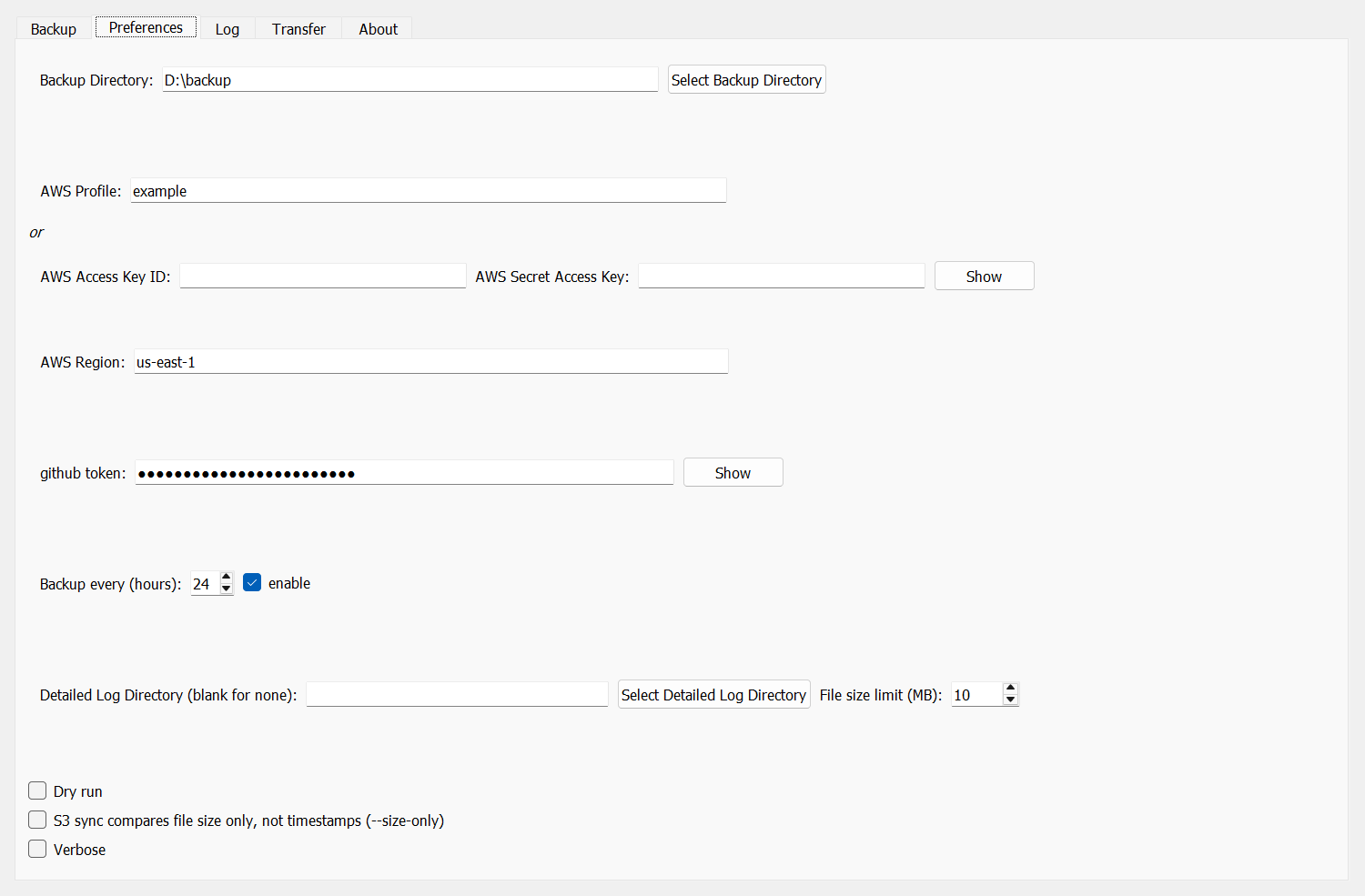
The Preferences tab holds the backup directory, credentials and the automatic backup schedule:
Install
bup needs Python 3.13 or later, and git on the PATH for GitHub backups. The AWS CLI it uses is installed with it.
pip install bup
Use
Run bup with no arguments for the GUI. Set the backup directory and credentials in the Preferences tab, then press
Start in the Backup tab (or enable the automatic backup).
Give bup a backup directory and what to back up for the command line:
bup D:\backup -s                 # S3
bup D:\backup -d                 # DynamoDB
bup D:\backup -a -p my-profile   # S3 and DynamoDB, with an AWS profile
bup D:\backup -g -t <token>      # GitHub (the token is saved for later runs)
bup D:\backup -s --dry_run       # show what an S3 backup would do
bup --help                       # all the options
The backup directory gets a directory per backup type: s3/<bucket>/, dynamodb/<table>.pickle and
dynamodb/<table>.json, and github/<owner>/<repo>/.
Exclusions
Each backup type (S3, DynamoDB, GitHub) has an exclusion list: names to skip, one per line. S3 entries are bucket
names, DynamoDB entries are table names, and GitHub entries are either a repo name (my-repo) or owner/my-repo.
Exclusion lists are edited in the GUI's "Exclusions" box for each backup type.
The same syntax applies to all three lists (S3 buckets, DynamoDB tables, and GitHub repos):
#starts a comment that runs to the end of the line. This works for whole-line comments and for inline trailing comments, e.g.my-bucket # too big, backed up elsewhere.- Blank and whitespace-only lines are ignored.
- Leading and trailing whitespace around a name is ignored, so
my-bucketmatchesmy-bucket. - Names are matched exactly (no wildcards).
# S3 buckets to skip
logs-archive        # 2 TB, backed up by a lifecycle rule instead
scratch-bucket
S3 backup verification
After each bucket is synced (aws s3 sync, deliberately without --delete so that objects deleted from S3 are
kept in the local backup), bup lists the bucket with boto3 and compares its total size in bytes to the total size
of the local backup directory. The comparison is by bytes, not by object count, because aws s3 sync does not
copy zero-length objects. The S3 object count and the local file count are included in the result line for
reference only.
There are three outcomes:
- S3 is larger than the local backup - something was not backed up. This is reported as an error in the backup output (the GUI's "Backup" tab, or the CLI's console output, where it also makes the CLI exit with a non-zero status).
- Local backup is larger than S3 - expected over time, since deletions in S3 are retained locally. Logged as info only.
- Match - logged as info only.
The info-level result lines are not shown in the backup output. They go to the application log: in the GUI this is
the "Log" tab (the "AWS S3" pane), and in the CLI it is the console with -v/--verbose. If a detailed log
directory is configured in Preferences, each backup type's log also goes to its own file there (s3.log,
dynamodb.log, github.log, application.log). A result line looks like:
my-bucket : local backup is larger than S3 (files deleted from S3 are retained locally) (synced=3, s3_count=120, local_count=125; s3_total_size=10485760, local_size=10520000)
A lower local file count, and files that download every run
aws s3 sync matches each S3 key against the local relative path as an exact string. Two consequences show up
in the result lines, and bup explains both - and fixes the second:
- Fewer local files than S3 objects (
local_countbelows3_count). When this happens, bup lists the bucket again and compares the keys to the local files. Zero-byte objects whose key ends in/(the S3 console's "Create folder") are folder markers -aws s3 syncnever downloads them, so they are expected to be absent and are listed in the application log as info. Any other object with no local file at exactly its path is a warning in the backup output, naming the object and, when a similarly named local file or directory exists, how the names differ. - A file that is downloaded on every run even though it is already backed up. On Windows, file names are case-insensitive and trailing spaces and dots are stripped, so a download can land in an existing file or directory whose on-disk name differs from the S3 key. Sync then never sees an exact match and downloads the file again each run. After each sync, bup checks the local name of every downloaded file against its key and, since the download just made is the current version, renames the local file or directory to the key's exact name (outermost component first - renaming a directory fixes everything under it at once). Each rename is reported as info in the backup output, and the next sync finds the file already backed up. A name the file system cannot store (e.g. a key ending in a space, on Windows) or a rename that fails is a warning naming the file and the reason. A dry run renames nothing and reports the mismatch as a warning instead.
my-bucket : renamed "D:\b\s3\my-bucket\static\Vendor" to "vendor" to match the S3 key "static/vendor/select2.js" so the next sync finds it already backed up
How S3 key case is handled
S3 keys are case-sensitive: Photos/IMG_1.jpg and photos/img_1.jpg are two different objects. bup never changes
or folds the case of a key - the local path of every object is made to match its key exactly, character for
character, on every platform.
- Case-sensitive file systems (Linux, and macOS or Windows volumes formatted case-sensitive): the local path is always the key as-is, so case needs no special handling and keys that differ only in case are stored as separate files.
- Case-insensitive file systems (the Windows default, and macOS by default): a download can land in an existing
file or directory whose name differs from the key only in case, e.g. a key
static/vendor/select2.jslanding under an existingstatic\Vendordirectory.aws s3 synccompares names as exact strings, so it would never see a match and would download that object again on every run. After each sync, bup compares the local name of every downloaded file to its key, component by component, and renames any that differ only in case (or only in Unicode normalization, or by a trailing space or dot) to the key's exact spelling, reporting each rename as info. A dry run reports the mismatch as a warning instead of renaming. - Keys that differ only in case (
Readme.mdandreadme.mdin the same prefix) cannot both exist on a case-insensitive file system: they share one local file, so bup reports a case mismatch and re-downloads them on every run. Back up such a bucket to a case-sensitive file system to keep both objects.
Transfer and approximate AWS cost
AWS charges for data sent out to the internet, which is what a backup is. bup reports what each backup received and approximately what AWS charges for it. In the GUI this is in the "Transfer" tab (and the application log), with one row per S3 bucket, DynamoDB table or GitHub repo that received anything (sorted by cost, highest at the top), a total per backup type and a grand total. The CLI prints the same lines in its regular output.
- S3: the total size of the files
aws s3 syncdownloaded, priced as data transfer out. - DynamoDB: the size of the table scan responses, priced as data transfer out, plus the read units the scan consumed, priced as on-demand reads. Tables are only scanned when they have changed or about once a day, so many runs receive nothing.
- GitHub: how much the local repository grew from a clone or fetch. GitHub does not charge for this, so it is informational only (e.g. to notice a repo that suddenly transfers a lot).
The costs are estimates:
- bup gets the prices itself, so there is nothing to enter. AWS prices differ by region, so each S3 bucket is priced
at the rates of the region it is in and each DynamoDB table at the rates of the region it is read from. The prices
come from the public AWS Price List files at
pricing.us-east-1.amazonaws.com(no AWS credentials or permissions are needed), are cached in a local SQLite database (aws_prices.dbin bup's user cache directory), and are fetched again when they are more than a week old. The Transfer tab shows the prices in use and when they were fetched. - If the prices can not be fetched (e.g. the price list is unreachable) the previously fetched prices are used. If there are none yet, the transfer is reported without a cost.
- Volume discounts are not applied (the price used is that of the first 10 TB a month).
- AWS does not charge for the first 100 GB of data transfer out a month, shared by the whole AWS account. bup does not know how much of that allowance is left, so the cost shown is before the allowance - the most the transfer could cost, not necessarily what you are billed.
- Request charges (e.g. S3 GET and LIST) are not included.
- DynamoDB reads are priced as on-demand. A table with provisioned capacity has already paid for its reads.
- A dry run reports nothing, since nothing is transferred.
Security Notes
- Credentials you enter (AWS secret access key, GitHub token) are stored unencrypted in a local
SQLite preferences database in your user profile. Prefer AWS profiles (
~/.aws/credentials) over raw keys where possible, and treat the preferences database with the same care as a credentials file. - GitHub authentication for clone/pull is passed to git via the process environment, so the token is
not written into each backup's
.git/config. Backups made by older versions of bup may still have a token embedded in their remote URL; bup scrubs these the next time each repo is pulled.
Acknowledgements
1 maintainer

Metadata
1 maintainer
Release files for bup 0.15.1
For a detailed explanation of source distributions (sdists) and built distributions (wheels), please see the package formats documentation.
Source distribution (sdist)
| File | Size | Uploaded | Provenance | Actions |
|---|---|---|---|---|
| bup-0.15.1.tar.gz | 86.2 kB | With provenance | Details for bup-0.15.1.tar.gz |
Built distribution (wheel)
| File | Interpreter | ABI | Platform | Actions Reset |
|---|---|---|---|---|
| bup-0.15.1-py3-none-any.whl | Python 3 | none | any | Details for bup-0.15.1-py3-none-any.whl |
Total release size: 173.4 kB
Release files / bup-0.15.1.tar.gz
| Download URL | bup-0.15.1.tar.gz |
|---|---|
| Size | 86.2 kB |
| Tags | Source |
|
SHA-256 checksum How to use checksums |
32851552b994a1e2c4079cc65c1b65b7a797e4d6f3463a556568f6d9680ead38
|
|
BLAKE2b-256 checksum How to use checksums |
02d6e2848ed7efd391b32d7c492f61937dc147927919ebbc65ac9c664f02f1d7
|
| Upload date | |
|
Uploaded using Trusted Publishing? What is trusted publishing? |
Yes |
| Uploaded via |
twine/7.0.0 CPython/3.13.16
|
Provenance
Provenance describes where a file came from. On PyPI, provenance is shared via attestations, which provide a verifiable record of the build or publishing details. View details, limitations and caveats.


PyPI Publish Attestation
PyPI verified that this artifact, at this checksum, originated from the publisher listed below.
Signed by GitHub Actions, verified by PyPI on Nov 21, 2026.
Transparency logRelease files / bup-0.15.1-py3-none-any.whl
| Download URL | bup-0.15.1-py3-none-any.whl |
|---|---|
| Size | 87.2 kB |
| Tags | Python 3 |
|
SHA-256 checksum How to use checksums |
36cf9eaea2714e29b67f7bf032879ea038010572f4fa04fa6c9a29ad9c9fae03
|
|
BLAKE2b-256 checksum How to use checksums |
cc3c98fc30ddc11018523c842d64d690bf35fb369fc3340c79ae662477c4e450
|
| Upload date | |
|
Uploaded using Trusted Publishing? What is trusted publishing? |
Yes |
| Uploaded via |
twine/7.0.0 CPython/3.13.16
|
Provenance
Provenance describes where a file came from. On PyPI, provenance is shared via attestations, which provide a verifiable record of the build or publishing details. View details, limitations and caveats.
PyPI Publish Attestation
PyPI verified that this artifact, at this checksum, originated from the publisher listed below.
Signed by GitHub Actions, verified by PyPI on Nov 21, 2026.
Transparency logSecurity for bup 0.15.1
Provenance
Provenance describes where a file came from. On PyPI, provenance is shared via attestations, which provide a verifiable record of the build or publishing details. View details, limitations and caveats.
Full provenance
Both files in this release have been uploaded with provenance metadata.
Attestation for bup-0.15.1.tar.gz
PyPI Publish Attestation
PyPI verified that this artifact, at this checksum, originated from the publisher listed below.
Signed by GitHub Actions, verified by PyPI on Nov 21, 2026.
Transparency logA note on package security
PyPI is a repository for distributing packages, not a service for auditing them. While third-party security researchers and our staff do their best to detect and remove malicious packages, PyPI cannot guarantee the quality, security or suitability of any given package.
To learn more about protecting yourself from malicious actors, visit our package security documentation.














