
Burnmeter
A live $/hour meter for Claude Code and Codex, against your own normal pace, chat by chat.
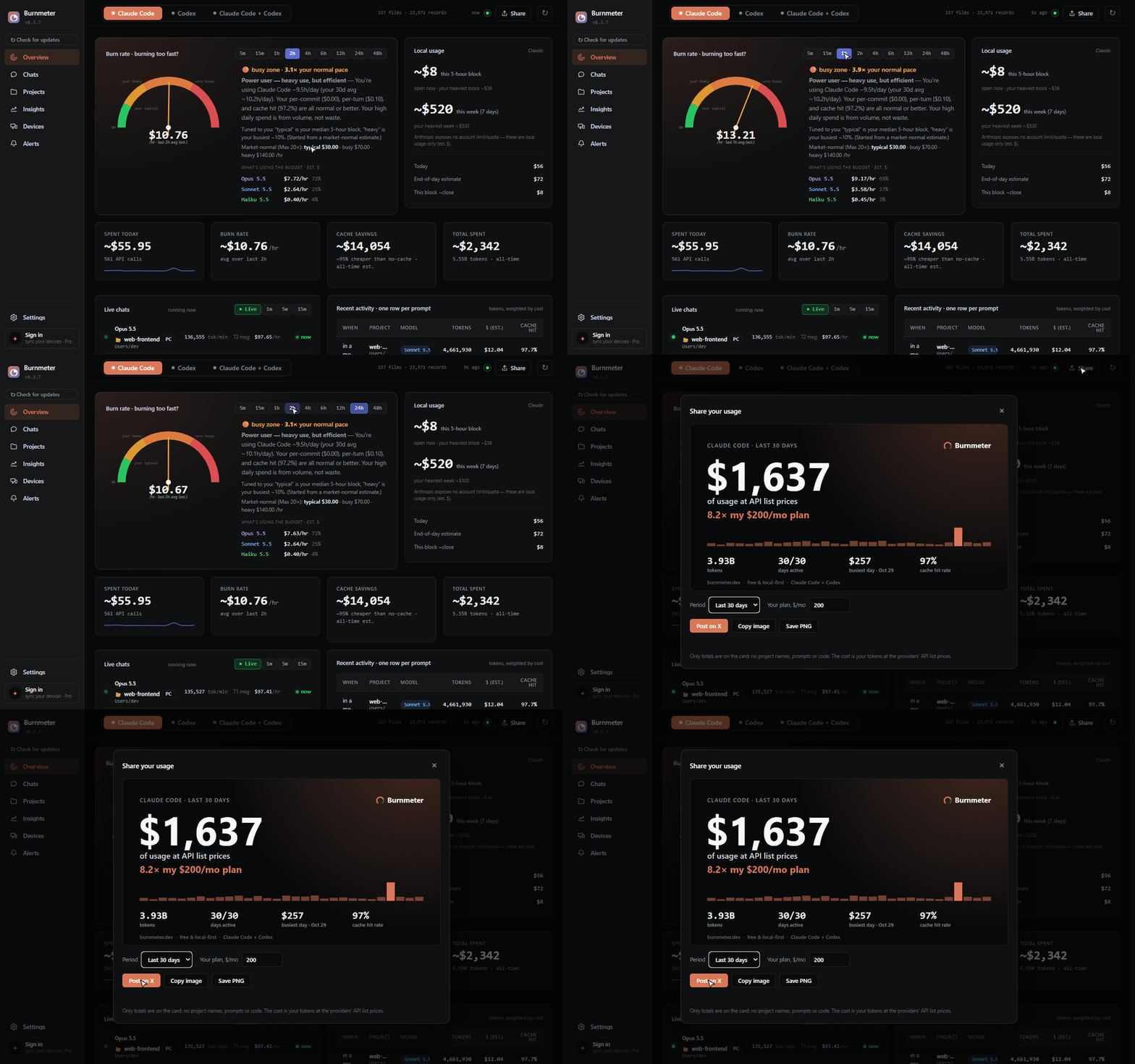
Burnmeter reads the session logs that Claude Code and OpenAI Codex already write to your disk and turns them into a live dashboard: how fast you're burning, what each project, chat and model costs, how much the prompt cache saves you, and, for Codex (which logs it), how close you are to your plan's 5-hour and weekly limits. No API keys, no account. Your usage data stays on your machine.
Download for Windows ·
pipx install burnmeter ·
burnmeter.dev ·
Claude Code + OpenAI Codex · AGPL-3.0
The demo and the screenshots use synthetic logs (tests/generate_fixture.py): the projects, chats and numbers are made up.
Install
Windows
Download BurnmeterSetup.exe from the latest release and run it. It installs for your user account only, doesn't need Python, and runs as a desktop app with a tray icon.
The installer isn't code-signed yet, so Windows SmartScreen may say it doesn't recognize the app. Click More info → Run anyway.
macOS
You need Python 3.10 or newer:
python3 -m pip install --upgrade "burnmeter[app]"
burnmeter
burnmeter opens the dashboard in its own window. burnmeter serve opens it in
your browser instead, at http://127.0.0.1:7654. The [app] extra adds the
native window and tray icon (pywebview, pystray, Pillow); without it, Burnmeter
has no third-party dependencies and uses your browser.
If pip stops with externally-managed-environment (common with Homebrew's
Python), install into a virtual environment, or use pipx
for the browser version: pipx install burnmeter.
Linux works the same way as macOS; burnmeter serve is the simplest option there.
From source
git clone https://github.com/cihanatak/BurnMeter
cd BurnMeter
python -m pip install -e .
python -m burnmeter serve
What you get
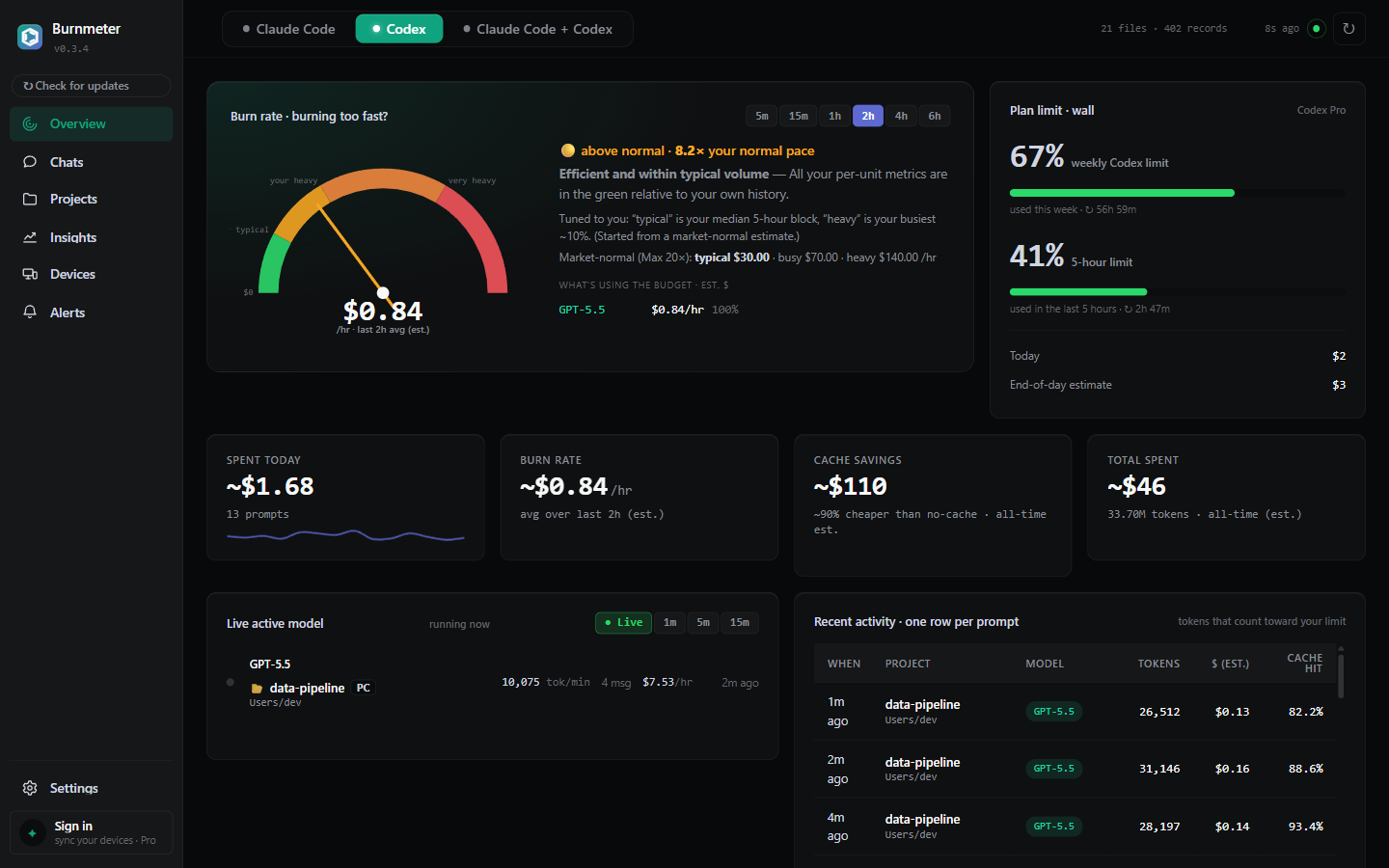
- Burn rate against your own normal. A gauge of your $/hour over the last 5 minutes to 48 hours, next to your own typical, busy and heavy zones, worked out from your past 5-hour blocks (a market-normal estimate until there's enough history), and which models are driving it.
- Live chats. Each chat that's running right now, with its own $/hour, so you can see which one is burning.
- Plan limits where they exist. Codex writes your real rate-limit usage into its logs, so the Codex view shows the 5-hour and weekly limits as percentages, with reset times. Claude Code doesn't write plan limits to disk, so Burnmeter does not show a "% of plan" for Claude; it shows your local usage and your own history instead of a guess.
- Per-version model pricing. Claude (Opus, Sonnet, Haiku, Fable) and OpenAI (GPT-5.x, Codex) models each at their own rate, including cache reads and 5-minute vs 1-hour cache writes. A model the price table doesn't know is flagged in the dashboard instead of being priced silently.
- Cache savings. Your cache hit rate, and what cache reads saved compared with paying full input price for those tokens. The extra cost of writing to the cache isn't subtracted, so this is the gross saving.
- Chats, projects and commits. Spend per chat (chat titles come from the Claude desktop app, if you use it), per project and per git commit.
- Insights. Daily trends, an activity heatmap, unusual days, and a monthly budget with a month-end projection.
- Alerts. Slack, webhook or email when Codex nears its limit or your burn rate runs far above your heavy zone. They are sent from your machine to destinations you set up.
- Terminal statusline and CSV export (see below).
Share your month
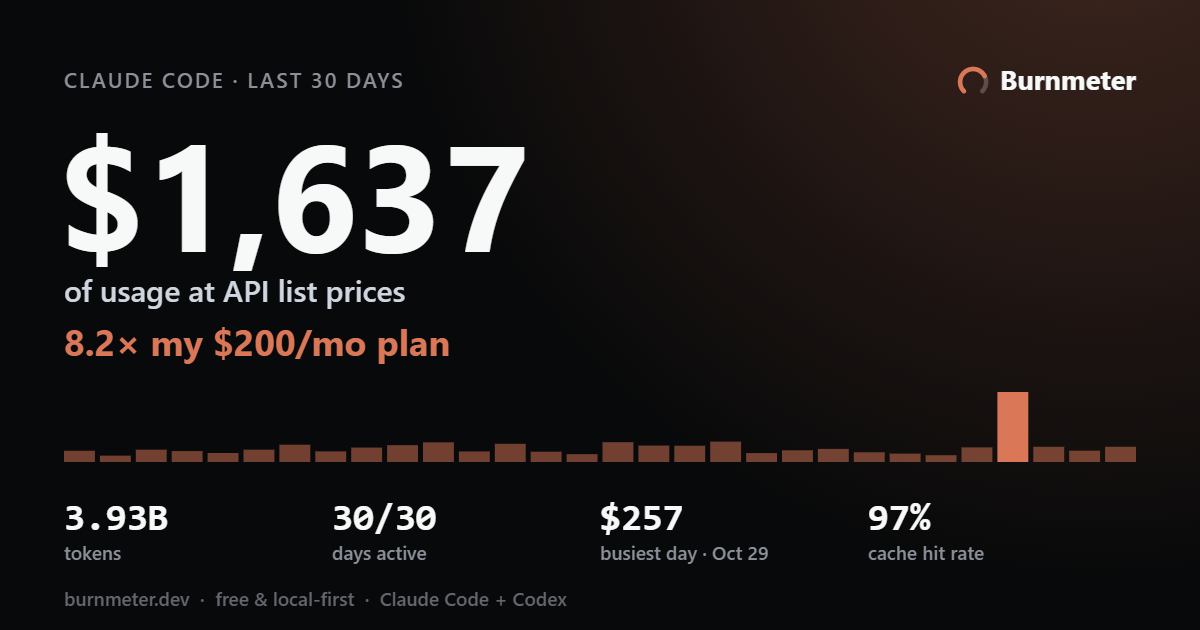
Share (top right) draws a card of your usage: what your tokens would have cost at API list prices, set against what your plan costs. Copy it, save it as a PNG or post it on X. The card holds totals only, with no project names, prompts or code. Nothing leaves your machine unless you click Post on X: that opens a draft post on x.com with the card's text and copies the picture for you to paste.
The numbers are estimates, not your bill
Burnmeter multiplies the tokens in your logs by each provider's public API list
prices (last checked 2026-10-29; PRICES_VERIFIED_AT in
burnmeter/pricing.py). That is what the same usage would
cost through the API. If you're on a flat-fee plan such as Claude Pro/Max or
ChatGPT Plus/Pro, it is not what you pay. Use it to compare models, projects
and days, and to see how hard you're leaning on your plan. Your provider's console
is the source of truth for billing.
Privacy: what stays local and what goes out
Burnmeter reads these files on your machine:
~/.claude/projects/**/*.jsonl(Claude Code)~/.codex/sessions/**/*.jsonl(Codex, the last 90 days by default)- the Claude desktop app's local chat titles, if the app is installed
git logof your project folders, for per-commit cost
The dashboard server listens on 127.0.0.1 only, and it rejects API requests
whose Host header isn't local, which blocks DNS-rebinding attacks from other
websites.
The free app makes only these network requests:
| Request | When |
|---|---|
raw.githubusercontent.com: reads the latest version number from this repo |
when the dashboard opens, then every 3 hours; the tray icon checks every 6 hours |
github.com: downloads the update |
only when you click Update |
x.com: opens a draft post with your share card's text (the period, the cost at API prices, the multiple of your plan) |
only when you click Post on X |
| your Slack, webhook or SMTP server: sends the alert message, including the numbers that triggered it (a Codex limit percentage, your burn rate or weekly spend) | only if you set up alerts |
The version check and the update download carry none of your usage data. The charts use a bundled copy of Chart.js, so the dashboard loads nothing from a CDN.
Pro sync (planned, see Pricing) is off unless you sign in. When on, it uses Google Firebase:
- Your account is a Firebase Authentication email and password. Signing in sends the password to Firebase, as any login does.
- Each machine uploads an encrypted snapshot to Cloud Firestore: summary numbers, the last 14 days of daily cost, top projects and recent turns, including project names, folder paths and chat titles. The encryption key is derived from your password on your machine and is never uploaded, so the stored snapshots can't be read without your password.
- Stored unencrypted next to it: the device name (your computer's name unless you rename it) and the time of the last sync. Like any web service, Firebase also sees your email address, IP address and request times.
Terminal statusline
burnmeter statusline                  # Claude Code
burnmeter statusline --source codex   # Codex
burnmeter statusline --json           # the same fields as JSON
Example output:
🟠 Opus 5.5 $4.20/h · block 4h24m · 0 err/24h · cache 97% · today $32
From left to right:
- Pace: your burn rate against your own typical, busy and heavy zones (🟢 🟡 🟠 🔴).
- Model: the one your latest session is using.
- Burn rate.
- Block: time left in the current 5-hour block.
⚠ P90+follows it when this block already costs more than 90% of your past blocks. - Errors: in the last 24 hours.
- Cache: today's cache hit rate.
- Today: today's spend.
When Burnmeter is running (the app or burnmeter serve), the command asks it for
these numbers and answers in about half a second. Otherwise it builds the line
itself from the last 26 hours of Claude Code logs. That is slower (about
9 seconds on the maker's machine), and 26 hours can't show everything. In that
case:
- the pace dot is ⚪;
⚠ P90+never appears;- the block reads
—unless those 26 hours include a 5-hour pause.
Without a running Burnmeter, --source codex reads all of Codex's logs instead
of the last 26 hours. Either way the numbers come from the same code as the
dashboard.
To show the line in Claude Code, keep Burnmeter running and add this to
~/.claude/settings.json:
{
  "statusLine": { "type": "command", "command": "burnmeter statusline" }
}
The burnmeter command comes with the pip install; the Windows app doesn't add
it to your PATH.
CSV export
Settings → Export → Download CSV saves every parsed record as a CSV file.
With burnmeter serve running you can also fetch
http://127.0.0.1:7654/api/records.csv (add ?source=codex for Codex).
How it works
~/.claude/projects/**/*.jsonl  ─┐
~/.codex/sessions/**/*.jsonl   ─┤→ parsers → normalized UsageRecord
                                │            ↓ (in a short-lived worker process)
                                └──────────→ analytics → report JSON
                                                         ↓
                                       local dashboard on 127.0.0.1
Parsing runs in a worker process that exits after each build, so the long-running
server stays small. Parsed records are cached in ~/.claude and ~/.codex
(.burnmeter_*_cache.json), so later builds only re-read new or changed logs.
Supported agents
| Agent | Logs | Status |
|---|---|---|
| Claude Code | ~/.claude/projects |
✅ |
| OpenAI Codex | ~/.codex/sessions |
✅ |
| Cursor, Copilot, Gemini CLI, others | planned |
Adding an agent is one parser module; see CONTRIBUTING.md.
Pricing
The local app is free and open source, with every agent and every panel. Paid options are planned; none are on sale yet:
- Pro, $6/month: hosted, end-to-end encrypted sync across your machines.
- Supporter, $99: a way to back development; details at launch.
- Commercial license, $49/year: for organizations that can't use AGPL
software; see
LICENSING.md.
More in PRICING.md.
Contributing
Bug reports, fixes and new agent parsers are welcome. Start with
CONTRIBUTING.md; pull requests need a one-time
CLA signature, and the
Code of Conduct applies. Report security problems
privately, as described in SECURITY.md.
License
Burnmeter is free software under the
GNU Affero General Public License v3.0 or later. A commercial license
is planned for organizations that can't use the AGPL; see
LICENSING.md.
1 maintainer

Metadata
1 maintainer
Release files for burnmeter 0.3.8
For a detailed explanation of source distributions (sdists) and built distributions (wheels), please see the package formats documentation.
Source distribution (sdist)
| File | Size | Uploaded | Provenance | Actions |
|---|---|---|---|---|
| burnmeter-0.3.8.tar.gz | 398.3 kB | With provenance | Details for burnmeter-0.3.8.tar.gz |
Built distribution (wheel)
| File | Interpreter | ABI | Platform | Actions Reset |
|---|---|---|---|---|
| burnmeter-0.3.8-py3-none-any.whl | Python 3 | none | any | Details for burnmeter-0.3.8-py3-none-any.whl |
Total release size: 779.2 kB
Release files / burnmeter-0.3.8.tar.gz
| Download URL | burnmeter-0.3.8.tar.gz |
|---|---|
| Size | 398.3 kB |
| Tags | Source |
|
SHA-256 checksum How to use checksums |
e8f0fe4e125e9f9579f4de80618eb1e968e71ef9e7512611d9451846e1110928
|
|
BLAKE2b-256 checksum How to use checksums |
834f1bab1132bcb4e52a8287ddefd8391783348b75b71842003779e0f315f87a
|
| Upload date | |
|
Uploaded using Trusted Publishing? What is trusted publishing? |
Yes |
| Uploaded via |
twine/7.0.0 CPython/3.13.16
|
Provenance
Provenance describes where a file came from. On PyPI, provenance is shared via attestations, which provide a verifiable record of the build or publishing details. View details, limitations and caveats.


PyPI Publish Attestation
PyPI verified that this artifact, at this checksum, originated from the publisher listed below.
Signed by GitHub Actions, verified by PyPI on Nov 1, 2026.
Transparency logRelease files / burnmeter-0.3.8-py3-none-any.whl
| Download URL | burnmeter-0.3.8-py3-none-any.whl |
|---|---|
| Size | 381.0 kB |
| Tags | Python 3 |
|
SHA-256 checksum How to use checksums |
4c2ec7fe49f3dee6d5b7bd0342a0b6c1964538f370c24054b1bedd27646c3425
|
|
BLAKE2b-256 checksum How to use checksums |
d224a245994098efab07a618a868f513eb94f952b40f3d9e3fb0ac579150bfba
|
| Upload date | |
|
Uploaded using Trusted Publishing? What is trusted publishing? |
Yes |
| Uploaded via |
twine/7.0.0 CPython/3.13.16
|
Provenance
Provenance describes where a file came from. On PyPI, provenance is shared via attestations, which provide a verifiable record of the build or publishing details. View details, limitations and caveats.
PyPI Publish Attestation
PyPI verified that this artifact, at this checksum, originated from the publisher listed below.
Signed by GitHub Actions, verified by PyPI on Nov 1, 2026.
Transparency logSecurity for burnmeter 0.3.8
Provenance
Provenance describes where a file came from. On PyPI, provenance is shared via attestations, which provide a verifiable record of the build or publishing details. View details, limitations and caveats.
Full provenance
All 2 files in this release have been uploaded with provenance metadata.
Attestation for burnmeter-0.3.8.tar.gz
PyPI Publish Attestation
PyPI verified that this artifact, at this checksum, originated from the publisher listed below.
Signed by GitHub Actions, verified by PyPI on Nov 1, 2026.
Transparency logA note on package security
PyPI is a repository for distributing packages, not a service for auditing them. While third-party security researchers and our staff do their best to detect and remove malicious packages, PyPI cannot guarantee the quality, security or suitability of any given package.
To learn more about protecting yourself from malicious actors, visit our package security documentation.













