
Ken Burns pan/zoom video effects: turn a still image (or a sequence of stills) into a cinematic pan/zoom film.

Project description
burns
Ken Burns pan/zoom video effects: turn a still image — or a sequence of stills — into a cinematic pan/zoom film.
The Ken Burns effect animates a
static photograph by slowly panning across it and zooming in or out, giving still
images a sense of motion. burns does exactly that, with a tiny API and no
configuration required.
pip install burns
burns needs ffmpeg available on your system (moviepy uses it to encode video).
On macOS: brew install ffmpeg. On Debian/Ubuntu: sudo apt-get install ffmpeg.
Demo
Starting from a single still image:

…two lines of code turn it into two different Ken Burns films — a slow zoom-in ("push") and a lateral pan ("drift"):
from burns import ken_burns_video, ken_burns_path

ken_burns_video("demo_landscape.jpg", phases=ken_burns_path(1, 4.0, zoom=1.4, pan=0.06, ease=True))
ken_burns_video("demo_landscape.jpg", phases=ken_burns_path(2, 4.0, style="drift", pan=0.14))
style="push" — eased zoom-in |
style="drift" — lateral pan |
|---|---|
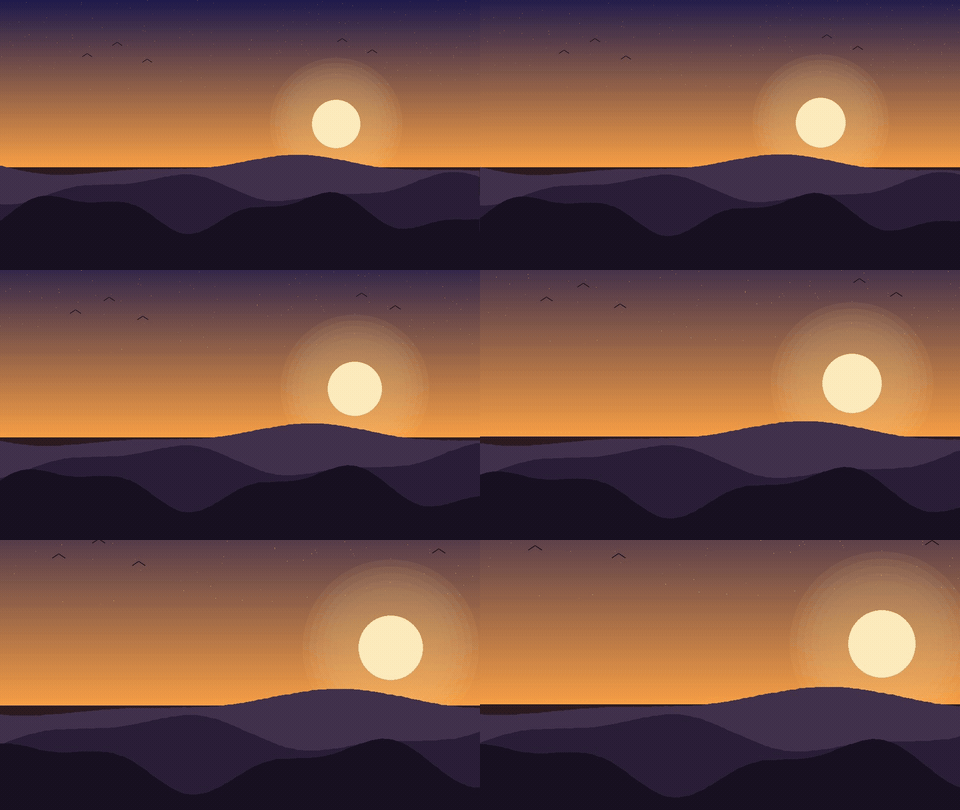 |
 |
The full script that generated this still and these GIFs is
misc/generate_demo.py.
Quickstart
A standard 2-second push-in, written next to the source image:
from burns import ken_burns_video

ken_burns_video("photo.jpg")          # → photo_kenburns.mp4
That's it. The result is an mp4 that slowly zooms into the center of photo.jpg.
A little more control
The camera path is a list of phases, each (start_rect, end_rect, duration_s).
A rect is (cx, cy, s) — a pan center (cx, cy) in [0, 1] image units and a
zoom scale s (1.0 = the full frame, > 1.0 = zoomed in). The camera moves
linearly from start_rect to end_rect over duration_s seconds; phases play
back-to-back.
from burns import ken_burns_video

# Pan from the full frame toward the upper-right while zooming in, over 5s.
ken_burns_video(
    "photo.jpg",
    phases=[((0.5, 0.5, 1.0), (0.65, 0.40, 1.2), 5.0)],
    saveas="out.mp4",
)

# A three-phase move: zoom in, pan across, settle back to center.
ken_burns_video(
    "photo.jpg",
    phases=[
        ((0.5, 0.5, 1.0), (0.65, 0.40, 1.2), 4.0),
        ((0.65, 0.40, 1.2), (0.35, 0.60, 1.2), 4.0),
        ((0.35, 0.60, 1.2), (0.5, 0.5, 1.3), 4.0),
    ],
)
Rects accept flexible shorthand: a bare number is a centered zoom (1.3), a pair
is a pan center at full scale ((0.3, 0.7)), a triple is the full spec.
Let burns design the motion for you
Hand-authoring rectangles for every image gets tedious. ken_burns_path generates
a cohesive, deterministic, non-repetitive path from a few intent parameters —
pass the image's position (index) and a duration, and it picks the framing:
from burns import ken_burns_video, ken_burns_path

# index seeds the focal direction; odd indices push in, even pull out.
ken_burns_video("photo.jpg", phases=ken_burns_path(1, 5.0))

# styles: "push" (zoom-led, the default) or "drift" (pure horizontal pan)
ken_burns_video("photo.jpg", phases=ken_burns_path(2, 5.0, style="drift"))

# ease=True replaces constant velocity with a slow-fast-slow curve
ken_burns_video("photo.jpg", phases=ken_burns_path(1, 6.0, ease=True))
Multi-image films
ken_burns_film renders a sequence of (image, phases) panels as one
continuous film — a single encode pass, so there are no concatenation seams and
no per-image freeze frames at the cuts. Pass an optional pre-built audio track to
mux it in.
from burns import ken_burns_film, ken_burns_path

panels = [
    ("a.jpg", ken_burns_path(1, 4.0)),
    ("b.jpg", ken_burns_path(2, 4.0)),
    ("c.jpg", ken_burns_path(3, 4.0)),
]
ken_burns_film(panels, saveas="film.mp4", fps=30, audio_path="narration.mp3")
API
| Function | What it does |
|---|---|
ken_burns_video(image, *, phases=..., fps=30, saveas=None, ...) |
Render one image into a multi-phase pan/zoom mp4. Accepts a path, a PIL.Image, or a numpy array. |
ken_burns_film(panels, *, saveas, fps=30, audio_path=None, ...) |
Render a sequence of (image, phases) panels as one continuous film, with optional audio. |
ken_burns_path(index, duration_s, *, style="push", zoom=1.10, pan=0.03, ease=False) |
Generate a deterministic pan/zoom path (the phases the renderers consume). |
All rectangles are (cx, cy, s) — pan center in [0, 1], zoom scale (1.0 = full
frame). Because the crop box is clamped to the image, you cannot zoom out past the
original; express a zoom-out as a start s > 1 panning to an end s = 1.


Download files
Download the file for your platform. If you're not sure which to choose, learn more about installing packages.
Source Distribution
Built Distribution
Filter files by name, interpreter, ABI, and platform.
If you're not sure about the file name format, learn more about wheel file names.
Copy a direct link to the current filters
File details
Details for the file burns-0.0.1.tar.gz.
File metadata
- Download URL: burns-0.0.1.tar.gz
- Upload date:
- Size: 2.1 MB
- Tags: Source
- Uploaded using Trusted Publishing? No
- Uploaded via: twine/6.2.0 CPython/3.12.12
File hashes
| Algorithm | Hash digest | |
|---|---|---|
| SHA256 |
03e6cebeb3caa3efdba964cb20ad36b7ca7e9111387ef1cc1686ee9e5674bfe1
|
|
| MD5 |
cd47cd5ef8c97d48b893a98aebce2a23
|
|
| BLAKE2b-256 |
1f129863b7c434d8874a56c6251dd8f85d367b945f76b5a03eb14a42c2f49bf3
|
File details
Details for the file burns-0.0.1-py3-none-any.whl.
File metadata
- Download URL: burns-0.0.1-py3-none-any.whl
- Upload date:
- Size: 15.2 kB
- Tags: Python 3
- Uploaded using Trusted Publishing? No
- Uploaded via: twine/6.2.0 CPython/3.12.12
File hashes
| Algorithm | Hash digest | |
|---|---|---|
| SHA256 |
35113577fd86e66623057c44db2eb0342976f875beb1c395d78733327820e651
|
|
| MD5 |
3b545a5fc700d12fe1da55d28b8a33a7
|
|
| BLAKE2b-256 |
67c4e4a9af828e23c7596f319512d962cce405d8c8ceeab9281bb80a1b8518a8
|






