
Library to search for files with content that most closely match the lines of a reference string

Project description
busca



CLI and library to search for files with content that most closely match the lines of a reference string.
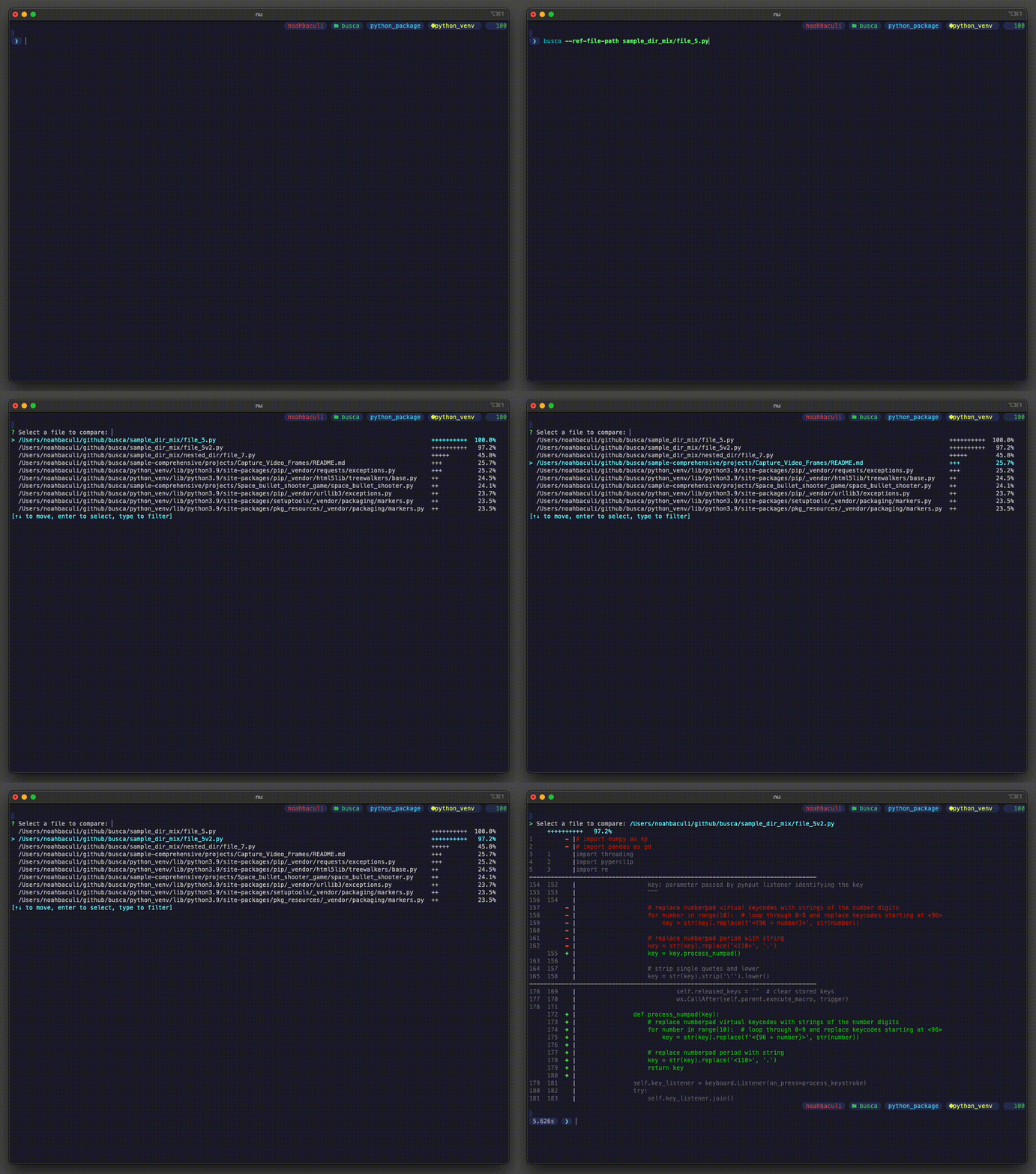
Table of Contents
- busca
- Table of Contents
- Python Library
- Command Line Interface
- CLI Usage
- Examples
- Find files that most closely match the source
file_5.pyfile in a search directory - Find files that most closely match the source
path_to_reference.jsonfile in a search directory - Change search to scan the current working directory
- Narrow search to only consider
.jsonfiles whose paths include the substring "foo" and that contain fewer than 1,000 lines - Piped input mode to search the output of a command
- Find files that most closely match the source
- Examples
- CLI Installation
- CLI Usage
Python Library
🐍 The Python library is renamed to
busca_pydue to a name conflict with an existing (possibly abandoned) project.
pip install busca_py
import busca_py as busca


reference_file_path = "./sample_dir_hello_world/file_1.py"
with open(reference_file_path, "r") as file:
    reference_string = file.read()

# Perform search with required parameters
all_file_matches = busca.search_for_lines(
    reference_string=reference_string,
    search_path="./sample_dir_hello_world",
)

# File matches are returned in descending order of percent match
closest_file_match = all_file_matches[0]
assert closest_file_match.path == reference_file_path
assert closest_file_match.percent_match == 1.0
assert closest_file_match.lines == reference_string

# Perform search for top 5 matches with additional filters
# to speed up runtime by skipping files that will not match
relevant_file_matches = busca.search_for_lines(
    reference_string=reference_string,
    search_path="./sample_dir_hello_world",
    max_lines=10_000,
    include_globs=["*.py"],
    count=5,
)

assert len(relevant_file_matches) < len(all_file_matches)

# Create new file match object
new_file_match = busca.FileMatch("file/path", 1.0, "file\ncontent")
Command Line Interface
CLI Usage
🧑💻️ To see usage documentation, run
busca -h
Output for v2.1.3
Simple utility to search for files with content that most closely match the lines of a reference string

Usage: busca --ref-file-path <REF_FILE_PATH> [OPTIONS]
       <SomeCommand> | busca [OPTIONS]

Options:
  -r, --ref-file-path <REF_FILE_PATH>  Local or absolute path to the reference comparison file. Overrides any piped input
  -s, --search-path <SEARCH_PATH>      Directory or file in which to search. Defaults to CWD
  -m, --max-lines <MAX_LINES>          The number of lines to consider when comparing files. Files with more lines will be skipped [default: 10000]
  -i, --include-glob <INCLUDE_GLOB>    Globs that qualify a file for comparison
  -x, --exclude-glob <EXCLUDE_GLOB>    Globs that disqualify a file from comparison
  -c, --count <COUNT>                  Number of results to display [default: 10]
  -h, --help                           Print help
  -V, --version                        Print version
Examples
Find files that most closely match the source file_5.py file in a search directory
❯ busca --ref-file-path sample_dir_mix/file_5.py --search-path sample_dir_mix

? Select a file to compare:
  sample_dir_mix/file_5.py                  ++++++++++  100.0%
> sample_dir_mix/file_5v2.py                ++++++++++   97.5%
  sample_dir_mix/nested_dir/file_7.py       ++++         42.3%
  sample_dir_mix/aldras/aldras_settings.py  ++           24.1%
  sample_dir_mix/aldras/aldras_core.py      ++           21.0%
  sample_dir_mix/file_3.py                  +            13.2%
  sample_dir_mix/file_1.py                  +            11.0%
  sample_dir_mix/file_2.py                  +             9.4%
  sample_dir_mix/aldras/aldras_execute.py   +             7.5%
  sample_dir_mix/file_4.py                  +             6.9%
[↑↓ to move, enter to select, type to filter]
Find files that most closely match the source path_to_reference.json file in a search directory
busca --ref-file-path path_to_reference.json --search-path path_to_search_dir
Change search to scan the current working directory
busca --ref-file-path path_to_reference.json
Narrow search to only consider .json files whose paths include the substring "foo" and that contain fewer than 1,000 lines
busca --ref-file-path path_to_reference.json --include-glob '*.json' --include-glob '**foo**' --max-lines 1000
Piped input mode to search the output of a command
# <SomeCommand> | busca [OPTIONS]
echo 'String to find in files.' | busca
MacOS piped input mode
📝 There is an open issue for MacOS in crossterm, one of busca's dependencies, that does not allow prompt interactivity when using piped input. Therefore, when a non interactive mode is detected, the file matches will be displayed but not interactively.
This can be worked around by adding the following aliases to your shell .bashrc or .zshrc file:
# Wrap commands for busca search
busca_cmd_output() {
    eval "$* > /tmp/busca_search.tmp" && busca -r /tmp/busca_search.tmp
}
One-liners to add the wrapper function:
| Shell | Command |
|---|---|
| Bash | echo -e 'busca_cmd_output() {\n\teval "$* > /tmp/busca_search.tmp" && busca -r /tmp/busca_search.tmp\n}' >> ~/.bashrc |
| Zsh | echo -e 'busca_cmd_output() {\n\teval "$* > /tmp/busca_search.tmp" && busca -r /tmp/busca_search.tmp\n}' >> ~/.zshrc |
Reload your shell for the function to become available:
# busca_cmd_output <SomeCommand>
busca_cmd_output echo 'String to find in files.'
CLI Installation
Mac OS
Homebrew
brew tap noahbaculi/busca
brew install busca
To update, run
brew update
brew upgrade busca
All platforms (Windows, MacOS, Linux)
Compile from source
-
Install Rust using
rustup. -
Clone this repo.
-
In the root of this repo, run
cargo build --release
-
Add to path. For example, by copying the compiled binary to your local bin directory.
cp target/release/busca $HOME/bin/
Release history Release notifications | RSS feed


Download files
Download the file for your platform. If you're not sure which to choose, learn more about installing packages.
Source Distribution
Built Distribution
Filter files by name, interpreter, ABI, and platform.
If you're not sure about the file name format, learn more about wheel file names.
Copy a direct link to the current filters
File details
Details for the file busca_py-2.2.1.tar.gz.
File metadata
- Download URL: busca_py-2.2.1.tar.gz
- Upload date:
- Size: 2.6 MB
- Tags: Source
- Uploaded using Trusted Publishing? No
- Uploaded via: maturin/1.2.3
File hashes
| Algorithm | Hash digest | |
|---|---|---|
| SHA256 |
06a388a243367acae001227a279d8cff50e0afa0d6c09e2150e214868814c060
|
|
| MD5 |
2e875ea641386f4701a298866759701d
|
|
| BLAKE2b-256 |
6778a32abd98b2f940fc4af3779d27ba7cf3a808718be7a836c5b18df18d9d04
|
File details
Details for the file busca_py-2.2.1-cp39-cp39-macosx_11_0_arm64.whl.
File metadata
- Download URL: busca_py-2.2.1-cp39-cp39-macosx_11_0_arm64.whl
- Upload date:
- Size: 328.1 kB
- Tags: CPython 3.9, macOS 11.0+ ARM64
- Uploaded using Trusted Publishing? No
- Uploaded via: maturin/1.2.3
File hashes
| Algorithm | Hash digest | |
|---|---|---|
| SHA256 |
8d5a240a9ea1ebf7e6e4a40469470e473f831996633f97985a5f72e8eac1d76e
|
|
| MD5 |
8228381642a585f81393564ef18ce0d4
|
|
| BLAKE2b-256 |
c288469231f46db9b3bfea6aa15feb74b6a79becb3569e53590c9d622691972a
|






