
Busy Crew
See what your Claude Code and Codex agents are doing at a glance, on the LED strip of your BUSY Bar. Each session is a little character: working, waiting for you, or done.
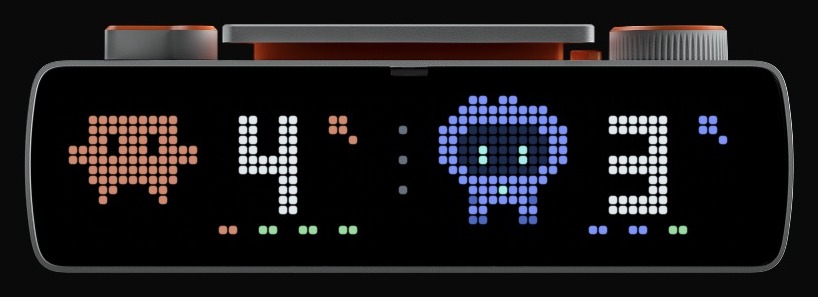
Your Mac reads Claude Code and Codex activity locally and sends a 72 × 16 pixel frame to the bar. No conversation content leaves your Mac. Monitoring needs no cloud service; an optional daily check looks for releases on GitHub. Busy Crew is an independent project, not affiliated with BUSY, Anthropic or OpenAI.
What you see
When both families are active, the duo view above shows each family's count and up to four state dots. With only one family, each session gets its own character. Turn the scroll wheel to see the tokens your agents used.
 Claude only |
 Codex only |
 Tokens today |
 Tokens this month |
| On the bar | Meaning |
|---|---|
| Terracotta (Claude) or blue (Codex), legs moving | Working |
Yellow ! |
Waiting for you: a question or a permission |
Green ✓ |
Finished, not yet acknowledged |
Gray, zzz |
Open but idle Claude session; zzz when all of them are |
Gray ? |
Failed turn, unknown state or unreadable source |
+N |
More sessions than the six slots |
Token totals are shown in K (thousand), M (million) or G (billion) and include cache tokens. These captures are real, taken on the author's bar with commands like busy-crew snapshot docs/tokens-today.png --leds.
Requirements
- A Mac (macOS) and a BUSY Bar, connected by USB or Wi-Fi
- Homebrew, or Python 3.11+ and uv
- Claude Code and/or the Codex app, used on this Mac
- Optional: ccusage 20+ for the token views
Install
Choose one package manager:
brew install cmdai-hq/tap/busy-crew
# or:
uv tool install busy-crew
For a first try, connect the bar by USB. No device password is needed:
busy-crew install --address http://10.0.4.20 --timezone Europe/Paris
# Wait a few seconds for the collector to start.
busy-crew status
Replace Europe/Paris with your IANA time zone. Already-open Claude sessions may need restarting to load the new hooks.
Wi-Fi needs API access enabled and a password. Follow the installation guide for Wi-Fi, token counts, uv PATH setup and manual updates.
Update: busy-crew upgrade keeps your settings, restarts the collector and refreshes the menu icon if installed. Remove: run busy-crew uninstall, then brew uninstall busy-crew or uv tool uninstall busy-crew.
To try a checkout, see Development. Use uv run busy-crew for its commands.
What install changes on your Mac
- A LaunchAgent (
local.busybar.agent-deck) starts the collector at login and restarts it if it exits. Homebrew installs use a stableoptpath. A checkout uses its own environment: keep the repository folder where it is. - Claude Code hooks, added after a private settings backup. They record status metadata, never prompts, and make no approval decisions. They run synchronously with a 2-second timeout. Existing hooks and settings are preserved; a conflicting edit fails with recovery copies.
- A private state folder,
~/Library/Application Support/BusyCrew, for the configuration, backups and the log. Installations made before 1.0 keepBusybarAgentDeck.
Use install --no-claude-hooks for passive Claude tracking: activity stays visible, but busy → idle alone does not produce a finished ✓. Repeat that option on every manual reinstall. For automatic upgrades and older installs, see passive tracking updates.
Re-running install keeps the saved address and time zone unless you pass new ones. busy-crew uninstall removes the LaunchAgent and the hooks, and keeps the state folder.
To choose another installed Python, pass --python /absolute/path/to/python or set BUSY_CREW_PYTHON. Otherwise, the installer uses its own interpreter.
Using it
| On the bar | Action |
|---|---|
| Start / Pause | Cycle: sessions → tokens today → tokens this month |
| Scroll wheel, turn | One view forward (+) or back (−) |
| Scroll wheel, press | Acknowledge the ✓ on screen |
| Back | Return to sessions |
| Selector on Off or Settings | Pause the display |
A session waiting for you always brings the sessions view back. No button answers a question or grants a permission: do that in Claude or Codex.
The same from the terminal:
busy-crew view sessions   # or: tokens, month
busy-crew ack             # acknowledge the results on screen
busy-crew refresh         # recount tokens now
busy-crew snapshot front.png --leds
A ✓ counts toward its family's total until you acknowledge it, the session starts new work, or it goes away (a closed Claude process, an archived Codex conversation, or a Codex response finished more than two hours ago). How results and acknowledgment work.
Menu bar icon
Optional. The icon shows the collector's health: running, paused, degraded, stopped, or update available. Its menu shows sessions and today's tokens, and lets you acknowledge results, recount tokens, reload the collector, open the log, or install a new release.
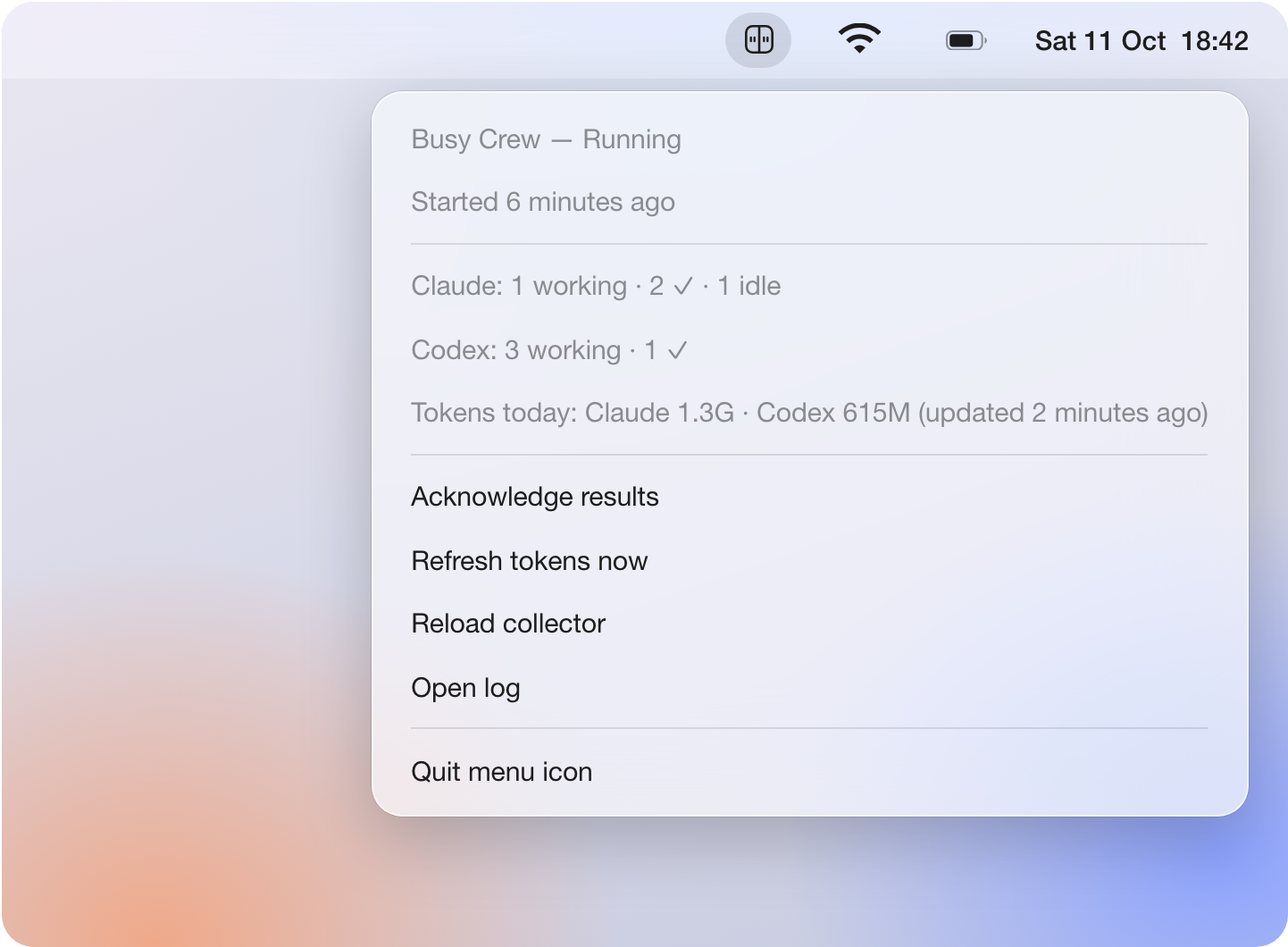
busy-crew menubar install # needs the Swift compiler: xcode-select --install
Icon states, actions and updates. The picture is a simulation of the real menu.
Configuration
install writes config.json in the state folder (example):
| Key | Purpose |
|---|---|
address |
The bar's origin, e.g. http://10.0.4.20; no /api suffix |
timezone |
IANA time zone for token totals; defaults to Europe/Paris |
ccusage |
Absolute path to ccusage, if the LaunchAgent cannot find it |
token |
The password set for the bar's local Wi-Fi API; not needed over USB |
update_check |
false stops the daily check for a new release on GitHub |
After editing config.json, choose Reload collector in the menu bar, or run:
launchctl kickstart -k gui/$UID/local.busybar.agent-deck
Over HTTP the key travels unencrypted: use a trusted network, or HTTPS if your device supports it. The busylib WebSocket SDK puts the key in a URL query and honors proxy environment variables; don't share those URLs or proxy logs.
CLAUDE_CONFIG_DIR, CODEX_HOME and BUSY_CREW_STATE (formerly AGENT_DECK_STATE, still honored) are supported. Set them before installing so the collector uses those roots and hooks write to the matching state folder.
Troubleshooting
Start with busy-crew status.
- The bar went dark: check
statusand the menu icon. A higher-priority app can also take the display; Busy Crew does not detect that ownership. - Token views show
?: ccusage is missing, failed or stale; sessions still work. Follow token setup. busy-crewnot found: check your PATH; after a uv install, runuv tool update-shelland reopen your terminal.invalid choice: check for an older copy withcommand -v busy-crew. From a checkout, useuv run busy-crew.
More, including Claude settings conflicts and recovery: troubleshooting.
How it works
- Claude Code: the session registry (
~/.claude/sessions) gives each session, its state and its process; hooks sharpen "waiting for you" and finished results. - Codex: the app's local SQLite databases and conversation logs, opened read-only.
- Tokens: one ccusage daily report from the 1st of the month, refreshed every two minutes.
- The bar: a frame through the BUSY Bar local API, with a 15-second lease so the bar recovers its own display if your Mac goes away.
Limits worth knowing: Codex approval requests are only partly visible, cloud tasks and other machines aren't tracked. Details: how it works, tested versions.
Privacy: Busy Crew sends frames to your bar and receives its button events. A daily GitHub release check can be disabled with "update_check": false. Turn events and questions may be decoded in memory; conversation text is never written to state files, logged or sent. What is read, kept and sent.
Development
git clone https://github.com/cmdai-hq/busy-crew.git
cd busy-crew
uv sync --locked
uv run python -m unittest discover -s tests -v
uv run busy-crew demo /tmp/busy-crew-demo
These commands need no bar and install no collector or hooks. The demos are fictional PNGs. Tests never contact a device, run a model or touch your real agent data.
See CONTRIBUTING for the module map, Swift tests and testing a branch on your bar. CI covers macOS and Linux on Python 3.11, 3.14 and 3.15; hardware was previously verified on firmware 1.2.4 (API 27.5.0). Security reporting.
License
MIT. Contributions are welcome; see CONTRIBUTING.
The characters are drawn in code, inspired by Clawd and Codex. References: BUSY Bar developer docs, busylib, Claude Code hooks, ccusage.
1 maintainer

Metadata
1 maintainer
Release files for busy-crew 1.1.4
For a detailed explanation of source distributions (sdists) and built distributions (wheels), please see the package formats documentation.
Source distribution (sdist)
| File | Size | Uploaded | |
|---|---|---|---|
| busy_crew-1.1.4.tar.gz | 754.6 kB | Details |
Built distribution (wheel)
| File | Interpreter | ABI | Platform | Reset |
|---|---|---|---|---|
| busy_crew-1.1.4-py3-none-any.whl | Python 3 | none | any | Details |
Total release size: 811.6 kB
Release files / busy_crew-1.1.4.tar.gz
| Download URL | busy_crew-1.1.4.tar.gz |
|---|---|
| Size | 754.6 kB |
| Tags | Source |
|
SHA-256 checksum How to use checksums |
105d6e6e4f0daca63f10adb5b8558904991ad9d8fdb19371b6d3734965abf654
|
|
BLAKE2b-256 checksum How to use checksums |
ee80e97d7b38ba83026a209d69c20de87ec540f2b2d46a9d3f315779375996b8
|
| Upload date | |
|
Uploaded using Trusted Publishing? What is trusted publishing? |
Yes |
| Uploaded via |
twine/7.0.0 CPython/3.13.14
|
Provenance
Provenance describes where a file came from. On PyPI, provenance is shared via attestations, which provide a verifiable record of the build or publishing details. View details, limitations and caveats.


PyPI Publish Attestation
PyPI verified that this artifact, at this checksum, originated from the publisher listed below.
Signed by GitHub Actions, verified by PyPI on Oct 11, 2026.
Transparency logRelease files / busy_crew-1.1.4-py3-none-any.whl
| Download URL | busy_crew-1.1.4-py3-none-any.whl |
|---|---|
| Size | 57.0 kB |
| Tags | Python 3 |
|
SHA-256 checksum How to use checksums |
192beafb7a61a3114b8e32c6cba1044ff7b525ae0704788181e279ad245ea109
|
|
BLAKE2b-256 checksum How to use checksums |
2206eac78889cad507b5827ac4c809f8d8fd90e6d48c64731bc653a37aba4e75
|
| Upload date | |
|
Uploaded using Trusted Publishing? What is trusted publishing? |
Yes |
| Uploaded via |
twine/7.0.0 CPython/3.13.14
|
Provenance
Provenance describes where a file came from. On PyPI, provenance is shared via attestations, which provide a verifiable record of the build or publishing details. View details, limitations and caveats.
PyPI Publish Attestation
PyPI verified that this artifact, at this checksum, originated from the publisher listed below.
Signed by GitHub Actions, verified by PyPI on Oct 11, 2026.
Transparency log













