
Deploy and manage ML/AI infrastructure on your own servers. Slothfully simple.
Servers, Docker, Kubernetes, databases, workflows, model serving, data services, tracking, and monitoring, with your product at the center. Managed in one place and connected by design.




What is MLOX?
ML/AI infrastructure is fragmented. Setup is painful, managed platforms are expensive, and vendor lock-in limits your choices.
MLOX brings the infrastructure around your product into one connected system. It manages servers, sets up Docker and Kubernetes clusters, deploys open-source services, stores secrets, and wires dependencies across databases, workflows, experiment tracking, model serving, data services, and monitoring.
Use the CLI or TUI to operate the same inspectable, configuration-driven core. MLOX is built for solopreneurs, startups, and small teams that want to focus on their product instead of assembling and maintaining infrastructure.
It's for engineers who prefer thoughtful systems over chaos. Backed by open source. Powered by sloths.
Status, roadmap, and decisions — see docs/DOCTRINE.md, the single point of truth.
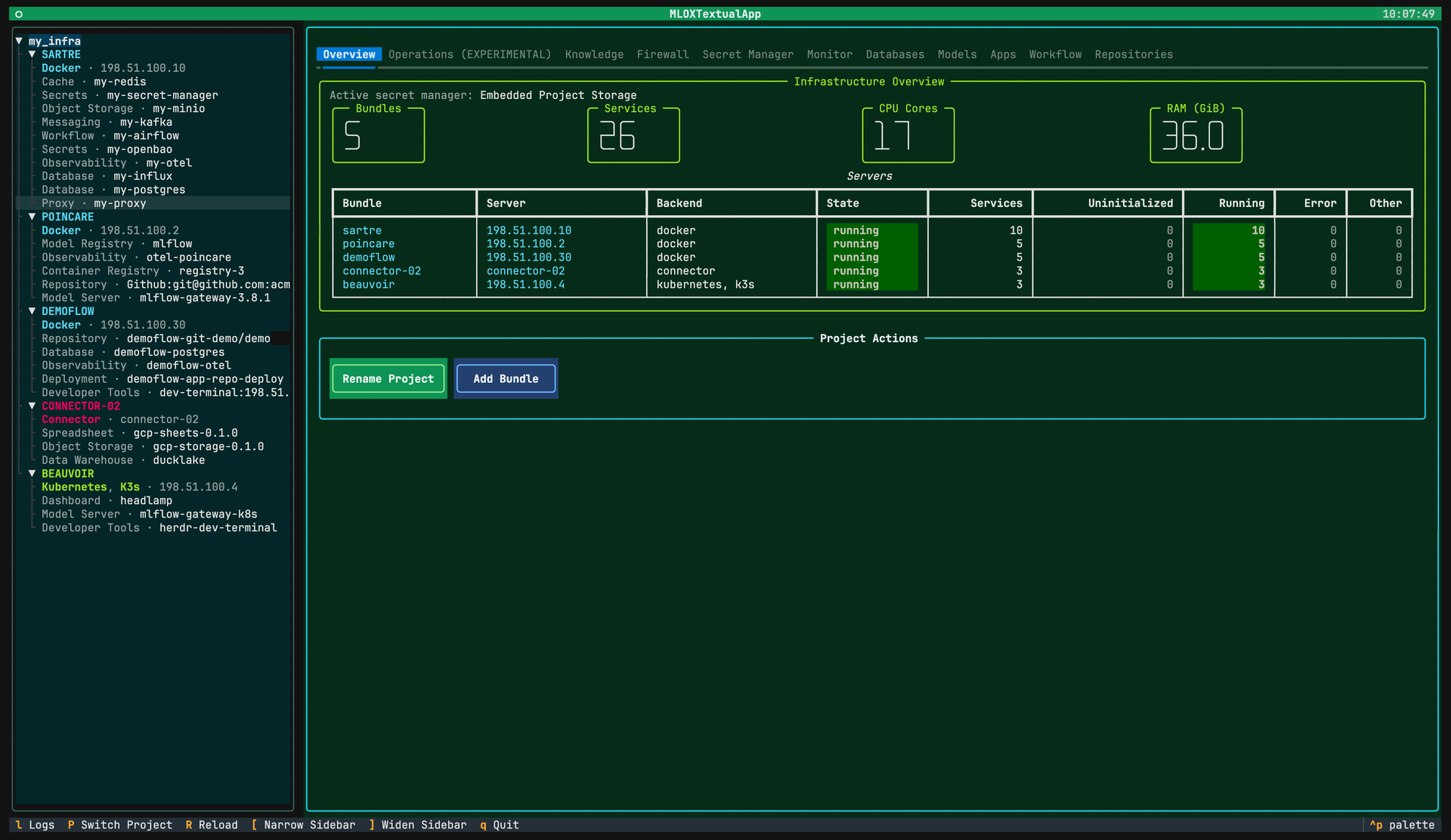
See It In Action

Status
MLOX is in active development and has been accepted at CAIN 2026. What is stable, beta, or experimental, and where the project is heading, is tracked in one place: the component status and roadmap in docs/DOCTRINE.md.
We welcome contributors, users, and honest feedback. If you hit something broken, please open an issue or reach out at contact@mlox.org.
What Can You Do with MLOX?
| Area | What's included |
|---|---|
| Infrastructure | Add, remove, and tag servers; run work natively, in Docker, or on single- or multi-node Kubernetes |
| Services | Deploy, manage, and remove services; centralize secrets; connect service dependencies |
| Connectors | Integrate externally hosted services such as BigQuery, Cloud Storage, Sheets, and GCP Secret Manager |
| Applications | Import repositories and deploy your product alongside its supporting services |
| Knowledge | Keep notes, wiki pages, FAQs, todos, and markdown kanban boards inside the encrypted project |
| Operations | Observe workload runs, keep incident evidence, plan work, and consult advisory agent workspaces |
| Code | busysloths-mlox PyPI package: the ProjectWorkspace SDK plus per-service client helpers |
Services Catalog
MLOX bundles a growing set of self-hosted services and connectors (MLflow, Airflow, Milvus, Feast, Kafka, LiteLLM, OpenBao, GCP, and more). The exhaustive, authoritative list — generated directly from the YAML plugin configs — lives in docs/SERVICES_CATALOG.md. Per-component maturity status is tracked in docs/DOCTRINE.md. For MLflow setup, model serving, and focused integration tests, see the MLflow service guide.
Architecture in 30 Seconds
MLOX plays two roles. As a platform, the CLI and TUI manage your infrastructure. As a client package, your own code consumes the services MLOX deployed.
 PLATFORM  (manage infrastructure)          CLIENT  (consume services)

     CLI           TUI                       your code, notebooks, jobs
      └─────┬───────┘                                   │
            ▼                                           │ token or keyfile
     ProjectWorkspace       public API,                 ▼
            │               one commit per change    secret manager
            ▼                                           │ endpoints + credentials
     application use cases                              ▼
            │                                     service client helpers
            ▼                                     (e.g. services/feast/client.py)
     WorkspaceState ◄──► SQLCipher repository ──► encrypted project.mlox
            │
            ▼
     Infrastructure: bundles of one server + its services
            │
            ▼
     executors + backend adapters ──► native · Docker · Kubernetes · connector
The model has three tiers:
- Servers are the machines: Ubuntu hosts, your local machine, or a virtual "connector" server for externally hosted services.
- Backends decide how a server runs work: native, Docker, Kubernetes, or a connector. A server's abilities come from the capability mixins it implements.
- Services run on top: tracking, serving, databases, workflows, and more.
Every server and service is a YAML config plus a Python class, so the catalog is inspectable and extensible. External packages add their own through plugin entry points. MLOX is deliberately opinionated: it knows how services depend on each other, so it can wire them together and manage them as one connected system.
For deeper reading:
- Architecture Guide — codebase walkthrough and invariants
- Python API — the supported
ProjectWorkspaceSDK contract - Plugin Guide — shipping services and servers from your own package
Quickstart
# 1. Install uv (https://docs.astral.sh/uv/)

# 2. Install MLOX with the terminal UI included
uv tool install 'busysloths-mlox[tui]'

# 3. Launch the TUI and hit the "Create" button on the login screen
#    to make your first encrypted, portable project file
mlox tui

# ... or open the same UI in your browser (http://localhost:8000)
mlox ui

# ... or explore the CLI
mlox --help
See the Installation Guide for user and developer setup and the integration-test VMs. See Encrypted Project Files for creation, storage, backup, and legacy migration details.
Project Structure
mlox/
├── mlox/                    # The busysloths-mlox package
│   ├── cli/                 # Typer CLI: declarative specifications/ + commands/
│   ├── tui/                 # Textual terminal UI: screens, widgets, service panels
│   ├── project/             # ProjectWorkspace, WorkspaceState, SQLCipher repository,
│   │                        #   embedded secrets, knowledge entries, operations records
│   ├── application/         # Frontend-independent use cases returning OperationResult
│   ├── infra.py             # Infrastructure topology: bundles of servers and services
│   ├── server.py            # AbstractServer and backend/capability mixins
│   ├── service.py           # AbstractService lifecycle contract and capability ABCs
│   ├── servers/             # Ubuntu (native/Docker/Kubernetes), local, and connector servers
│   ├── services/            # Built-in services: YAML config, class, manifests, client.py
│   ├── config.py            # YAML config loading and plugin entry-point discovery
│   ├── execution/           # Target-agnostic execution base + Docker/K8s/Git/firewall helpers
│   ├── executors.py         # UbuntuTaskExecutor, the current (Fabric/SSH) executor
│   ├── secret_manager.py    # Secret manager interface and TinySecretManager
│   ├── ui/                  # Frontend handler registry
│   ├── assets/              # Cloud-init and Multipass helper scripts
│   └── resources/           # Logos and README media
├── tests/
│   ├── unit/                # Fast tests, no external deps
│   └── integration/         # Multipass VM tests, including Kubernetes/k3s
├── examples/                # Telemetry, tracking, Airflow DAGs, operations demo
├── docs/                    # Doctrine, architecture, catalog, and guides
├── content/                 # Demo and tutorial scripts + media registry
├── scripts/                 # Maintenance utilities, docs checks, content pipeline
├── wiki/                    # GitHub Wiki source pages
└── website/                 # Astro site published to GitHub Pages
Contributing
Sloth-Friendly Setup
# 1. Install Task (https://taskfile.dev/installation/)
# 2. Clone the repo
git clone https://github.com/BusySloths/mlox.git && cd mlox
# 3. Set up the dev environment (uv-based, installs the package with dev extras)
task first:steps
Run Tests
task dev:lint                   # flake8
task tests:unit:run             # unit tests (fast, no external deps)
task tests:integration:run      # integration tests (requires Multipass VMs)
task tests:integration:k8s      # Kubernetes integration tests (requires Multipass/k3s)
To keep integration runs quiet and save output per test module:
task tests:integration:run -- --integration-quiet
# Or choose the parent directory for the logs:
task tests:integration:run -- --integration-log-dir /tmp/mlox-logs
# These flags also work with pytest directly and the k8s/service tasks:
uv run python -m pytest tests/integration --run-integration --integration-quiet
Each run creates a unique mlox-integration-* directory under the system temp
folder (or the supplied parent directory). The terminal shows each test name as it starts, its pass/fail result, and the log
paths. Module files contain captured stdout, stderr, Python logs at
INFO level and above, and full failure tracebacks, including fixture setup and
teardown. Shared fixture output belongs to the module whose test triggers that
fixture phase. Files are written after each phase completes. Quiet capture
applies to the whole pytest invocation; only integration modules get log files.
Omit both options to retain the existing live output.
Ways to Contribute
- Bug reports
- Documentation improvements
- Feature requests
- New service implementations
- Examples and tutorials
See CONTRIBUTING.md for the issue, milestone, and PR workflow.
Documentation
| Document | Description |
|---|---|
| Doctrine | Status, roadmap, and binding decisions (single point of truth) |
| Services Catalog | Generated service/server catalog |
| Architecture | Codebase walkthrough and invariants |
| Python API | Supported ProjectWorkspace SDK contract |
| Installation Guide | Setup from scratch |
| DuckLake Guide | Set up a lake and connect a DuckDB client |
| Content Pipeline Recipe | Script, record, redact, verify, and publish demos/tutorial media |
| Project Files | Encrypted project files, backup, migration |
| Contributing Guide | How to contribute |
| Plugin Guide | External service and server config plugins |
| Releasing | Versioning and the release pipeline |
| API Docs | Generated Python API reference |
Sponsors
MLOX is proudly funded by:

Supporters

License & Contact
MLOX is open-source, distributed under the MIT License. Contributions are welcome and subject to the same terms.
We are looking for people invested in the problem we're solving. Say hello at contact@mlox.org or start a conversation in GitHub Discussions.
1 maintainer

Metadata
1 maintainer
Release files for busysloths-mlox 0.6.0
For a detailed explanation of source distributions (sdists) and built distributions (wheels), please see the package formats documentation.
Source distribution (sdist)
| File | Size | Uploaded | Provenance | Actions |
|---|---|---|---|---|
| busysloths_mlox-0.6.0.tar.gz | 3.8 MB | With provenance | Details for busysloths_mlox-0.6.0.tar.gz |
Built distribution (wheel)
| File | Interpreter | ABI | Platform | Actions Reset |
|---|---|---|---|---|
| busysloths_mlox-0.6.0-py3-none-any.whl | Python 3 | none | any | Details for busysloths_mlox-0.6.0-py3-none-any.whl |
Total release size: 7.7 MB
Release files / busysloths_mlox-0.6.0.tar.gz
| Download URL | busysloths_mlox-0.6.0.tar.gz |
|---|---|
| Size | 3.8 MB |
| Tags | Source |
|
SHA-256 checksum How to use checksums |
83168bb9f477885f544b159105062aa5e6a9be9ac9debc58b1b80c1be6789306
|
|
BLAKE2b-256 checksum How to use checksums |
402a72dd757be75fa5d94a5c0903eb671a2fc8b4ee2e0d29df7f5180e2836ecf
|
| Upload date | |
|
Uploaded using Trusted Publishing? What is trusted publishing? |
Yes |
| Uploaded via |
twine/7.0.0 CPython/3.13.14
|
Provenance
Provenance describes where a file came from. On PyPI, provenance is shared via attestations, which provide a verifiable record of the build or publishing details. View details, limitations and caveats.


PyPI Publish Attestation
PyPI verified that this artifact, at this checksum, originated from the publisher listed below.
Signed by GitHub Actions, verified by PyPI on Nov 12, 2026.
Transparency logRelease files / busysloths_mlox-0.6.0-py3-none-any.whl
| Download URL | busysloths_mlox-0.6.0-py3-none-any.whl |
|---|---|
| Size | 3.9 MB |
| Tags | Python 3 |
|
SHA-256 checksum How to use checksums |
115b57cc3f29aab13213a364d66055b34621a497245fdf67ec85b46301f3ff90
|
|
BLAKE2b-256 checksum How to use checksums |
08eb320538dd8c66e2adf1e3a093f7336212736feee0056bd25de62ac7606456
|
| Upload date | |
|
Uploaded using Trusted Publishing? What is trusted publishing? |
Yes |
| Uploaded via |
twine/7.0.0 CPython/3.13.14
|
Provenance
Provenance describes where a file came from. On PyPI, provenance is shared via attestations, which provide a verifiable record of the build or publishing details. View details, limitations and caveats.
PyPI Publish Attestation
PyPI verified that this artifact, at this checksum, originated from the publisher listed below.
Signed by GitHub Actions, verified by PyPI on Nov 12, 2026.
Transparency logSecurity for busysloths-mlox 0.6.0
Provenance
Provenance describes where a file came from. On PyPI, provenance is shared via attestations, which provide a verifiable record of the build or publishing details. View details, limitations and caveats.
Full provenance
Both files in this release have been uploaded with provenance metadata.
Attestation for busysloths_mlox-0.6.0.tar.gz
PyPI Publish Attestation
PyPI verified that this artifact, at this checksum, originated from the publisher listed below.
Signed by GitHub Actions, verified by PyPI on Nov 12, 2026.
Transparency logA note on package security
PyPI is a repository for distributing packages, not a service for auditing them. While third-party security researchers and our staff do their best to detect and remove malicious packages, PyPI cannot guarantee the quality, security or suitability of any given package.
To learn more about protecting yourself from malicious actors, visit our package security documentation.














