
PyC2PA
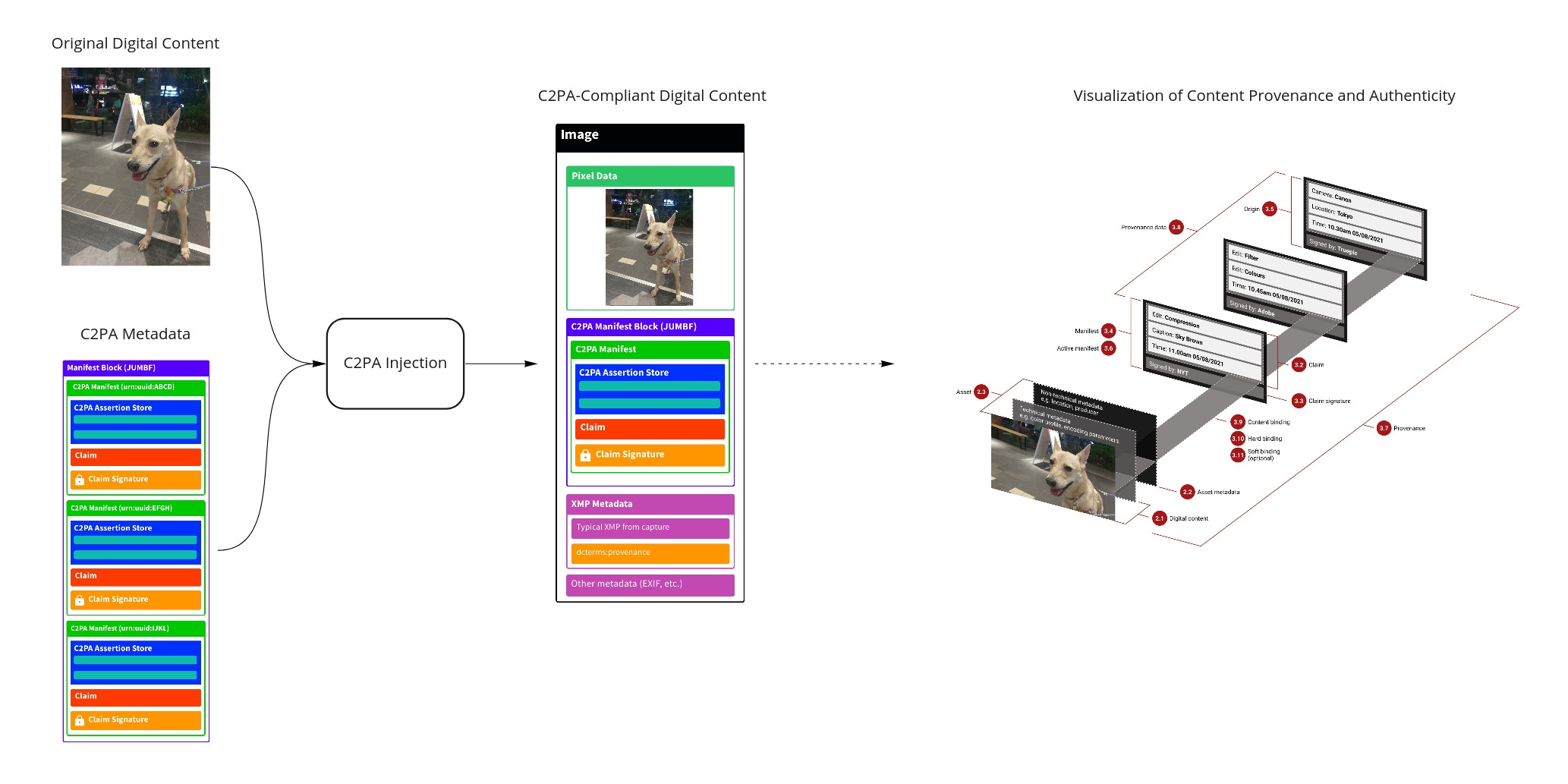
PyC2PA is Python implementation of C2PA (Coalition for Content Provenance and Authenticity) addressing the prevalence of misleading information online through the development of technical standards for certifying the source and history (or provenance) of media content.
Quick Trial
-
Download the testing photo: meimei-fried-chicken-cai-cai-cai.jpg
-
Go to the CAI verification website and upload the photo.
-
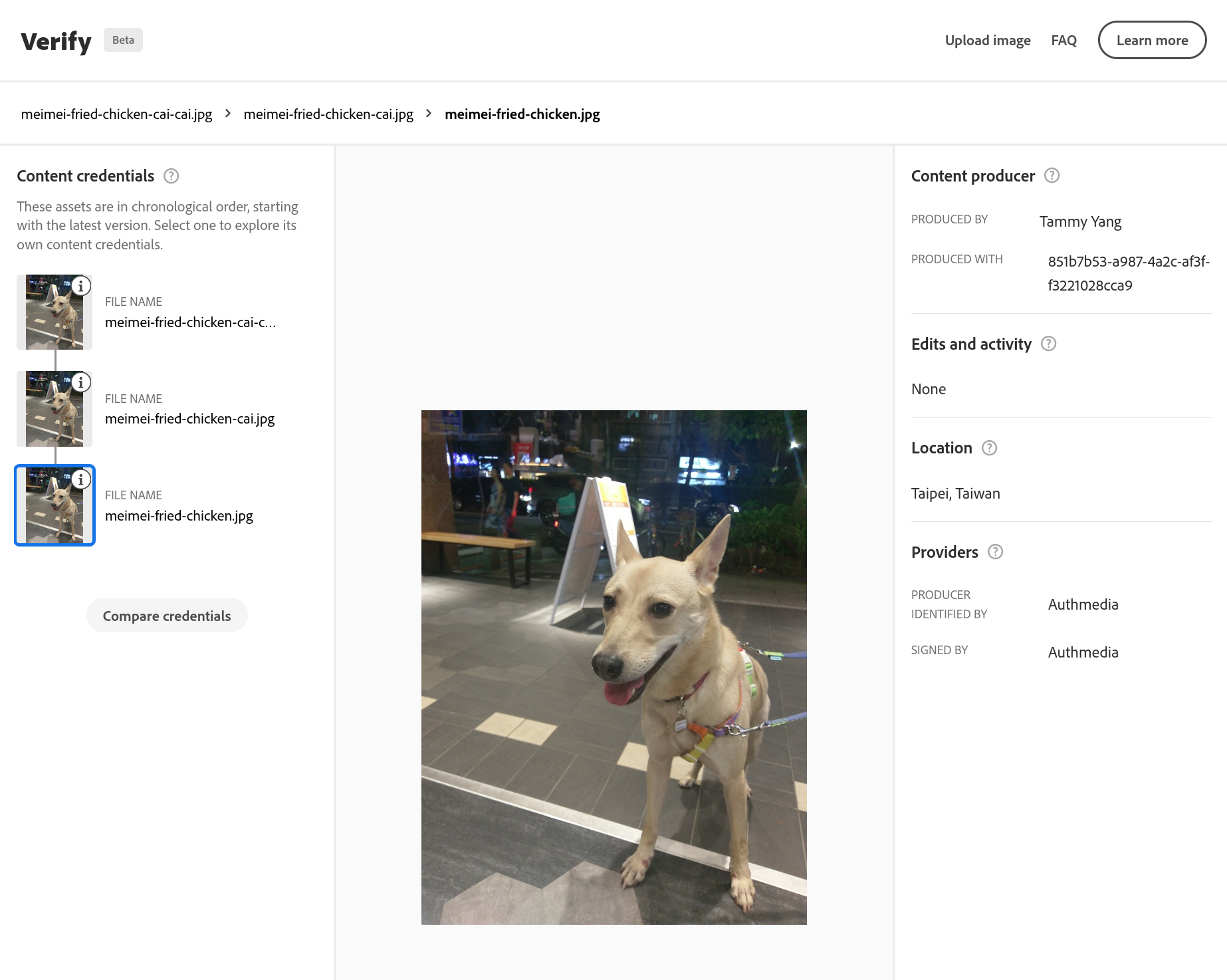
You should see the C2PA information (3 injections) like this:
Installation
$ python3 -m pip install pyc2pa
C2PA CLI
In command line run:
$ c2pa [-a ASSERTION] [--store-label STORE_LABEL] [--recorder RECORDER] [-k KEY] [-s SIG] [-o OUTPUT] [-i INJECT]
Example: generate meimei-fried-chicken-cai.jpg containing single C2PA injection.
$ c2pa \
    -a cai.location.broad.json \
    -a cai.rights.json \
    -a cai.claim.thumbnail.jpg.jpg \
    -a cai.acquisition.thumbnail.jpg.jpg \
    -a adobe.asset.info.json \
    -a starling.integrity.json \
    --recorder "Starling Capture using Numbers Protocol" \
    --store-label "cb.starling_1" \
    -k certificate.p12 \
    -s endesive \
    -i meimei-fried-chicken.jpg
Quick Start
In pyc2pa/utils/, there are two examples showing how to do single injection and multiple injection programmatically.
# Prepare testing input JPEG photo and its thumbnail.
# Assuming that testing input JPEG is ~/meimei-fried-chicken.jpg
$ cd pyc2pa/utils/
$ cp ~/meimei-fried-chicken.jpg .
$ convert -resize 50% meimei-fried-chicken.jpg meimei-fried-chicken-thumbnail.jpg

# Run single injection example
# (download meimei-fried-chicken-cai.jpg from IPFS)
# output: meimei-fried-chicken-cai.jpg
$ python3 c2pa_hello_world.py

# Run multiple injection example
# output: meimei-fried-chicken-cai-cai-cai.jpg
$ python3 c2pa_multiple_injection.py meimei-fried-chicken.jpg
Development Tips
- Currently, the
mainbranch is based on C2PA spec draft v0.5 (compatible with the latest C2PA spec draft). - The
feature-support-c2pa-photobranch follows the latest C2PA spec implementation. pyc2pa/utils/contains examples of single injection and multiple injection.pyc2pa/utils/digital-signature/contains detailed documents and example codes how to create and verify a C2PA signature.


Release files for c2pa 1.4.1
For a detailed explanation of source distributions (sdists) and built distributions (wheels), please see the package formats documentation.
Source distribution (sdist)
| File | Size | Uploaded | |
|---|---|---|---|
| c2pa-1.4.1.tar.gz | 26.9 kB | Details |
Built distribution (wheel)
| File | Interpreter | ABI | Platform | Reset |
|---|---|---|---|---|
| c2pa-1.4.1-py3-none-any.whl | Python 3 | none | any | Details |
Total release size: 68.1 kB
Release files / c2pa-1.4.1.tar.gz
| Download URL | c2pa-1.4.1.tar.gz |
|---|---|
| Size | 26.9 kB |
| Tags | Source |
|
SHA-256 checksum How to use checksums |
d27a51327dc14163a17c32c7f7ac8442a4654cac6608841f97162b3d50f38e63
|
|
BLAKE2b-256 checksum How to use checksums |
68568fe544ff3527cb383092dcddb5c2b8ca572065d507fe6cbe4cf9caeff0e8
|
| Upload date | |
|
Uploaded using Trusted Publishing? What is trusted publishing? |
No |
| Uploaded via |
twine/3.4.2 importlib_metadata/4.8.1 pkginfo/1.7.1 requests/2.26.0 requests-toolbelt/0.9.1 tqdm/4.62.2 CPython/3.8.2
|
Release files / c2pa-1.4.1-py3-none-any.whl
| Download URL | c2pa-1.4.1-py3-none-any.whl |
|---|---|
| Size | 41.2 kB |
| Tags | Python 3 |
|
SHA-256 checksum How to use checksums |
a094ff0f59ff9c83c3cbdfa6ef96522ab9cc6a7f0fefe268c13809947b1dc4c7
|
|
BLAKE2b-256 checksum How to use checksums |
dc9128bf85aea16c8fef94248a9ad2b17c28da00b1fb1267f0180e2932e35768
|
| Upload date | |
|
Uploaded using Trusted Publishing? What is trusted publishing? |
No |
| Uploaded via |
twine/3.4.2 importlib_metadata/4.8.1 pkginfo/1.7.1 requests/2.26.0 requests-toolbelt/0.9.1 tqdm/4.62.2 CPython/3.8.2
|















