
Usage
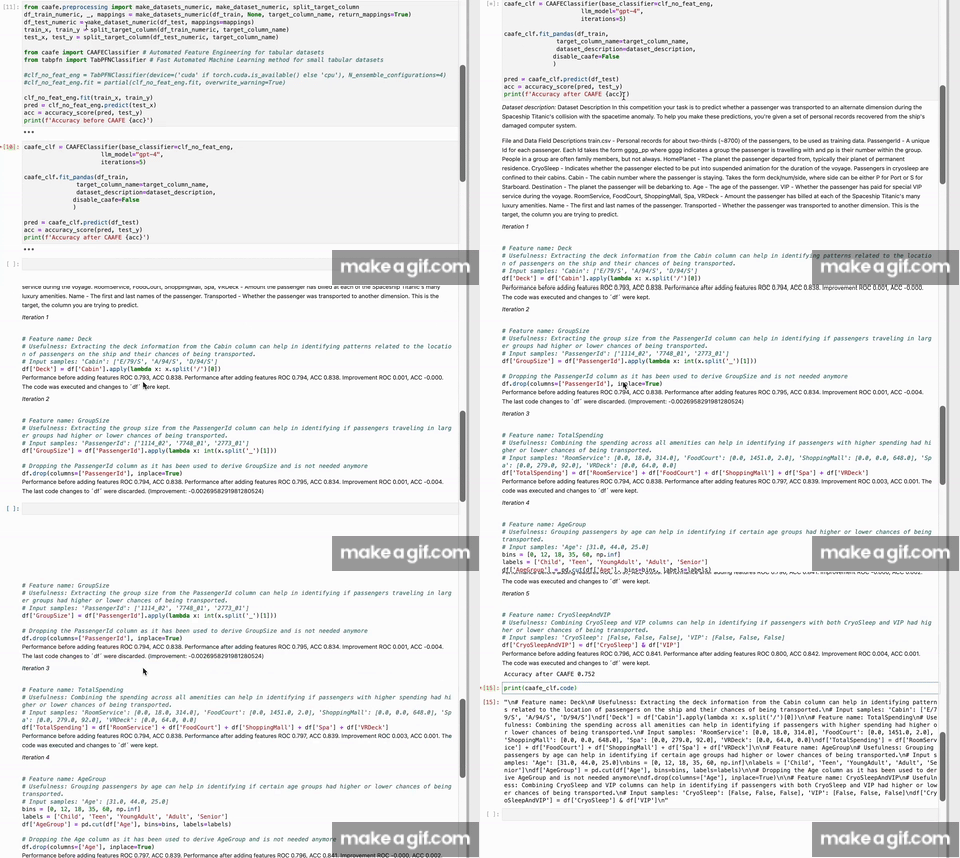
CAAFE lets you semi-automate your feature engineering process based on your explanations on the dataset and with the help of language models. It is based on the paper "LLMs for Semi-Automated Data Science: Introducing CAAFE for Context-Aware Automated Feature Engineering" by Hollmann, Müller, and Hutter (2023). CAAFE is developed as part of Prior Labs. CAAFE systematically verifies the generated features to ensure that only features that are actually useful are added to the dataset.
To use CAAFE, first create a CAAFEClassifier object specifying your sklearn base classifier (clf_no_feat_eng; e.g. a random forest or TabPFN) and the language model you want to use (e.g. gpt-4):
caafe_clf = CAAFEClassifier(base_classifier=clf_no_feat_eng,
                      llm_model="gpt-4",
                      iterations=2)
Then, fit the CAAFE-enhanced classifier to your training data:
caafe_clf.fit_pandas(df_train,
               target_column_name=target_column_name,
               dataset_description=dataset_description
              )
Finally, use the classifier to make predictions on your test data:
pred = caafe_clf.predict(df_test)
View generated features:
print(caafe_clf.code)
Why not let GPT generate your features directly (or use Code Interpreter)?
GPT-4 is a powerful language model that can generate code. However, it is not designed to generate code that is useful for machine learning. CAAFE uses a systematic verification process to ensure that the generated features are actually useful for the machine learning task at hand by: iteratively creating new code, verifying their performance using cross validation and providing feedback to the language model. CAAFE makes sure that cross validation is correctly applied and formalizes the verification process. Also, CAAFE uses a whitelist of allowed operations to ensure that the generated code is safe(er) to execute. There inherent risks in generating AI generated code, however, please see "Important Usage Considerations".
Downstream Classifiers
Downstream classifiers should be fast and need no specific hyperparameter tuning since they are iteratively being called. By default we are using TabPFN as the base classifier, which is a fast automated machine learning method for small tabular datasets.
from tabpfn import TabPFNClassifier # Fast Automated Machine Learning method for small tabular datasets

clf_no_feat_eng = TabPFNClassifier(device=('cuda' if torch.cuda.is_available() else 'cpu'), N_ensemble_configurations=4)
clf_no_feat_eng.fit = partial(clf_no_feat_eng.fit, overwrite_warning=True)
However, TabPFN only works for small datasets. You can use any other sklearn classifier as the base classifier. For example, you can use a random forest classifier:
from sklearn.ensemble import RandomForestClassifier
clf_no_feat_eng = RandomForestClassifier(n_estimators=100, max_depth=2, random_state=0)
Demo
Try out the demo at: https://colab.research.google.com/drive/1mCA8xOAJZ4MaB_alZvyARTMjhl6RZf0a
For a minimal example of how to use CAAFE on your dataset, use CAFE_minimal.ipynb. To reproduce the experiments from the paper, use CAAFE.ipynb.
Important Usage Considerations
Code Execution
Executing AI-generated code automatically poses inherent risks. These include potential misuse by bad actors or unforeseen outcomes when AI systems operate outside of their typical, controlled environments. In developing our approach, we have taken insights from research on AI code generation and cybersecurity into account. We scrutinize the syntax of the Python code generated by the AI and employ a whitelist of operations allowed for execution. However, certain operations such as imports, arbitrary function calls, and others are not permitted. While this increases security, it's not a complete solution – for example, it does not prevent operations that could result in infinite loops or excessive resource usage, like loops and list comprehensions. We continually work to improve these limitations.
Replication of Biases
It's important to note that AI algorithms can often replicate and even perpetuate biases found in their training data. CAAFE, which is built on GPT-4, is not exempt from this issue. The model has been trained on a vast array of web crawled data, which inevitably contains biases inherent in society. This implies that the generated features may also reflect these biases. If the data contains demographic information or other sensitive variables that could potentially be used to discriminate against certain groups, we strongly advise against using CAAFE or urge users to proceed with great caution, ensuring rigorous examination of the generated features.
Cost of Running CAFE
CAAFE uses OpenAIs GPT-4 or GPT-3.5 as an endpoint. OpenAI charges The cost of running CAAFE depends on the number of iterations, the number of features in the dataset, the length of the dataset description and of the generated code. For example, for a dataset with 1000 rows and 10 columns, 10 iterations cost about 0.50$ for GPT-4 and 0.05$ for GPT-3.5.
Paper
Hollmann, N., Müller, S., & Hutter, F. (2023). LLMs for Semi-Automated Data Science: Introducing CAAFE for Context-Aware Automated Feature Engineering https://arxiv.org/abs/2305.03403
License
Copyright by Prior Labs.

This work is licensed under a Creative Commons Attribution-NonCommercial-ShareAlike 4.0 International License.


Release files for caafe 0.1.6
For a detailed explanation of source distributions (sdists) and built distributions (wheels), please see the package formats documentation.
Source distribution (sdist)
| File | Size | Uploaded | |
|---|---|---|---|
| caafe-0.1.6.tar.gz | 22.8 kB | Details |
Built distribution (wheel)
| File | Interpreter | ABI | Platform | Reset |
|---|---|---|---|---|
| caafe-0.1.6-py3-none-any.whl | Python 3 | none | any | Details |
Total release size: 46.4 kB
Release files / caafe-0.1.6.tar.gz
| Download URL | caafe-0.1.6.tar.gz |
|---|---|
| Size | 22.8 kB |
| Tags | Source |
|
SHA-256 checksum How to use checksums |
6ff4e23ef670f7173c1cba3b55f4911e851760cc9682cb281f1b4ab9f0b1c0f8
|
|
BLAKE2b-256 checksum How to use checksums |
64745074d0728b05d2f46a0be6196a89f0041302a32cb2817b8bd6dc5fba0fff
|
| Upload date | |
|
Uploaded using Trusted Publishing? What is trusted publishing? |
No |
| Uploaded via |
twine/4.0.2 CPython/3.10.12
|
Release files / caafe-0.1.6-py3-none-any.whl
| Download URL | caafe-0.1.6-py3-none-any.whl |
|---|---|
| Size | 23.6 kB |
| Tags | Python 3 |
|
SHA-256 checksum How to use checksums |
25665689813d89e067d252bf43c1a5db30ab2bf8809c431337804ce3799214ae
|
|
BLAKE2b-256 checksum How to use checksums |
bfe7b6c836107697dfecfa3f7c7db28602a6c9ffbfa21008c77ab6012c9fad7d
|
| Upload date | |
|
Uploaded using Trusted Publishing? What is trusted publishing? |
No |
| Uploaded via |
twine/4.0.2 CPython/3.10.12
|














