
TUI inspector for USB-C cables, eMarkers, and Power Delivery.

Project description
CableCat




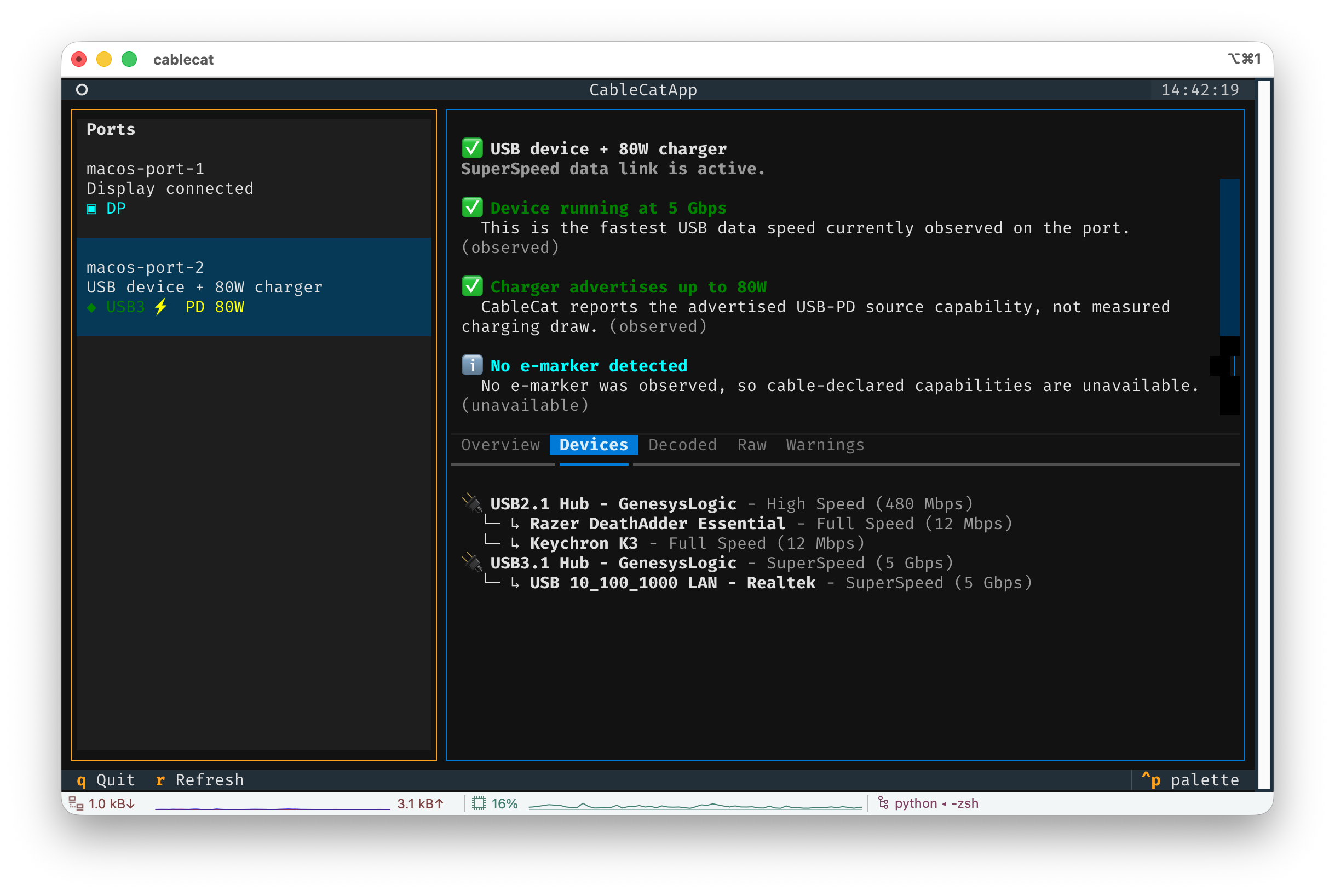
CableCat is a terminal inspector for USB-C ports, cables, eMarkers, USB Power Delivery, data speed, DisplayPort Alt Mode, USB4, and Thunderbolt-related state.
It opens as a TUI by default and gives each USB-C port a readable diagnosis: what is connected, what the OS can observe, what the cable or partner appears to declare, and which details are unavailable.
Install
CableCat is distributed through PyPI.
pipx install cablecat
You can also use uv or pip:
uv tool install cablecat
python -m pip install cablecat
Quick Start
Open the inspector:
cablecat
Export a machine-readable snapshot:
cablecat --json
Include raw OS observations:
cablecat --json --raw
Refresh snapshots continuously:
cablecat --watch --json
What CableCat Shows
CableCat is designed to answer practical questions quickly:
- Is this port empty, charging, carrying USB data, running DisplayPort Alt Mode, or doing several things at once?
- What USB speed is currently observable, such as High Speed, SuperSpeed, or SuperSpeed+?
- What USB-PD source power profiles are visible, and what is the advertised max?
- Was an eMarker observed, and what cable capabilities can be decoded from it?
- Is the connected partner likely a display, hub, peripheral, charger, AMA, or another PD product type?
- Which USB devices are attached below the port?
- Which facts are observed, decoded, inferred, unknown, or unavailable?
The TUI keeps the port list on the left and a readable diagnosis on the right. The detail tabs expose overview, attached devices, decoded PD/VDO fields, raw OS properties, and warnings.
Important Limits
CableCat is read-only. It does not:
- sniff USB-PD traffic;
- send Discover Identity or other active PD messages;
- load a helper driver;
- claim to verify cable electrical quality.
CableCat reports declared capabilities and OS-observed state. A cable can claim support for a speed or current rating and still fail a real signal-integrity or power test. Use a hardware tester when you need electrical validation.
On macOS, some eMarker information may only appear when the system decides it needs it, such as for cables above 3A, USB4, or Thunderbolt scenarios. When the OS does not expose a field, CableCat marks it as unavailable instead of guessing.
Platform Support
CableCat v0 focuses on Apple Silicon macOS 14+.
| Platform | Status |
|---|---|
| macOS 14+ arm64 | Supported first. Uses a bundled Swift/IOKit probe. |
| Linux | Adapter placeholder only. Future target: /sys/class/typec. |
| Windows | Adapter placeholder only. Future target: UCSI, SetupAPI, or WMI. |
CLI Reference
cablecat                 # open the TUI
cablecat --json          # print normalized JSON
cablecat --json --raw    # include raw OS probe data
cablecat --watch --json  # stream refreshed JSON snapshots
cablecat --version       # print version
cablecat --help          # show all options
The JSON output contains stable high-level sections for diagnosis, capabilities, decoded PD/VDO fields, and raw observations when requested.
Development
CableCat uses Python for the CLI/TUI and decoding layers, plus a SwiftPM-built macOS dynamic library for the IOKit probe.
Common commands:
make test
make build
make push
make build runs:
.venv/bin/python -m build --outdir dist
On macOS arm64, python -m build invokes the Hatchling build hook, builds
libCableCatMacOSProbe.dylib with SwiftPM, and includes it in the wheel at:
cablecat/native/macos/libCableCatMacOSProbe.dylib
The resulting macOS wheel is tagged like:
py3-none-macosx_14_0_arm64
License And Prior Art
CableCat is licensed under GPL-3.0-only.
WhatCable is useful prior art for product behavior and presentation, but CableCat does not copy WhatCable implementation code. CableCat treats WhatCable's public repository only as a behavioral reference because its license note describes mixed MIT/proprietary source boundaries.
Release history Release notifications | RSS feed


Download files
Download the file for your platform. If you're not sure which to choose, learn more about installing packages.
Source Distribution
Built Distribution
Filter files by name, interpreter, ABI, and platform.
If you're not sure about the file name format, learn more about wheel file names.
Copy a direct link to the current filters
File details
Details for the file cablecat-0.1.0.tar.gz.
File metadata
- Download URL: cablecat-0.1.0.tar.gz
- Upload date:
- Size: 42.8 kB
- Tags: Source
- Uploaded using Trusted Publishing? No
- Uploaded via: twine/6.2.0 CPython/3.12.9
File hashes
| Algorithm | Hash digest | |
|---|---|---|
| SHA256 |
53025f83f24b556e52725a9793e70e9b7917879a97719df296f9527f08e0dba4
|
|
| MD5 |
935ffbf0a377ab1978f7de9f3ccb6b19
|
|
| BLAKE2b-256 |
601552939b5a802dccfde7e3aa1cdbe8ddc9133888e0c9f20227afddd84d4287
|
File details
Details for the file cablecat-0.1.0-py3-none-macosx_14_0_arm64.whl.
File metadata
- Download URL: cablecat-0.1.0-py3-none-macosx_14_0_arm64.whl
- Upload date:
- Size: 60.2 kB
- Tags: Python 3, macOS 14.0+ ARM64
- Uploaded using Trusted Publishing? No
- Uploaded via: twine/6.2.0 CPython/3.12.9
File hashes
| Algorithm | Hash digest | |
|---|---|---|
| SHA256 |
d4e231e9767f4fead55bf2a831015f45e2a5117a01e3c313c47da3905a41fc2b
|
|
| MD5 |
f2a1728198aaa6ad6362baf54c30ab65
|
|
| BLAKE2b-256 |
548bf76250b38aa427f4b5574675539f19b562e3e30edcfa848618b89473248d
|






