

File system snapshot tool that prioritizes snapshot speed and reducing redundant storage.
How it works
cacheback achieves its goals of quick snapshots and minimized snapshot storage size by using hardlink features of modern filesystems
for files whose contents are unchanged between snapshots.
This is similar to how git tracks objects in a repository by storing a file's data based on its content hash.
To further improve speed, a cache of the previous snapshot scan is stored which stores each file's last modification timestamp and
these timestamps are compared before computing the file content hash. If the timestamp is unchanged, it is assumed that the file has
not changed since the previous snapshot and is linked to the existing content stored on disk.
Here is a diagram visualizing this concept of files within snapshots being pointers to stored data based on content hash:
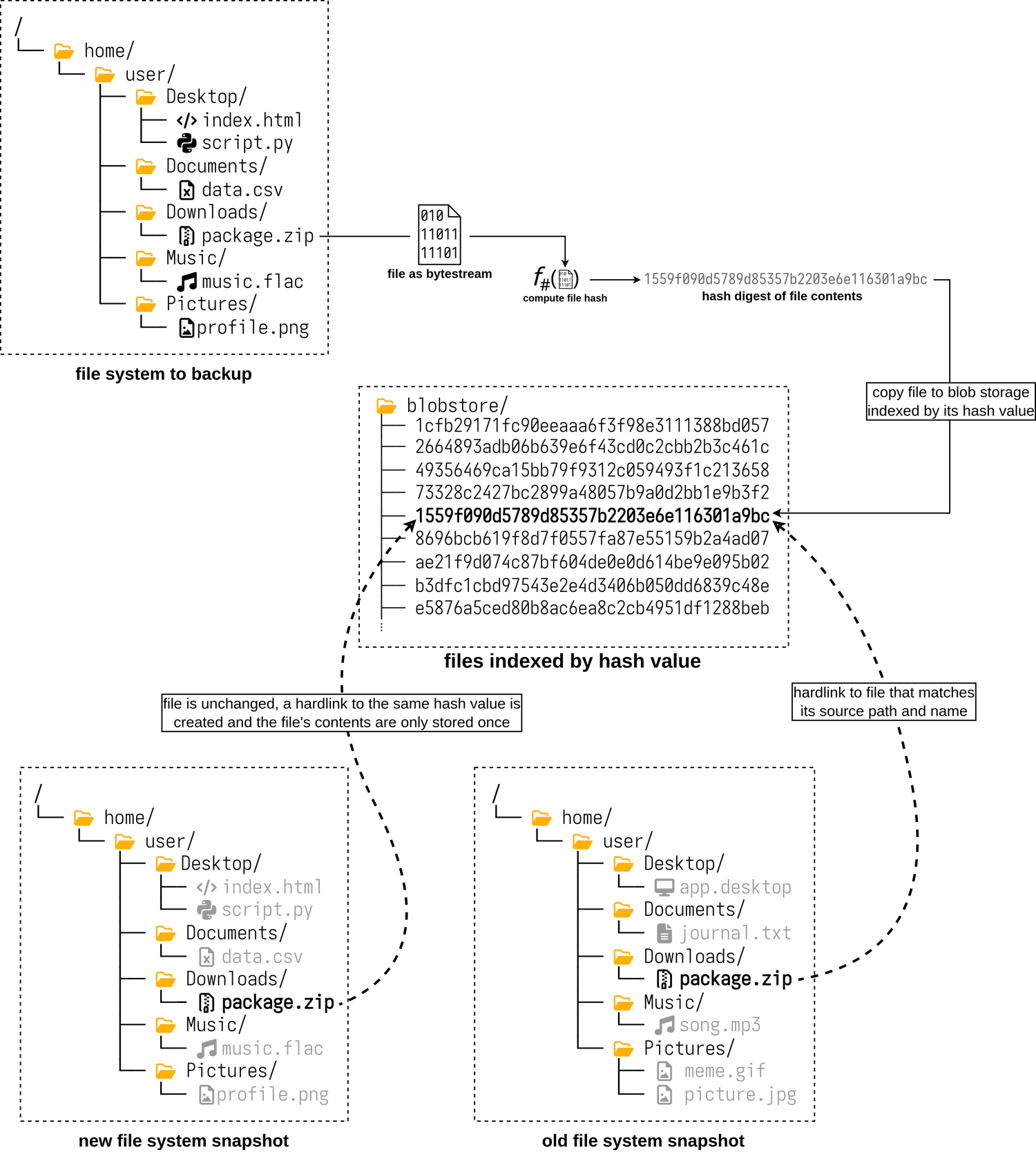
If a file is unchanged between multiple snapshots, each file will point to the same hash-named object and therefore the literal file content
is only stored on disk one time. If snapshots are deleted and a given hashed content is no longer pointed to by any files in any snapshots,
then the --gargbage-collect flag will prompt cacheback to purge these unused hash-named files to recover storage space.
Install
PyPi
pip install cacheback-snapshot
ZipApp
Create an executable single-file using python's zipapp feature by running ./scripts/install-zipapp.sh <install_dir>, for example:
$ ./scripts/install-zipapp.sh ~/.local/bin/
Processing ./.
  Installing build dependencies ... done
  Getting requirements to build wheel ... done
  Preparing metadata (pyproject.toml) ... done
Building wheels for collected packages: cacheback-snapshot
  Building wheel for cacheback-snapshot (pyproject.toml) ... done
Successfully built cacheback-snapshot
Installing collected packages: cacheback-snapshot
Successfully installed cacheback-snapshot

$ ~/.local/bin/cacheback --help
usage: python /home/m/.local/bin/cacheback ...
Usage
[!NOTE] The first time taking a snapshot will take much longer than subsequent snapshots, since the first run will need to copy any and all files to the snapshot storage directory. The real magic of this tool happens on the subsequent snapshots that target mostly the same directories.
Installing the package will add an entrypoint executable cacheback to your configured executables directory. Run cacheback --help for detailed usage information.
Sample
This example will create a snapshot in the directory in /archives/my-snapshot of the contents of /home/ and /opt/ on the current machine, and will omit including any directories or files that have the word "cache" in them. It will use 2 threads to scan over the directory hierarchies and compute hashes.
cacheback \
  --snapshot-name 'my-snapshot' \
  --destination /archives/ \
  --targets /home /opt \
  --exclude '**/*cache*' \
  --threads 2
1 maintainer

Metadata
1 maintainer
Release files for cacheback-snapshot 0.0.2
For a detailed explanation of source distributions (sdists) and built distributions (wheels), please see the package formats documentation.
Source distribution (sdist)
| File | Size | Uploaded | |
|---|---|---|---|
| cacheback_snapshot-0.0.2.tar.gz | 9.4 kB | Details |
Built distribution (wheel)
| File | Interpreter | ABI | Platform | Reset |
|---|---|---|---|---|
| cacheback_snapshot-0.0.2-py3-none-any.whl | Python 3 | none | any | Details |
Total release size: 19.4 kB
Release files / cacheback_snapshot-0.0.2.tar.gz
| Download URL | cacheback_snapshot-0.0.2.tar.gz |
|---|---|
| Size | 9.4 kB |
| Tags | Source |
|
SHA-256 checksum How to use checksums |
ec04b50d8fef563e6249b207f3b501a54cddb422da83464604fccbd754b1cc0a
|
|
BLAKE2b-256 checksum How to use checksums |
fd52f82b0f9ccffc07b0dd188ab193cdb3f093e0e6ea40819c4ecf8a469dec0e
|
| Upload date | |
|
Uploaded using Trusted Publishing? What is trusted publishing? |
Yes |
| Uploaded via |
twine/6.1.0 CPython/3.13.7
|
Provenance
Provenance describes where a file came from. On PyPI, provenance is shared via attestations, which provide a verifiable record of the build or publishing details. View details, limitations and caveats.


PyPI Publish Attestation
PyPI verified that this artifact, at this checksum, originated from the publisher listed below.
Signed by GitHub Actions, verified by PyPI on Mar 1, 2026.
Transparency logRelease files / cacheback_snapshot-0.0.2-py3-none-any.whl
| Download URL | cacheback_snapshot-0.0.2-py3-none-any.whl |
|---|---|
| Size | 10.0 kB |
| Tags | Python 3 |
|
SHA-256 checksum How to use checksums |
720753ee5204bcf5cc5baa0b106db9f8c1235767fef0b3f4a58a2b346427f08a
|
|
BLAKE2b-256 checksum How to use checksums |
255442389459e189b0d25043945b83a947af8a46daf34ff12525a64a7721371c
|
| Upload date | |
|
Uploaded using Trusted Publishing? What is trusted publishing? |
Yes |
| Uploaded via |
twine/6.1.0 CPython/3.13.7
|
Provenance
Provenance describes where a file came from. On PyPI, provenance is shared via attestations, which provide a verifiable record of the build or publishing details. View details, limitations and caveats.
PyPI Publish Attestation
PyPI verified that this artifact, at this checksum, originated from the publisher listed below.
Signed by GitHub Actions, verified by PyPI on Mar 1, 2026.
Transparency log













