
CACP: Classification Algorithms Comparison Pipeline



Free software: MIT license
Documentation: https://cacp.readthedocs.io
GUI Preview: https://cacp.czmil.com
Description
CACP is made for comparing newly developed classification algorithms (both traditional and incremental) in Python with other commonly used classifiers to evaluate classification performance, reproducibility, and statistical reliability. CACP simplifies the entire classifier evaluation process.
Installation
To install cacp, run this command in your terminal:
pip install cacpPython 3.10 or greater required to download latest version of CACP. In order to install older version that supports Python 3.8 or greater, run this command in your terminal:
pip install cacp==0.3.1Usage
Jupyter Notebook on Kaggle: https://www.kaggle.com/sc4444/cacp-example-usage
Simple Usage
An example usage of this library is included in the package: https://github.com/sylwekczmil/cacp/tree/main/cacp_examples_simple.
from sklearn.ensemble import RandomForestClassifier
from sklearn.neighbors import KNeighborsClassifier
from sklearn.svm import SVC
from sklearn.tree import DecisionTreeClassifier

from cacp import run_experiment, ClassificationDataset

# select datasets
experimental_datasets = [
    ClassificationDataset('iris'),
    ClassificationDataset('wisconsin'),
    ClassificationDataset('pima'),
    ClassificationDataset('wdbc'),
]

# select classifiers
experimental_classifiers = [
    ('SVC', lambda n_inputs, n_classes: SVC()),
    ('DT', lambda n_inputs, n_classes: DecisionTreeClassifier(max_depth=5)),
    ('RF', lambda n_inputs, n_classes: RandomForestClassifier(max_depth=5, n_estimators=10, max_features=1)),
    ('KNN', lambda n_inputs, n_classes: KNeighborsClassifier(3)),
]

# trigger experiment run
run_experiment(
    experimental_datasets,
    experimental_classifiers,
    results_directory='./example_result'
)
Advanced Usage
An advanced example usage of this library is included in the package: https://github.com/sylwekczmil/cacp/tree/main/cacp_examples.
from sklearn.neighbors import KNeighborsClassifier
from skmultiflow.lazy import KNNClassifier
from skmultiflow.meta import LearnPPNSEClassifier

from cacp import all_datasets, run_experiment, ClassificationDataset
from cacp_examples.classifiers import CLASSIFIERS
from cacp_examples.example_custom_classifiers.xgboost import XGBoost

# you can specify datasets by name, all of them will be automatically downloaded
experimental_datasets_example = [
    ClassificationDataset('iris'),
    ClassificationDataset('wisconsin'),
    ClassificationDataset('pima'),
    ClassificationDataset('sonar'),
    ClassificationDataset('wdbc'),
]
# or use all datasets
experimental_datasets = all_datasets()

# same for classifiers, you can specify list of classifiers
experimental_classifiers_example = [
    ('KNN_3', lambda n_inputs, n_classes: KNeighborsClassifier(3)),
    # you can define classifiers multiple times with different parameters
    ('KNN_5', lambda n_inputs, n_classes: KNeighborsClassifier(5)),
    # you can use classifiers from any lib that
    # supports fit/predict methods eg. scikit-learn/scikit-multiflow
    ('KNNI', lambda n_inputs, n_classes: KNNClassifier(n_neighbors=3)),
    # you can also use wrapped algorithms from other libs or custom implementations
    ('XGB', lambda n_inputs, n_classes: XGBoost()),
    ('LPPNSEC', lambda n_inputs, n_classes: LearnPPNSEClassifier())
]
# or you can use predefined ones
experimental_classifiers = CLASSIFIERS

# this is how you trigger experiment run
run_experiment(
    experimental_datasets,
    experimental_classifiers,
    results_directory='./example_result'
)
Defining custom classifier wrapper: https://github.com/sylwekczmil/cacp/tree/main/cacp_examples/example_custom_classifiers/xgboost.py.
Defining custom dataset: https://github.com/sylwekczmil/cacp/tree/main/cacp_examples/example_custom_datasets/random_dataset.py
Defining local dataset: https://github.com/sylwekczmil/cacp/tree/main/cacp_examples/example_custom_datasets/local_dataset.py
Incremental Algorithms Usage
An example usage of this library for incremental classifiers is included in the package: https://github.com/sylwekczmil/cacp/tree/main/cacp_examples_incremental.
import river
from river.forest import ARFClassifier
from river.naive_bayes import GaussianNB
from river.neighbors import KNNClassifier
from river.tree import HoeffdingTreeClassifier

from cacp import run_incremental_experiment, ClassificationDataset

if __name__ == '__main__':
    # select datasets
    experimental_datasets = [
        ClassificationDataset('iris'),
        ClassificationDataset('wisconsin'),
        # you can use datasets from river
        river.datasets.Phishing(),
        river.datasets.Bananas(),

    ]

    # select incremental classifiers
    experimental_classifiers = [
        ('ARF', lambda n_inputs, n_classes: ARFClassifier()),
        ('HAT', lambda n_inputs, n_classes: HoeffdingTreeClassifier()),
        ('KNN', lambda n_inputs, n_classes: KNNClassifier()),
        ('GNB', lambda n_inputs, n_classes: GaussianNB()),
    ]

    # trigger experiment run
    run_incremental_experiment(
        experimental_datasets,
        experimental_classifiers,
        results_directory='./example_result'
    )
Graphical user interface (GUI)
PIP
After installation, run this command in your terminal:
cacpYou should get message like this:
CACP stared on http://127.0.0.1:8050/Make sure that your scripts directory is in the PATH. Example gui executable file on Windows can be found under:
C:/Users/<USER>/AppData/Local/Programs/Python/Python<PYTHON_VERSION>/Scripts/cacp.exe.Docker
You can also run CACP GUI with docker:
docker run -p 8050:8050 --name cacp sylwekczmil/cacpCACP will be available at: http://127.0.0.1:8050/
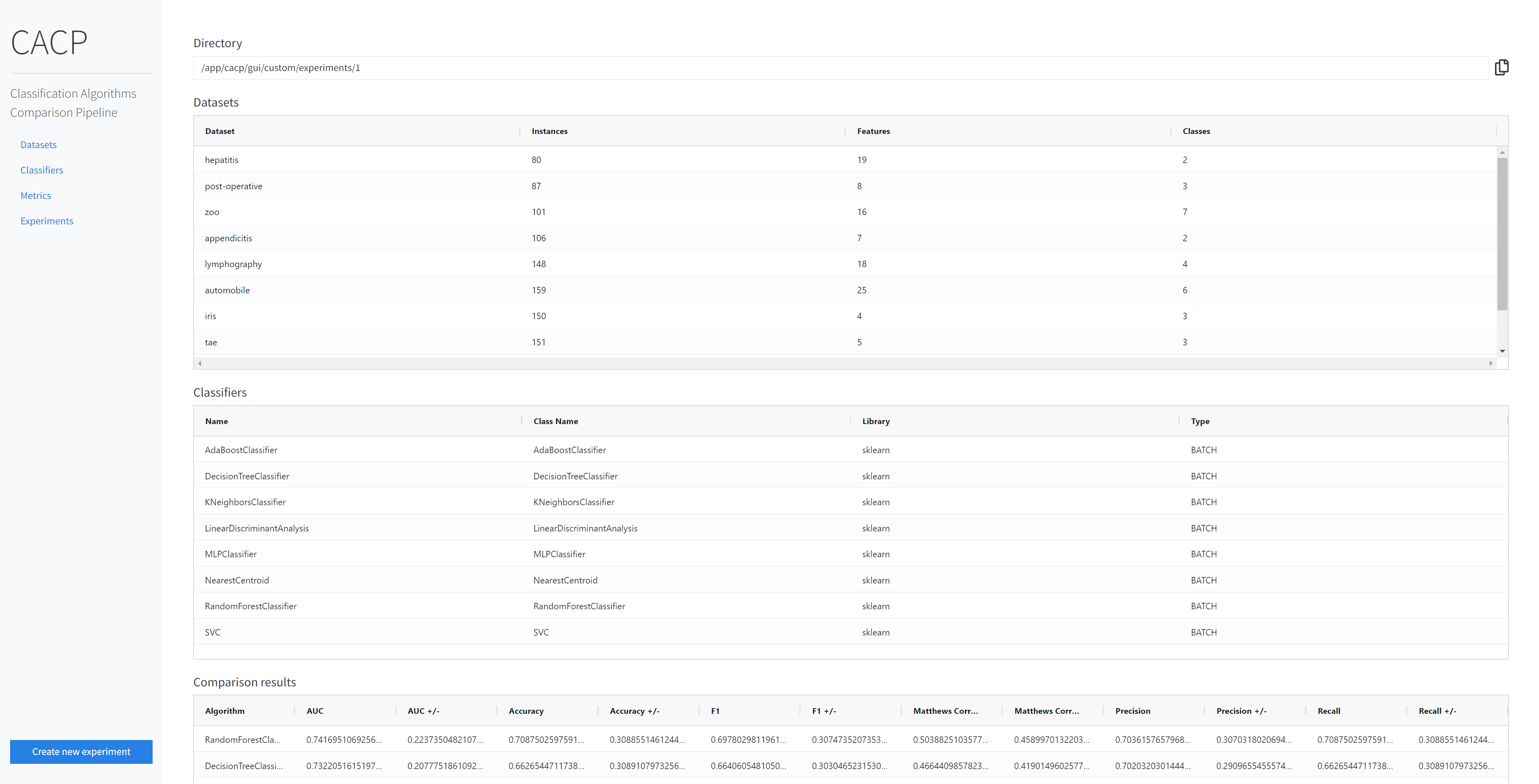
CACP GUI Preview
Sample preview of the CACP GUI is available at: https://cacp.czmil.com.
1 maintainer

Metadata
1 maintainer
Release files for cacp 1.0.4
For a detailed explanation of source distributions (sdists) and built distributions (wheels), please see the package formats documentation.
Source distribution (sdist)
| File | Size | Uploaded | |
|---|---|---|---|
| cacp-1.0.4.tar.gz | 41.4 kB | Details |
Built distribution (wheel)
| File | Interpreter | ABI | Platform | Reset |
|---|---|---|---|---|
| cacp-1.0.4-py3-none-any.whl | Python 3 | none | any | Details |
Total release size: 115.3 kB
Release files / cacp-1.0.4.tar.gz
| Download URL | cacp-1.0.4.tar.gz |
|---|---|
| Size | 41.4 kB |
| Tags | Source |
|
SHA-256 checksum How to use checksums |
18d551374da3fab6c45c269d8676a94fd2ddc0da3b8e7477b1b8d07e48d9ae98
|
|
BLAKE2b-256 checksum How to use checksums |
2ff438649323c214bb07b4d1b7394ea879afaa65e98bd77c4ef0f530a0bded33
|
| Upload date | |
|
Uploaded using Trusted Publishing? What is trusted publishing? |
No |
| Uploaded via |
poetry/1.6.1 CPython/3.11.1 Windows/10
|
Release files / cacp-1.0.4-py3-none-any.whl
| Download URL | cacp-1.0.4-py3-none-any.whl |
|---|---|
| Size | 73.9 kB |
| Tags | Python 3 |
|
SHA-256 checksum How to use checksums |
cbd0c4823a0344ae7c348c2896efb2824e5f1c982058f993a589d762ce69a422
|
|
BLAKE2b-256 checksum How to use checksums |
95020d9b58a73b0edaa7bd8291f7aa67cdcab5f4d3eda4d65d0ead55f3833aa7
|
| Upload date | |
|
Uploaded using Trusted Publishing? What is trusted publishing? |
No |
| Uploaded via |
poetry/1.6.1 CPython/3.11.1 Windows/10
|














