
CAELUS: Classification Algorithm for the Evaluation of the cLoUdiness Situations



A Python implementation of the CAELUS sky classification algorithm, described in:
Ruiz-Arias, J. A., and Gueymard, C. A. (2023) CAELUS: classification of sky conditions from 1-min time series of global solar irradiance using variability indices and dynamic thresholds. Solar Energy, 263, 111895 doi: 10.1016/j.solener.2023.111895 (open access)
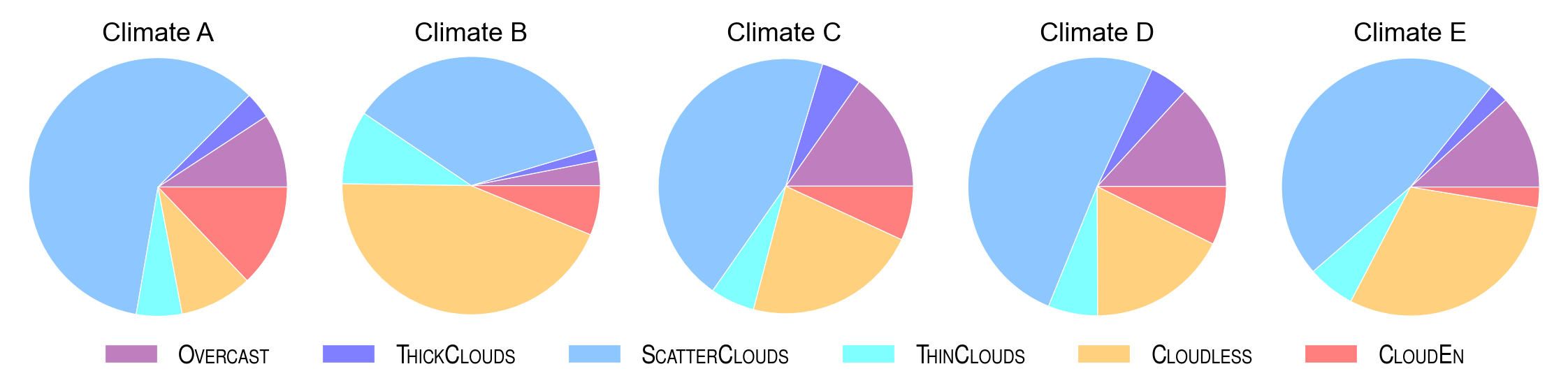
CAELUS classifies the sky conditions in up to 6 different classes:
- OVERCAST
- THICK CLOUDS
- SCATTER CLOUDS
- THIN CLOUDS
- CLOUDLESS
- CLOUD ENHANCEMENT
To do so, it uses 1-min time series of global horizontal irradiance and global horizontal irradiances under hypothetical clear-sky conditions. It works for solar zenith angles up to 85º.
The package also provides easy access to the data set that was used to develop, validate and benchmark the algorithm.
[!IMPORTANT] The name of the different sky conditions is only orientative of the expected situations within each class. However, it does not mean that, for instance, all situations detected as
THICK_CLOUDSare actually made up only by thick clouds. Among other reasons, because what can be considered a "thick" cloud is highly subjective, and also because there are many situations made up by those "thick" clouds, but also others. The same reasoning holds for all other sky conditions.
Installation
pip install caelus-solar
Or, using uv:
uv add caelus-solar
Classify data
import caelus
sky_type = caelus.classify(data, latitude, longitude)
where data is a Pandas DataFrame with ghi and ghics columns and a DatetimeIndex with timestamps with a 1-min frequency:
ghi: global horizontal irradiance, in W/m$^2$ghics: clear-sky global horizontal irradiance, in W/m$^2$
The index must be tz aware. If it is not, UTC is assumed.
It also needs latitude (in degrees, positive north) and longitude (in degrees, positive east) to evaluate solar position and the solar irradiance under cloudless clean and dry conditions.
The output is a integer pandas Series with values in the range from 1 to 7 (both included), where 1 indicates an unknown type (e.g., because solar zenith angle is greater than 85º) and the values 2 to 7 indicate the multiple sky conditions from overcast to cloud enhancement (see order above).
Additional, optional input arguments are:
- engine: main library used to perform the computations. It can be polars or pandas. Defaults to polars (several times faster than pandas).
- apply_filters: If set to True (default) is applies an extra pass to the classification to remove potentially unlikely classification instances.
- categorical: If set to True, the sky classification result is a categorical series with the names of the different sky types as categories. By default (categorical False), the output is integer in the range [1, 7].
- full_output: If set to True, it returns a dataframe with multiple sky indices computed internally to perform the sky classification in addition to the sky type.
[!IMPORTANT] It is important to keep data gaps to a minimum as the sky-type classification algorithm relies heavily on variability indicators that are computed as a centered moving window. Data gaps prevent a proper evaluation of such indicators and the classification performance can be deteriorated.
Load data
In order to evaluate the algorithm, caelus can also access the individual site-and-year data files used to develop it, and that are available in zenodo.org. For instance, to load the data taken during 2014 in the BSRN station in Carpentras, France, and perform the sky classification one can do the following:
import caelus

data = caelus.data.load("car", 2014)
lat = caelus.data.load_metadata("car").get("latitude")
lon = caelus.data.load_metadata("car").get("longitude")
sky_type = caelus.classify(data[["ghi", "ghics"]], lat, lon)
Comparing results
In addition to ghi and ghics, data has also the classification results from a previous version of caelus. One would expect that the sky_type column included in it was identical to the sky_type Series just obtained with caelus.classify. However, there are timestamps with different sky types, mostly around sunrise and sunset. The reason of the mismatches is that the precision of the input data was slightly decreased to reduce the volume of data in the zenodo repository, but this was done after the sky_type column in data was calculated. The decrease of the precision was sufficient to induce few discrepancies that result in the mismatches mentioned above, which was not anticipated. In addition, caelus now uses the SPARTA clear-sky model, which provides different clear-sky values and contributes also to the mismatches. Thus, be aware of these isssues if you compare the sky type results in zenodo with the sky type results that you may compute with the newer versions of caelus.
Diagnostic plots
caelus also provides basic functions to make some diagnostic plots:
import caelus.diagnostics as diag

diag.histogram(sky_type)
diag.pie_chart(sky_type)
diag.density_ktk(data, sky_type)
1 maintainer

Metadata
1 maintainer
Release files for caelus-solar 0.3.1
For a detailed explanation of source distributions (sdists) and built distributions (wheels), please see the package formats documentation.
Source distribution (sdist)
| File | Size | Uploaded | |
|---|---|---|---|
| caelus_solar-0.3.1.tar.gz | 19.9 kB | Details |
Built distribution (wheel)
| File | Interpreter | ABI | Platform | Reset |
|---|---|---|---|---|
| caelus_solar-0.3.1-py3-none-any.whl | Python 3 | none | any | Details |
Total release size: 43.4 kB
Release files / caelus_solar-0.3.1.tar.gz
| Download URL | caelus_solar-0.3.1.tar.gz |
|---|---|
| Size | 19.9 kB |
| Tags | Source |
|
SHA-256 checksum How to use checksums |
9965dde8291e3c91dd280638106855e34fdf9a30e4cc3982cc22723ffc059fc4
|
|
BLAKE2b-256 checksum How to use checksums |
400ec76ef8008cec60b612191654af6c90d7b1fc36632681164529b7e707e87e
|
| Upload date | |
|
Uploaded using Trusted Publishing? What is trusted publishing? |
No |
| Uploaded via |
uv/0.11.28 {"installer":{"name":"uv","version":"0.11.28","subcommand":["publish"]},"python":null,"implementation":{"name":null,"version":null},"distro":{"name":"Manjaro Linux","version":null,"id":null,"libc":null},"system":{"name":null,"release":null},"cpu":null,"openssl_version":null,"setuptools_version":null,"rustc_version":null,"ci":null}
|
Release files / caelus_solar-0.3.1-py3-none-any.whl
| Download URL | caelus_solar-0.3.1-py3-none-any.whl |
|---|---|
| Size | 23.5 kB |
| Tags | Python 3 |
|
SHA-256 checksum How to use checksums |
398e04b974d7df1a431070e0f4b8034f4db57232e336a9ac5b19608d63ec4065
|
|
BLAKE2b-256 checksum How to use checksums |
6f017982850508dc9b358e7bc3bd1addf85e916530766d44f46366eb951716df
|
| Upload date | |
|
Uploaded using Trusted Publishing? What is trusted publishing? |
No |
| Uploaded via |
uv/0.11.28 {"installer":{"name":"uv","version":"0.11.28","subcommand":["publish"]},"python":null,"implementation":{"name":null,"version":null},"distro":{"name":"Manjaro Linux","version":null,"id":null,"libc":null},"system":{"name":null,"release":null},"cpu":null,"openssl_version":null,"setuptools_version":null,"rustc_version":null,"ci":null}
|














